
Official statement
Other statements from this video 16 ▾
- □ Are JavaScript Web Components really crawlable by Google's bots?
- □ Does Google really require FAQ Schema content to follow a strict presentation format?
- □ Does FAQ Schema Markup Really Guarantee That Your FAQ Snippets Will Show Up in Google?
- □ Should you really avoid duplicating your own content for SEO?
- □ Why does Google penalize excessive variations of the same content?
- □ Does your CMS really penalize your SEO compared to static HTML?
- □ Why aren't your pages getting indexed even though your site is technically flawless?
- □ Why have external user studies become essential for diagnosing quality issues that your team can no longer see?
- □ Should you really trust rel=canonical to control indexation?
- □ Are backlinks pointing to 404 pages really worthless for your SEO?
- □ Does the disavow tool really erase all traces of toxic links from Google's algorithms?
- □ Can an SSL certificate really penalize your search rankings?
- □ Does a progressive multi-domain ranking decline reveal a quality issue rather than a technical one?
- □ Do technical SEO issues really have an immediate impact on your rankings?
- □ Does blocking Google Translate really impact your search rankings?
- □ Can the meta notranslate tag really remove the 'Translate this page' link from Google search results?
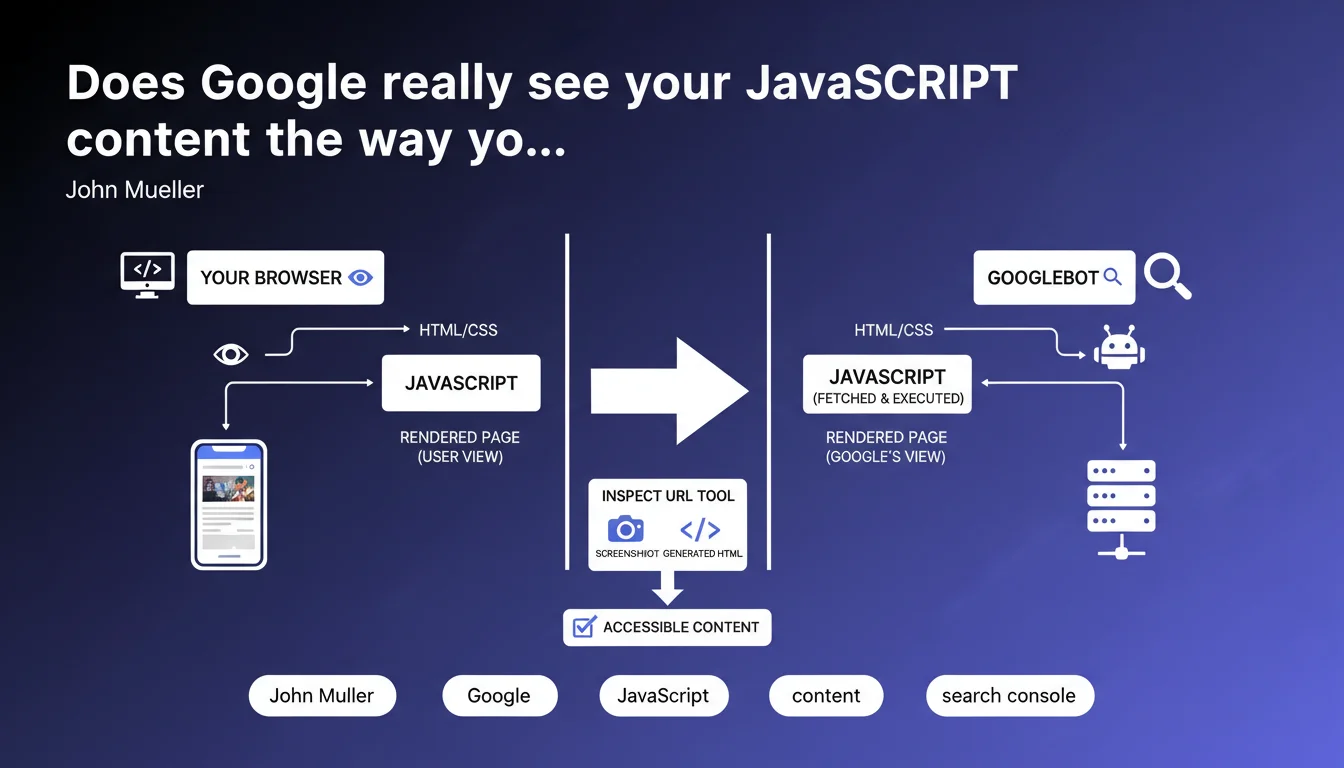
The URL Inspection tool in Search Console lets you see exactly what Googlebot displays after rendering your JavaScript: the final screenshot and generated HTML. It's the only official way to verify that your client-side content is actually accessible to Google, without relying on assumptions.
What you need to understand
Why does Google emphasize JavaScript rendering in Search Console?
Because most modern websites generate content on the client side, and what you see in your browser isn't necessarily what Googlebot indexes. Between raw HTML and the final DOM, a lot happens — and sometimes it breaks down.
The URL Inspection tool captures the exact result of the rendering performed by Googlebot: you get the screenshot as it sees it, plus the HTML generated after JavaScript execution. This is the "official" version of your page from Google's perspective.
What sets this tool apart from a standard test in your browser?
Your browser is not Googlebot. It uses stable Chrome, with extensions, cookies, geolocation — in short, a completely different context. Googlebot operates with a version of Chromium, without persistent cookies, with specific timeouts and a limited rendering budget.
Testing in Search Console means testing under real crawling conditions. If your content appears here, it will be indexed. If it doesn't appear, you have a problem — even if everything works perfectly in Firefox or Safari.
What specific elements should you check in the rendering?
- Main text content: headings, paragraphs, descriptions — everything that carries your semantic meaning must be present in the rendered HTML
- Internal links: if your navigation is generated in JavaScript, verify that the
<a href>tags are in the final DOM - Structural elements: breadcrumb, pagination, filters — if they don't appear, Googlebot will never see them
- Meta tags and structured data: some are injected client-side; ensure they're rendered before the timeout
- Visual screenshot: if the page is blank or partially displayed, that's an immediate red flag
SEO Expert opinion
Is this statement consistent with real-world observations?
Yes, largely. The URL Inspection tool is reliable for diagnosing obvious rendering issues: missing content, blocking JavaScript errors, timeouts. When a page doesn't display correctly here, it won't index correctly either.
The catch — and Mueller doesn't mention this — is that this tool tests one URL at a time, in real time. It doesn't necessarily reflect what happened during the last actual crawl, nor the potential variations between different Googlebot passes. [To verify]: if your JavaScript loads unstable third-party resources (CDN, external API), rendering can vary from one test to another.
What nuances should be added to this recommendation?
First, rendering in Search Console isn't instantaneous. Googlebot waits a few seconds for JavaScript to execute, but there's a timeout — typically around 5 seconds, sometimes less depending on load. If your content takes 6 seconds to appear, it won't be indexed, even if it eventually displays.
Second, this tool doesn't detect crawl priority issues or deferred rendering. A page can be perfectly rendered on demand, but if Googlebot only returns every 3 months, fresh content will never be indexed quickly. JavaScript rendering consumes far more resources than a simple HTML fetch.
When is this tool not enough?
When your site generates content conditionally based on user-agent, geolocation, or authentication. Search Console tests with the Googlebot user-agent, but it doesn't cover cases where you serve different content based on device (mobile/desktop) or language detected via IP.
Another limitation: sites with content generated by user interaction (infinite scroll, lazy loading on click, closed accordions by default). If content only loads after a click or scroll, Googlebot won't see it — even if the JavaScript works perfectly.
Practical impact and recommendations
What should you concretely do to leverage this tool?
Start by testing your strategic pages: homepage, category pages, flagship product pages, high-potential articles. Compare the rendered HTML with what you expect. If entire sections are missing, that's an immediate red flag.
Next, check internal links in the rendered DOM. Open the HTML code displayed by Search Console and look for your <a href> tags. If your navigation menu doesn't appear, Googlebot won't be able to crawl the rest of your site via these links.
Finally, cross-reference with index coverage data. If a page is marked as indexed but rendering shows missing content, it was indexed with an incomplete version — and that tanks your ranking.
What mistakes should you absolutely avoid?
- Don't test only locally or in a standard browser — Googlebot's behavior is specific
- Don't ignore JavaScript timeouts: if your content takes too long to load, it will never be indexed, even if it eventually appears
- Don't forget to check rendering after every major update to your JS framework (React, Vue, Angular...)
- Don't assume rendering will be identical between desktop and mobile — test both versions
- Don't overlook JavaScript console errors that can silently block rendering
- Don't leave critical content loaded only through user interactions (infinite scroll, clicks, hovers)
How do you integrate this check into your SEO routine?
Automate a quarterly audit of JavaScript rendering on your key pages. Use the Search Console API for mass testing if you have thousands of pages. Document gaps between source HTML and rendered HTML: it's an indicator of technical complexity.
Set up alerts on rendering variations: if a page that was displaying correctly becomes blank or incomplete, it signals a recent bug in your JavaScript stack. The faster you detect it, the less impact on indexation will be.
The URL Inspection tool is essential to validate that Googlebot actually accesses your JavaScript content. Test your strategic pages regularly, verify the rendered DOM, and cross-reference with actual indexation data. If you notice complex discrepancies between expected and actual rendering, or if your JavaScript architecture requires fine-tuning to guarantee optimal indexation, partnering with a specialized SEO agency can save you significant time and help you avoid costly mistakes.
❓ Frequently Asked Questions
Est-ce que l'outil Inspection d'URL teste en temps réel ou montre le dernier crawl effectué ?
Si mon contenu apparaît dans le screenshot mais pas dans le HTML rendu, est-ce un problème ?
Combien de temps Googlebot attend-il avant de considérer le rendu comme terminé ?
Dois-je tester chaque page de mon site ou seulement les pages stratégiques ?
Que faire si le rendu affiche une page blanche alors que tout fonctionne dans mon navigateur ?
🎥 From the same video 16
Other SEO insights extracted from this same Google Search Central video · published on 08/05/2022
🎥 Watch the full video on YouTube →
💬 Comments (0)
Be the first to comment.