
Official statement
Other statements from this video 13 ▾
- □ Does robots.txt really prevent your pages from being indexed by Google?
- □ Is the meta tag 'none' really the same as using noindex + nofollow together?
- □ Is robots.txt really ineffective at preventing your pages from being indexed by Google?
- □ Can you block indexation of entire directories using server modules instead of robots.txt?
- □ Is indexing your login pages actually hurting your user experience?
- □ Should you really use rel=canonical over noindex for aging content?
- □ Does the noarchive meta tag really prevent Google from caching your pages?
- □ Should you block snippets with nosnippet to protect your sensitive content?
- □ Should you really use max-snippet and max-image-preview to control how your content appears in search results?
- □ Should you use individual nofollow attributes or a meta robots nofollow tag to control PageRank distribution?
- □ Why Is Google So Reluctant to Develop New Meta Robots Directives?
- □ Is the X-Robots-Tag header really the only way to keep PDFs out of Google's index?
- □ How does Google really transform your PDFs into searchable content?
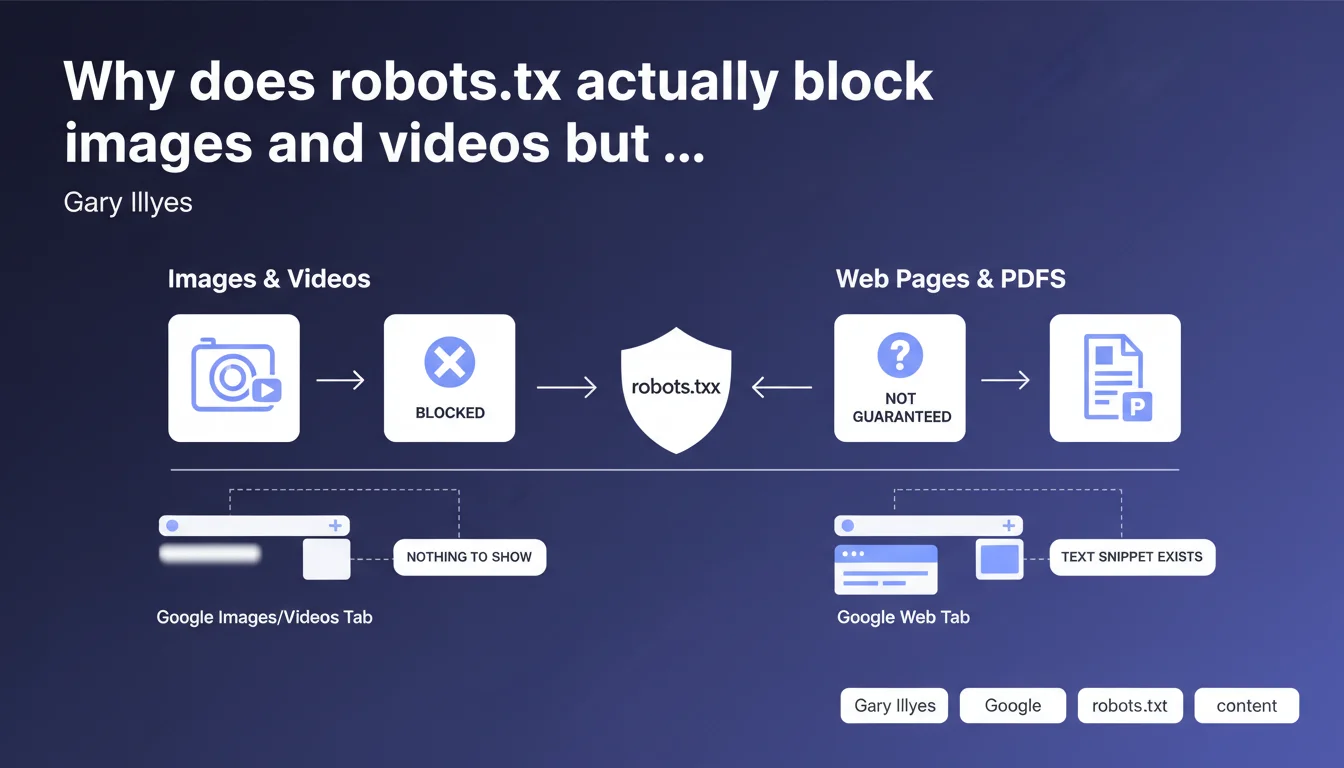
The robots.txt file effectively blocks the indexation of images and videos because these contents live in separate tabs (Images, Videos) where Google has nothing to display without the media itself. For standard web pages or PDFs, robots.txt is not sufficient to prevent indexation — the URL can appear in search results even if the content is not crawled.
What you need to understand
How does Google index images/videos and web pages differently?
Google's architecture relies on separate indexes by content type. Images live in the Images index, videos in the Videos index, and textual content in the main Web index. This technical separation creates radically different behaviors when facing robots.txt.
When you block an image or video via robots.txt, Google cannot crawl it. Without access to the media file, it has no snippet to display in the Images or Videos tabs — so indexation fails completely. The content appears nowhere.
Why doesn't robots.txt block indexation of web pages?
For a standard web page, Google can discover the URL through external links even if crawling is forbidden. It then indexes the URL with a minimal snippet — often just the title retrieved from anchor text or public metadata. The page appears in SERPs, just without description or excerpt.
This is not a bug. It's a technical choice: a URL is information in itself, independent of the page's content. Google can decide to show it even without access to the HTML.
What are the concrete implications for controlling indexation?
- Images and videos: robots.txt is sufficient to completely block them from indexation in their respective tabs
- Web pages and PDFs: robots.txt prevents crawling but doesn't necessarily prevent appearance in the index — use noindex for guaranteed blocking
- Strategic consistency: robots.txt and noindex address two different objectives (crawl vs indexation) — don't confuse them
- Special case: an image/video can still appear on the main Web if it is embedded in an indexed page with rich structured data
SEO Expert opinion
Is this distinction consistent with field observations?
Yes, and this is one of the rare cases where Google's statement perfectly aligns with reality. We regularly observe URLs blocked by robots.txt that appear in SERPs with empty or generic snippets. Conversely, an image blocked in robots.txt never appears in Google Images if properly forbidden.
The classic trap? Blocking a sensitive page with robots.txt thinking it becomes invisible. It remains indexable through its backlinks, and Google will display the URL even without a description. For truly confidential content, this is insufficient — you need authentication or noindex on a crawlable page.
What nuances should be added to this rule?
Gary intentionally simplifies, but there are gray areas. An image can appear in standard Web results if it's part of a rich snippet or Knowledge Panel — even if blocked in robots.txt. The Images index is isolated, but structured data creates bridges. [To verify] the extent to which ImageObject schema.org bypasses this blocking.
Another nuance: videos hosted on YouTube or Vimeo completely escape your robots.txt. You only control the indexation of the embed page, not the video on the third-party platform. It's not your robots.txt that decides.
In what cases does this logic create problems?
The real problem is that many sites block entire directories by default (/wp-content/uploads/, /media/) without realizing they're killing their Images visibility. Later, they're surprised their visuals appear nowhere. Let's be honest: robots.txt is a brutal tool that doesn't forgive approximation.
Practical impact and recommendations
What should you do concretely to manage images and videos?
If you want your images and videos to appear in Google results, never block their URLs in robots.txt. It seems obvious, but it's the number one mistake on refactored or migrated sites — an overly broad disallow that swallows an entire /images/ directory.
To control indexation without blocking crawl, use X-Robots-Tag: noindex in the HTTP headers of the media file instead. This works for images and videos, and leaves you the option to crawl without indexing. But frankly, cases where you want this are rare.
How do you manage web pages you really want to exclude from the index?
For sensitive pages, forget robots.txt as a deindexation method. Serve a <meta name="robots" content="noindex"> tag on a crawlable page. Google must be able to read the directive to respect it — and that's where it gets tricky.
The technical paradox: if you block a page in robots.txt AND add noindex, Google cannot crawl to read the noindex. Result? The URL remains potentially indexed. The only clean solution: allow crawling, serve noindex, wait for deindexation, then block if needed.
What critical errors should you avoid in robots.txt?
- Never block your CSS, JS, or image files if you want proper rendering in SERPs — Google needs these resources to evaluate the page
- Check that your
Disallow: /images/isn't destroying your Images SEO — it's reversible but long to recover from - Don't use robots.txt to hide duplicate content: Google will index it anyway through external links, and you lose control of canonicalization
- Systematically test your changes in Search Console (robots.txt testing tool) before deploying — one misplaced comma can block the entire site
- Regularly audit blocked URLs that still appear in the index — sign that your robots.txt/noindex strategy is flawed
❓ Frequently Asked Questions
Si je bloque une image dans robots.txt, peut-elle quand même apparaître dans les résultats Web classiques ?
Puis-je utiliser robots.txt pour empêcher l'indexation d'une page sensible ?
Que se passe-t-il si je bloque une page dans robots.txt ET que j'ajoute une balise noindex ?
Est-ce que bloquer /images/ dans robots.txt affecte mon référencement e-commerce ?
Comment vérifier que mes directives robots.txt fonctionnent correctement ?
🎥 From the same video 13
Other SEO insights extracted from this same Google Search Central video · published on 30/06/2022
🎥 Watch the full video on YouTube →
💬 Comments (0)
Be the first to comment.