
Official statement
Other statements from this video 13 ▾
- □ Is the meta tag 'none' really the same as using noindex + nofollow together?
- □ Is robots.txt really ineffective at preventing your pages from being indexed by Google?
- □ Can you block indexation of entire directories using server modules instead of robots.txt?
- □ Is indexing your login pages actually hurting your user experience?
- □ Should you really use rel=canonical over noindex for aging content?
- □ Does the noarchive meta tag really prevent Google from caching your pages?
- □ Should you block snippets with nosnippet to protect your sensitive content?
- □ Should you really use max-snippet and max-image-preview to control how your content appears in search results?
- □ Should you use individual nofollow attributes or a meta robots nofollow tag to control PageRank distribution?
- □ Why Is Google So Reluctant to Develop New Meta Robots Directives?
- □ Is the X-Robots-Tag header really the only way to keep PDFs out of Google's index?
- □ Why does robots.txt actually block images and videos but not web pages?
- □ How does Google really transform your PDFs into searchable content?
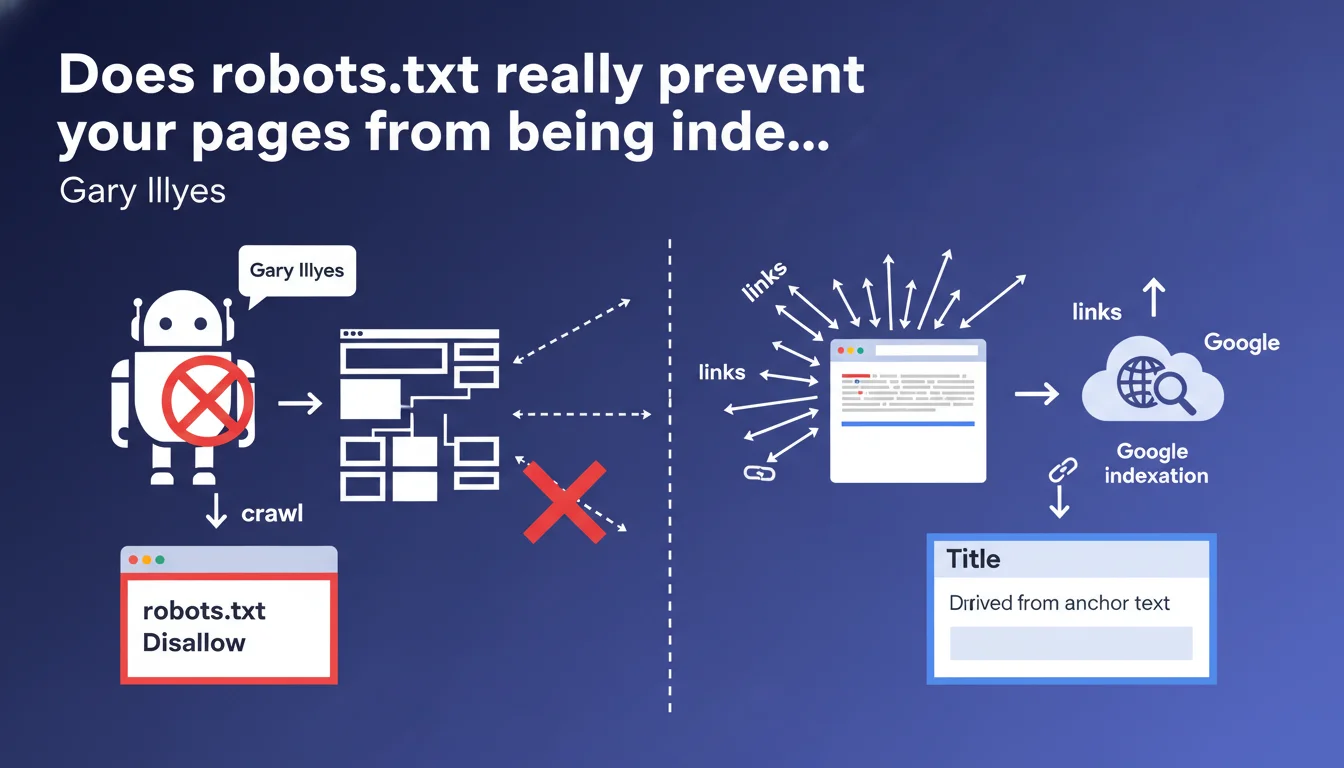
Robots.txt prevents crawling, not indexation. If a URL receives enough backlinks, Google can index it without ever crawling its content — it will appear in search results with a title derived from anchor text and without a meta description. This confusion costs many websites dearly because they believe they're protected with a simple Disallow.
What you need to understand
What is the difference between crawling and indexation?
A crawl is the action of visiting a page to retrieve its content. Indexation is the decision to store that URL in Google's index so it appears in search results. These are two distinct processes — and that's where everything gets complicated.
When you block a URL in robots.txt, you prevent Googlebot from visiting it. But if that page accumulates external backlinks, Google knows it exists. It can then choose to index it without ever having read its content, based solely on external signals.
How does Google index a page blocked by robots.txt?
Google discovers the URL through incoming links. Without access to the content, it builds the search result with what it has: the anchor text of links pointing to the page serves to generate an approximate title. The meta description remains empty or displays a generic message.
The result is ugly, not very clickable, but present in the index. For sensitive pages (admin, staging, private content), this is a potential security issue — the URL is publicly visible even if the content remains inaccessible.
Why does this confusion persist among so many professionals?
Because for a long time, Google's documentation was vague on this point. Many SEO professionals still believe that robots.txt = total protection. That's false. A Disallow protects your crawl budget, not your privacy.
- Robots.txt only controls what Googlebot can explore, not what it can index
- A blocked page but heavily linked can appear in the SERP with an empty snippet
- To truly block indexation, you need a noindex tag (which requires that the page be crawlable)
- Robots.txt does not protect sensitive content — use authentication or HTTP headers
SEO Expert opinion
Is this statement consistent with real-world observations?
Yes, 100%. Across thousands of audits, I've seen dozens of sites indexed on URLs blocked in robots.txt — staging environments, filter parameters, admin pages. The pattern is always the same: external backlinks + poorly configured robots.txt = indexation leak.
The classic case: a developer puts a staging site in complete robots.txt Disallow, but forgets to cut the links from production. Result? Google indexes the staging URL with a generic title like "Index of /staging". Visible in the SERP, a disaster in terms of image.
Where does this rule show its limitations?
Google says "if a page becomes very popular with many links". But how many links? What minimum PageRank? [To verify] — this part remains intentionally vague. In the field, I've observed indexations with as few as 3-4 backlinks from moderately authoritative sites.
Another gray area: what happens if you add a robots.txt Disallow to an already indexed page? Google maintains the indexation, but can no longer recrawl to update the content. The URL stays in the index, frozen in time — often with outdated information. Convenient when you want to quickly erase a page? No. You must wait for natural deindexation or go through Search Console.
When does this logic become problematic?
For sites with sensitive content. I've seen B2B price tables, client access, internal policy pages appear in Google — URL visible, content protected by robots.txt. Technically compliant with what Gary Illyes says, but catastrophic in practice.
Practical impact and recommendations
What should you do concretely to avoid this pitfall?
First, stop using robots.txt as a deindexation tool. Its role is to manage crawl budget and protect server resources, not to hide content. To deindex properly, the only reliable method: meta noindex tag or HTTP X-Robots-Tag header.
Next, audit your currently blocked URLs. Go to Google Search Console > Settings > Robots.txt file, retrieve the Disallow list, then check how many are indexed with a site:yourdomain.com/blocked-url. You'll be surprised.
How to fix a page indexed despite a robots.txt?
Paradox: for deindexation, Google must be able to recrawl the page. So you must temporarily remove the Disallow, add a noindex tag, wait for deindexation (a few days to a few weeks depending on crawl frequency), then restore the robots.txt if necessary.
Quick but risky alternative: request URL removal via Search Console. That hides the URL for ~6 months, but it's not permanent. If the page remains crawlable and without noindex, it will return.
What mistakes should you absolutely avoid?
- NEVER block in robots.txt a page you want to deindex — use noindex
- Never put noindex on a page blocked in robots.txt — Google won't be able to read the directive
- Don't rely on robots.txt to protect sensitive data — authenticate at server level
- Don't block /wp-admin/ or /admin/ in robots.txt if these URLs receive backlinks — indexation guaranteed
- Regularly check URLs indexed despite a Disallow with a site: search
Robots.txt is a crawl management tool, not an indexation barrier. To truly control what appears in Google, you must master the difference between crawling, indexation, and the directives suited to each case.
These technical distinctions may seem subtle, but their implications are major — a misconfiguration exposes sensitive URLs or wastes crawl budget on unnecessary pages. If your architecture combines dynamic parameters, staging content and private areas, support from a specialized SEO agency can help you avoid costly errors and speed up compliance.
❓ Frequently Asked Questions
Puis-je utiliser robots.txt pour empêcher Google d'indexer une page ?
Comment désindexer une page actuellement bloquée en robots.txt ?
Combien de backlinks suffisent pour qu'une page bloquée soit indexée ?
Que se passe-t-il si j'ajoute un robots.txt sur une page déjà indexée ?
Comment protéger vraiment des contenus sensibles de l'indexation ?
🎥 From the same video 13
Other SEO insights extracted from this same Google Search Central video · published on 30/06/2022
🎥 Watch the full video on YouTube →
💬 Comments (0)
Be the first to comment.