
Official statement
Other statements from this video 13 ▾
- □ Robots.txt bloque-t-il vraiment l'indexation de vos pages ?
- □ La balise meta 'none' est-elle vraiment l'équivalent de noindex + nofollow ?
- □ Robots.txt est-il vraiment inefficace pour bloquer l'indexation ?
- □ Peut-on bloquer l'indexation de répertoires entiers via des modules serveur plutôt que robots.txt ?
- □ Faut-il vraiment indexer les pages de connexion de votre site ?
- □ Faut-il vraiment préférer rel=canonical à noindex pour les contenus anciens ?
- □ Faut-il bloquer les snippets avec nosnippet pour protéger son contenu sensible ?
- □ Faut-il vraiment utiliser max-snippet et max-image-preview pour contrôler l'affichage dans les SERP ?
- □ Faut-il privilégier l'attribut nofollow individuel ou la balise meta robots nofollow pour contrôler le PageRank ?
- □ Pourquoi Google refuse-t-il de créer de nouvelles balises meta robots ?
- □ Comment bloquer l'indexation de PDFs et fichiers non-HTML sans accès aux headers HTTP ?
- □ Pourquoi robots.txt bloque-t-il vraiment les images et vidéos mais pas les pages web ?
- □ Comment Google transforme-t-il vraiment vos PDFs en contenu indexable ?
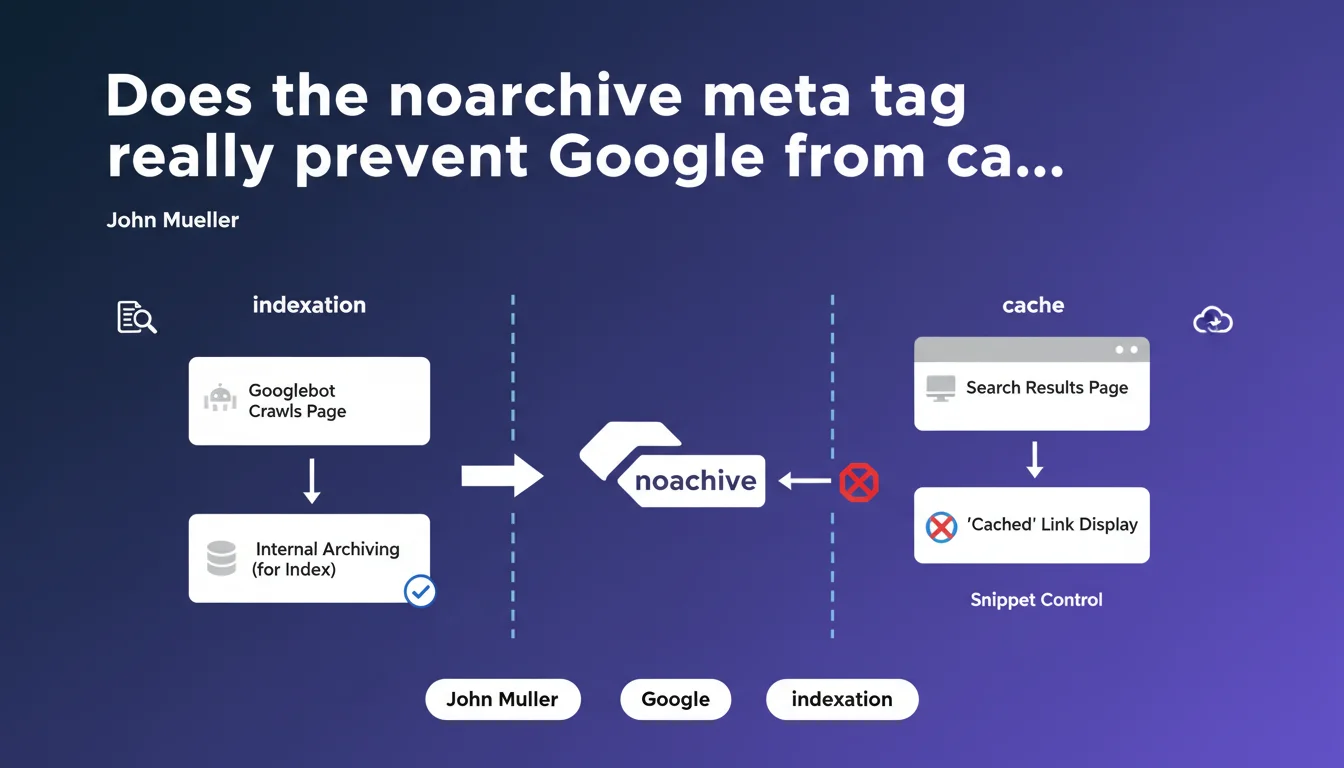
The 'noarchive' meta tag does not block Google's internal archiving — the search engine needs this archiving to index. It simply removes the 'Cached' link in the SERPs. It's a snippet display control, not an indexation directive.
What you need to understand
What is the difference between internal archiving and the 'Cached' link?
Google systematically archives the pages it indexes. This internal archiving is essential to the search engine's functioning: it allows comparison of successive versions of a page, analysis of its content, detection of modifications. Without this archive, indexation is impossible.
The 'Cached' link visible in search results is a distinct public feature. It offers users access to the archived version of the page. The noarchive tag cuts this link — but the internal archive remains active.
Why does this distinction exist?
Some sites don't want to publicly expose their archived versions. Confidential content, dynamic pricing, sensitive information — the reasons vary. Google respects this choice via noarchive, while maintaining its technical indexation capacity.
It's a compromise between the search engine's technical needs and the site owner's editorial control.
What does this imply for the snippet?
Mueller explicitly classifies noarchive among snippet controls. Just like nosnippet or max-snippet, it modifies what Google displays in the SERPs without affecting indexation itself.
- The noarchive tag removes only the 'Cached' link in search results
- Google's internal archiving remains active — it's a technical condition of indexation
- It's a display control, not a robotic directive
- It can be combined with other snippet directives (nosnippet, max-snippet)
- No impact on crawl budget or exploration frequency
SEO Expert opinion
Does this clarification really resolve field confusion?
Let's be honest: many practitioners believed that noarchive prevented any form of archiving. The wording itself — 'no archive' — invites confusion. Mueller clarifies an age-old misunderstanding, but the terminology remains ambiguous.
In the field, we do observe that pages with noarchive continue to be indexed normally, with regular updates. Google's behavior matches what it describes. No surprises here.
What use cases really justify using noarchive?
In practice? Very few. Sites displaying real-time pricing (flight tickets, hotels) may want to avoid an obsolete cache circulating. Same for restricted access content or pages with visible personal data.
But be careful — and this is where it gets sticky: if your content is truly confidential, why is it indexable? Logic would suggest using noindex or an access restriction via robots.txt. Using noarchive alone often amounts to a poorly calibrated strategy.
Is there an indirect SEO impact to consider?
Technically, no. Mueller is clear: this is a snippet control, not a ranking signal. [To verify]: some observers suggest that systematically removing the cache could harm user trust in the SERPs — but there's no solid data on this.
What is certain: if you hide the cache on key pages without reason, you deprive users of a fallback point in case your server becomes unavailable. This is rarely a good trade-off.
Practical impact and recommendations
Should I remove noarchive from my current pages?
Start with an audit. Identify all pages carrying this tag — via Screaming Frog, Search Console, or a custom crawl. For each page, ask yourself: is there a legitimate reason to hide the cache?
If the answer is no, remove the directive. If the answer is yes, then ask yourself: should this page even be indexed? Often, the real solution is noindex, not noarchive.
How to properly implement noarchive if necessary?
The syntax is simple: <meta name="robots" content="noarchive"> in the page's <head>. It can be combined with other directives: content="index, follow, noarchive".
Verify that your server does not block resources needed for page rendering. If Google cannot see the tag because your CSS/JS is blocked, it will have no effect.
What common mistakes should you avoid?
The classic mistake: using noarchive as a substitute for noindex on truly sensitive content. It's not the right tool. Google always archives the page internally — only the public display of the cache is cut.
Another trap: applying noarchive in bulk via a global template. Some CMS platforms do this by default on all pages. Result: none of your content displays a cache, for no reason. It's counterproductive.
- Audit pages currently bearing the noarchive tag
- Verify that each use is justified by a real need (dynamic pricing, sensitive content)
- Favor noindex for truly confidential content
- Test cache display after removing the directive (Google Search Console)
- Document exceptions: which pages retain noarchive, and why
- Avoid global application via default templates
❓ Frequently Asked Questions
La balise noarchive ralentit-elle l'indexation de mes pages ?
Puis-je combiner noarchive avec d'autres directives robots ?
Si je retire noarchive, combien de temps avant que le lien 'En cache' réapparaisse ?
Noarchive empêche-t-il les outils d'archivage tiers comme Wayback Machine ?
Y a-t-il un impact SEO si je masque le cache sur toutes mes pages ?
🎥 From the same video 13
Other SEO insights extracted from this same Google Search Central video · published on 30/06/2022
🎥 Watch the full video on YouTube →
💬 Comments (0)
Be the first to comment.