
Official statement
Other statements from this video 12 ▾
- □ Faut-il se fier à PageSpeed Insights ou à la Search Console pour mesurer la vitesse de son site ?
- □ Google indexe-t-il vraiment tout le contenu de votre site ?
- □ Pourquoi Googlebot ignore-t-il vos liens JavaScript si vous n'utilisez pas de balises <a> ?
- □ Google a-t-il vraiment abandonné l'idée d'un score SEO global ?
- □ Peut-on créer des liens vers des sites HTTP sans risque SEO ?
- □ Faut-il vraiment écrire « naturellement » pour ranker sur Google ?
- □ Faut-il vraiment supprimer son fichier de désaveu de liens ?
- □ Faut-il vraiment éviter d'implémenter le Schema markup via Google Tag Manager ?
- □ Peut-on dupliquer la même URL dans plusieurs fichiers sitemap sans risque SEO ?
- □ Comment indexer le contenu d'une iframe sans indexer la page source ?
- □ HSTS et preload list : une fausse piste pour le référencement ?
- □ Pourquoi un nom de domaine descriptif ne garantit-il pas votre classement sur sa requête ?
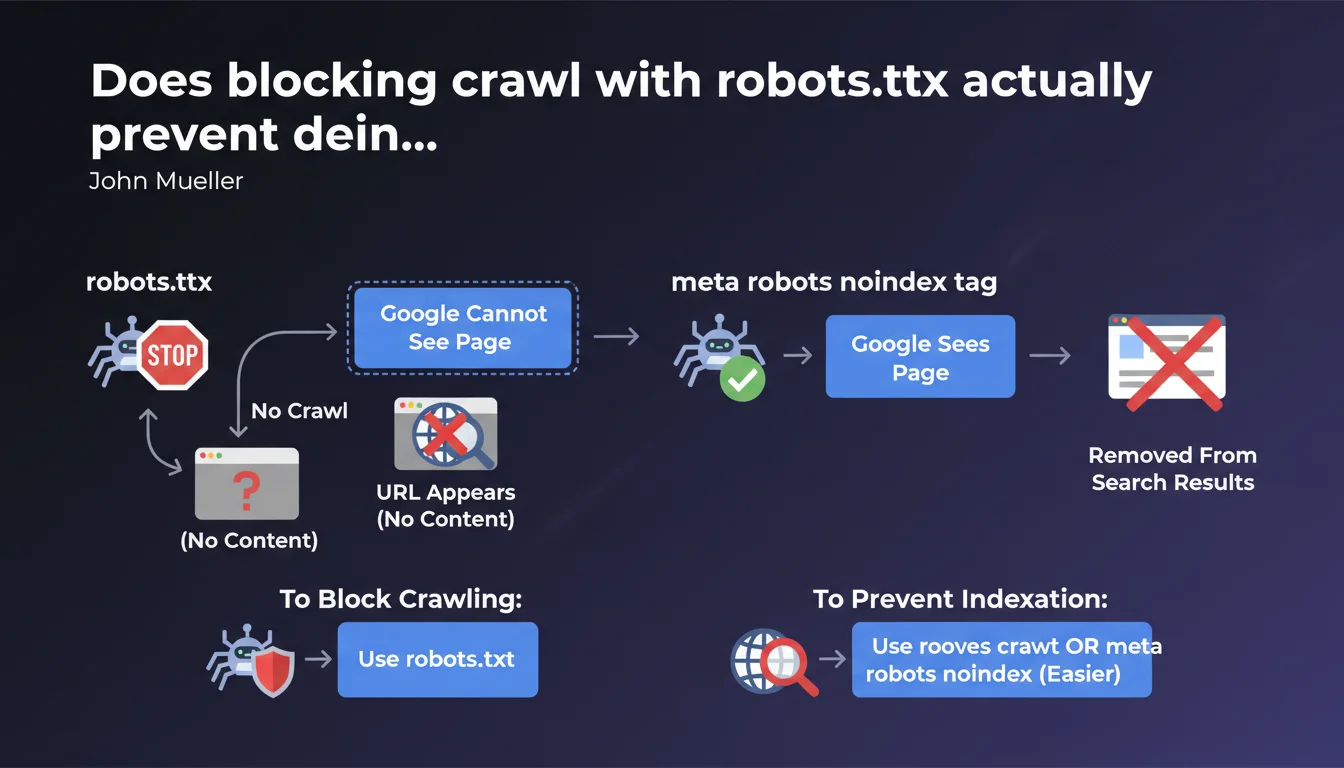
Robots.txt blocks crawling but the URL can still appear in Google without content or description. The meta robots noindex tag allows Google to see the page before removing it completely. For proper deindexation, prioritize noindex over robots.txt.
What you need to understand
What is the fundamental difference between these two methods?
The robots.txt file prevents Googlebot from accessing a page. The bot cannot read the content, analyze meta tags, or follow links. It's a gatekeeper that says "don't enter."
The meta robots noindex tag works the opposite way: it allows Google to crawl the page, read its content, understand its structure — then asks it not to index it. The bot enters, sees that you don't want this page in the index, and removes it or never adds it.
Why can a URL blocked by robots.txt still appear in search results?
Google can discover a URL through external links or sitemaps without ever crawling the page itself. In this case, the URL can appear in the SERPs with "No information available" — because Google knows the page exists, but has never been able to access it to verify its content.
It's paradoxical but logical: robots.txt blocks crawling, not knowledge of the URL's existence. If you want a page to disappear completely from results, blocking access is not enough.
When should you use one method or the other?
Use robots.txt to save crawl budget on unnecessary resources: heavy JS files, internal PDFs, infinite filter pages, admin zones. The goal is to prevent Google from wasting time on these URLs.
Use meta robots noindex when you want a page completely absent from the index: thank you pages, internal search results, private but accessible pages. Google must be able to read the directive to apply it — so no upstream blocking.
- Robots.txt: controls crawling, not indexation — the URL can remain visible
- Meta robots noindex: controls indexation — Google must be able to crawl to read the directive
- Never combine both: blocking a page in robots.txt prevents Google from seeing the noindex
- To completely remove a URL, always prioritize noindex
SEO Expert opinion
Is this distinction actually respected by Google in practice?
Yes, and it's a classic pitfall. We regularly see sites that block sensitive pages in robots.txt — account pages, abandoned carts, search filters — and later discover these URLs in Google with "Description unavailable for this page."
The problem? These URLs are known through backlinks or sitemap leaks. Google indexes them as "existing pages" without ever being able to access them. Result: you have zombie URLs in the index, with no control over their presentation.
What mistakes do we still see too often in the field?
Mistake number one: blocking in robots.txt a page you want to deindex. Typical example: a redesign where you block the old site in robots.txt to "force" deindexation. Google can no longer crawl, so never sees the 301 redirects, noindex tags, nothing. Old URLs remain in the index for months.
Second common mistake: putting noindex on a page then blocking it in robots.txt "for security." Google can no longer verify if the noindex is still present — and may reindex the page if it deems it relevant through external signals. [To verify] on large volumes, as Google sometimes seems to ignore this rule if the page receives many positive signals.
Is Google consistent with its own historical recommendations?
For years, Google said "use robots.txt to block indexation" — which was technically wrong but often worked in practice, because Google wouldn't crawl and would eventually remove URLs from the index. Then Search Console started reporting "URLs indexed despite robots.txt blocking."
Today, the message is clear: robots.txt does not guarantee deindexation. This is an acknowledged change in doctrine, and practices must adapt accordingly — especially for large sites that historically managed indexation via robots.txt.
Practical impact and recommendations
What should you audit first on an existing site?
Start by cross-checking two sources: URLs blocked in robots.txt (via your CMS or a Screaming Frog crawl in list mode) and URLs indexed in Google (via site: or Search Console). Any intersection between these two lists is a potential problem.
Next, check pages with noindex: are they accessible to crawling? If you have noindex on a page blocked in robots.txt, the directive is useless — Google cannot read it. Unblock, wait for recrawl, then reblock if necessary to save crawl budget.
How do you fix a misconfigured deindexation?
If pages are blocked in robots.txt but appear in the index: unblock them immediately. Add a <meta name="robots" content="noindex"> tag in the <head>. Request reindexation via Search Console to accelerate the process.
Once pages are deindexed (verify with site:yoururl.com), you can reblock in robots.txt if you want to save crawl budget. But if there's a risk of indexation through external links, keep the noindex in place — it's safer.
What best practices should you adopt to avoid these errors in the future?
- Never block in robots.txt a page you want to deindex — always use meta robots noindex
- Reserve robots.txt for crawl budget control: unnecessary resources, heavy files, admin zones without SEO value
- Regularly audit URLs indexed despite robots.txt blocking via Search Console (Coverage report)
- Clearly document your indexation strategy: which pages should be crawled, which indexed, which neither
- Test your directives on a staging environment before deploying them to production
- Use Search Console to force recrawl of critical pages after directive changes
❓ Frequently Asked Questions
Peut-on utiliser robots.txt ET meta robots noindex sur la même page ?
Pourquoi mes pages bloquées en robots.txt apparaissent-elles encore dans Google ?
Le X-Robots-Tag HTTP fonctionne-t-il comme la balise meta robots ?
Combien de temps faut-il pour qu'une page en noindex disparaisse de l'index ?
Faut-il retirer les pages en noindex du sitemap XML ?
🎥 From the same video 12
Other SEO insights extracted from this same Google Search Central video · published on 04/07/2022
🎥 Watch the full video on YouTube →
💬 Comments (0)
Be the first to comment.