
Official statement
Other statements from this video 12 ▾
- □ Faut-il se fier à PageSpeed Insights ou à la Search Console pour mesurer la vitesse de son site ?
- □ Google indexe-t-il vraiment tout le contenu de votre site ?
- □ Google a-t-il vraiment abandonné l'idée d'un score SEO global ?
- □ Peut-on créer des liens vers des sites HTTP sans risque SEO ?
- □ Faut-il vraiment écrire « naturellement » pour ranker sur Google ?
- □ Faut-il vraiment supprimer son fichier de désaveu de liens ?
- □ Faut-il vraiment éviter d'implémenter le Schema markup via Google Tag Manager ?
- □ Robots.txt vs meta robots : pourquoi bloquer le crawl peut-il nuire à la désindexation ?
- □ Peut-on dupliquer la même URL dans plusieurs fichiers sitemap sans risque SEO ?
- □ Comment indexer le contenu d'une iframe sans indexer la page source ?
- □ HSTS et preload list : une fausse piste pour le référencement ?
- □ Pourquoi un nom de domaine descriptif ne garantit-il pas votre classement sur sa requête ?
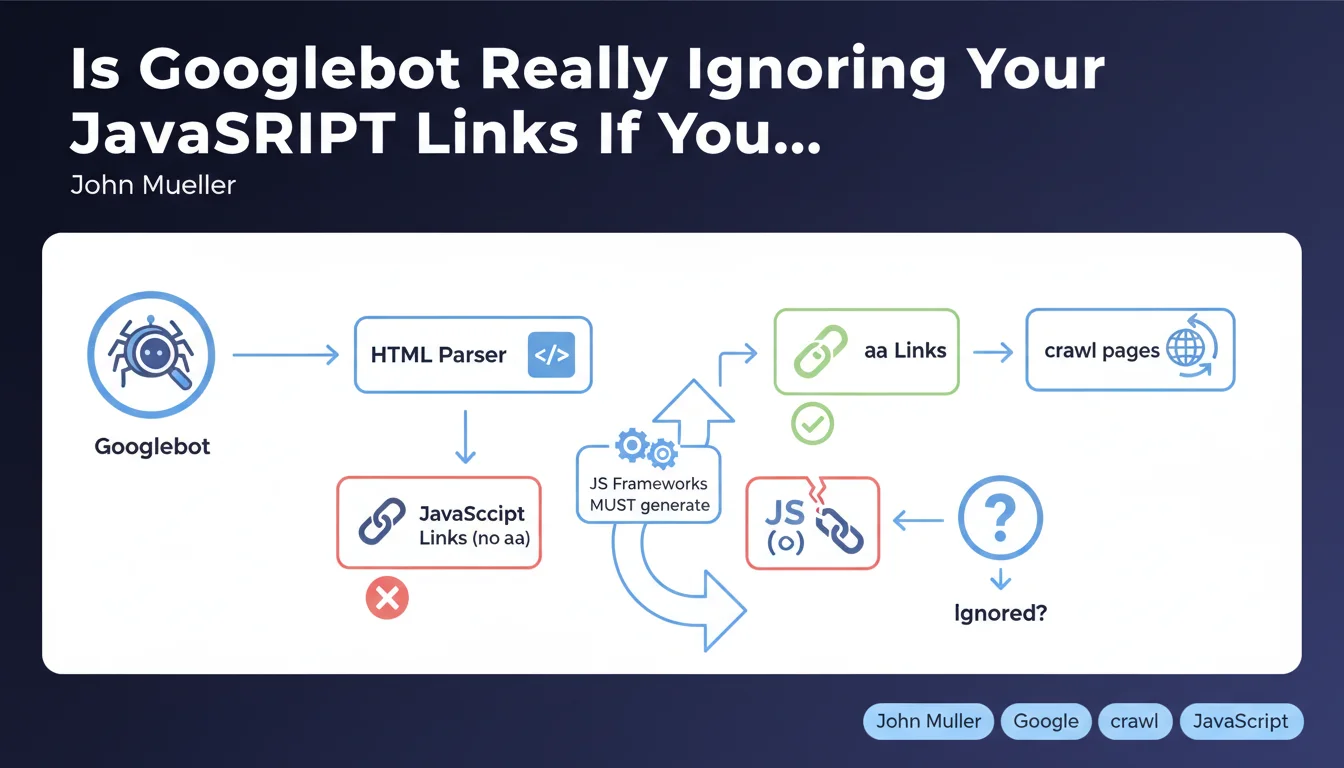
Googlebot doesn't click on interactive elements to discover your pages — it exclusively searches for classic HTML links (anchor tags with <a>). If your JavaScript framework generates links via pure JavaScript (onClick, SPA routers without HTML fallback), Google may never discover a portion of your site. The solution: ensure that every important link exists as an <a> tag with a valid href attribute.
What you need to understand
What Exactly Does Google Mean by "Normal HTML Links"?
A normal HTML link is a classic <a href="/page"> tag. Not a <div onClick="navigate()">, not a button managed by a JavaScript event listener, not a dynamically injected link added later by React or Vue.
Googlebot parses the rendered DOM — it does execute JavaScript and has been for several years — but it doesn't simulate user behavior by clicking everywhere. It searches for href attributes in <a> tags. Period.
Why Is This Distinction Crucial for Crawling?
Many modern frameworks (React Router, Vue Router, Next.js in client-side mode) generate Single Page Applications (SPAs) where navigation happens without a full page reload. If these frameworks don't expose real <a> tags in the HTML, Googlebot won't detect the links.
Concretely: you might have 500 perfectly functional pages on the user side, but if they're only accessible through JavaScript events without an <a> tag, Google will never see them — except if they appear in your XML sitemap or via external links.
Does This Only Concern JavaScript-Heavy Sites?
No. Even a classic WordPress site can fall into this trap if a menu plugin uses JavaScript to manage navigation without generating real HTML links. Or if you implement a dynamic mega-menu that loads sub-categories via AJAX without HTML anchors.
The rule is universal: Googlebot doesn't click, it reads the DOM. If there's no <a href>, there's no automatic discovery.
- Googlebot exclusively searches for
<a>tags with a validhrefattribute - It doesn't interact with clickable elements (buttons, divs, onClick events)
- Modern JavaScript frameworks must generate classic HTML links, even in SPA mode
- XML sitemaps or external links can partially compensate, but don't replace a solid internal linking architecture
- This rule applies to all types of sites, not just complex JavaScript applications
SEO Expert opinion
Is This Statement Consistent with Real-World Observations?
Yes, and it's a timely reminder. We regularly observe SPA sites where entire sections aren't indexed because developers prioritized user experience (fluid navigation, no reloads) without considering crawlability. [To verify]: Google claims to execute JavaScript "like a modern browser," but in practice, the rendering budget is limited — if your JS takes 5 seconds to load, Googlebot might not see your dynamically injected links that appear later.
Modern frameworks (Next.js, Nuxt, SvelteKit) have built this constraint into their design for years: they generate classic <a> tags even in client-side routing mode. But many custom setups or older React implementations still miss this.
What Nuances Should We Add to This Rule?
Google isn't saying JavaScript itself is a problem — it's saying that the absence of <a> tags is a problem. If your React Router generates <Link to="/page"> which transforms into <a href="/page"> in the DOM, everything works fine.
But — and this is where it gets tricky — if your menu loads lazily after a scroll or hover, and the <a> tag only appears at that moment, Googlebot might never see it. It doesn't scroll, it doesn't hover.
In What Cases Can This Rule Cause Problems?
On e-commerce sites with JavaScript filters: if filtered pages (e.g., "Red shoes size 42") are only accessible via JavaScript buttons without a dedicated URL or <a> tag, they'll never be indexed. Same logic applies to listing sites or portfolios with modal navigation.
The classic trap: a developer implements a pure JavaScript pagination system ("Load More" button without a URL) — result, only the first page gets crawled. Let's be honest: many sites lose 30 to 50% of their indexation potential because of these kinds of details.
Practical impact and recommendations
What Should You Do Concretely to Ensure Your Links Are Crawlable?
Immediate Technical Audit: inspect the rendered DOM of your key pages. Disable JavaScript in Chrome DevTools (Cmd+Shift+P > "Disable JavaScript") and verify if your main navigation links are still present. If half your menu disappears, you have a problem.
For JavaScript frameworks: use components that generate real <a> tags. React Router? <Link>. Next.js? <Link>. Vue Router? <router-link> which compiles to <a>. Avoid <div onClick={navigate}>
What Mistakes Should You Absolutely Avoid?
Don't rely solely on your XML sitemap to compensate for poor link architecture. Google prioritizes internal links — the sitemap is a complement, not a workaround. If your pages aren't linked anywhere in HTML, they'll have lower crawl priority.
Another common mistake: mega-menus that load sub-categories via AJAX on hover. If these sub-categories don't exist as <a> tags in the initial HTML, Googlebot won't see them. Solution: inject all links into the HTML, even if hidden with CSS, or use a mobile-first menu that exposes them by default.
How Do You Verify Your Site Complies?
Three quick checks: (1) Crawl your site with Screaming Frog or Sitebulb in "Googlebot smartphone" mode — compare the number of discovered pages with your actual inventory. (2) Use the URL inspection tool in Search Console and look at the rendered DOM — verify that your internal links appear correctly. (3) Test your pages with JavaScript disabled to identify links that depend on JS.
If you detect significant gaps, the fix might be technical: refactor a React component, adjust your routing system, or restructure your menu. These optimizations often require cross-disciplinary SEO-development expertise — common mistake: developers don't naturally think about crawlability, and SEOs don't always master the subtleties of modern frameworks.
- Audit the rendered DOM of your key pages with JavaScript disabled
- Verify that all your navigation links use
<a href>tags - If you use a JS framework, prioritize native components (Link, router-link) that generate valid HTML
- Crawl your site with a professional tool and compare the number of discovered pages to your inventory
- Check the rendered DOM in Search Console to confirm link presence
- Avoid conditional links (displayed only after a click or scroll)
- Don't rely solely on XML sitemap to compensate for a failing architecture
<a> tags. If your links depend on JavaScript events without HTML fallback, part of your site will remain invisible. This issue affects both complex SPAs and misconfigured WordPress sites alike. Technical audit is the first step, but achieving compliance might require deep refactoring — if your technical stack is complex or if you're experiencing significant indexation losses, support from an SEO agency specializing in JavaScript SEO can save you months and prevent costly mistakes.
💬 Comments (0)
Be the first to comment.