
Official statement
Other statements from this video 13 ▾
- □ Les images de stock pénalisent-elles vraiment votre référencement ?
- □ Faut-il vraiment penser stratégie avant technique pour l'optimisation des images ?
- □ Faut-il vraiment contextualiser les attributs alt pour améliorer le référencement des images ?
- □ Faut-il vraiment arrêter d'écrire 'image de' dans les attributs alt ?
- □ Faut-il vraiment rédiger des phrases complètes dans les attributs alt ?
- □ Faut-il choisir entre accessibilité et SEO dans vos balises alt ?
- □ Faut-il vraiment remplir l'attribut alt de toutes vos images ?
- □ Faut-il vraiment renommer tous vos fichiers images pour le SEO ?
- □ Pourquoi Google crawle-t-il vos images beaucoup moins souvent que vos pages HTML ?
- □ Faut-il vraiment redouter un changement massif d'URLs d'images pour votre SEO ?
- □ Le texte autour de vos images pèse-t-il vraiment plus lourd que l'attribut alt ?
- □ Faut-il vraiment utiliser rel="canonical" pour les images multiples ?
- □ Pourquoi vos logos et boutons cliquables sabotent-ils votre accessibilité et votre SEO ?
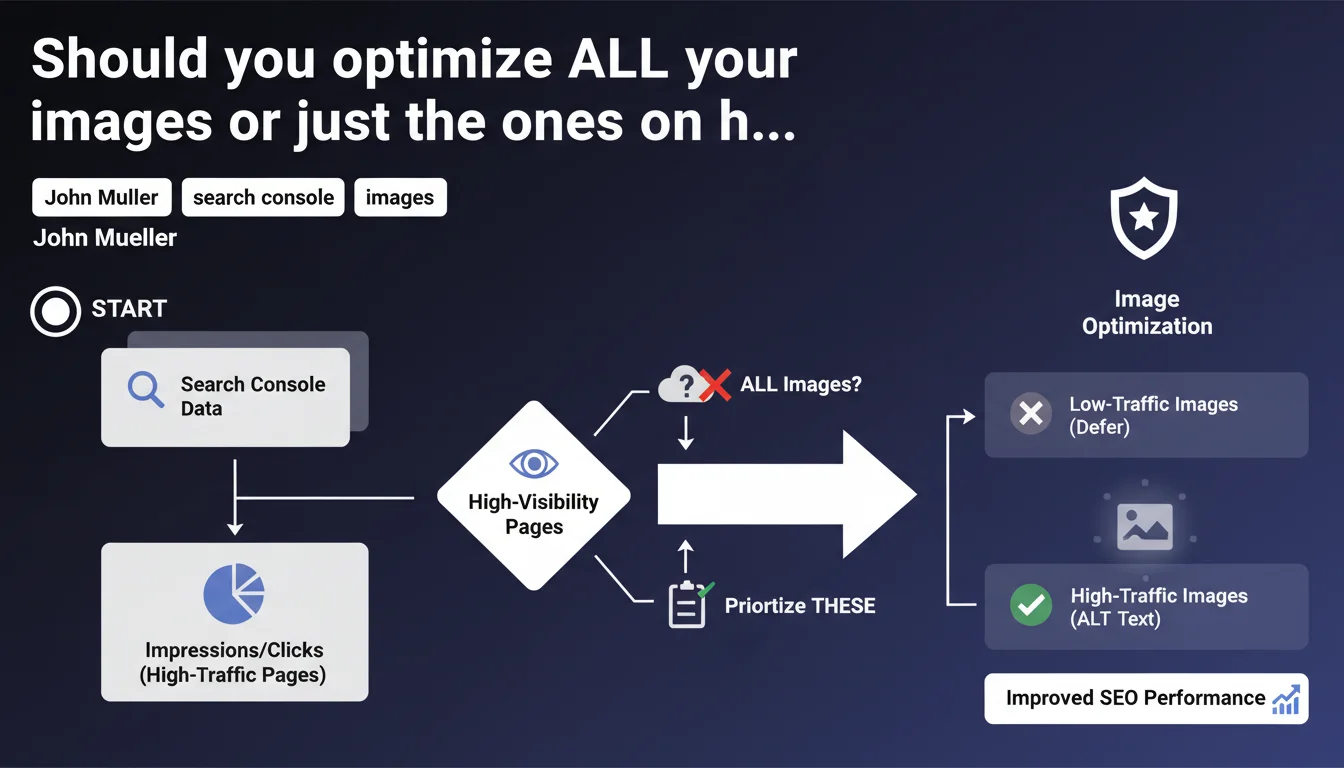
Google recommends cross-referencing Search Console data (impressions/clicks) with a list of images missing alt text to prioritize optimization. In other words: focus first on pages that are already generating traffic rather than blindly optimizing your entire site. It's an ROI-driven approach that acknowledges you never have enough time or budget to do everything.
What you need to understand
Why does Google insist on this prioritization-based approach?
The reality on the ground is that 90% of websites have thousands of unoptimized images. Wanting to fix everything at once? Unrealistic. Google therefore suggests a surgical method: identify pages that already have visibility in the SERPs, then optimize their images as a priority.
The underlying idea is simple. A page that generates impressions—even without clicks—has passed the first filter: Google deems it relevant for certain queries. Improving its signals (including alt text) may be enough to move it from an invisible top 20 to a clickable top 10.
How do you identify these high-potential pages?
Mueller recommends cross-referencing two data sources: on one side, Search Console reports (Performance tab, sorted by impressions or clicks); on the other, a technical audit that lists all images without an alt attribute. The intersection of the two gives you your priority project list.
Concretely? Export your pages with the most impressions over the last 3 months. Run a crawl (Screaming Frog, Oncrawl, etc.) to detect <img> tags without alt. Match the two files and you have your optimization roadmap sorted by descending ROI.
What does this change compared to standard image optimization?
Nothing in substance—good alt text is still good alt text. But everything in method. Many sites launch into mass image optimizations, often via automated scripts that generate generic and useless alt text.
The prioritized approach avoids two traps: the perfectionist syndrome that optimizes 10,000 images of which nobody will ever see 9,500, and the lazy approach of doing nothing because "it's too much". Between the two, there's this 80/20 strategy: concentrate effort where the impact will be measurable.
- Prioritize pages already visible in Search Console (impressions > 100/month minimum)
- Cross-reference this data with a technical audit to detect images without alt
- Optimize first the images on pages with high conversion or ranking potential
- Measure impact over 4-6 weeks before expanding to other segments
- Avoid mindless automation that generates useless alt text ("image-1234.jpg")
SEO Expert opinion
Is this recommendation truly new or just common sense repackaged?
Let's be honest: it's common sense. Any SEO who has moved beyond junior level knows you prioritize based on potential impact. What's interesting is that Google validates it officially—and especially, that it suggests a precise methodology (Search Console + technical audit).
Where it becomes more relevant is in convincing a client or marketing director who demands "complete site optimization". Being able to answer "Google itself recommends prioritizing high-traffic pages" cuts through endless discussions. It's an authority argument that saves time—and budget.
What nuances should you add to avoid shooting yourself in the foot?
First point: this approach works for established sites that already have traffic. On a new or nearly invisible site, you don't have exploitable Search Console data. In that case, you should start with semantic analysis (strategic pages, flagship product pages, priority landing pages) rather than sorting by impressions.
Second nuance—and this is where it sometimes stalls. [To verify] Mueller doesn't specify whether this prioritization also applies to Google Images as an autonomous traffic source. Yet some sites (e-commerce, portfolios, recipes) draw 20-40% of their organic traffic via Google Images. In that case, optimizing all images may make more sense than limiting yourself to pages already visible in regular search.
In what cases does this rule not apply or need to be adapted?
Case #1: news or fresh content sites. If your model relies on daily publishing, you can't wait 3 months of Search Console data to optimize. Image optimization must be integrated at publication—it's a prerequisite, not an option.
Case #2: sites with strong seasonality. A "ski rental" page invisible in June can explode in November. If you only optimize it once it already has traffic, you miss the window. In this context, you must anticipate and optimize before season, based on previous year's data.
Case #3: redesigns or migrations. When you switch CMS or structure, you don't have the luxury of prioritizing: everything must be clean from go-live. A migration with 30% of images missing alt on key pages is SEO suicide—even if those pages didn't have much traffic yet.
Practical impact and recommendations
What specifically should you do to implement this method?
First step: extract Search Console data. Go to Performance > Pages, filter on the last 3-6 months, sort by descending impressions. Export the complete list (you can go up to 1000 lines via direct export, beyond that you need to use the API or third-party tool).
Second step: crawl your site to identify images without alt. Screaming Frog, Sitebulb, Oncrawl—whatever tool, the key is getting an export listing each page URL + the number of images lacking alt attribute. If you have thousands of images, segment by template (product sheet, blog article, category page) to ease processing.
Third step: cross-reference the two files. A simple VLOOKUP in Excel or a Python script is enough. You get a list of pages ranked by impressions, with for each the number of images to optimize. That's your roadmap.
- Export pages with the most impressions from Search Console (3-6 months of data)
- Crawl the site to list all images without alt attribute (or with empty/generic alt)
- Cross-reference the two lists to identify priority pages (high traffic + unoptimized images)
- Write descriptive, contextual alt text—no keyword stuffing, no generic descriptions like "product image"
- Verify that important images also have an explicit filename (rename if necessary before upload)
- Deploy optimizations in waves (top 50 pages, then top 100, then top 500) and measure impact between each wave
- Monitor evolution of impressions/clicks in Search Console 4-6 weeks after each deployment
- Progressively expand to the entire site, maintaining ROI logic (strategic pages before orphaned pages)
What errors should you avoid to not waste your time?
Error #1: mindless automation. Generating alt text via a script that copies the page title or filename doesn't help. Google wants contextual description, not copy-paste. If you don't have time to do this properly, better do nothing—or delegate to someone who understands context.
Error #2: keyword stuffing in alt text. Yes, alt text helps image ranking, but stuffing your alt with keywords will make your HTML unreadable and be counter-productive. Good alt describes what you see in the image, period. If the keyword naturally fits, great; if not, so be it.
Error #3: neglecting other attributes. Alt text is just one signal among others. Filename, image <title> tag, surrounding text context, compression, format (WebP vs JPEG), lazy loading—all of that matters. Optimizing only alt without touching the rest means missing 50% of potential.
How do you measure the impact of these optimizations and adjust your strategy?
Set up before/after tracking in Search Console. Note average impressions and clicks of your priority pages over the 28 days before optimization. Wait 4-6 weeks after deployment (time for Google to recrawl and re-evaluate), then compare. If you see positive delta on 70% of optimized pages, you've got the right method.
Another angle: Google Images as a traffic source. If your site can benefit from image search traffic, monitor Google Analytics (source/medium = google/organic + landing page containing images). A rise in image traffic post-optimization validates you're on the right track.
❓ Frequently Asked Questions
Faut-il optimiser les alt text des images décoratives ou uniquement celles à valeur informative ?
Peut-on utiliser des outils d'IA pour générer automatiquement les alt text ?
Quelle est la longueur idéale d'un attribut alt ?
Si une page a 20 images, faut-il toutes les optimiser ou seulement les principales ?
Est-ce que l'optimisation des images peut vraiment impacter le ranking en recherche textuelle classique ?
🎥 From the same video 13
Other SEO insights extracted from this same Google Search Central video · published on 06/10/2022
🎥 Watch the full video on YouTube →
💬 Comments (0)
Be the first to comment.