
Official statement
Other statements from this video 9 ▾
- □ Does the Search Console API really give you access to data that the interface hides?
- □ Why does Google Search Console cap your indexing reports at 1000 rows?
- □ Did Google just give SEOs the data superpower they've been begging for?
- □ Why is Google refusing to index some of your pages?
- □ Should you really fix every single 404 error detected in Search Console?
- □ Why won't Google diagnose your ranking problems?
- □ Can the URL Inspection API truly replace manual inspections at scale?
- □ Does Google finally have an SEO tool for non-technical users with Search Console Insights?
- □ How is the BigQuery integration transforming advanced SEO analysis beyond Search Console's standard limitations?
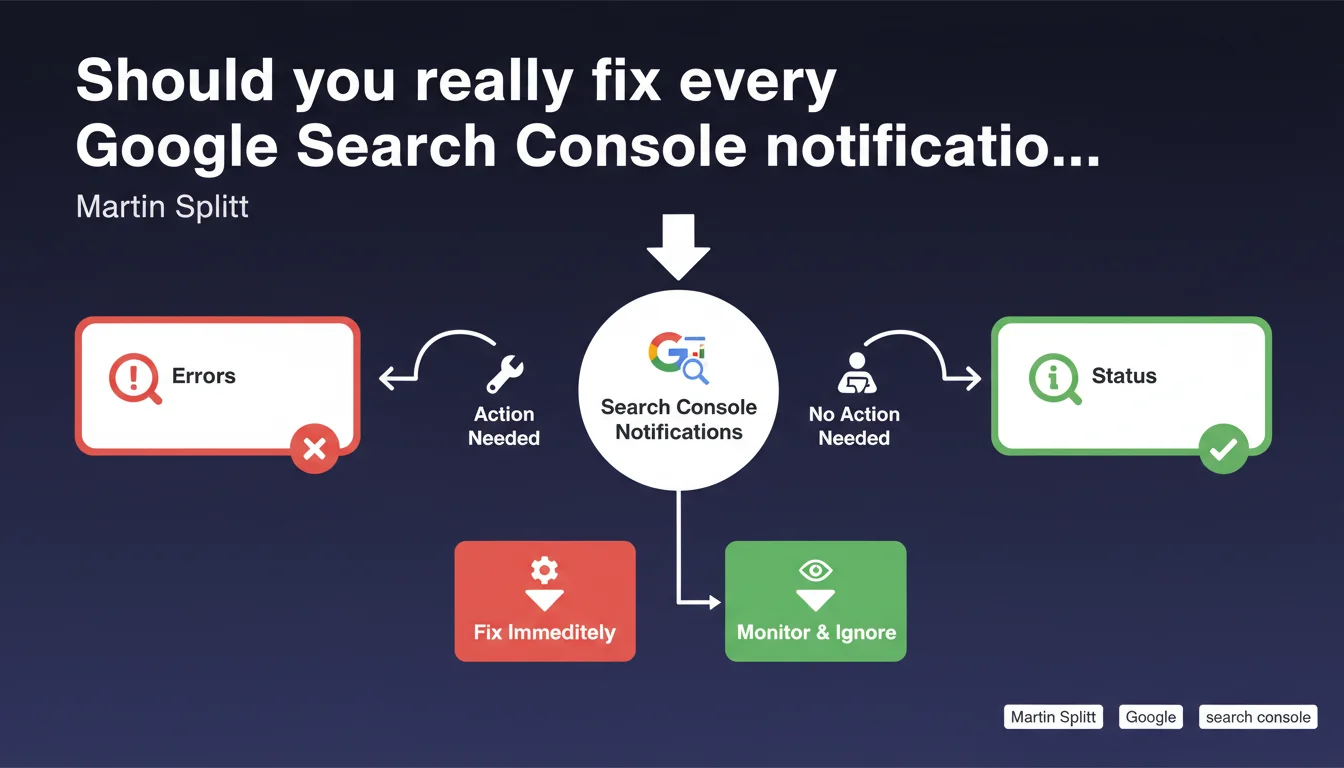
Google reminds us that Search Console sends informational notifications that are not urgent errors to handle. Many professionals waste time trying to 'fix' everything when only certain alerts require concrete action. The key is knowing what really matters.
What you need to understand
Search Console floods site owners with notifications that often trigger an instinctive reaction: fix everything urgently. Martin Splitt is reminding us that not all these alerts are critical emergencies.
Some are just status indicators, others are simple confirmations that Google detected something without necessarily requiring your intervention.
What's the difference between an error and an informational notification?
An error blocks or degrades crawling, indexation, or the display of your pages in search results. It requires immediate corrective action.
An informational notification, on the other hand, states a condition without necessarily implying a problem. For example, Google tells you that a page isn't indexed because it's blocked by robots.txt — if that's intentional, there's nothing to fix.
Why does Google send so many non-critical notifications?
Google wants to provide visibility into your site's technical status, even when everything is working well or when a situation is intentional. The goal is transparency, not necessarily an alert.
But this volume creates information noise that drowns out real problems. Many professionals panic over notifications that simply describe the normal functioning of their technical configuration.
How do you identify what really needs action?
Look at the type of notification and its potential impact on your traffic. If a strategic page isn't indexed when it should be, that's an error to fix.
If a test page, internal PDF, or pagination URL is excluded due to noindex or canonicalization, and that's your intentional configuration, ignore the alert.
- Critical error: blocks indexation of important pages, degrades user experience, or causes massive coverage issues
- Informational notification: describes a technical status that may be intentional or have no impact on your SEO strategy
- Signal to monitor: weak signal that deserves follow-up over time but not necessarily immediate intervention
- Decisive context: the same notification can be critical or insignificant depending on your configuration and goals
SEO Expert opinion
Is this distinction really new for SEO practitioners?
No. Any experienced professional already knows how to sort critical alerts from inconsequential notifications. This statement is mainly aimed at those discovering Search Console and panicking at every red badge.
The real problem is that Google doesn't always make this sorting easy. The interface mixes blocking errors and simple observations without clearly prioritizing what matters. Result: lots of wasted time analyzing non-issues.
Is Google consistent in how it classifies notifications?
Not always. Some notifications classified as 'errors' are actually deliberate strategic choices — like excluding URL facets through canonicalization or noindex. Google still flags them as problems to solve.
Conversely, real issues can hide in secondary reports. For example, poorly managed pagination might appear as simply 'excluded' without explicitly signaling its impact on crawl budget. [To verify]: Google has never published an official framework for prioritizing its own notifications.
When does an 'informational' notification become a real problem?
When it reveals a gap between your intention and your site's actual state. If you thought a category was indexable and Search Console tells you it's blocked by a forgotten noindex, that's a problem.
Another case: a notification informs you that Google detected soft 404s. If these are result pages with no content that you should have handled with a proper 404, that's a signal to fix, even if Google presents it as a simple observation.
Practical impact and recommendations
How do you efficiently sort Search Console notifications?
Start by identifying your site's strategic pages. Any notification concerning these pages deserves immediate attention, even if classified as 'informational'.
For the rest, compare the reported status with your intentional technical configuration. If it's a deliberate choice — excluded pagination, blocked PDF, non-indexed test environment — note it and ignore the alert.
What pitfalls should you avoid with notifications?
The first pitfall is wanting to fix everything to get a green dashboard. You risk degrading your site by forcing indexation of pages with no SEO value.
The second is ignoring a notification because it seems minor, when it actually hides a structural malfunction. A classic example: hundreds of pages excluded for duplicate content, a sign that your canonicalization or URL parameter management is broken.
What routine should you set up to monitor Search Console without drowning?
Create a weekly routine: check coverage errors on strategic pages, monitor new critical notifications, and review user experience reports (Core Web Vitals).
Keep a file documenting recurring notifications you've validated as non-critical. This saves you from re-analyzing the same case every week.
- List your strategic pages: conversion pages, high-traffic content, main categories
- Check the index coverage report and filter by these pages only
- Identify notifications tied to intentional technical choices (noindex, robots.txt, canonicalization) and document them
- Prioritize errors that impact traffic-generating or conversion pages
- Monitor trends: an isolated notification is often harmless, a spike in similar notifications signals a structural problem
- Automate alerts for indexation drops or critical errors via the Search Console API
Not all Search Console notifications require immediate action. The key is to contextualize each alert based on your technical configuration and strategic priorities.
Focus your efforts on errors impacting your high-value pages, and document informational notifications to avoid reprocessing them unnecessarily.
If you struggle to distinguish real errors from simple observations, or if your Search Console accumulates alerts that are hard to interpret, support from a specialized SEO agency can save you time. An outside perspective often unlocks complex situations and prevents you from fixing what doesn't need fixing.
❓ Frequently Asked Questions
Comment savoir si une notification Search Console est critique ou informative ?
Faut-il viser zéro erreur dans Search Console ?
Pourquoi Google classe certaines notifications volontaires en erreurs ?
Quelle fréquence de consultation de Search Console recommander ?
Les notifications Search Console impactent-elles directement le classement ?
🎥 From the same video 9
Other SEO insights extracted from this same Google Search Central video · published on 22/08/2024
🎥 Watch the full video on YouTube →
💬 Comments (0)
Be the first to comment.