
Official statement
Other statements from this video 9 ▾
- □ Pourquoi l'API Search Console contient-elle plus de données que l'interface utilisateur ?
- □ Pourquoi Search Console plafonne-t-elle vos rapports d'indexation à 1000 lignes ?
- □ Pourquoi Google a-t-il multiplié par 5 la rétention de données dans Search Console ?
- □ Pourquoi Google refuse-t-il d'indexer certaines de vos pages ?
- □ Faut-il vraiment corriger toutes les notifications de Google Search Console ?
- □ Faut-il vraiment corriger toutes les erreurs 404 détectées dans Search Console ?
- □ Pourquoi Google refuse-t-il de diagnostiquer vos problèmes de ranking ?
- □ L'API d'inspection d'URL peut-elle vraiment remplacer les inspections manuelles à grande échelle ?
- □ Search Console Insights : Google propose-t-il enfin un outil SEO pour non-techniciens ?
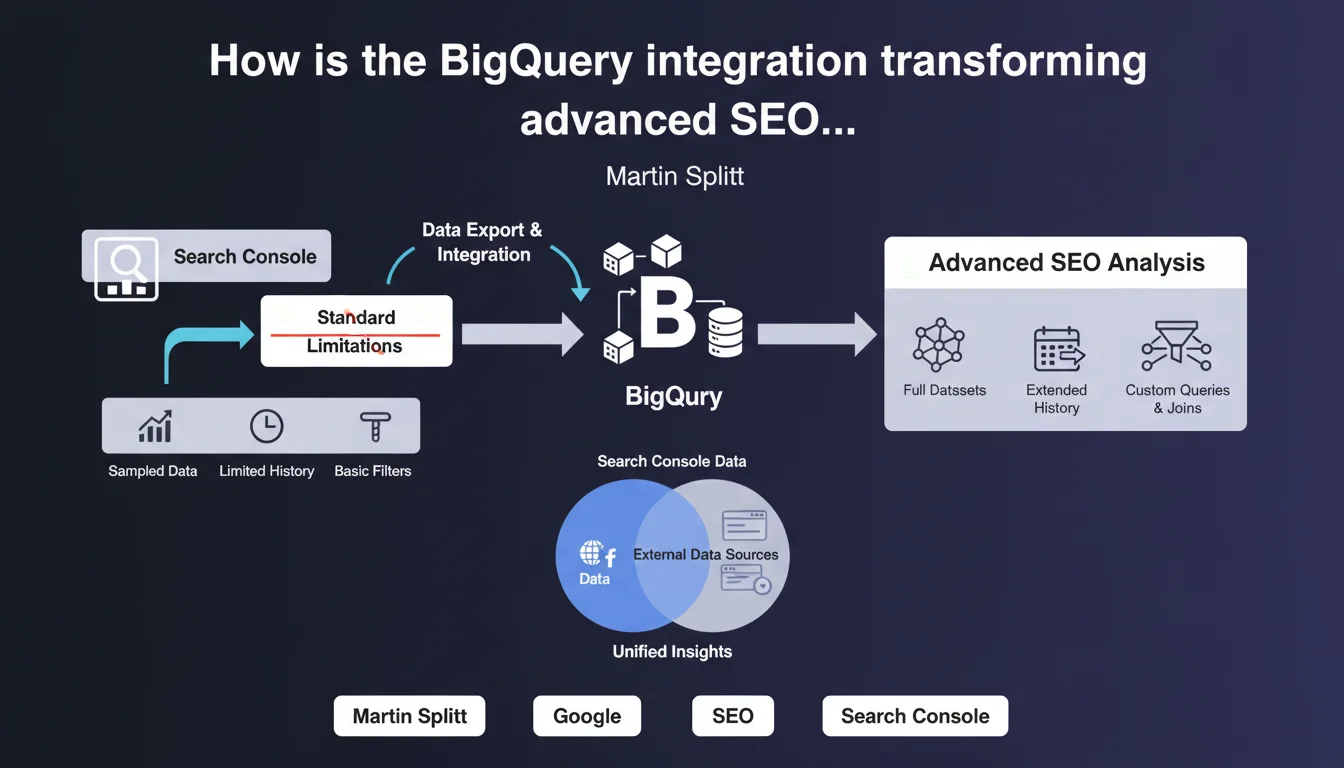
Google now offers a BigQuery integration for exporting Search Console data, enabling SEOs to overcome the limitations of the classic interface (16 months retention, 1000 exportable rows). This feature opens the door to in-depth historical analysis and data cross-references impossible via the standard interface.
What you need to understand
What are the current limitations of the Search Console interface?
The standard Search Console interface imposes frustrating constraints for any SEO working on large-scale sites. Data retention is limited to 16 months, and manual export only allows you to retrieve a maximum of 1000 rows.
For a site generating thousands of queries per day, this limitation makes granular long-tail analysis or performance tracking beyond 18 months impossible. The Search Console API exists, certainly, but it remains technical to implement and subject to the same quotas.
How does this BigQuery integration work in practice?
The integration allows you to automatically export all raw Search Console data to BigQuery, Google's cloud data warehouse. Once activated, data is sent daily without volume limitations or storage duration constraints.
For practitioners, this means being able to query several years of data with SQL, cross-reference search performance with other sources (Analytics, CRM, product data), and build custom dashboards that far exceed what the native interface allows.
Is this accessible to all Search Console accounts?
No, and that's where it gets tricky. BigQuery integration is only available for certain account types, particularly those benefiting from significant data volume. Google does not communicate a precise threshold, but the functionality appears reserved for sites generating substantial organic traffic.
In practice, if you manage a small site or personal blog, there's little chance this option will appear in your interface. The target audience is clearly large-scale sites and professionals manipulating large data volumes.
- Automatic daily export of Search Console data to BigQuery
- Unlimited historical data retention (vs 16 months in the interface)
- No limitation on the number of exportable rows (vs 1000 rows manually)
- Ability to cross-reference with other data sources via SQL
- Availability limited to accounts managing significant volumes
- Requires BigQuery infrastructure and SQL skills to fully exploit
SEO Expert opinion
Does this integration truly meet SEO professionals' real-world needs?
Yes, absolutely. Any SEO who has attempted to analyze a site's evolution over several years or work on long-tail keywords has hit against Search Console's limitations. A 1000-row export is ridiculous when managing an e-commerce site with 100,000 indexed URLs.
The BigQuery integration solves these problems radically. But — and this is a significant caveat — it creates a clear divide between practitioners with access to this feature and those without. Not to mention that BigQuery has a cost (though reasonable for moderate volumes) and requires SQL skills that not all SEOs possess.
What specific data is exported to BigQuery?
Google exports the same dimensions available in the classic interface: queries, URLs, countries, devices, search appearance. Each row corresponds to a unique combination of these dimensions with associated metrics (impressions, clicks, CTR, average position).
What changes is the temporal granularity and volume. Instead of aggregated data limited to 1000 rows, you retrieve all combinations, day by day. [To verify]: Google does not specify whether certain data anonymized in the interface (queries grouped under "Other queries") is also masked in the BigQuery export, but field feedback suggests it is.
Are there pitfalls to anticipate before activating this integration?
The first pitfall is BigQuery billing. While Google offers generous free quotas (10 GB storage, 1 TB queries per month), a site generating significant data can quickly exceed these thresholds. You need to monitor consumption, especially if you launch poorly optimized SQL queries.
Second point: the export only begins from the moment you activate the integration. You don't retroactively retrieve the last 16 months already present in Search Console. If you want a complete history, you must activate this feature as soon as possible.
Practical impact and recommendations
What do you need to do concretely to activate this integration?
First step: verify if the option is available in your Search Console account. Go to Settings > Bulk data export. If the BigQuery option doesn't appear, either your site doesn't generate enough traffic, or Google hasn't yet rolled out the feature to your account.
If the option is present, you'll need a Google Cloud Platform project with BigQuery enabled. Link this project to your Search Console property, set the storage region (choose the one closest to your infrastructure to limit costs and latency), and activate daily export.
What mistakes should you avoid during implementation?
Don't underestimate storage and query costs. An e-commerce site generating millions of impressions per day can quickly accumulate several gigabytes of data per month. Before activating export, estimate the likely volume and configure budget alerts in Google Cloud.
Another common mistake: launching SQL queries on the entire dataset without filters or partitions. BigQuery charges based on the volume of data scanned. A poorly written query that sweeps all rows across all tables can be expensive. Systematically use date-based partitions and avoid unnecessary scans.
How can you leverage this data for competitive advantage?
The main benefit is being able to cross-reference Search Console data with other sources. For example, join search performance with CRM or Google Analytics conversion data to identify queries that generate not only traffic but also revenue.
Another powerful use case: track the evolution of average position for thousands of long-tail queries across multiple years. Impossible via the classic interface, trivial with SQL. You can also detect seasonal patterns, identify pages gradually losing positions, or measure the real impact of your SEO optimizations with fine temporal granularity.
- Check option availability in Settings > Bulk data export
- Create a Google Cloud Platform project and enable BigQuery
- Configure budget alerts to avoid cost overruns
- Activate export as soon as possible to maximize available history
- Use date-based partitions in SQL queries to limit costs
- Cross-reference Search Console data with Analytics, CRM, or product data
- Build custom dashboards to track long-tail KPIs
- Automate recurring reports via scheduled SQL scripts
❓ Frequently Asked Questions
L'intégration BigQuery remplace-t-elle l'interface Search Console classique ?
Puis-je récupérer les données historiques antérieures à l'activation de l'export ?
Combien coûte l'utilisation de BigQuery pour les données Search Console ?
Faut-il des compétences techniques pour exploiter cette intégration ?
Tous les comptes Search Console ont-ils accès à cette intégration ?
🎥 From the same video 9
Other SEO insights extracted from this same Google Search Central video · published on 22/08/2024
🎥 Watch the full video on YouTube →
💬 Comments (0)
Be the first to comment.