
Official statement
Other statements from this video 10 ▾
- □ Pourquoi la navigation à facettes cause-t-elle la moitié des problèmes de crawl ?
- □ Faut-il vraiment bloquer la navigation à facettes dans robots.txt ?
- □ Pourquoi Google intervient-il directement dans le code des plugins WordPress ?
- □ Les paramètres d'URL courts mettent-ils vraiment votre crawl budget en danger ?
- □ Faut-il vraiment se débarrasser des session IDs dans vos URLs ?
- □ Pourquoi vos paramètres de calendrier WordPress sabotent-ils votre crawl budget ?
- □ Le double encodage d'URLs tue-t-il vraiment votre crawl budget ?
- □ Pourquoi Googlebot doit-il crawler massivement un nouveau site avant de savoir s'il vaut le coup ?
- □ Faut-il attendre 24 heures pour qu'une modification de robots.txt soit prise en compte ?
- □ Faut-il abandonner les paramètres GET pour sécuriser son crawl budget ?
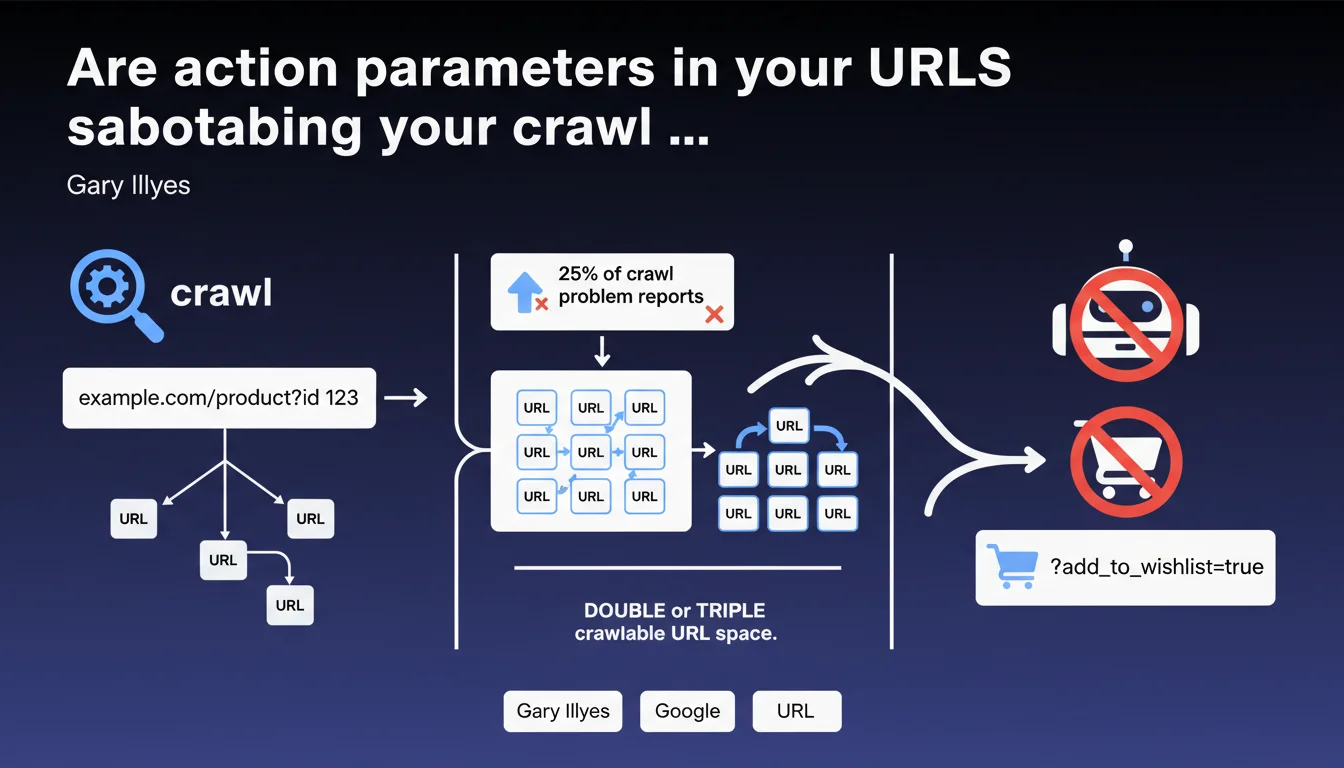
Action parameters like add_to_cart=true represent 25% of crawl problems reported to Google. These unnecessary URLs double or triple your crawlable URL space without adding value, since Googlebot doesn't purchase products. Blocking these parameters frees up crawl budget for your strategic pages.
What you need to understand
Why do these parameters create a crawl problem?
Action parameters generate distinct URLs for each user interaction — adding to cart, creating a wishlist, sharing a product. Each variant creates a new URL that Googlebot attempts to crawl, even though it often displays the same content as a standard product page.
Concretely? A site with 10,000 products can generate 30,000 crawlable URLs if each product has three action variants. Googlebot wastes time on pages with no SEO value while strategic content remains under-crawled.
What's the real scope of this problem?
Gary Illyes indicates that these parameters represent 25% of crawl problem reports. That's massive. One quarter of all reports received by Google concern this type of URL pollution.
This statistic reveals that many e-commerce sites have never taken the time to audit their URL parameters. E-commerce platforms generate these parameters by default, and nobody thinks to clean them up.
How does Google identify these useless URLs?
Googlebot spots action parameters by their structure: add_to_cart, add_to_wishlist, share, compare. These patterns are identifiable because they trigger user actions rather than displaying unique content.
The problem: Google crawls these URLs anyway before realizing they're useless. Crawl budget is already consumed — the damage is done.
- 25% of crawl problems come from action parameters according to Google
- These parameters double or triple crawlable URL space with no SEO value
- Googlebot can't purchase products or create wishlists — these pages are useless to it
- Crawl budget wasted on these URLs slows indexation of your strategic pages
- E-commerce platforms generate these parameters by default, creating invisible pollution
SEO Expert opinion
Does this statement really change the game for practitioners?
Let's be honest: SEO professionals have known for years that URL parameters need cleaning. The real novelty is the 25% figure — it finally quantifies the problem's scope and justifies the time spent on this topic with clients.
What's missing here? [To verify] Gary doesn't specify whether Google automatically ignores certain action parameter patterns or if each URL actually gets crawled. The nuance matters: if Googlebot filters them upstream, the problem is less severe than if each URL truly consumes budget.
Do real-world observations confirm this diagnosis?
Absolutely. Crawl audits consistently show spikes in Googlebot requests on URLs with action parameters. Apache/Nginx logs don't lie — these pages are crawled, sometimes multiple times daily.
A recurring case: sites using share links with parameters (utm_source, share_via) see Googlebot following these links from social networks. Result: thousands of identical URLs with different tracking parameters.
What situations escape this general rule?
Some action parameters can have legitimate SEO value. Example: a product comparator that generates URLs like /compare?product1=X&product2=Y with unique content (comparison table, cross reviews). In this case, blocking these URLs would be counterproductive.
And that's where it gets tricky. Gary's statement is too binary. It suggests blocking all action parameters, but some sites actually monetize public wishlist or comparison pages. A case-by-case analysis is essential — no universal rule applies.
Practical impact and recommendations
How do you identify action parameters polluting your crawl?
First step: analyze your server logs. Search for recurring patterns with add_to_cart, wishlist, share, compare in URLs crawled by Googlebot. Tools like Screaming Frog Log File Analyser or OnCrawl automate this detection.
Second step: check Google Search Console, Coverage section, for excluded URLs marked "Discovered, currently not indexed." If you see hundreds of pages with action parameters, it's a clear pollution signal.
What method should you use to block these URLs effectively?
Several options, from simplest to most robust. Robots.txt lets you block complete patterns: Disallow: /*add_to_cart= prevents Googlebot from crawling any URL containing this parameter.
A finer alternative: configure URL parameters in Google Search Console. Indicate that add_to_cart, add_to_wishlist don't change page content. Google will adjust its crawl behavior accordingly.
Third option: use the canonical tag to point all variants to the clean URL without parameters. This requires server-side development, but it's the cleanest technical solution.
What mistakes must you absolutely avoid in this optimization?
Never block a parameter without verifying its traffic impact. Some sites generate organic traffic on public wishlist pages or product comparisons. A brutal block can kill acquired rankings.
Another trap: blocking in robots.txt without managing internal links. If your pages keep generating these URLs in your internal linking, you create broken links. Clean up the code generating these parameters first, then block.
- Audit your server logs to quantify crawl on action parameters
- List all action parameters used on your site (cart, wishlist, share, compare)
- Verify in Search Console whether these URLs generate organic traffic
- Block via robots.txt patterns with no SEO value:
Disallow: /*add_to_cart= - Configure URL parameters in Search Console to refine crawl behavior
- Implement canonicals to clean URLs if necessary
- Clean source code to stop generating links with action parameters
- Monitor crawl changes in Search Console after implementation
❓ Frequently Asked Questions
Faut-il bloquer tous les paramètres d'URL pour optimiser le crawl budget ?
Le robots.txt suffit-il pour bloquer les paramètres d'action ?
Comment vérifier si mes paramètres d'action consomment du crawl budget ?
Les paramètres UTM de tracking posent-ils le même problème ?
Si Google ignore ces URLs, pourquoi s'en préoccuper ?
🎥 From the same video 10
Other SEO insights extracted from this same Google Search Central video · published on 03/02/2026
🎥 Watch the full video on YouTube →
💬 Comments (0)
Be the first to comment.