
Official statement
Other statements from this video 9 ▾
- □ Pourquoi l'API Search Console révèle 50 fois plus de données que l'interface standard ?
- □ L'API Search Analytics peut-elle remplacer l'interface Search Console pour piloter votre SEO ?
- □ L'API URL Inspection peut-elle vraiment remplacer les tests manuels d'indexation ?
- □ Comment exploiter l'API URL Inspection pour détecter les écarts entre canonical déclaré et canonical Google ?
- □ Peut-on vraiment déboguer les données structurées à grande échelle avec l'API URL Inspection ?
- □ L'API URL Inspection dévoile-t-elle enfin le vrai statut d'indexation de vos pages ?
- □ Faut-il surveiller vos sitemaps via l'API dédiée de Google ?
- □ Pourquoi combiner l'API Search Console avec d'autres sources de données SEO ?
- □ Faut-il vraiment passer par les bibliothèques clientes pour exploiter l'API Search Console ?
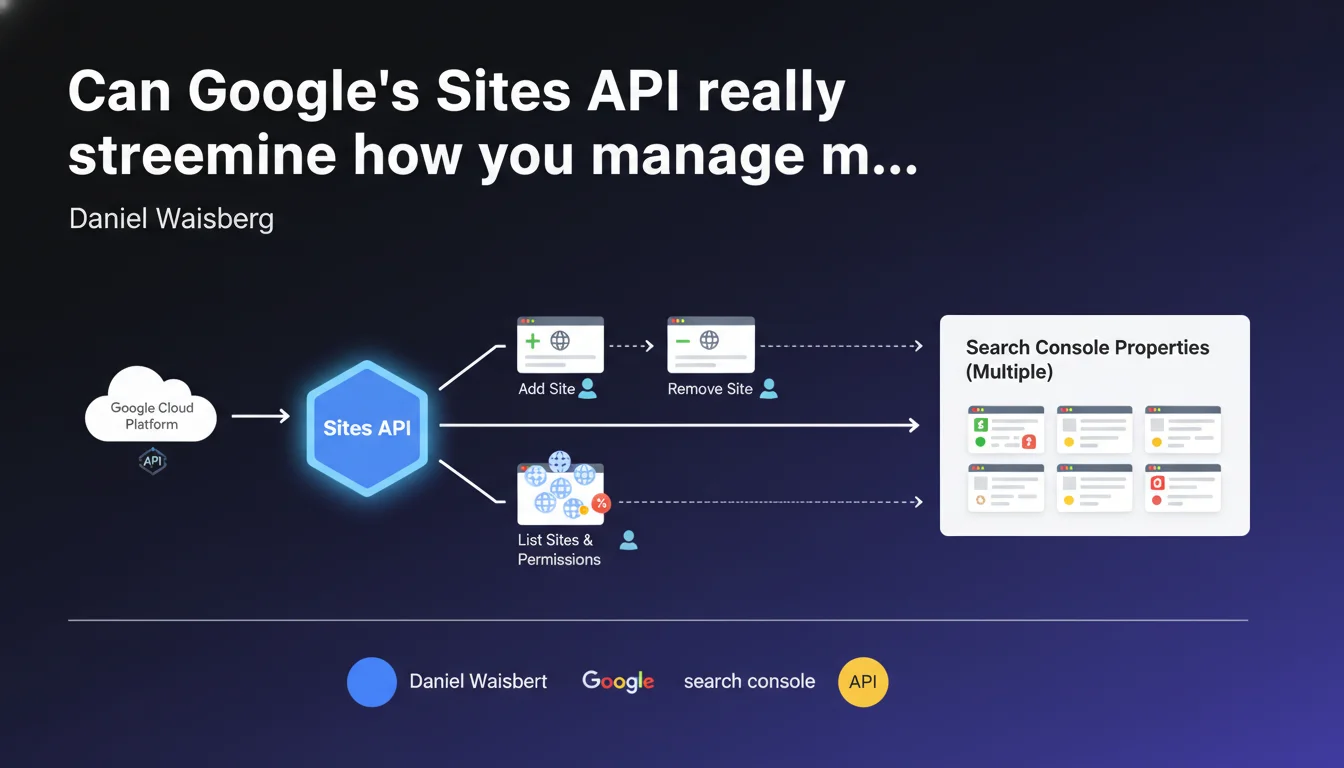
Google offers the Sites API to automate Search Console property management: add, remove, retrieve information, and list properties with permission levels. A technical tool for teams managing multiple sites simultaneously, but limited to administrative functions without access to performance data.
What you need to understand
What exactly can this Sites API do for you?
The Sites API delivers four core functionalities: add a site to Search Console, remove it, retrieve information for a specific site, or list all of a user's sites with their respective permissions. In other words, it's an automation layer for basic administrative tasks.
It might sound simple, but for agencies or organizations managing dozens (or even hundreds) of properties, it eliminates tedious manual back-and-forth in the interface. The goal: control your property management and access administration from your own tools or custom dashboards.
How does it differ from other Search Console APIs?
The standard Search Console API (Search Analytics API) is designed to extract performance data: clicks, impressions, rankings, search queries. The Sites API, on the other hand, only touches property management itself — not metrics.
Concretely, if you want to automate a monthly report showing clicks by page, you use the Search Analytics API. If you want to automate adding a new client domain to your agency account or verify who has what permission level, the Sites API is what you need.
Who really needs this API?
Organizations with substantial site portfolios: SEO agencies, media groups, franchises, multi-store e-commerce platforms. For a single site or even a handful of properties, manual interface management is entirely sufficient.
The value increases when you need to manage access rights programmatically — for example, automating onboarding for a new client, or auditing permissions across a site portfolio for security or compliance reasons. But for a solo consultant managing five clients, it's a luxury.
- The Sites API handles only the administrative aspect of Search Console properties (adding, removing, permissions).
- It provides no access to performance data (clicks, impressions, queries).
- Its usefulness is relevant starting from a certain volume of sites to manage simultaneously.
- Retrieved permissions include the access level per user for each property.
SEO Expert opinion
Does this API actually solve a real-world problem?
Let's be honest: for the majority of SEO practitioners, the Sites API remains a niche tool. The Search Console interface is more than sufficient for manually managing a handful of properties. Real-world use cases concentrate primarily on large organizations — agencies with automated workflows, SaaS platforms integrating Search Console, SEO departments in major corporations.
The real win is automating repetitive tasks: client onboarding and offboarding, large-scale permission audits, synchronization with internal systems. But this assumes you already have technical infrastructure in place — and therefore a non-negligible initial investment.
What limitations should you anticipate?
First point: this API only manages already-verified properties. It cannot automatically verify a new site — you still need to go through the standard verification procedure (DNS, HTML file, meta tag, etc.). So it's not a complete provisioning tool.
Second limitation: quotas and OAuth authorization. Like all Google APIs, there are request limitations, and implementation requires proper understanding of the authentication system. [To verify]: Google doesn't provide precise public figures on this specific API's quotas, unlike the Search Analytics API.
Should you integrate it into your workflows right now?
That depends entirely on your volume and technical stack. If you manage fewer than 20 sites, the ROI will likely be negative: development and maintenance time will exceed the time saved on manual tasks.
However, if you already have scripts or internal tools to centralize your Search Console data (via the Search Analytics API), adding the Sites API to automate access management can fit naturally into your ecosystem. But it's clearly not a priority for most practitioners.
Practical impact and recommendations
When should you consider using this API?
The Sites API becomes relevant in three main scenarios: you manage a large volume of sites (50+), you have recurring permission audit requirements (compliance, security), or you're developing a SaaS tool integrating Search Console. Outside these cases, skip it.
If you're in one of these profiles, start by documenting your current workflows: how much time do you spend adding/removing sites, checking permissions, onboarding clients? Quantify the wasted time before committing to development.
What errors should you avoid during implementation?
First common mistake: neglecting secure OAuth token management. These tokens provide complete access to your property management — a leak or poor handling can open the door to accidental (or malicious) site deletions.
Second pitfall: underestimating maintenance complexity. An API evolves. Google can change response formats, introduce new required fields, modify quotas. If you don't have dev resources to track these changes, you risk ending up with a broken tool at the worst possible moment.
How do you actually get started?
If you decide to proceed, start with a limited POC: automate a single task (for example, list all your properties with their permissions) and measure the time gained. Validate that the investment is worthwhile before developing a complete system.
On the technical side, familiarize yourself with Google's OAuth 2.0 authentication and token management best practices. Test first on a development account, never directly on your production properties. And document everything: your future colleagues will thank you.
- Quantify the time currently spent on Search Console administrative tasks before any implementation.
- Set up secure OAuth token management (rotation, encrypted storage, restricted access).
- Start with a POC on a single feature to validate ROI.
- Test all integration on a development environment before production.
- Plan for maintenance resources to track API evolution.
- Document automated workflows to facilitate knowledge transfer.
❓ Frequently Asked Questions
L'API Sites permet-elle de récupérer les données de clics et impressions ?
Peut-on valider automatiquement un nouveau site via cette API ?
Quels sont les risques de sécurité liés à l'utilisation de cette API ?
À partir de combien de sites l'API Sites devient-elle vraiment utile ?
L'API Sites fonctionne-t-elle avec tous les types de propriétés Search Console ?
🎥 From the same video 9
Other SEO insights extracted from this same Google Search Central video · published on 26/04/2023
🎥 Watch the full video on YouTube →
💬 Comments (0)
Be the first to comment.