
Official statement
Other statements from this video 9 ▾
- □ Pourquoi l'API Search Console révèle 50 fois plus de données que l'interface standard ?
- □ L'API Search Analytics peut-elle remplacer l'interface Search Console pour piloter votre SEO ?
- □ L'API URL Inspection peut-elle vraiment remplacer les tests manuels d'indexation ?
- □ Comment exploiter l'API URL Inspection pour détecter les écarts entre canonical déclaré et canonical Google ?
- □ Peut-on vraiment déboguer les données structurées à grande échelle avec l'API URL Inspection ?
- □ L'API URL Inspection dévoile-t-elle enfin le vrai statut d'indexation de vos pages ?
- □ Faut-il surveiller vos sitemaps via l'API dédiée de Google ?
- □ L'API Sites de Search Console peut-elle vraiment simplifier la gestion de vos propriétés ?
- □ Faut-il vraiment passer par les bibliothèques clientes pour exploiter l'API Search Console ?
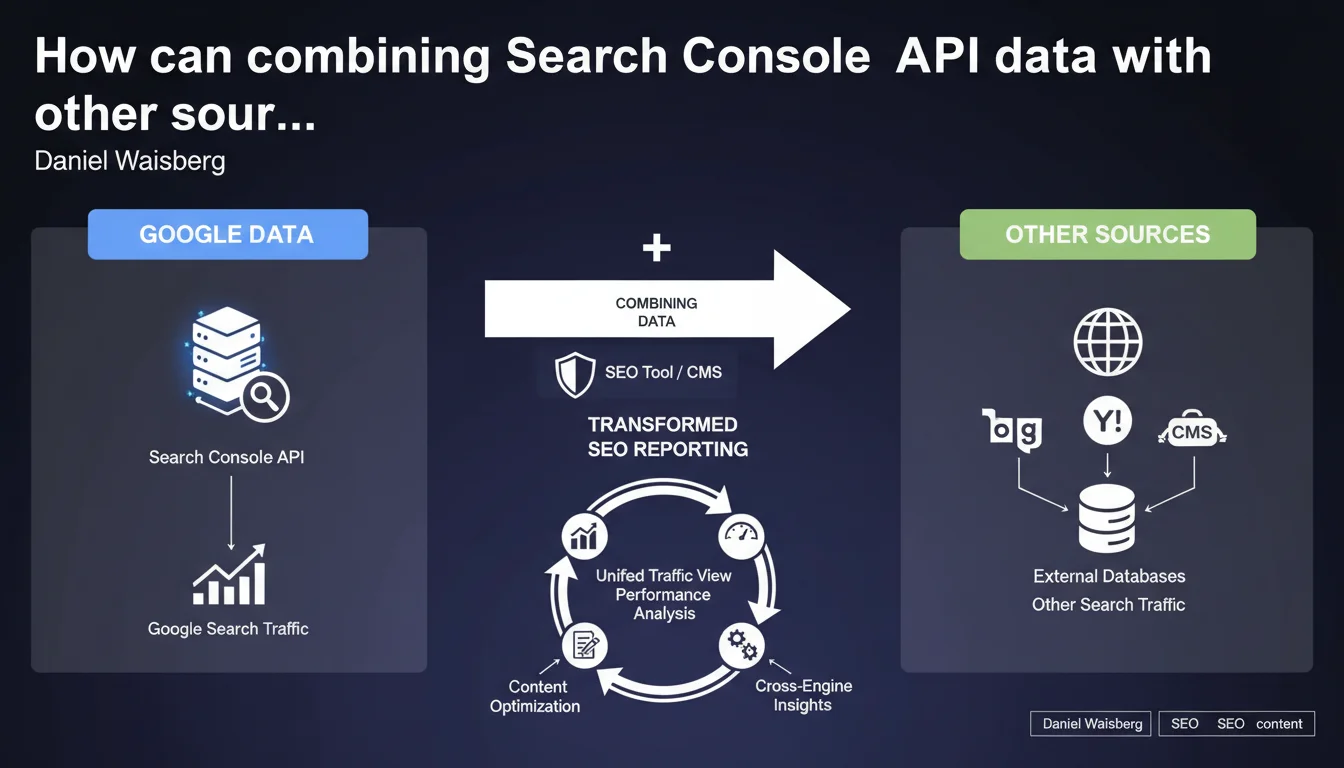
The Search Analytics API enables you to cross Google Search Console data with other traffic sources or third-party tools. In practical terms, this means you can analyze your Google performance alongside Bing, Yandex, or other channels within a single dashboard. This is the foundation of a comprehensive, integrated SEO vision.
What you need to understand
What is the Search Analytics API really for?
The Search Analytics API is a programming interface that lets you extract raw data from Google Search Console to use it elsewhere. You retrieve impressions, clicks, average positions, CTR, without going through the classic web interface.
Many SEO tools (SEMrush, Ahrefs, Screaming Frog, etc.) and CMS platforms use this API to display your Google performance directly in their interface. The benefit? Cross this data with other metrics: Bing traffic, Analytics conversions, page speed, crawl budget.
Why combine Google data with other sources?
Because Google Search Console only tells you one thing: what happens on Google. If you operate on Bing, Yandex, DuckDuckGo, or verticals (Amazon, YouTube), you have to compile all that manually.
By combining feeds via API, you get a complete overview of organic traffic — across all sources. It also helps you spot discrepancies: a page that performs well on Bing but not on Google sometimes reveals a problem specific to Google's algorithm.
What tools or systems use this API?
All-in-one SEO platforms (SEMrush, Ahrefs, SE Ranking) retrieve your GSC data to display it alongside their own metrics. CMS platforms (WordPress with SEO plugins, Wix, Shopify) can also display these stats in their back-office.
Some develop custom dashboards (Data Studio, Power BI, Tableau) to merge GSC, Analytics, Search Ads, CRM and get a unified view of performance. That's where the API really shines: it breaks down silos.
- The Search Analytics API is used to extract GSC data for use outside the Google interface
- Combining Google data with other sources provides a global view of organic traffic across all search engines
- SEO tools, CMS, and custom dashboards are the primary users of this API
- Crossing data allows you to identify performance gaps between search engines
SEO Expert opinion
Is this statement consistent with what's actually happening in the field?
Yes, absolutely. The Search Analytics API is widely used by professional SEO tools for years. It has become a standard: if an SEO tool doesn't connect to GSC, it loses credibility.
However, Google remains quiet about the limitations of this API. For example, data is sampled beyond a certain volume, and some queries are anonymized (the famous "not provided"). Google doesn't shout this from the rooftops, but it's documented in the technical documentation. [Verify]: the exact sampling and traffic thresholds are not public.
What nuances should we add to this statement?
Google presents this as a convenient feature, but there's a strategic dependency issue. If you build all your reporting on the GSC API and Google changes the rules (quotas, pricing, access), you're stuck.
Another point: combining Google data with other sources assumes that metrics are comparable. Yet, the definition of an "impression" varies between Google, Bing, and Yandex. Same for CTR. If you merge all of this in a dashboard, you need to normalize — otherwise, you're comparing apples and oranges.
In what cases doesn't this approach apply?
If you manage a small single-market site and Google represents 99% of your organic traffic, combining data serves no purpose. You're adding complexity for nothing.
Similarly, if you lack technical skills or budget for a third-party tool, the standard GSC interface is plenty. The API is a building block for automating and aggregating, not a necessity for everyone.
Practical impact and recommendations
What exactly do you need to do to use this API?
First, enable the Search Analytics API in Google Cloud Console for your project. Then, generate credentials (OAuth 2.0) to authorize your tool or script to access GSC data.
If you use a third-party tool (SEMrush, Ahrefs, Data Studio), the connection is simplified: you grant access, and the tool handles the rest. If you develop a custom dashboard, you need to code the extraction and storage of data (Python, R, Google Apps Script, etc.).
What mistakes should you avoid when setting this up?
First mistake: not checking quotas. If you launch massive requests without verifying your daily limit, you risk temporary blocking. Remember to cache data to avoid soliciting the API too often.
Second mistake: merging data without preprocessing. GSC metrics (impressions, clicks) aren't always directly comparable with those from Bing Webmaster Tools or Analytics. You need to harmonize periods, definitions, segments.
How do you verify that your API usage is optimal?
Verify that your dashboards display up-to-date data (maximum latency of 2-3 days). Check that volumes match between GSC and your tool: if you see a gap of more than 10%, there's an extraction or filtering problem.
Also monitor API errors in Google Cloud Console. If you have many 429s (quota exceeded) or 403s (access denied), your configuration or call frequency is problematic.
- Enable the Search Analytics API in Google Cloud Console
- Generate OAuth 2.0 credentials to authorize access
- Check quotas and cache data to limit API calls
- Harmonize metrics before merging multiple data sources
- Verify volume consistency between GSC and your third-party tool
- Monitor API errors to detect blocks or access denials
❓ Frequently Asked Questions
L'API Search Analytics est-elle gratuite ?
Peut-on récupérer toutes les requêtes de recherche via l'API ?
Quelle est la latence des données dans l'API ?
Peut-on utiliser l'API pour exporter des données historiques sur plusieurs années ?
Est-il possible de combiner GSC avec Google Analytics via l'API ?
🎥 From the same video 9
Other SEO insights extracted from this same Google Search Central video · published on 26/04/2023
🎥 Watch the full video on YouTube →
💬 Comments (0)
Be the first to comment.