
Official statement
Other statements from this video 9 ▾
- □ Pourquoi Google supprime-t-il 7% de son index vidéo et comment éviter d'en faire partie ?
- □ Pourquoi les incidents d'indexation paralysent-ils autant les sites d'actualités ?
- □ Faut-il s'inquiéter des incidents techniques mineurs chez Google ?
- □ Comment Google décide-t-il de communiquer publiquement sur un incident technique ?
- □ Pourquoi Google ne crawle-t-il pas votre site aussi souvent que vous le souhaitez ?
- □ Pourquoi Google utilise-t-il des messages pré-approuvés lors d'incidents techniques ?
- □ Pourquoi votre contenu n'apparaît-il pas dans les SERP malgré la résolution de votre incident d'indexation ?
- □ Pourquoi les expériences de Google provoquent-elles des incidents dans les résultats de recherche ?
- □ Google va-t-il enfin communiquer sur les bonnes nouvelles de son moteur ?
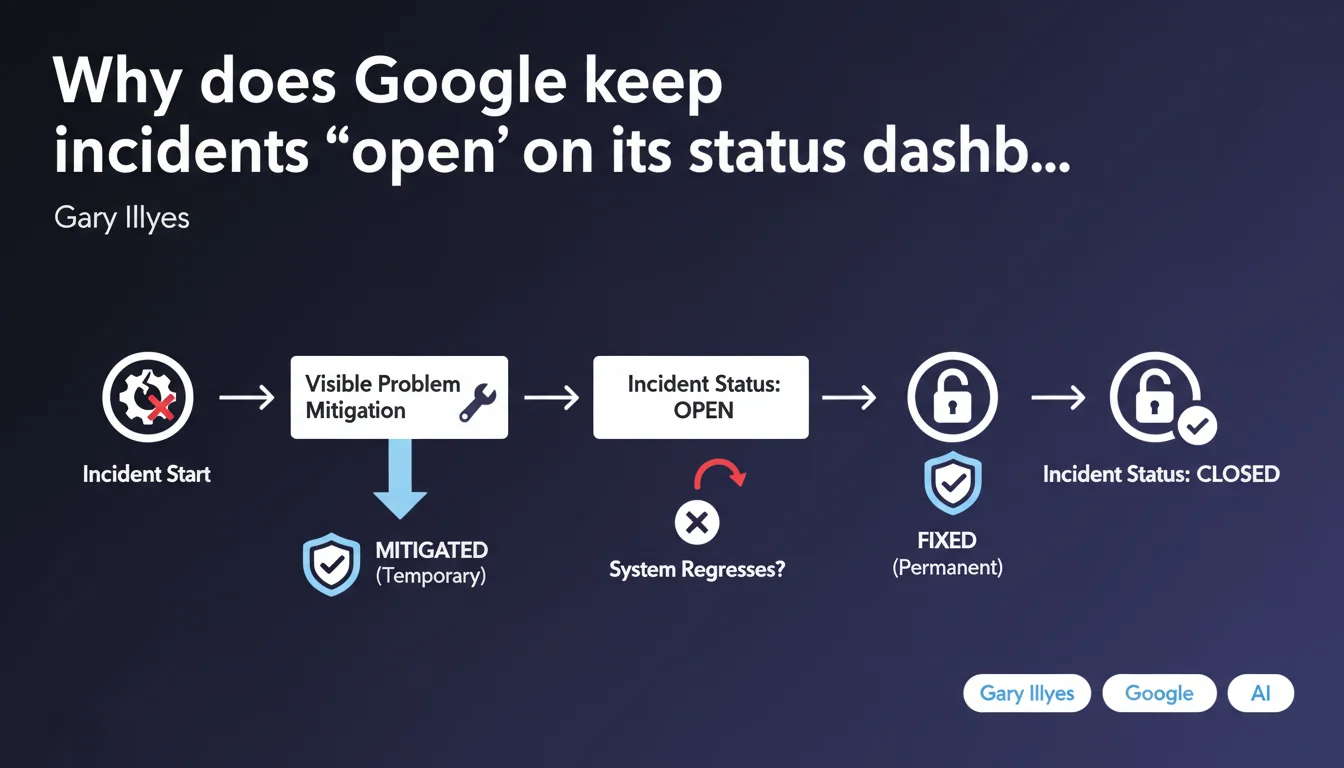
Google now explicitly distinguishes between 'fixed' incidents (permanent fix) and 'mitigated' incidents (temporary solution) on its status dashboard. For critical incidents, the status remains open even after visible problem mitigation to avoid having to reopen the ticket in case of regression. This transparency allows SEO professionals to better anticipate potential instability phases.
What you need to understand
What does this distinction between 'fixed' and 'mitigated' actually mean in practice?
An incident marked 'mitigated' indicates that Google has deployed a temporary solution — the problem is no longer visible from the user side, but the underlying cause persists. The system can therefore regress if this workaround fails.
Conversely, a 'fixed' status means that a structural fix has been implemented. Google then closes the incident, considering the risk of recurrence as null or negligible.
Why does Google keep incidents open after mitigation?
Simply to avoid communication ping-pong. Reopening an incident after prematurely closing it creates confusion — especially when thousands of professionals are monitoring the dashboard.
By keeping the status 'open but mitigated', Google signals: "The worst has passed, but we remain under active monitoring." This is a more honest approach than declaring victory too soon.
What types of incidents are covered by this distinction?
Gary Illyes mentions critical incidents. We're generally talking about massive malfunctions: indexation blocked on certain content, crawl disrupted at scale, Search Console reporting skewed.
For micro-incidents or minor glitches, Google probably doesn't bother with this nuance — the incident is either open or closed.
- 'Mitigated' status = temporary solution, risk of regression, incident remains open
- 'Fixed' status = permanent fix, incident definitively closed
- This distinction applies mainly to critical incidents affecting indexation or crawl at scale
- Google's status dashboard becomes a more reliable monitoring tool to anticipate instability phases
SEO Expert opinion
Does this transparency really change anything for SEO practitioners?
Let's be honest: this is marginal progress. Google's status dashboard has always suffered from a granularity problem. An incident marked "resolved" didn't prevent some sites from struggling for days.
With this distinction, we at least gain one piece of information: if an incident remains open in 'mitigated' mode, we know to stay vigilant. But — and this is where it gets tricky — Google doesn't specify the estimated duration of this mitigation phase. An incident can remain 'mitigated' for two days or two months.
What nuances should be applied to this announcement?
Gary Illyes talks about "certain critical incidents." Total ambiguity on the criticality threshold. Is a problem affecting 5% of sites "critical"? 20%? 50%? [To verify]: Google provides no objective criteria.
Another point: this distinction changes nothing about the fact that Google often communicates late about its incidents. When indexation unblocks on day 3 and the dashboard shows 'mitigated' on day 5, the info arrives after the battle.
In which cases does this rule not apply?
Micro-incidents or bugs affecting a handful of sites probably don't benefit from this distinction. Google doesn't even open a public incident in these cases.
Same for problems related to site-side configuration errors (broken robots.txt, canonicals in loops, etc.). Google's dashboard only handles malfunctions *on Google's side*, not webmaster errors.
Practical impact and recommendations
What should you concretely do when an incident is marked 'mitigated'?
First, stay alert. Continue closely monitoring your indexation and crawl KPIs — number of indexed pages, Googlebot crawl frequency, organic traffic evolution by page type.
Next, document everything. If your site continues experiencing anomalies despite announced mitigation, note the patterns: which pages are affected? At what times? Is there a common profile (structure, templates, depth)? This data can be useful if you need to escalate a Search Console ticket.
What mistakes to avoid during a mitigation phase?
Classic mistake: deploying structural modifications (internal linking revamp, partial migration, template changes) while an incident is mitigated. If indexation regresses, you'll never know if it's due to Google's regression or your intervention.
Another trap: interpreting a return to normal as a green light to accelerate crawl via a boost in published pages. If the mitigation doesn't hold, you risk congesting your crawl budget at the worst possible time.
How to verify that your site is not affected by a 'mitigated' incident?
- Check the Search Console dashboard: look at the evolution of indexed pages and coverage errors over the last 7 days
- Cross-reference with your server logs: verify whether Googlebot maintained its usual crawl frequency or if strategic pages were ignored
- Compare organic traffic by page type (categories, product sheets, articles): a localized drop may indicate partial indexation issues
- Test manual indexation via the "URL Inspection" tool on a few key recently published URLs
- If your site shows signs of dysfunction while Google announces a mitigation, open a detailed Search Console ticket with URL examples and logs
❓ Frequently Asked Questions
Combien de temps un incident peut-il rester en statut 'atténué' ?
Si mon site continue à avoir des problèmes malgré un incident marqué 'atténué', que faire ?
Cette distinction s'applique-t-elle aussi aux incidents liés aux Core Web Vitals ou à la Search Console ?
Peut-on faire confiance au statut 'corrigé' pour reprendre des déploiements SEO importants ?
Où consulter le tableau de bord d'état de Google pour suivre ces incidents ?
🎥 From the same video 9
Other SEO insights extracted from this same Google Search Central video · published on 06/06/2024
🎥 Watch the full video on YouTube →
💬 Comments (0)
Be the first to comment.