
Official statement
Other statements from this video 11 ▾
- □ Does Google really render every single HTML page without exception?
- □ Does Googlebot really follow Chrome in real-time?
- □ Does Google really crawl structured data injected through JavaScript?
- □ Does Google Really Treat JavaScript Redirects the Same as Server-Side Redirects?
- □ Why will Google's rendering never truly match a standard browser's behavior?
- □ Should you really unblock all your resources in robots.txt to avoid indexing problems?
- □ Does Google really keep cookies between each page render?
- □ Does Google really ignore cookie consent banners when crawling your site?
- □ Should you stop using dynamic rendering based on Googlebot's user-agent?
- □ Is JavaScript error handling now the hidden factor that determines whether Google can index your site?
- □ Is the URL inspection tool really reliable for testing how Googlebot renders your pages?
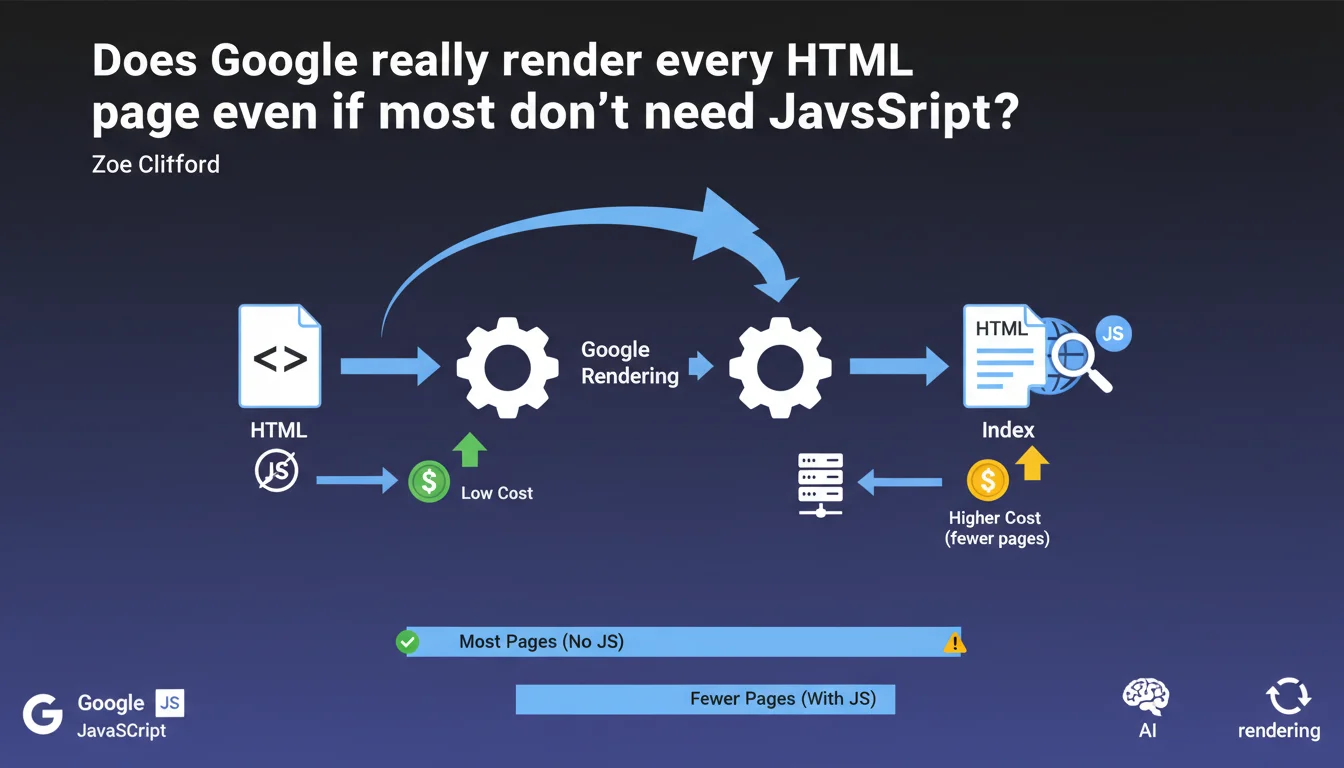
Google systematically renders all HTML pages, including those that don't use JavaScript. The resource cost remains low for purely HTML pages, which justifies this generalized approach rather than pre-filtering based on JavaScript needs.
What you need to understand
What does Google mean by "inexpensive pages to render"?
Page rendering consumes server resources at Google — CPU, memory, processing time. A static HTML page with no JavaScript to execute remains very lightweight to process for Googlebot.
Google clarifies that even though its infrastructure must technically "render" all pages, those that don't require JavaScript execution only mobilize a fraction of resources. The processing cost is so low that it becomes negligible at the scale of indexing operations.
Why doesn't Google filter out pages without JavaScript upstream?
Googlebot could theoretically detect the absence of scripts before rendering and bypass the rendering step entirely. But this pre-detection would itself introduce technical complexity and error risks.
By systematically rendering all pages, Google simplifies its indexing pipeline. The overhead for simple HTML pages is so minimal that optimization doesn't justify the added complexity. It's an architectural decision: a uniform process beats uncertain pre-sorting.
What's the distinction between client-side and server-side rendering?
Pages that generate their content via client-side JavaScript (SPAs, modern frameworks) force Google to execute this code to access the final DOM. That's where rendering becomes expensive — waiting, executing, stabilizing.
Conversely, a traditional HTML page or server-side rendered (SSR) page delivers its content directly. Google only needs to parse the HTML without triggering a JavaScript engine. The cost remains minimal.
- Rendering consumes resources at Google, but not uniformly depending on technologies used
- Static HTML or SSR pages remain very inexpensive even within a generalized rendering pipeline
- Google prioritizes operational simplicity by rendering all pages rather than filtering
- The true cost distinction lies between pages requiring JavaScript and purely HTML pages
SEO Expert opinion
Is this statement consistent with real-world observations?
Yes. Static HTML or SSR sites have never encountered indexing problems related to rendering budget. Index appearance times remain short, pages are crawled regularly.
Full JavaScript sites sometimes experience delays between crawl and indexing — deferred rendering creates a bottleneck. This asymmetry confirms Google treats both categories differently, even if technically it "renders" everything.
What nuances should be added to this statement?
The statement remains intentionally vague on the exact threshold of "low cost". Google doesn't quantify: how many milliseconds exactly? What CPU consumption? At what point does a page become "expensive"?
[To verify]: the notion of "inexpensive" is relative to Google's infrastructure, not your server. A page heavy in DOM (50,000 nodes) but without JS remains "inexpensive" for Google, even if it brings your servers to their knees. Don't confuse the two.
Another point — this statement says nothing about prioritization. Google renders all pages, certainly, but how frequently? Do JS pages go to the back of the queue? The silence on this point is telling.
In which cases does this rule not apply?
If your HTML contains massive inline scripts or <script> tags loading dozens of files, you're outside the "inexpensive" scope. The volume of external resources to download can tip the cost significantly.
Progressive Web Apps (PWAs) with complex service workers, sites with aggressive lazy loading triggering JS on scroll — all of that consumes resources. Google can technically render them, but the cost climbs quickly.
Practical impact and recommendations
What should you do concretely if your site uses a lot of JavaScript?
Prioritize Server-Side Rendering (SSR) or static generation for critical content: product pages, categories, articles. You reduce dependency on client-side rendering and streamline indexation.
If you remain full client-side, ensure your main content is accessible in the initial HTML — even if empty at first — rather than 100% generated by JS after loading. Google can wait a few seconds, not indefinitely.
What mistakes should you avoid to not overload the rendering budget?
Don't multiply unnecessary JS layers. A WordPress CMS with 40 plugins each loading their own footer scripts still burdens rendering even if the page seems "static". Audit your dependencies.
Avoid mono-page SPAs where each client-side navigation requires a complete rendering cycle. Google must re-execute all JS for each URL — the cost explodes. Break into true distinct HTML pages when possible.
How do you verify your site stays in the "inexpensive" zone?
- Test your key pages with the URL Inspection tool in Search Console — verify rendering succeeds and displays expected content
- Compare raw HTML DOM (view source) to rendered DOM (DevTools): if 80%+ of content is already in raw HTML, you're good
- Measure render time in Puppeteer or similar tool: aim for < 3 seconds to reach a stable state
- Monitor crawl logs to detect any potential delays or rendering abandonments (timeout errors)
- Use modern frameworks with integrated SSR (Next.js, Nuxt, SvelteKit) rather than pure client-side React/Vue
❓ Frequently Asked Questions
Google rend-il vraiment toutes les pages, même celles sans JavaScript ?
Une page HTML statique est-elle indexée plus vite qu'une SPA ?
Le Server-Side Rendering (SSR) élimine-t-il tous les problèmes de rendu côté Google ?
Dois-je abandonner les frameworks JavaScript pour améliorer mon SEO ?
Comment savoir si mon site dépasse le seuil "peu coûteux" de Google ?
🎥 From the same video 11
Other SEO insights extracted from this same Google Search Central video · published on 11/07/2024
🎥 Watch the full video on YouTube →
💬 Comments (0)
Be the first to comment.