
Official statement
Other statements from this video 12 ▾
- □ Faut-il vraiment se préoccuper du crawl budget pour votre site ?
- □ Le crawl budget est-il un concept inventé par Google ou par les SEO ?
- □ Google n'indexe-t-il vraiment qu'une fraction du web à cause de ses coûts de stockage ?
- □ Les requêtes POST plombent-elles vraiment votre crawl budget ?
- □ Le crawl budget d'une nouvelle section est-il hérité de la qualité du site principal ?
- □ Les codes 503 et 429 peuvent-ils vraiment réduire votre crawl budget ?
- □ Peut-on vraiment piloter son crawl budget depuis Google Search Console ?
- □ HTTP/2 améliore-t-il vraiment votre crawl budget ?
- □ Pourquoi vos URLs 'découvertes mais non crawlées' révèlent-elles un problème de fond ?
- □ Faut-il bloquer l'indexation de vos fichiers JavaScript pour optimiser le crawl budget ?
- □ Les 404 et robots.txt gaspillent-ils vraiment votre crawl budget ?
- □ Faut-il bloquer vos fichiers JavaScript décoratifs pour optimiser votre crawl budget ?
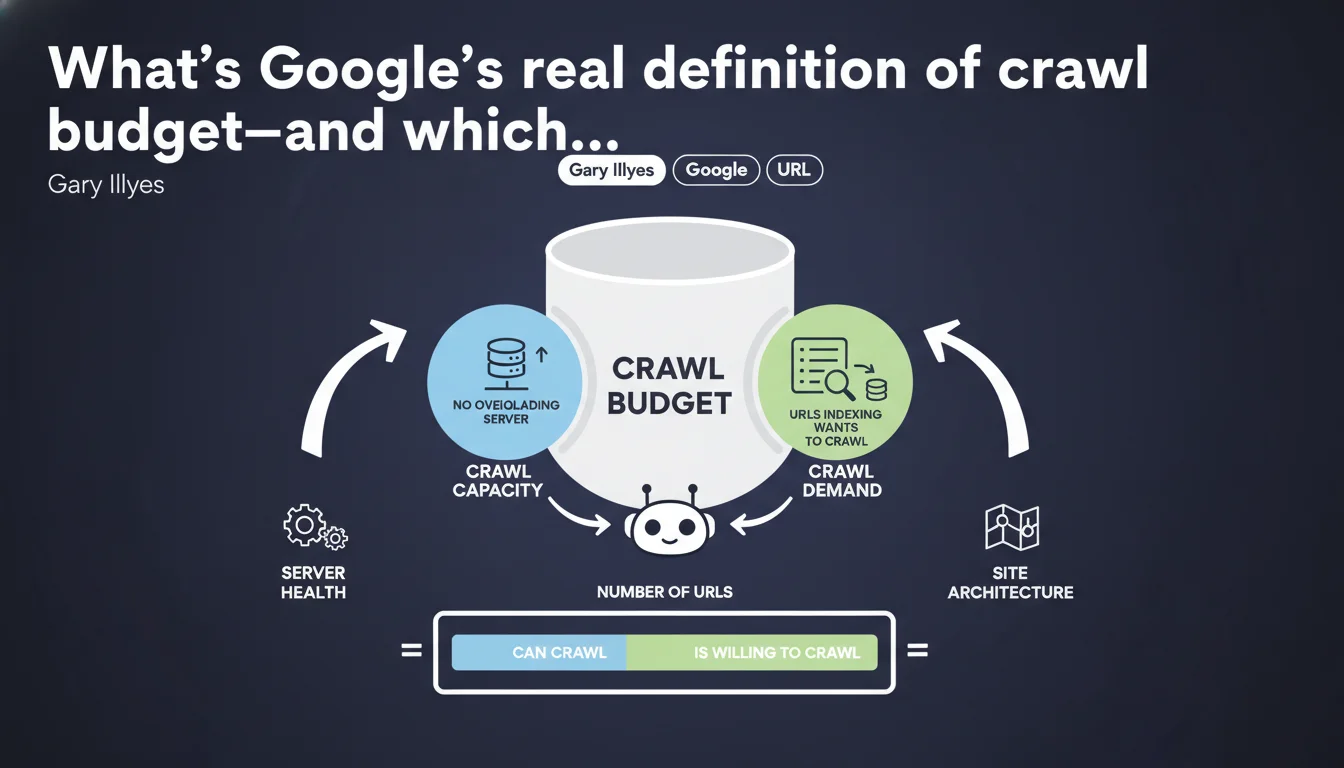
Google breaks crawl budget into two pillars: crawl capacity (don't overload the server) and crawl demand (URLs the index actually wants to explore). Gary Illyes formalizes a mechanic we suspected but remained fuzzy. To optimize crawl budget, you need to play both angles: server performance AND URL relevance.
What you need to understand
Why is Google formalizing this definition now?
For years, crawl budget remained a nebulous concept, thrown around by SEOs without any real framework. Gary Illyes ends the ambiguity by breaking the problem into two distinct axes: crawl capacity and crawl demand.
This distinction isn't trivial. It means optimizing crawl budget isn't just about lightening your server or cleaning up zombie URLs—you need to act on both fronts simultaneously.
What does crawl capacity actually mean in practice?
Crawl capacity is the volume of URLs Googlebot can explore without bringing your server to its knees. Google doesn't want its bot to become a headache for your users.
If your server lags, Googlebot eases off. If response time spikes, it reduces crawl frequency. It's a protection mechanism—not a generous one.
And crawl demand—what actually drives it?
Crawl demand is Google's appetite for your content. More precisely, it's indexing that decides which URLs deserve to be crawled and how often.
If your pages are judged as low-value, duplicated, or poor quality, demand tanks. If your content is fresh, popular, and URLs change regularly, Googlebot will return more often.
- Crawl capacity: determined by server performance and site responsiveness.
- Crawl demand: driven by perceived content quality and update frequency.
- Real crawl budget = the minimum of these two factors. An ultra-fast server can't compensate for mediocre content.
- Google adjusts crawl budget automatically—you can't "force" it, only optimize it.
SEO Expert opinion
Is this definition truly new, or is Google just reformulating the obvious?
Let's be honest: experienced SEOs already knew crawl budget depended on server health and content appeal. What changes is that Google formalizes a nomenclature—and that's useful for avoiding confusion.
However, the statement stays deliberately vague on real thresholds. How many URLs per day for an average site? What's the exact impact of response time jumping from 200ms to 500ms? [Needs verification]—Google gives no actionable numbers.
When doesn't this rule really apply?
For small sites (under a few thousand pages), crawl budget simply isn't a problem. Google will crawl the entire site regularly, unless content is catastrophic.
The topic becomes critical on large sites (e-commerce, media, directories) where millions of URLs compete for Googlebot's attention. There, every wasted URL (poor facet handling, pagination issues, duplicates) directly eats into the budget for important pages.
What's the limitation of this two-factor approach?
Google presents capacity and demand as independent variables, but in reality, they influence each other. A slow server degrades user experience, which tanks engagement signals, which reduces… crawl demand.
In other words, neglecting server performance doesn't just kill capacity—it weakens demand too. The reverse is true: excellent content loading in 5 seconds wastes its potential.
Practical impact and recommendations
What should you do concretely to maximize crawl budget?
First step: audit server performance. Check response times in Google Search Console ("Crawl statistics" section). If Googlebot spends less time on your site than before, or download time increases, that's a red flag.
Second axis: eliminate useless URLs. Facets without added value, empty tag pages, session IDs in parameters—every URL crawled for nothing is a strategic URL waiting its turn.
What mistakes should you absolutely avoid?
Classic mistake: believing a massive XML sitemap will "force" Google to crawl everything. False. A sitemap stuffed with low-quality pages erodes Google's trust in your signals—guaranteed backfire.
Another trap: blocking entire sections via robots.txt thinking you'll "save" crawl budget. If those URLs are already crawled elsewhere (internal links, backlinks), Googlebot will still check—and waste time getting rejected. A clean noindex is better.
How do you verify your site is optimized on both axes?
Capacity side: install server monitoring (median response time, 5xx error rates). Compare against crawl data in Google Search Console. If Google slows down while your server handles the load, the problem is elsewhere.
Demand side: analyze which sections Googlebot crawls most. If it's secondary or stale content, your internal link architecture sends wrong signals. Rebalance the linking toward strategic pages.
- Audit server response times and fix pages > 500ms
- Clean up useless URLs (facets, duplicates, session parameters)
- Optimize XML sitemap: only crawlable and current pages
- Revise internal linking to push strategic content
- Monitor crawl budget evolution in Google Search Console (pages crawled per day)
- Avoid redirect chains and 301 loops
❓ Frequently Asked Questions
Le crawl budget impacte-t-il tous les sites de la même manière ?
Un sitemap XML bien rempli augmente-t-il automatiquement le crawl budget ?
Peut-on forcer Google à crawler davantage en améliorant uniquement les performances serveur ?
Bloquer des sections entières via robots.txt économise-t-il du crawl budget ?
Comment savoir si mon crawl budget est suffisant ?
🎥 From the same video 12
Other SEO insights extracted from this same Google Search Central video · published on 25/08/2022
🎥 Watch the full video on YouTube →
💬 Comments (0)
Be the first to comment.