
Official statement
Other statements from this video 11 ▾
- □ Is the 1,000-row limit in Search Console really hindering your SEO analysis?
- □ Is the 50,000-row limit in Search Console really crippling your SEO analysis?
- □ Does Google's BigQuery export from Search Console really give you access to ALL the data?
- □ Is bulk Search Console export really only for massive websites?
- □ What access rights do you need to export your Search Console data to BigQuery?
- □ How long does it actually take for Google Search Console to start exporting data to BigQuery?
- □ Why is your BigQuery dataset location in Search Console permanently locked after the first export?
- □ Why does Google notify all owners whenever a bulk export is set up in Search Console?
- □ Does your BigQuery Search Console data really pile up forever without limits?
- □ What actually stops your Search Console bulk export—and why Google won't do it for you?
- □ Does Google really notify you when Search Console exports fail, and how long does it keep retrying?
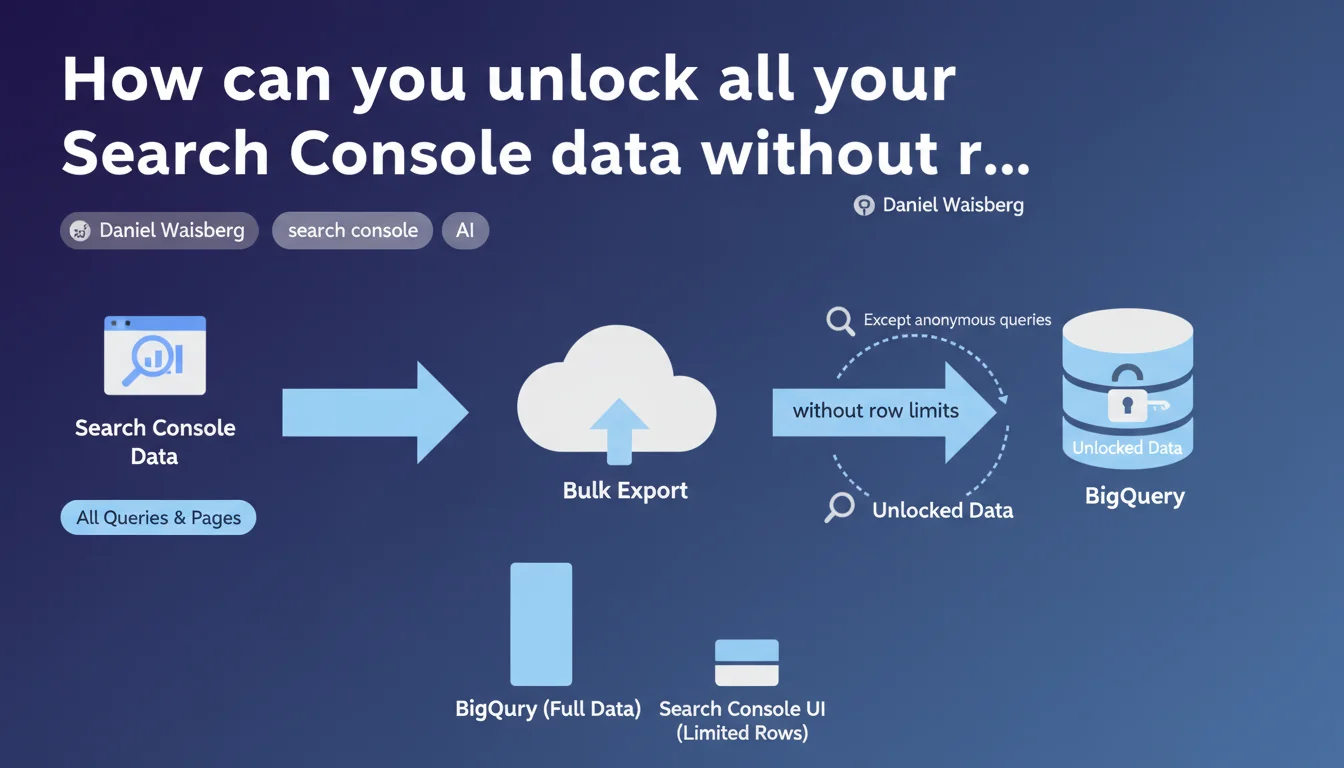
Google confirms that bulk export to BigQuery is the only method allowing you to access the complete Search Console dataset without row limits. Only anonymous queries remain filtered. In practical terms, this means full access to all query/page combinations available in GSC.
What you need to understand
What's the real difference between standard export and BigQuery export?
The classic Search Console interface enforces a strict 1,000 row limit on data exports. This constraint forces SEO professionals to aggregate data or multiply filters just to get a complete overview.
Bulk export to BigQuery removes this technical barrier entirely. Every query and page reported by Google becomes accessible, with no artificial ceiling — except anonymized queries that Google filters systematically for privacy reasons.
Why does Google maintain filtering of anonymous queries?
Google anonymizes certain queries to protect user privacy, especially when search volume is extremely low or when the query could reveal sensitive information. This mechanism applies regardless of export method.
Even in BigQuery, this data remains inaccessible. Privacy policy takes precedence over data completeness, meaning no technical solution will circumvent this limitation.
What volume of data can you really retrieve?
For high-traffic sites generating millions of monthly impressions, the difference becomes enormous. The GSC interface shows only a microscopic fraction of the long tail, while BigQuery grants access to the entire spectrum.
- Unlimited access to all query × page × country × device combinations available
- Ability to analyze complete long-tail distribution without sampling
- Raw data exploitable for advanced statistical analysis and machine learning
- Complete historical data retained according to your BigQuery settings (beyond GSC's 16-month limit)
- Continued exclusion of anonymous queries for privacy reasons
SEO Expert opinion
Does this statement really change the game for SEO practitioners?
Let's be honest: this information isn't new. BigQuery export has existed for years and its superiority over the standard interface is well-documented. What Daniel Waisberg explicitly confirms is the permanent nature of this two-tier architecture.
The problem — and Google never mentions this — is that BigQuery isn't free beyond the monthly quota. For large sites, costs can quickly escalate if SQL queries aren't optimized efficiently. This "completeness" therefore comes with a price tag many SMEs cannot afford.
Is BigQuery data truly identical to GSC data?
In theory, yes. In practice, accounting discrepancies regularly appear between the GSC interface and BigQuery exports, particularly on average position metrics. [Verify] systematically by comparing totals before basing strategic decisions on this data.
Temporal granularity also differs: BigQuery aggregates daily while GSC allows query-level zoom. This nuance can mask important intra-day fluctuations in certain sectors (news, finance, weather).
Should you abandon the GSC interface in favor of BigQuery?
No. The interface remains more responsive for quick checks, index coverage verification, or security alerts. BigQuery excels at exploratory analysis and large-scale data cross-referencing, but requires solid SQL skills.
Practical impact and recommendations
What exactly needs to be implemented to leverage BigQuery?
BigQuery export activation happens directly from Search Console, in "Settings" then "Bulk export". Google automatically creates a dataset in your BigQuery project and feeds the tables daily.
Warning: export doesn't pull historical data. You only recover data from the activation date forward. If you want to analyze historical trends, activate the export immediately — even if you don't yet have the SQL skills to exploit it.
What mistakes should you avoid when exploiting the data?
The first mistake is launching SQL queries across the entire dataset without filtering by date. Scan costs explode quickly, especially on large sites with multiple years of history.
Another trap: naively cross-referencing impressions and clicks metrics without understanding aggregation by device and country. The same URL can appear multiple times in results with different positions depending on context, skewing averages if they aren't properly weighted.
How do you verify the export is working correctly?
Compare daily impression totals between GSC and BigQuery over a reference period. A 5-10% discrepancy is acceptable and explained by differences in handling anonymous data and update delays.
- Enable BigQuery export today to start building historical data
- Define a data retention policy in BigQuery to control storage costs
- Create optimized SQL views to avoid scanning the entire dataset with each query
- Automate weekly reports on long-tail evolution (queries < 10 impressions/month)
- Cross-reference GSC data with Google Analytics 4 via BigQuery for unified visibility
- Train teams on SQL or use connectors to dataviz tools (Looker Studio, Tableau)
❓ Frequently Asked Questions
L'export BigQuery inclut-il les données de Google Discover et Google News ?
Peut-on exporter les données de plusieurs propriétés GSC vers le même projet BigQuery ?
Quel est le délai entre la collecte des données et leur disponibilité dans BigQuery ?
Les filtres de l'interface GSC (pays, appareil) s'appliquent-ils à BigQuery ?
Combien coûte réellement l'utilisation de BigQuery pour un site moyen ?
🎥 From the same video 11
Other SEO insights extracted from this same Google Search Central video · published on 18/05/2023
🎥 Watch the full video on YouTube →
💬 Comments (0)
Be the first to comment.