
Official statement
Other statements from this video 11 ▾
- □ Pourquoi la limite des 1 000 lignes dans Search Console pose-t-elle un vrai problème d'analyse ?
- □ Pourquoi la limite de 50 000 lignes dans Search Console peut-elle fausser vos analyses SEO ?
- □ Comment exploiter toutes vos données Search Console sans limite de lignes grâce à BigQuery ?
- □ L'export BigQuery de Search Console donne-t-il vraiment accès à TOUTES les données ?
- □ L'export en masse de la Search Console est-il réservé aux très gros sites ?
- □ Quels droits d'accès faut-il pour exporter vos données Search Console vers BigQuery ?
- □ Combien de temps faut-il attendre avant que l'export Search Console vers BigQuery démarre réellement ?
- □ Pourquoi l'emplacement BigQuery de Search Console est-il définitivement figé ?
- □ Pourquoi Google notifie-t-il tous les propriétaires lors de la configuration d'un export Search Console ?
- □ Les exports BigQuery Search Console s'accumulent-ils vraiment sans limite ?
- □ Comment arrêter ou relancer l'export en masse des données Search Console ?
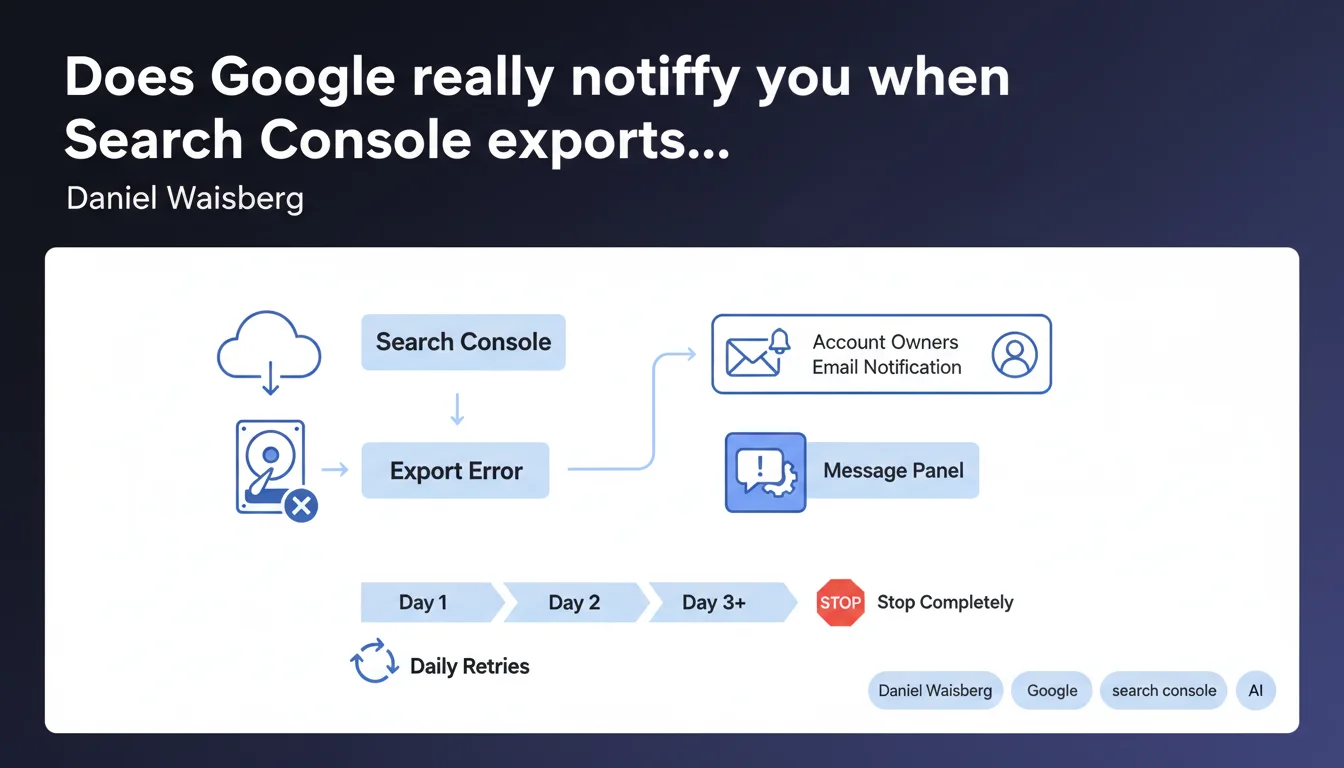
Google notifies all account owners via email and Search Console messages when export errors occur. The system automatically retries the export daily for a few days before permanently stopping. This resilience mechanism reduces data loss risks, but requires active monitoring on your part.
What you need to understand
What exactly happens when a Search Console export fails?
When an export error occurs in Search Console, Google activates a dual notification system: an email is sent to all account owners, and a message appears in the notification panel of the interface. This redundancy aims to ensure that at least one channel reaches the concerned team.
The system doesn't give up immediately. Google retries the export daily for an unspecified period — Google vaguely refers to "a few days." After this interval, retry attempts stop permanently and data risks being lost if the problem isn't resolved.
Why does this automatic retry mechanism exist?
Search Console exports to BigQuery or other external destinations fail for various reasons: authentication issues, exceeded quotas, incorrect configurations, revoked permissions. Rather than requiring immediate manual intervention, Google offers a window of resilience.
This approach acknowledges a reality: SEO teams don't monitor Search Console 24/7. A weekend, vacation, change of manager — these are situations where an alert can go unnoticed. The automatic retry system creates a temporary safety net.
What are the key points to remember?
- Dual notification: email + Search Console message panel for each export error
- Daily retry attempts for "a few days" — exact duration not specified by Google
- Permanent cessation of retry attempts after this deadline, with no automatic recovery possible
- Responsibility to resolve the issue remains entirely with the user
- No guarantee that missed export data will be preserved after retries stop
SEO Expert opinion
Is this notification mechanism truly reliable?
On paper, the email + interface redundancy looks solid. But — and here's where it breaks down — it relies on two fragile assumptions: that Google notification emails don't end up in spam (spoiler: they do), and that someone regularly checks the Search Console message panel.
In large organizations, Search Console accounts accumulate historical owners, some of whom have left the company or changed roles. The email goes to "all owners," but in reality? It ends up in dead mailboxes. [To verify]: Google doesn't clarify whether notifications adapt to roles (full owner vs. restricted) or if they're customizable.
What does "a few days" of retry really mean?
Google remains deliberately vague. "A few days" could mean 2, 3, 5 days — impossible to determine without empirical testing. This imprecision is problematic for teams managing strict SLAs or automated reporting based on these exports.
Worse still: nothing indicates whether Google preserves data it couldn't export. If your export fails Monday through Friday and you fix the issue on Saturday, did you lose 5 days of data? The documentation doesn't say. Field observation: missed data is generally not recovered retroactively.
In which cases does this retry system completely fail?
The automatic retry assumes the problem is temporary and self-resolving. But many export errors require manual intervention: revoked OAuth permissions, incompatible BigQuery schema changes, permanently exceeded API quotas.
If the error persists structurally, Google will mechanically retry each day only to fail the same way — until silently giving up after "a few days." You end up with a permanent data gap and no post-abandonment alert notifying you that the system has conceded defeat.
Practical impact and recommendations
What must you concretely set up to avoid data loss?
First line of defense: never rely solely on Google's default notifications. Configure active monitoring through scripts that check the status of your BigQuery exports or other destinations daily.
On the organizational side, audit your Search Console owner list. Remove inactive accounts, ensure at least two active people receive notifications. Create a dedicated team email address rather than depending on individual addresses likely to change.
How do you quickly detect that an export has failed?
Integrate your Search Console exports into your global monitoring pipeline. A simple daily script that verifies data freshness in your BigQuery table is enough: if the last row is older than 36 hours, trigger an internal alert.
Regularly test your export configurations in a staging environment. Permission errors, quota issues, or schema problems are detected better before they impact production. A BigQuery change, an API key rotation — all of this silently breaks exports if you don't test.
What errors should you absolutely avoid?
- Never assume Google emails arrive systematically — verify your anti-spam rules
- Don't depend on a single Search Console owner to receive critical alerts
- Never treat exports as infallible — always have a backup data source
- Don't wait "a few days" to react — act as soon as you receive the first error notification
- Don't forget to document procedures for resolving common errors (permissions, quotas, authentication)
- Never neglect regular audits of export configurations and API access
Managing Search Console export errors relies on a delicate balance between automation and human oversight. Google provides a limited-time safety net, but the final responsibility for preserving your data falls entirely on you.
Setting up a robust monitoring architecture with redundant alerts and documented procedures requires technical expertise and constant vigilance. If your team lacks resources to maintain this critical monitoring, support from a specialized SEO agency can help you securely safeguard your data pipelines and prevent information loss.
❓ Frequently Asked Questions
Combien de temps exactement Google retente-t-il les exports échoués ?
Les données manquées pendant une erreur d'export sont-elles récupérables après correction ?
Qui reçoit exactement les notifications d'erreur d'export ?
Peut-on personnaliser les notifications d'erreur d'export de Search Console ?
Que se passe-t-il si l'erreur persiste au-delà de la période de retry ?
🎥 From the same video 11
Other SEO insights extracted from this same Google Search Central video · published on 18/05/2023
🎥 Watch the full video on YouTube →
💬 Comments (0)
Be the first to comment.