
Official statement
Other statements from this video 11 ▾
- □ Pourquoi la limite des 1 000 lignes dans Search Console pose-t-elle un vrai problème d'analyse ?
- □ Pourquoi la limite de 50 000 lignes dans Search Console peut-elle fausser vos analyses SEO ?
- □ Comment exploiter toutes vos données Search Console sans limite de lignes grâce à BigQuery ?
- □ L'export BigQuery de Search Console donne-t-il vraiment accès à TOUTES les données ?
- □ L'export en masse de la Search Console est-il réservé aux très gros sites ?
- □ Quels droits d'accès faut-il pour exporter vos données Search Console vers BigQuery ?
- □ Combien de temps faut-il attendre avant que l'export Search Console vers BigQuery démarre réellement ?
- □ Pourquoi l'emplacement BigQuery de Search Console est-il définitivement figé ?
- □ Pourquoi Google notifie-t-il tous les propriétaires lors de la configuration d'un export Search Console ?
- □ Les exports BigQuery Search Console s'accumulent-ils vraiment sans limite ?
- □ Comment Google gère-t-il réellement les erreurs d'export dans Search Console ?
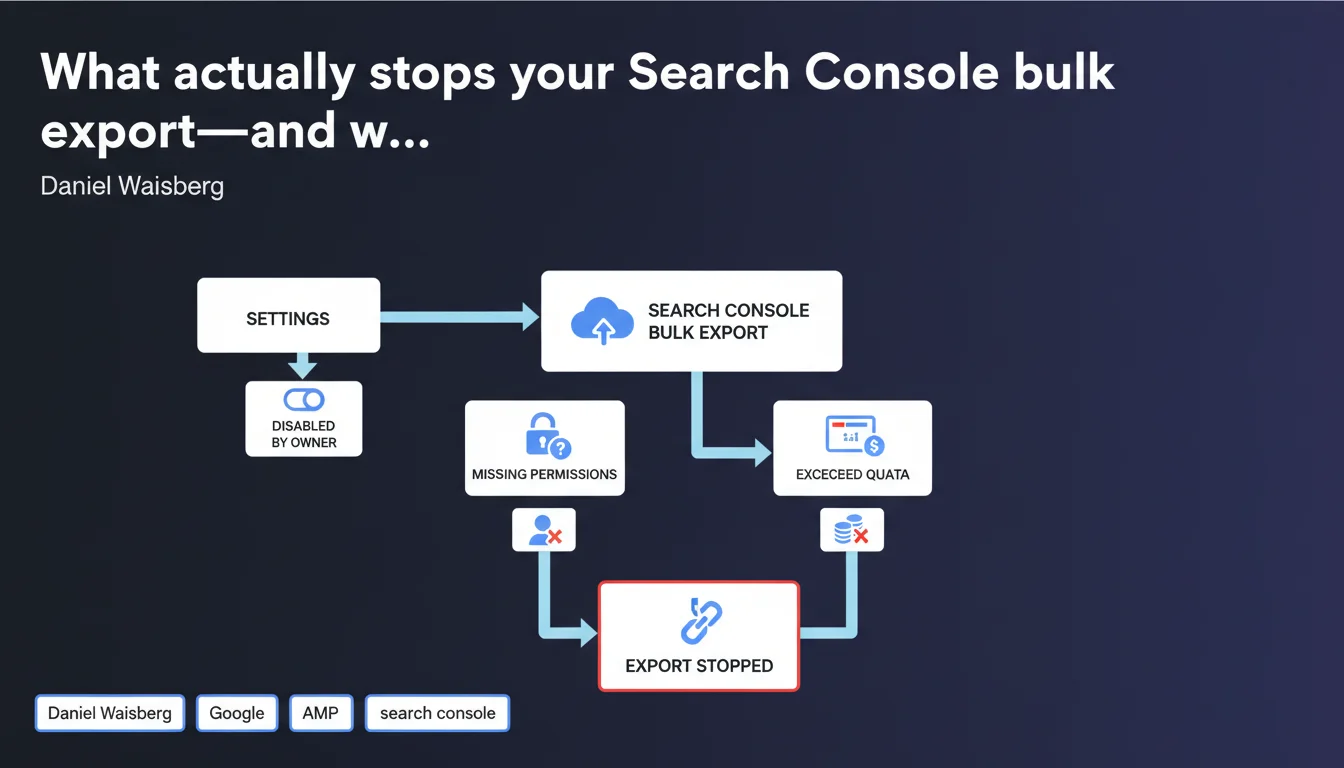
Search Console bulk export runs continuously until you manually disable it or a technical error occurs (missing permissions, Cloud quota exceeded). Google doesn't automatically cut the data flow—it's entirely up to the property owner to manage shutdown and failure scenarios.
What you need to understand
What exactly is bulk export in Search Console?
Bulk export lets you pull Search Console data into BigQuery, Google's Cloud data warehouse. This feature is built for sites with volumes too large to analyze through the standard interface.
Unlike manual one-off exports, bulk export runs continuously: every day, Search Console automatically pushes fresh data to your Cloud project. It's designed for high-volume sites and complex analytics workflows.
Why would Search Console ever auto-stop your export?
Google documents two technical scenarios: missing permissions or quota exceeded in your Cloud project. If your service account loses write access to BigQuery, export fails. Same if you hit the limits on your Cloud plan (storage, queries).
But outside these error cases, export runs indefinitely. No maximum duration, no automatic cutoff after X months. Google won't take the initiative to stop it.
How do I shut down the export if I don't need it anymore?
Head to Search Console settings, bulk export section. A simple toggle stops the flow. Once disabled, historical data stays in BigQuery—only the daily push stops.
Fair warning: if you turn it back on later, export won't fill in the missing days. Those gaps remain gaps. Plan your shutdowns carefully if you're thinking of reactivating.
- Bulk export runs continuously to BigQuery with no duration cap
- Only two conditions auto-stop export: revoked Cloud permissions or quota exceeded
- The property owner must manually disable export in settings to stop it
- Once shut down, history stays in BigQuery but daily push ceases
- Reactivating export won't recover data from the missed days
SEO Expert opinion
Does this statement actually clarify how it works?
We appreciate the transparency on stopping conditions, but Google stays silent on critical details. How long does data stay in BigQuery after you disable export? The docs don't say. And if permissions get restored after an error, does export resume automatically or do you need to manually reactivate it?
In the wild, export fails sometimes with zero clear notification. You discover the data gap three weeks later when you check BigQuery. [To verify]: Google claims Search Console "can no longer export" when problems hit, but no alert mechanism is documented.
Is the quota-exceeded risk actually a real problem?
BigQuery charges on storage and queries. A big e-commerce site with millions of daily queries can burn through multiple GB per month. Stuck on the free Cloud tier (10 GB storage, 1 TB queries/month)? You'll hit that ceiling fast.
Real-world scenario: a site with 50,000 active pages plus 90 days of data easily consumes 5–8 GB. Throw in a few poorly optimized analytics queries and you've blown your quota without noticing. Export dies, you lose data—and Google doesn't email you a heads-up.
Should you monitor export status regularly?
Absolutely. Set up a BigQuery alert on incoming data volume. If your normal daily flow (say, 200 MB/day) drops to zero, you get pinged immediately.
Also audit your service account permissions every quarter. Cloud reshuffles, team changes, or API key rotations can break export without anyone realizing.
Practical impact and recommendations
What do you need to verify before turning on bulk export?
Make sure your Google Cloud project has enough quota. Estimate your daily data volume (test a 7-day manual export to extrapolate). If you're looking at over 10 GB/month, jump on a paid plan from day one.
Set up service account permissions with BigQuery Data Editor and BigQuery Job User roles. Document this in your technical runbook—if your team turns over, no one should touch these permissions without understanding the fallout.
How do you monitor export once it's live?
Create a BigQuery alert that flags you if no data arrives for 48 hours. Use Cloud Monitoring or an external script that hits the BigQuery API and checks when your tables last updated.
Log the activation date and the property owner who started it. If that owner leaves and loses Search Console access, export keeps running—but no one can shut it down without reclaiming site ownership.
When should you kill the export?
The moment you stop using that data regularly. An orphaned export bleeding away for months eats quota and racks up Cloud bills for nothing. Six months without touching BigQuery? Cut the feed.
Before a site migration or Search Console ownership change, cleanly disable the old export first, then fire up a new one on the new property. Never run two exports for the same domain—you'll duplicate data and turn analysis into a mess.
- Confirm your Cloud project has sufficient quota (storage and queries)
- Configure service account permissions with the right BigQuery roles
- Set up an alert for data absence (via Cloud Monitoring or external script)
- Document the setup in a runbook your technical team can access
- Schedule a quarterly audit of permissions and export health
- Shut down export if you're not using the data on a regular basis
- Before migrating, cleanly disable the old export and reactivate on the new property
❓ Frequently Asked Questions
L'export en masse se coupe-t-il automatiquement après une certaine durée ?
Que se passe-t-il si je dépasse mon quota BigQuery ?
Puis-je récupérer les données manquantes après une interruption de l'export ?
Comment savoir si mon export fonctionne encore ?
Les données restent-elles dans BigQuery après désactivation de l'export ?
🎥 From the same video 11
Other SEO insights extracted from this same Google Search Central video · published on 18/05/2023
🎥 Watch the full video on YouTube →
💬 Comments (0)
Be the first to comment.