
Official statement
Other statements from this video 12 ▾
- □ Why is Google now rejecting certain directives in your robots.txt file?
- □ Can Google really index your URLs blocked by robots.txt without you being able to do anything about it?
- □ Does Google really process HTTP status codes during the crawl phase, not after?
- □ Does Google extract meta robots and canonical tags during indexing rather than at crawl time—and why does this distinction matter for your site?
- □ Can a single noindex tag on an hreflang page contaminate your entire international cluster?
- □ Should you really rely on JavaScript to handle noindex directives?
- □ Should you use X-Robots-Tag to keep PDFs and binary files out of Google's index?
- □ Does the unavailable_after directive really slow down Google's crawling?
- □ Should you disable Google cache to take control of how your snippets appear in search results?
- □ Can you really force Google to refresh a snippet without owning the website?
- □ Why does it really take Google months to permanently remove a page from its index?
- □ Does Google's URL removal tool actually stop crawling your pages?
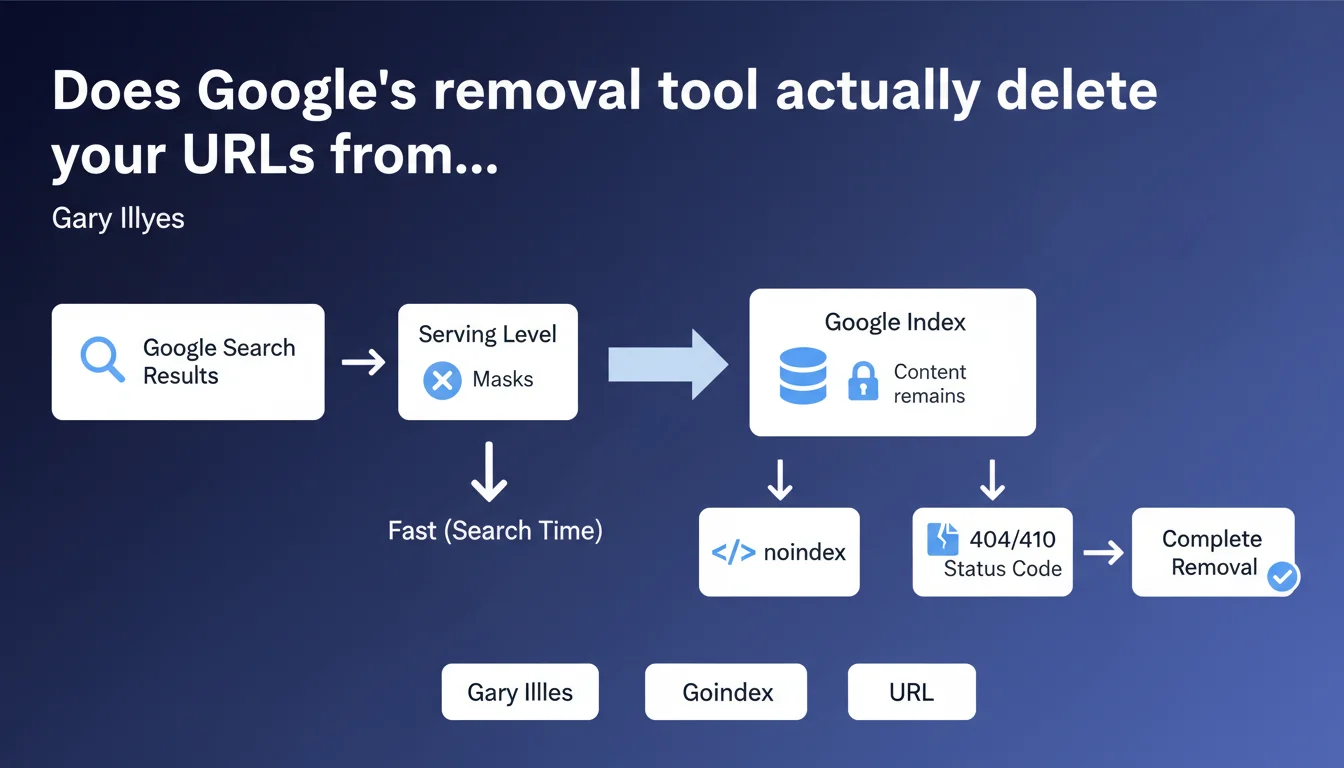
Google's removal tool masks search results at query time, but doesn't remove the URL from the index. For complete removal, you must combine the tool with a noindex tag or return a 404/410 status code. This distinction changes everything for managing sensitive or outdated content.
What you need to understand
What's the difference between masking and index removal?
Gary Illyes clarifies a fundamental technical point: the Google removal tool operates at the serving level, meaning at the moment results are displayed to the user. The URL technically remains in Google's index.
Concretely, when you use the removal tool through Search Console, Google applies a filter that prevents the URL from appearing in search results. But Googlebot keeps the URL in its database — with its signals, historical content, and backlinks.
Why is this technical distinction important?
Because masking is temporary and reversible, unlike true deindexing. If you don't complete the action with a noindex tag or a 404/410 status code, the URL can reappear in results once the masking period expires (typically 6 months).
This nuance explains why some webmasters observe URLs returning to the index even though they thought they had removed them. The serving filter is only an emergency solution — not a permanent one.
How does masking work at the serving level?
Google applies a server-side filter when generating SERPs. It's designed for speed: no need to recrawl the URL, no need to update the full index. The system simply checks whether the URL is on the masked URLs list before displaying it.
This speed explains why removal requests through the Search Console tool take effect within hours, whereas a meta robots tag change can take days or weeks depending on crawl budget.
- Masking ≠ index removal: the URL technically remains in the database
- The serving filter is temporary (approximately 6 months)
- For permanent removal, combine the tool with noindex or 404/410
- Masking takes effect within hours because it doesn't require recrawling
- Signals associated with the URL (backlinks, history) remain in memory
SEO Expert opinion
Does this distinction change our approach to managing obsolete content?
Absolutely. The removal tool should only be used as an emergency solution, not as a standard deindexing method. If you have sensitive content to remove quickly (personal data, legally problematic content), the tool is perfect — but it's only the first step.
For clean and permanent deindexation, the standard method remains: noindex plus waiting for recrawl, or better yet, removing the content with a 404/410 status code. The removal tool buys you time while you implement the real solution.
Why does Google maintain this two-level architecture?
Two technical reasons: execution speed and reversibility. Modifying Google's complete index for each removal request would be resource-intensive and slow. The serving filter enables immediate action without touching the central infrastructure.
Reversibility also protects against mistakes: if you accidentally remove a strategic URL, you have 6 months to correct it before it becomes permanent. But be careful — [To verify]: Google doesn't clearly communicate what happens to ranking signals during this masking period. Does the invisible URL continue accumulating link juice? Does it gradually lose authority? Field observations suggest gradual degradation, but Google remains evasive on this point.
What are the edge cases where this rule causes problems?
The classic case: temporary duplicate content. You launch a campaign with event-specific landing pages, you want to remove them quickly after the event. Using the removal tool alone creates an awkward situation: the URL is masked but technically remains in the index, with any potential duplication signals.
Another tricky situation: site migrations. If you use the tool to accelerate the disappearance of old URLs without implementing 301 redirects or 410 status codes, you create a void in the index. Backlinks point to masked URLs but not officially removed ones — Google doesn't know how to handle the signal.
Practical impact and recommendations
What should you actually do to remove a URL from the index?
The two-step method has become the standard after Gary Illyes' clarification. First, use the removal tool for immediate masking. Then, implement a permanent solution based on your use case.
If the content must disappear permanently: add noindex, nofollow to the meta robots tags, or better yet, delete the page and return a 410 Gone status code (more definitive than 404). If it's a mistake and the content should remain: simply cancel the removal request in Search Console.
For sensitive content (GDPR, right to be forgotten), combine the tool with a 404/410 status code and a formal deindexing request through Google's dedicated form. Masking alone isn't legally sufficient — you need traceable index removal.
What mistakes must you absolutely avoid?
The classic mistake: using the removal tool as a quick fix instead of correcting the root problem. You have zombie pages constantly reindexing? The tool won't solve anything — you need to identify why Googlebot is crawling them (internal links, sitemap, backlinks) and cut the source.
Second trap: believing that removal through the tool erases the URL's history. If Google has associated algorithmic or manual penalties with this URL, masking won't cancel them. You're masking symptoms, not the cause.
Third common mistake: failing to document removals. You use the tool, forget to add noindex, six months later the URL reappears and you don't understand why. Keep a log of masked URLs with the date and planned permanent action.
How do you verify that removal is complete?
First check: site:yoururl.com in Google. If the URL doesn't appear, masking is working. But that doesn't confirm index removal — only the serving filter.
To confirm true deindexation, check Search Console, Coverage tab: the URL should move to "Excluded" with the corresponding reason (noindex detected, or 404/410 error). If it remains "Indexed" despite masking, that's proof the tool only acted at the serving level.
Another test: use the URL inspection tool. If Google indicates "URL known to Google" but with noindex status or 404/410, you have confirmation that the URL is still in the database but correctly marked for permanent removal.
- Use the removal tool only for emergency masking
- Always follow up with noindex or 404/410 depending on your case
- Document every removal and its associated permanent method
- Verify through Search Console that the URL moves to "Excluded" status
- Never rely on the tool alone for GDPR compliance
- Wait for complete recrawl before considering a URL permanently removed
- Monitor for reappearances 6 months after initial masking
❓ Frequently Asked Questions
Combien de temps dure le masquage via l'outil de suppression Google ?
Est-ce que l'outil de suppression fait perdre le jus des backlinks ?
Peut-on utiliser l'outil de suppression pour gérer du contenu dupliqué ?
Que se passe-t-il si j'annule une demande de suppression avant la fin des 6 mois ?
L'outil de suppression suffit-il pour une conformité RGPD ?
🎥 From the same video 12
Other SEO insights extracted from this same Google Search Central video · published on 04/08/2022
🎥 Watch the full video on YouTube →
💬 Comments (0)
Be the first to comment.