
Official statement
Other statements from this video 12 ▾
- □ Why is Google now rejecting certain directives in your robots.txt file?
- □ Can Google really index your URLs blocked by robots.txt without you being able to do anything about it?
- □ Does Google extract meta robots and canonical tags during indexing rather than at crawl time—and why does this distinction matter for your site?
- □ Can a single noindex tag on an hreflang page contaminate your entire international cluster?
- □ Should you really rely on JavaScript to handle noindex directives?
- □ Should you use X-Robots-Tag to keep PDFs and binary files out of Google's index?
- □ Does the unavailable_after directive really slow down Google's crawling?
- □ Should you disable Google cache to take control of how your snippets appear in search results?
- □ Can you really force Google to refresh a snippet without owning the website?
- □ Does Google's removal tool actually delete your URLs from the index?
- □ Why does it really take Google months to permanently remove a page from its index?
- □ Does Google's URL removal tool actually stop crawling your pages?
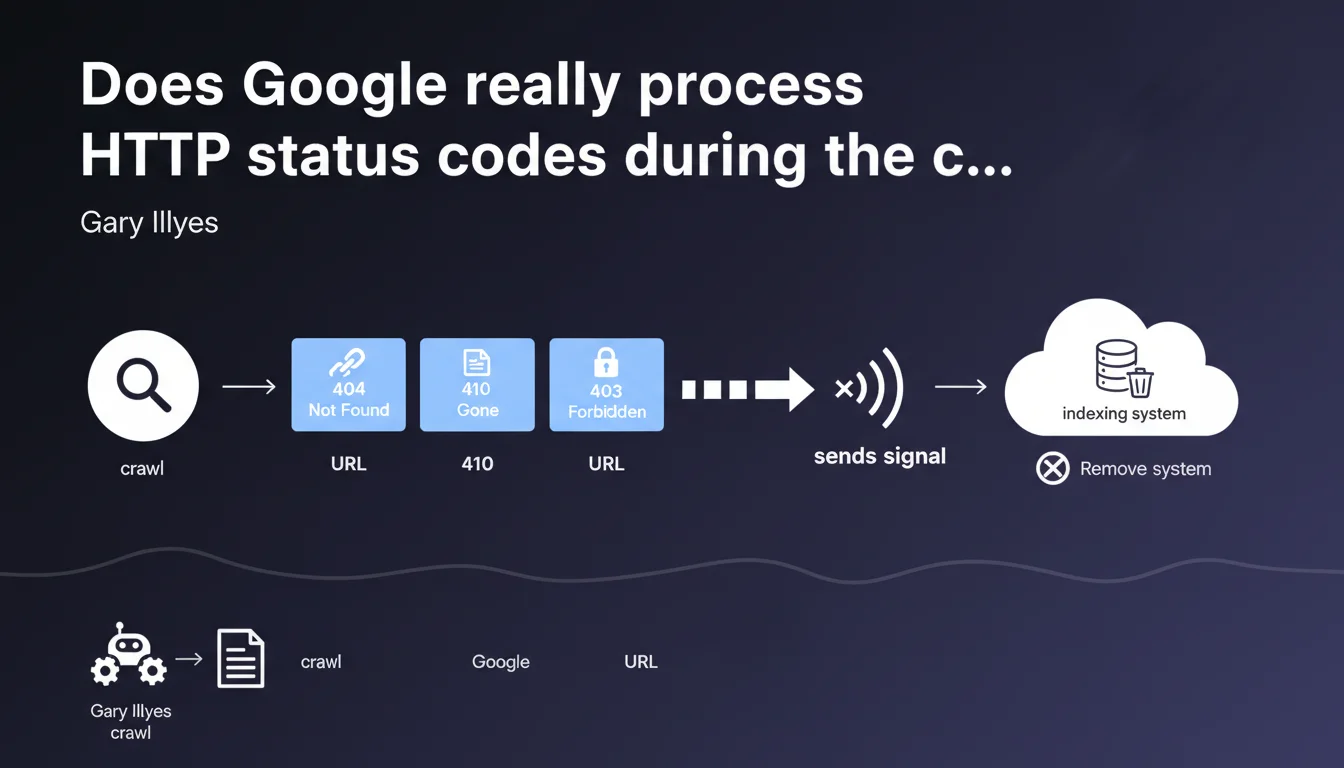
Google detects 404, 410, and 403 codes during the crawl phase, not afterward. The crawler sends a removal signal to the indexing system without ever passing the page content to it. This distinction between crawling and indexing fundamentally changes how you should think about managing server errors.
What you need to understand
Why is this separation between crawling and indexing so important?
Google operates with two distinct systems: the crawler (Googlebot) and the indexer. Gary Illyes clarifies that HTTP status codes are not evaluated at the indexing stage, but rather upstream, during the crawl phase.
Concretely? Googlebot makes its request, receives a 404, 410, or 403, and immediately sends a signal to indexing: "This URL no longer exists, remove it." The page content is never transmitted or analyzed by the indexer.
What does this change compared to what we thought we knew?
Many SEO professionals believed Google first analyzed the page, then checked the status code. Wrong. The HTTP code is processed before any content analysis.
This logic explains why a 404 page disappears quickly from the index, even if its content was excellent. The indexer never sees it — it only receives the order to remove the URL.
Which HTTP status codes are affected by this process?
Gary Illyes explicitly mentions three codes: 404 (resource not found), 410 (gone permanently), and 403 (forbidden). These three codes trigger the same mechanism: a removal signal sent to indexing.
- The crawler detects the HTTP code during the request
- A removal signal is transmitted to indexing
- The indexer never receives the page content
- The decision to deindex belongs to indexing, but it follows the crawler's signal almost systematically
- This process applies to 404, 410, and 403 identically
SEO Expert opinion
Is this statement consistent with field observations?
Yes, and it clarifies a point that many SEO professionals misunderstood. We indeed observe that 404 pages disappear from the index without a grace period, even if they were well-ranked.
But — and this is where it gets tricky — Gary doesn't specify how long it takes indexing to react to the signal. We notice that some URLs persist in Google's cache for several weeks despite a 404. [To verify]: is this delay related to crawl frequency, URL priority, or another factor?
What important nuance should we add here?
Gary says that "indexing decides to remove" the URL. This phrasing suggests there's a decision, therefore a margin for interpretation. In reality, this decision appears automatic for 404/410/403 responses.
Caution: this statement doesn't cover 301/302 redirects, nor 5xx codes (server errors). For 5xx errors, Google adopts a different strategy — it retries multiple times before considering the page inaccessible.
What about soft 404 pages in this context?
Gary doesn't mention soft 404s (error content page but with 200 status code). That's telling. Google treats them differently: the crawler transmits the page to indexing, which must analyze the content to detect it's an error.
Result: soft 404s remain longer in the index and consume crawl budget unnecessarily. Let's be honest — it's a nightmare for large e-commerce sites with thousands of out-of-stock products.
Practical impact and recommendations
What should I do concretely on my website?
First rule: return the correct HTTP code at the right time. No 200 on an error page, no 404 on a temporarily unavailable page.
For out-of-stock products in e-commerce, several strategies exist. Some apply a 404 immediately (risk of losing backlinks), others maintain the page as 200 with an "out of stock" message (risk of soft 404). The choice depends on your restocking strategy.
What mistakes should you absolutely avoid?
Don't confuse 403 and 503. A 403 triggers deindexing, a 503 indicates temporary unavailability — Google will retry later without deindexing.
Avoid redirect chains that end in a 404. Google crawls the first URL, follows the redirect, encounters the 404 — and deindexes it. Result: you've lost the link equity and the page disappears from the index.
How can I verify that my site handles these codes correctly?
Use Google Search Console: the "Coverage" or "Pages" tab lists all excluded URLs with their status codes. Filter by 404/410/403 and verify there are no surprises.
Test manually with curl -I or a tool like Screaming Frog. Verify that each page type returns the correct code: deleted page = 410, never existed = 404, temporarily restricted access = 503.
- Audit HTTP status codes for all indexed URLs
- Replace soft 404s with true 404s when appropriate
- Use 410 for permanent deletions (abandoned products, obsolete content)
- Configure a 503 with Retry-After for planned maintenance
- Monitor Search Console to detect new 404/403 errors
- Set up 301 redirects for deleted pages with quality backlinks
- Regularly test with curl or Screaming Frog to validate returned codes
❓ Frequently Asked Questions
Un 410 est-il vraiment différent d'un 404 pour Google ?
Pourquoi une page en 404 reste-t-elle parfois visible dans l'index pendant plusieurs semaines ?
Que se passe-t-il si je remets en ligne une page qui était en 404 ?
Les erreurs 5xx sont-elles traitées de la même façon que les 404 ?
Faut-il utiliser un 403 pour bloquer l'accès à certaines sections du site ?
🎥 From the same video 12
Other SEO insights extracted from this same Google Search Central video · published on 04/08/2022
🎥 Watch the full video on YouTube →
💬 Comments (0)
Be the first to comment.