
Official statement
Other statements from this video 12 ▾
- □ Pourquoi Google refuse-t-il désormais certaines directives dans le robots.txt ?
- □ Pourquoi robots.txt disallow peut-il indexer vos URLs sans que vous puissiez rien y faire ?
- □ Comment Google gère-t-il réellement les codes de statut HTTP lors du crawl ?
- □ Pourquoi Google extrait-il les balises meta robots et canonical pendant l'indexation plutôt qu'au crawl ?
- □ Pourquoi un noindex sur une page hreflang peut-il contaminer tout votre cluster international ?
- □ Faut-il vraiment compter sur JavaScript pour gérer le noindex ?
- □ Comment désindexer un PDF ou un fichier binaire avec l'en-tête X-Robots-Tag ?
- □ La directive unavailable_after ralentit-elle vraiment le crawling de Google ?
- □ Peut-on vraiment forcer Google à rafraîchir un snippet sans être propriétaire du site ?
- □ L'outil de suppression de Google supprime-t-il vraiment vos URLs de l'index ?
- □ Pourquoi Google met-il des mois à supprimer définitivement une page de son index ?
- □ L'outil de suppression Google bloque-t-il réellement le crawl des pages ?
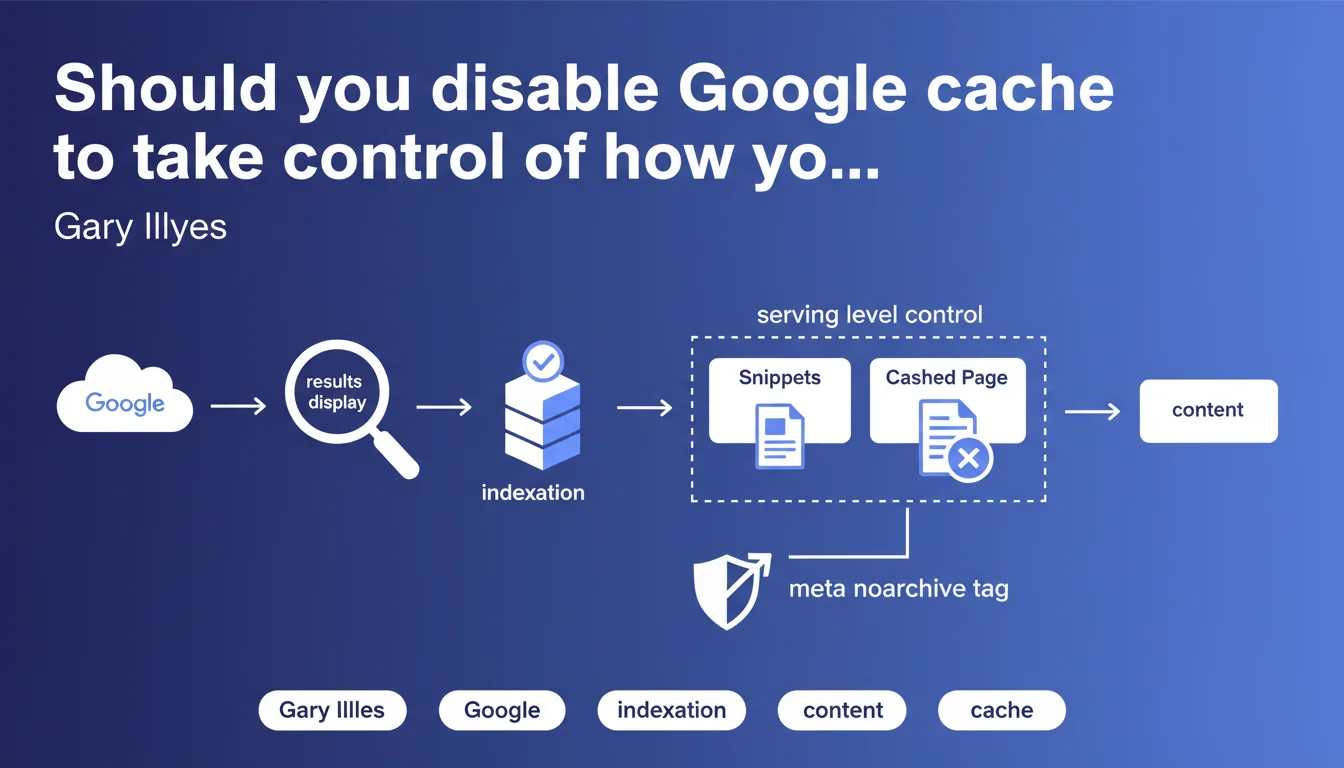
Google allows you to control snippets and cached content at the serving level, without affecting indexation. The meta noarchive tag removes the cached page while preserving full content indexation. A technical nuance often misunderstood that offers granular control over SERP display.
What you need to understand
What is the difference between indexation and serving?
Indexation refers to the phase where Google analyzes, processes, and stores a page's content in its databases. Serving is when Google displays search results — and this is the stage where snippets are generated and the "Cached" link appears.
This distinction is crucial. Disabling cache or limiting snippets does not impact Google's ability to understand and index your content. You control the display, not the upstream processing.
How does the meta noarchive tag work?
The <meta name="robots" content="noarchive"> tag tells Google to not offer the "Cached" link in search results. Your page remains indexed normally, its content is analyzed and used for ranking, but users cannot view the cached version.
Concretely? Google continues to crawl, index, and evaluate your content for ranking. Only the cache display is disabled on the end user's side.
Why is this separation between indexation and display so important?
Because it allows granular control without sacrifice. You can hide the cache to protect sensitive content or prevent outdated versions from being visible, without penalizing your organic visibility.
It's also a reassuring signal: using noarchive or max-snippet costs you nothing in terms of technical SEO. You keep the benefit of indexation while adjusting the display according to your needs.
- Serving only concerns display in the SERPs, not how Google processes your content
- The noarchive tag removes the cache without affecting indexation or ranking
- Snippet directives (max-snippet, max-video-preview, max-image-preview) also act at the serving level
- This separation provides a control lever without compromise on organic visibility
SEO Expert opinion
Is this statement consistent with observed practices?
Yes, and it's actually one of the rare topics where Google is transparent and consistent over the years. Field tests confirm it: a page with noarchive remains indexed, ranked, and generates traffic normally. The only visible effect is the absence of the "Cached" link in the results.
But — and this is where it sometimes gets tricky — some SEO professionals still confuse noarchive with noindex, or think that limiting snippets hurts ranking. Spoiler: it doesn't. Google has never penalized a page because it controls its display.
In which cases is this directive truly useful?
Let's be honest: for the majority of websites, disabling cache adds no value. It's mainly relevant for sensitive, evolving, or paid content — premium news sites, e-commerce with fluctuating prices, pages containing personal information.
The risk? A user accessing an outdated version through cache and reporting inconsistencies (expired price, out of stock). In these cases, noarchive is a legitimate safety net.
What is the limitation of this approach?
Google talks about control at the serving level, but remains vague about exact granularity. For example: can you control snippets differently depending on query types? Can you force a specific snippet for certain strategic pages? [To verify] — the available tools (meta robots, structured data) remain quite binary.
Another point: this statement says nothing about featured snippets. Controlling a regular snippet is one thing; preventing Google from positioning you in position 0 with an unwanted excerpt is another. And there, the available levers are much more limited.
Practical impact and recommendations
What should you do concretely to control cache and snippets?
To disable the cache, simply add <meta name="robots" content="noarchive"> in the <head> of your pages. You can also combine with other directives: noarchive, max-snippet:150 to limit snippet length to 150 characters.
For finer control, use X-Robots-Tag in your HTTP headers — useful for non-HTML files (PDF, images) or to apply dynamic rules server-side.
What mistakes should you avoid with these directives?
Never confuse noarchive with noindex. The first hides the cache, the second completely deindexes the page. Accidentally combining the two means losing all organic visibility.
Also avoid blocking cache by default across your entire site "just in case." It has no SEO value and deprives users of a sometimes useful way to access your content (temporarily unavailable page, slow server).
How do you verify that your directives are properly applied?
Inspect your pages with the URL Inspection tool in Google Search Console. It displays the indexation directives detected by Google, including noarchive, max-snippet, etc.
On the SERP side, perform a site:yourdomain.com search and manually verify the absence of the "Cached" link on the relevant pages. If the cache persists after several weeks, there's an implementation problem.
- Add
<meta name="robots" content="noarchive">in the head of sensitive pages - Use X-Robots-Tag in HTTP headers for non-HTML files
- Never accidentally combine noarchive and noindex
- Test your directives with Google Search Console (URL Inspection)
- Manually verify display in the SERPs with site:yourdomain.com
- Document your choices to prevent regressions during redesigns
❓ Frequently Asked Questions
La balise noarchive affecte-t-elle le classement de ma page ?
Peut-on combiner noarchive avec d'autres directives robots ?
Le cache Google protège-t-il contre le scraping ?
Comment désactiver le cache pour des fichiers PDF ou images ?
Faut-il désactiver le cache sur tout le site par précaution ?
🎥 From the same video 12
Other SEO insights extracted from this same Google Search Central video · published on 04/08/2022
🎥 Watch the full video on YouTube →
💬 Comments (0)
Be the first to comment.