
Official statement
Other statements from this video 9 ▾
- □ Faut-il vraiment doubler les données produits entre Schema et Merchant Center ?
- □ Faut-il vraiment empiler trois couches de données produits pour plaire à Google ?
- □ Comment la Search Console détecte-t-elle réellement les erreurs dans vos données structurées produits ?
- □ Pourquoi Google veut-il que vous affichiez des prix plus élevés dans vos données structurées ?
- □ Faut-il vraiment utiliser une requête site: pour vérifier vos données de prix ?
- □ Pourquoi Google exige-t-il des identifiants produits GTIN, MPN ou marque pour le référencement marchand ?
- □ Les identifiants produits sont-ils vraiment la clé du matching multi-marchands dans Google Shopping ?
- □ Faut-il abandonner Merchant Center au profit des données structurées pour le e-commerce ?
- □ Pourquoi limiter Schema.org à Google alors que d'autres moteurs l'exploitent déjà ?
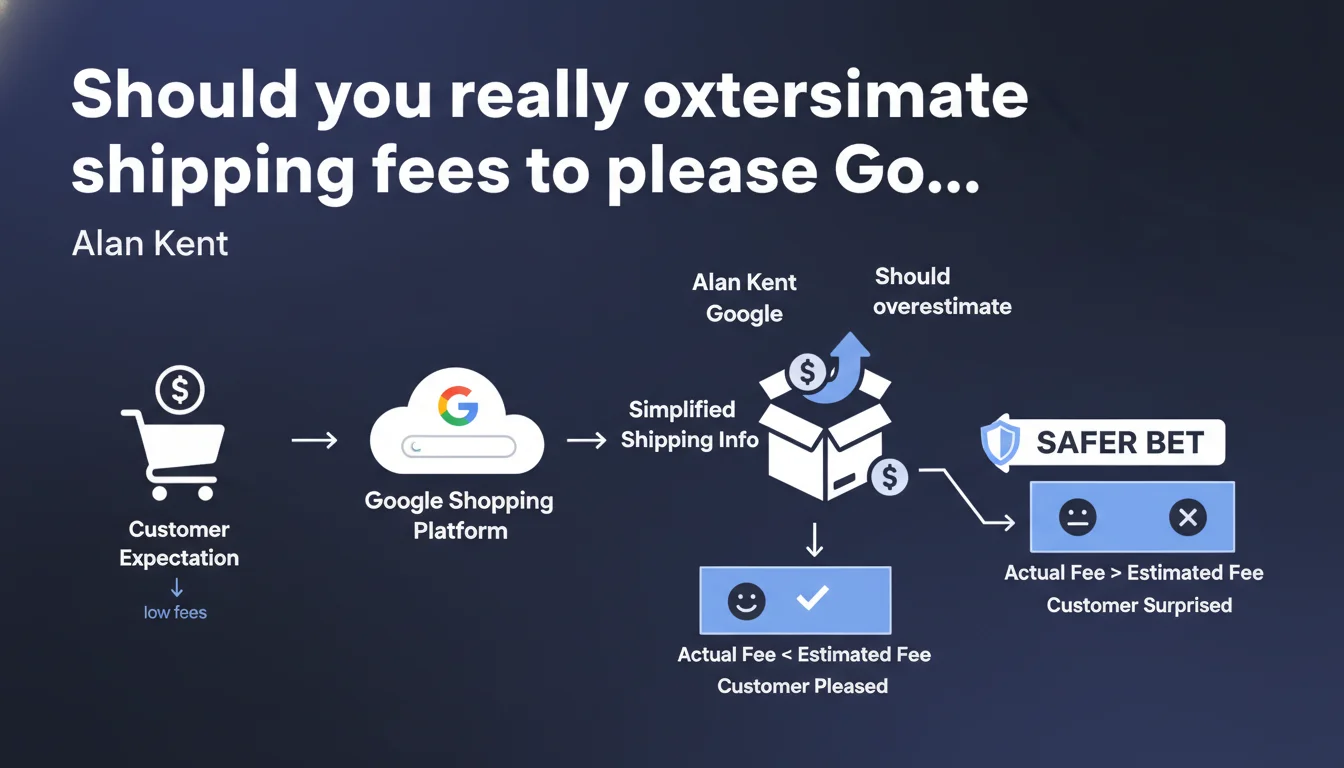
Google recommends simplifying shipping data transmitted via product feeds to match its limited technical capabilities. When uncertain about exact pricing, it's safer to display a slightly overestimated cost rather than create a trust breakdown at checkout — even if this may impact your conversion rate.
What you need to understand
Why does Google ask to simplify shipping information?
The Google Merchant Center platform doesn't handle all the pricing complexities that e-commerce merchants can offer. Fees calculated dynamically based on total cart weight, ultra-precise geographic zones, temporary delivery promotions — so many variables that the system doesn't always interpret correctly.
Rather than risk incorrect display in Shopping ads, Alan Kent recommends a conservative approach: round up to ensure the advertised amount remains less than or equal to the actual checkout amount.
What exactly does Google mean by "limited capabilities"?
The product feed accepts several attributes for shipping (shipping, shipping_weight, shipping_label), but their combination can generate inconsistencies if your business logic is too granular. For example, a carrier that applies surcharges for islands or rural areas won't always be correctly represented.
Google has never documented exhaustively all supported configurations. The implicit advice: test, observe rejections in Merchant Center, and simplify until it works.
What are the risks if displayed fees don't match checkout?
A customer who discovers higher shipping fees when validating their order abandons their cart at a significant rate — some studies cite 60% abandonment in case of pricing surprise. Google knows this, and can even suspend your Merchant Center account if discrepancies occur too frequently.
Conversely, displaying an overestimated cost can harm your advertising competitiveness, since the total price (product + shipping) influences Shopping ads ranking.
- Product feeds have technical limitations for managing complex shipping rates
- A gap between the ad and final checkout can lead to Merchant Center account suspension
- Overestimating fees protects from trust breakdown, but can degrade CTR and conversion rate
- Google doesn't exhaustively document all supported configurations — empiricism remains necessary
SEO Expert opinion
Is this recommendation really in the user's interest?
On paper, yes: it's better to announce €6.99 in shipping fees and charge €5.50 at checkout than the reverse. Except that in practice, this approach mechanically penalizes your visibility on price comparison sites and on Google Shopping itself, where the displayed total cost directly influences ranking.
Let's be honest: this recommendation looks more like a workaround for Merchant Center's technical limitations. Rather than improving system granularity, Google is asking merchants to sacrifice precision — and potentially their margins or competitiveness.
In which cases does this rule become problematic?
If you operate in a sector where shipping fees are a strong commercial argument (free delivery over €50, unbeatable flat rate), deliberately displaying an inflated amount can kill your qualified traffic before it even reaches your site.
Another thorny case: multi-vendor marketplaces. If each seller applies its own pricing grid, oversimplifying amounts to lying about actual conditions — which can generate disputes or even litigation.
What nuances should be added to this advice?
Alan Kent doesn't specify how much to "overestimate" — 10 cents? 2 euros? This gray area leaves room for reckless interpretations. [To verify]: no published Google study quantifies the impact of a 5% versus 20% difference on feed approval rates.
Finally, this logic assumes your checkout is perfectly stable. If your actual fees fluctuate (flash promotion, temporary carrier partnership), you'll need to update your feeds constantly — or accept remaining in permanent misalignment.
Practical impact and recommendations
What should you do concretely to remain compliant?
First step: audit your current shipping rules. List all scenarios (weight, destination, cart value, fragile products) and identify those that Merchant Center doesn't natively handle. For each gray area, calculate the maximum plausible cost and use it as the default value in the feed.
Next, test under real conditions: create dummy orders from different locations, compare the amount announced in the Shopping ad to the final total. If the gap exceeds 5%, adjust.
What mistakes should you absolutely avoid?
Don't fall into the trap of "I'll display €0 in shipping fees to maximize clicks". Google quickly detects dishonest feeds and you risk permanent suspension. Conversely, don't inflate fees so much that your products become invisible — find the happy medium between security and competitiveness.
Another common mistake: forgetting to synchronize updates. If you modify your shipping conditions on your site, remember to regenerate the feed immediately — a 48-hour delay can be enough to generate customer complaints.
How to verify your configuration is optimal?
Use the feed diagnostic tool in Merchant Center to spot warnings related to shipping attributes. Also compare your click-through rates and conversion rates before/after adjustment: a significant drop in CTR may indicate your displayed fees have become non-competitive.
Finally, monitor customer satisfaction metrics (return rate, Trustpilot ratings, post-purchase feedback). If complaints about shipping fees increase, it means your simplification went too far.
- Audit all your shipping rules and identify cases not supported by Merchant Center
- Calculate the maximum plausible cost for each scenario and use it as the default value
- Test under real conditions from multiple geographic locations
- Synchronize the feed immediately with each pricing change on the site
- Monitor Merchant Center diagnostics and customer satisfaction metrics
- Regularly compare fees displayed in Shopping ads to actual checkout rates
❓ Frequently Asked Questions
Dois-je arrondir mes frais de port dans tous les cas ou seulement quand je ne suis pas sûr du montant exact ?
Quel écart maximum puis-je afficher entre mes frais annoncés et mes frais réels sans risquer de suspension ?
Si j'affiche des frais surestimés et que je facture moins au checkout, cela peut-il me pénaliser en conversion ?
Comment gérer les promotions temporaires sur la livraison (ex : livraison gratuite pendant 48h) ?
Les frais de port influencent-ils directement le classement des annonces Shopping ?
🎥 From the same video 9
Other SEO insights extracted from this same Google Search Central video · published on 17/01/2023
🎥 Watch the full video on YouTube →
💬 Comments (0)
Be the first to comment.