
Official statement
Other statements from this video 9 ▾
- □ Faut-il vraiment doubler les données produits entre Schema et Merchant Center ?
- □ Faut-il vraiment empiler trois couches de données produits pour plaire à Google ?
- □ Comment la Search Console détecte-t-elle réellement les erreurs dans vos données structurées produits ?
- □ Pourquoi Google veut-il que vous affichiez des prix plus élevés dans vos données structurées ?
- □ Faut-il vraiment utiliser une requête site: pour vérifier vos données de prix ?
- □ Faut-il vraiment surestimer les frais de port pour plaire à Google Shopping ?
- □ Pourquoi Google exige-t-il des identifiants produits GTIN, MPN ou marque pour le référencement marchand ?
- □ Faut-il abandonner Merchant Center au profit des données structurées pour le e-commerce ?
- □ Pourquoi limiter Schema.org à Google alors que d'autres moteurs l'exploitent déjà ?
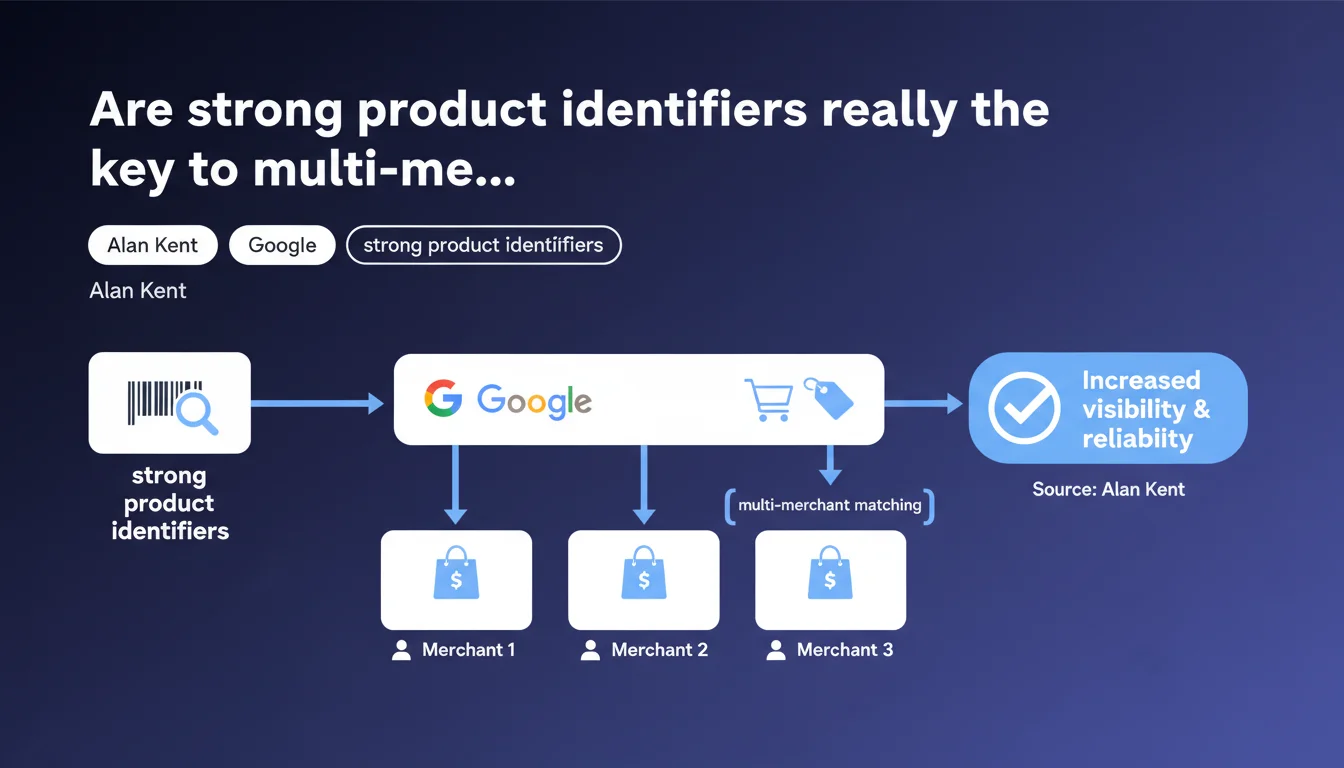
Google confirms that strong product identifiers (GTIN, EAN, UPC) are essential to appear in the multi-merchant Shopping knowledge panel. Without these structured identifiers, your product risks not being grouped with competing offers, drastically reducing your visibility in Shopping results.
What you need to understand
What exactly is the multi-merchant Shopping knowledge panel?
This panel aggregates multiple sellers offering the same product in Google search results. Unlike isolated Shopping ads, it presents a comparative view with price, availability, and multiple vendors.
The goal is to make comparison easier for users. For Google, it means they must be able to identify with certainty that a product sold by merchant A is strictly identical to the product sold by merchant B.
Why does Google insist on "strong" product identifiers?
A strong product identifier is a standardized and universal code: GTIN (Global Trade Item Number), EAN, UPC, ISBN. These codes are unique globally and leave no room for ambiguity.
Without these identifiers, Google must rely on weak signals: title, images, description. Matching becomes probabilistic and less reliable. Result: you risk not appearing in the multi-merchant panel, even if you're selling exactly the same item.
Does this logic apply only to Google Shopping or to traditional SEO as well?
Alan Kent's statement explicitly concerns the Shopping panel. However, product identifiers also have an indirect impact on traditional SEO through Schema.org Product structured data.
Google can leverage this data to enrich snippets, display product information in organic SERPs, and improve semantic understanding of your catalog. It's an additional layer of signals that strengthens consistency between your Merchant Center data and your website.
- Strong identifiers = reliable matching: GTIN, EAN, UPC enable unambiguous multi-merchant grouping
- Multi-merchant Shopping panel: displays multiple sellers of the same product side by side
- Indirect impact on organic SEO: Product structured data also benefits from these identifiers
- Without identifier: you risk invisibility in comparative Shopping results
SEO Expert opinion
Is this statement consistent with real-world observations?
Yes, absolutely. Merchants who feed Google Merchant Center with missing or incorrect GTINs regularly see reduced visibility in Shopping panels. Google can even reject or limit the distribution of products without valid identifiers.
In the field, I've seen entire catalogs penalized because GTINs were auto-generated or fictitious. As soon as they're corrected, impression rates soar. It's one of the most underestimated levers in e-commerce SEO.
In what cases does this rule not apply or create problems?
Major issue: artisanal, custom-made, or white-label products. No official GTIN. Google theoretically allows missing identifiers in these cases, but in practice, you lose all multi-merchant matching benefits.
Another tricky case: very niche products where multiple manufacturers use non-standardized internal codes. Here, you must choose between creating a fictional identifier (risk of rejection) or accepting lower visibility. [To verify]: Google has never clearly explained the tolerance threshold for catalogs without GTIN.
What nuances should be added to this logic?
Alan Kent talks about identifiers "on your product pages". This implies that Google also scans Schema.org structured data present in the HTML, not just the Merchant Center feed.
Therefore: absolute consistency is required between Merchant Center, Schema.org Product markup, and visible content. A discrepancy between these three sources can confuse matching. Concretely, if your GTIN differs between the feed and the page, Google might display nothing at all.
Practical impact and recommendations
What should you do concretely to optimize your multi-merchant matching?
First, audit your catalog: identify products without GTIN, EAN, or UPC. Prioritize products with high search volume and high competition — these will benefit most from the multi-merchant panel.
Next, integrate these identifiers in three places:
- Your Google Merchant Center feed (required
gtinfield) - Schema.org Product structured data on each product page (property
gtin,gtin13,eanorisbn) - Visible content if possible (mention of barcode in description or product sheet)
What errors should you absolutely avoid?
Never invent a GTIN. Google validates these codes through international databases (GS1). A fictional code = rejection or suspension of the product, or even your Merchant Center account.
Also avoid using internal codes or in-house SKUs in the GTIN field. These codes are not universal and serve no purpose for matching. Reserve them for the id or mpn (Manufacturer Part Number) field.
Another pitfall: consistency across variants. If you sell the same product in multiple sizes/colors, each variant must have its own GTIN. Don't duplicate the same code for all variations — otherwise Google can't properly match.
How can you verify that your site is compliant and properly matched?
Test your pages with Google's Rich Results testing tool. Verify that the GTIN appears correctly in the extracted structured data.
In Google Merchant Center, monitor product diagnostics: alerts for "Missing GTIN value", "Invalid GTIN", "Product not recognized". Fix these errors as a priority.
Finally, search for your own products on Google Shopping. If your competitors appear in a multi-merchant panel and you don't, it's a sign of an identifier problem.
- Audit your catalog to identify missing GTINs
- Integrate identifiers in Merchant Center, Schema.org, and visible content
- Never invent or duplicate GTIN codes
- Assign a unique GTIN to each variant (size, color)
- Test with Google's Rich Results testing tool
- Monitor Merchant Center diagnostics continuously
- Manually verify presence in multi-merchant Shopping panels
❓ Frequently Asked Questions
Qu'est-ce qu'un identifiant produit fort selon Google ?
Que se passe-t-il si je n'ai pas de GTIN pour mes produits artisanaux ?
Puis-je utiliser mon propre code SKU à la place du GTIN ?
Les identifiants produits ont-ils un impact sur le SEO organique classique ?
Comment Google détecte-t-il un GTIN invalide ?
🎥 From the same video 9
Other SEO insights extracted from this same Google Search Central video · published on 17/01/2023
🎥 Watch the full video on YouTube →
💬 Comments (0)
Be the first to comment.