
Official statement
Other statements from this video 15 ▾
- □ Comment Google jongle-t-il avec 40 signaux pour choisir l'URL canonique ?
- □ Clustering et canonicalisation : Google fait-il vraiment la différence entre ces deux processus ?
- □ Le rel canonical joue-t-il un double rôle dans l'algorithme de Google ?
- □ Que se passe-t-il quand vos signaux de canonicalisation se contredisent ?
- □ Comment Google choisit-il réellement entre HTTP et HTTPS dans ses résultats ?
- □ Pourquoi vos redirections multiples empêchent-elles Google de choisir la version HTTPS ?
- □ Google traite-t-il vraiment différemment les traductions de boilerplate et de contenu ?
- □ Hreflang fonctionne-t-il indépendamment du clustering de contenu dupliqué ?
- □ Google va-t-il vraiment faciliter le traitement du hreflang pour les sites fiables ?
- □ X-default est-il vraiment un signal canonique comme les autres ?
- □ Les pages d'erreur 200 créent-elles vraiment des trous noirs de clustering ?
- □ Pourquoi un message d'erreur explicite peut-il sauver votre crawl budget ?
- □ Les redirections JavaScript vers des pages d'erreur sont-elles vraiment prises en compte par Google ?
- □ Pourquoi un no-index supprime-t-il une page plus vite qu'une erreur 404 ou 410 ?
- □ Un rel canonical vide peut-il vraiment supprimer tout votre site de l'index Google ?
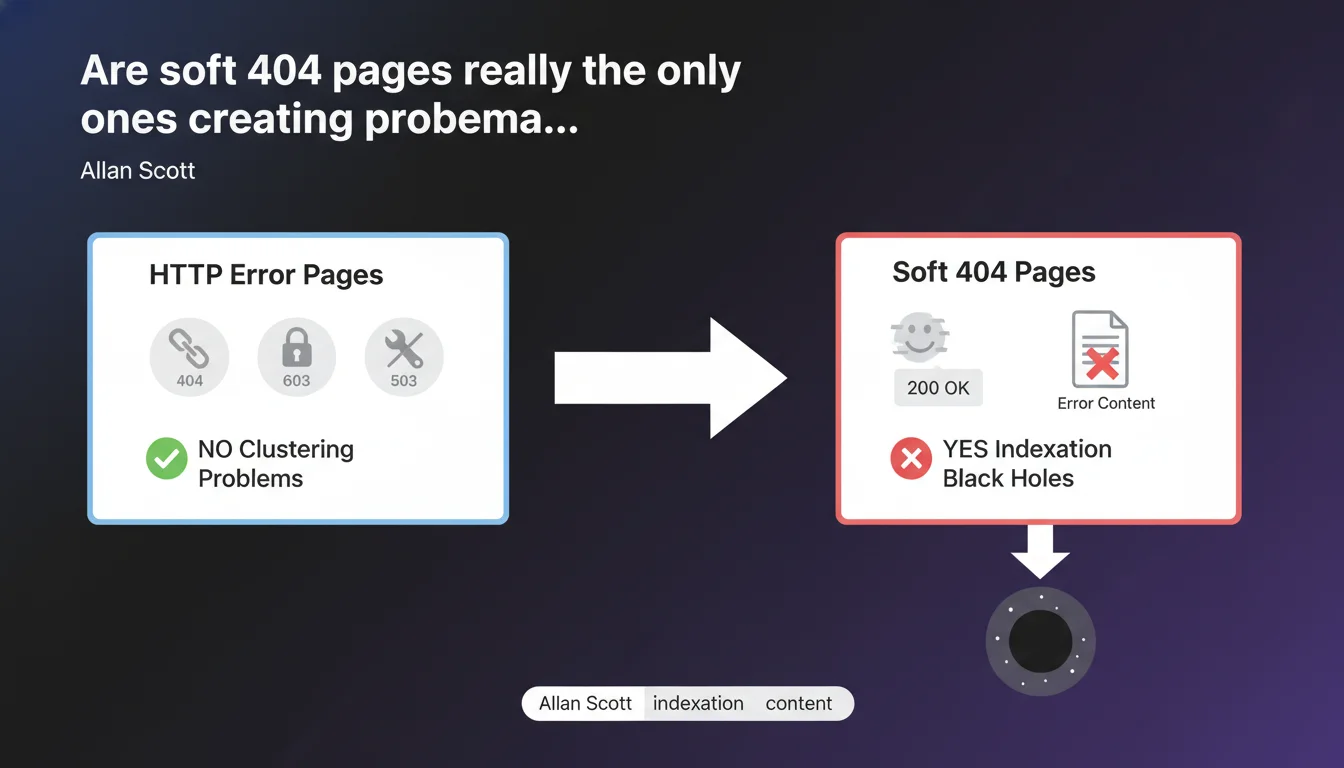
Google claims that only pages returning an HTTP 200 code with error content create "black holes" in indexation. Real errors served with proper codes (404, 403, 503) pose no clustering problems. The risk is concentrated on soft 404s—these pages that claim "everything is fine" while displaying an error.
What you need to understand
What exactly is an indexation "black hole"?
An indexation black hole is a collection of pages that absorb crawl budget without providing any value. Google explores them, sometimes indexes them, but they dilute the site's relevance. The engine wastes time on useless URLs instead of focusing on strategic content.
These black holes form especially when a site generates empty pages, filter facets without unique content, or misconfigured error pages. The crawler detects content, indexes it, but the user hits a dead end.
Why don't real HTTP errors cause problems?
Because they send a clear signal to Googlebot: this page doesn't exist or isn't accessible. A 404 says "nothing to see here", a 403 says "forbidden", a 503 says "temporarily unavailable". The crawler understands, records the info, and moves on.
These HTTP codes allow Google to clean up its index efficiently. A 404 page gradually disappears from the index. A 503 page stays in the queue for later recrawling. No phantom clusters form.
Why are soft 404s more toxic?
A soft 404 is a page that returns a 200 OK code when it should signal an error. Google sees a positive status, indexes the page, but discovers empty or generic content: "No results", "Page not found", "Oops, error".
The problem? The engine doesn't immediately know it's an error. It treats these pages as legitimate content, which creates clusters of useless pages. Result: wasted crawl budget, internal PageRank dilution, degraded quality signals.
- Correct HTTP codes (404, 403, 503) don't create clustering problems
- Soft 404s (200 code with error content) generate indexation black holes
- The crawler wastes time on pages that appear valid but aren't
- The key: return the right HTTP code at the right time
SEO Expert opinion
Is this statement consistent with real-world observations?
Yes, absolutely. For years, we've observed that sites with massive soft 404 problems suffer from chronic indexation issues. Thousands of "phantom pages" appear in Search Console without traffic or rankings, but they remain in the index.
Technical audits often reveal filter facets, empty internal search pages, or dynamically generated URL variants—all returning 200 OK. Google crawls them in loops, indexes them, and the site loses efficiency. Fixing these soft 404s with proper HTTP codes often boosts crawl and indexation metrics within weeks.
Why is Google emphasizing this point now?
Because modern sites generate increasingly more dynamic pages. Single Page Applications (SPAs), e-commerce sites with complex filters, user-generated content platforms—all create cascading URLs, many of which are empty or duplicated.
Google wants to avoid crawling and indexing millions of useless pages. It's a matter of crawl cost for them, and indexation quality for us. By clarifying this point, Google pushes developers to better manage HTTP codes from the design phase.
Are there edge cases where this rule gets complicated?
Yes—and that's where it gets tricky. Take internal search results pages: if no results are found, should you return a 404 or a 200 with "No results"? Technically, the page exists, but it has no value for the index.
[To verify] Google doesn't give precise directives on these ambiguous cases. The best practice seems to be returning a 200 with noindex in meta robots, which prevents indexation without breaking user experience. But it remains a gray area.
Practical impact and recommendations
How do I identify soft 404s on my site?
First step: Search Console. Open the "Coverage" or "Pages" section and filter by "Excluded". Google often flags auto-detected soft 404s. But it misses many.
Second step: a complete crawl with Screaming Frog, Oncrawl, or Botify. Filter pages returning 200 OK with little content (under 200 words, few internal links, generic title tag). Cross-reference this with analytics: if they have no traffic, that's a bad sign.
Third step: check server logs. Identify URLs massively crawled by Googlebot but never visited by real users. These are often phantom pages the engine explores in loops.
What errors must you absolutely avoid?
Never return 200 OK on an error page. If a product no longer exists, it's a 410 (Gone) or a 301 to an alternative. If a category is temporarily empty, it's a 503 (Service Unavailable) or a 200 with noindex.
Don't create "No results" or "Custom 404 error" pages returning 200 OK. Even if it looks nice for users, it's toxic for SEO. The server must return the correct HTTP code along with the personalized content.
Don't leave thousands of filter facets returning 200 OK. Use canonicals, noindex, or robots.txt to prevent their indexation. If they're useful for users, keep them accessible, but block them on the crawl side.
What strategy should you implement to clean up your indexation?
- Audit your site with a crawler: identify all 200 OK pages with little content
- Fix HTTP codes: 404 for deleted pages, 410 for permanently removed products, 503 for temporary unavailability
- Add noindex in meta robots on useful but non-indexable pages (internal search, filters, URL variations)
- Redirect with 301 old URLs to relevant alternatives when possible
- Monitor Search Console: verify that flagged soft 404s gradually disappear
- Set up monthly monitoring to detect new soft 404s before they multiply
❓ Frequently Asked Questions
Un soft 404 peut-il pénaliser le référencement global du site ?
Faut-il supprimer les pages en soft 404 de la Search Console ?
Une page en 200 avec noindex crée-t-elle un cluster problématique ?
Les pages en 503 restent-elles longtemps dans l'index ?
Comment savoir si mes corrections de soft 404 fonctionnent ?
🎥 From the same video 15
Other SEO insights extracted from this same Google Search Central video · published on 05/12/2024
🎥 Watch the full video on YouTube →
💬 Comments (0)
Be the first to comment.