
Official statement
Other statements from this video 9 ▾
- □ Is Search Console really THE benchmark for measuring Google organic traffic?
- □ Why do Search Console clicks and Analytics sessions never match up?
- □ Does Google really process Search Console data the same way for every single website?
- □ Why do Search Console and Google Analytics show conflicting data?
- □ Why does Search Console report more traffic than Analytics for your non-HTML content?
- □ Why do your traffic data differ between Search Console and Analytics?
- □ Why do Search Console and Google Analytics show different traffic numbers?
- □ Should you worry about discrepancies between Search Console and Google Analytics?
- □ Should you really cross Search Console and Google Analytics data to optimize your SEO strategy?
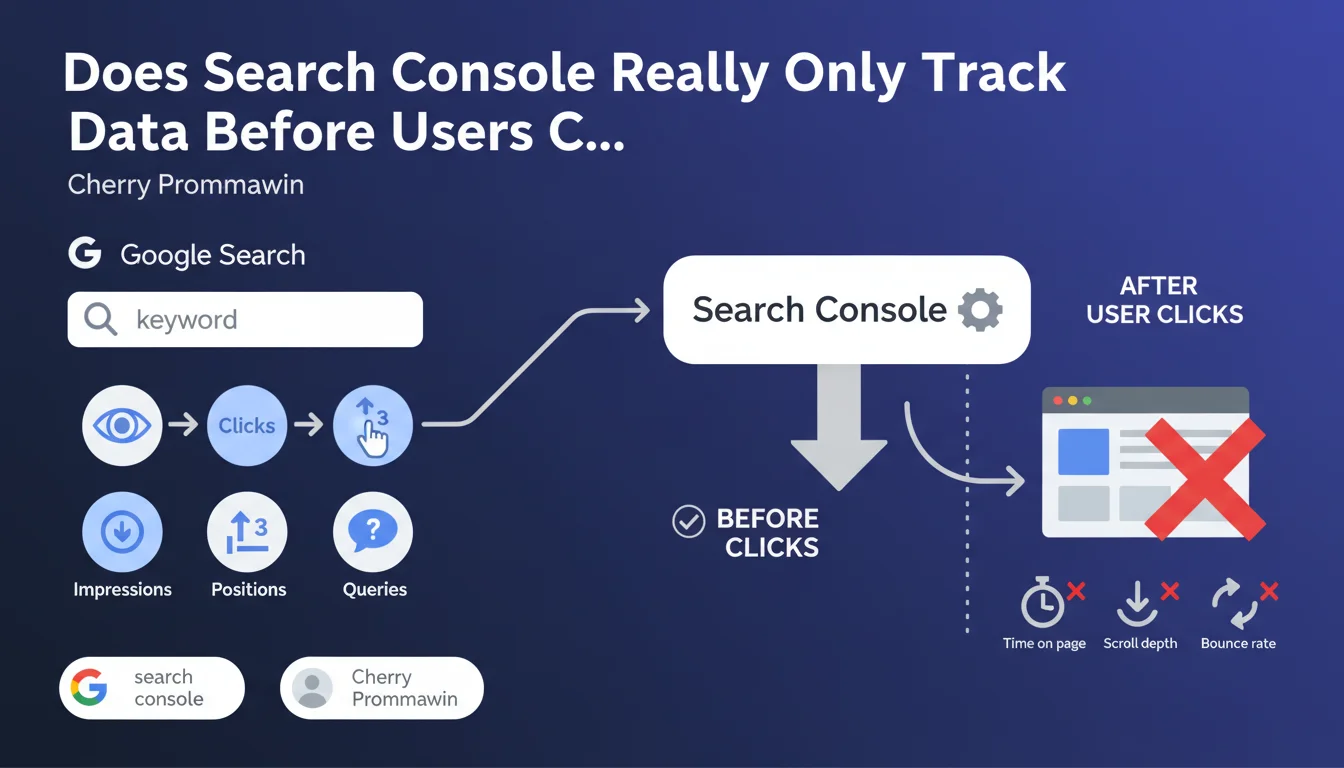
Google confirms that Search Console tracks only pre-click events: impressions, positions, queries, and clicks. Once a user lands on your site, Search Console captures nothing else — bounce rate, time spent, conversions remain invisible in this tool. In other words, GSC analyzes the performance of your search results in the SERPs, not the performance of your pages.
What you need to understand
What Is the Exact Scope of Search Console?
Search Console works like a SERP radar: it records everything that happens between the moment Google displays your result and the moment the user clicks. Impressions, average positions, key queries, click-through rates — that's its territory. The click is the boundary. After that, it's a blind spot.
This precision is not trivial. Many junior SEOs confuse GSC with Analytics, hoping to find engagement metrics there. Google clarifies: if you want to know what visitors do once they land on your site, use a different tool.
Why Does Google Insist on This Distinction?
Because confusion persists. Clients regularly ask why Search Console doesn't show bounce rate or session duration. The answer comes down to one word: scope. GSC covers pre-click, Analytics (or other analysis tools) covers post-click.
This clear boundary allows Google to focus Search Console on a specific objective: diagnosing organic visibility and technical issues that impact crawling, indexation, or ranking. Everything else falls under different logics.
What Concrete Data Can You Extract From GSC?
- Impressions: how many times your URL appears in search results, even if no one clicks
- Clicks: number of visits coming from Google Search
- Average position: average ranking of your page for each query (careful, this metric can be misleading if read out of context)
- Queries: keywords triggering the display of your page in the SERPs
- CTR: clicks-to-impressions ratio, reflecting the attractiveness of your snippet
All this data stops at the moment of the click. What happens after — immediate bounce, smooth navigation, conversion — completely escapes Search Console.
SEO Expert opinion
Is This Separation Consistent With What We See in Practice?
Yes, and it's even strictly enforced. In 15 years of practice, I've never seen Search Console bleed into post-click metrics. Google respects this boundary without exception. The only bridges between GSC and Analytics go through manual integrations or cross-exports — never through a native data merger.
That said, this clarity masks a trap: many junior SEOs overestimate Search Console's scope. They believe they'll find the key to user engagement there, when the tool says nothing about the real quality of traffic once on site.
What Nuances Should We Add?
The main nuance concerns CTR. Technically, it's a pre-click metric. But it indirectly reflects your page's promise: if your CTR collapses despite good positioning, it's often because title and description disappoint or lack differentiation. You're then diagnosing a packaging problem, not a content one.
Another point: Search Console only captures Google organic traffic. If your audience arrives via Bing, DuckDuckGo, direct links, or paid campaigns, GSC won't see anything. It's not exhaustive analytics, just a microscope pointed at Google Search.
When Does This Limitation Become Problematic?
When you want to correlate visibility with conversion. Imagine a well-ranked page with good CTR, but it doesn't convert. Search Console won't help you understand why — it doesn't see the bounce or the user journey. You need to cross-reference with Analytics, or even heatmapping tools.
Let's be honest: this separation is also a product strategy. Google wants you to use multiple tools — GSC for visibility, Analytics for engagement, Tag Manager for advanced tracking. This fragments the ecosystem, sometimes at the expense of simplicity.
Practical impact and recommendations
What Should You Actually Do With This Information?
First, stop expecting from Search Console what it cannot deliver. If you're looking to optimize engagement, time spent, or conversions, get out of GSC. Use Google Analytics 4, Matomo, or any other tool capable of tracking post-click events.
Next, fully leverage the pre-click territory. Search Console excels at identifying queries that generate impressions without clicks — in other words, missed opportunities. Low CTR on a strategic query signals a snippet or positioning problem.
What Mistakes Should You Avoid?
- Don't fail to cross-reference GSC with Analytics — you'll lose the complete funnel vision
- Don't interpret average position without looking at impression volume (position 3 on 10 monthly impressions is worthless)
- Don't ignore pages with high impressions but low CTR — that's wasted potential
- Don't confuse GSC clicks with Analytics sessions — counting methodologies differ slightly
- Never use raw GSC data without exporting — the web interface aggregates and simplifies, sometimes at the expense of granularity
How Should You Structure Your Analysis to Maximize Impact?
Create a two-phase workflow. First phase: identify in Search Console underperforming pages and queries (low CTR, floating positions, impressions without clicks). Second phase: switch to Analytics to analyze post-click behavior of visitors arriving via these queries.
This back-and-forth between pre-click and post-click enables you to diagnose the entire chain. A page can fail at the SERP level (poor snippet) or once the visitor arrives (disappointing content, invisible CTA). Without crossing both sources, you're navigating blind.
❓ Frequently Asked Questions
Search Console remplace-t-elle Google Analytics ?
Pourquoi y a-t-il parfois un écart entre les clics GSC et les sessions Analytics ?
Peut-on utiliser Search Console pour analyser le taux de rebond d'une page ?
Les données de Search Console incluent-elles le trafic provenant de Bing ou d'autres moteurs ?
Comment exploiter les impressions sans clics dans Search Console ?
🎥 From the same video 9
Other SEO insights extracted from this same Google Search Central video · published on 29/01/2025
🎥 Watch the full video on YouTube →
💬 Comments (0)
Be the first to comment.