
Official statement
Other statements from this video 9 ▾
- □ Search Console est-elle vraiment LA référence pour mesurer le trafic organique Google ?
- □ Search Console ne mesure-t-elle vraiment que les données avant l'arrivée sur le site ?
- □ Pourquoi les clics Search Console et les sessions Analytics ne correspondent-ils jamais ?
- □ Search Console traite-t-il vraiment les données de la même façon pour tous les sites ?
- □ Pourquoi Search Console et Google Analytics affichent-ils des données contradictoires ?
- □ Pourquoi Search Console et Analytics affichent-ils des écarts de trafic sur vos contenus non-HTML ?
- □ Pourquoi Search Console et Google Analytics affichent-ils des chiffres de trafic différents ?
- □ Faut-il s'inquiéter des écarts entre Search Console et Google Analytics ?
- □ Faut-il vraiment croiser les données de Search Console et Google Analytics pour optimiser son SEO ?
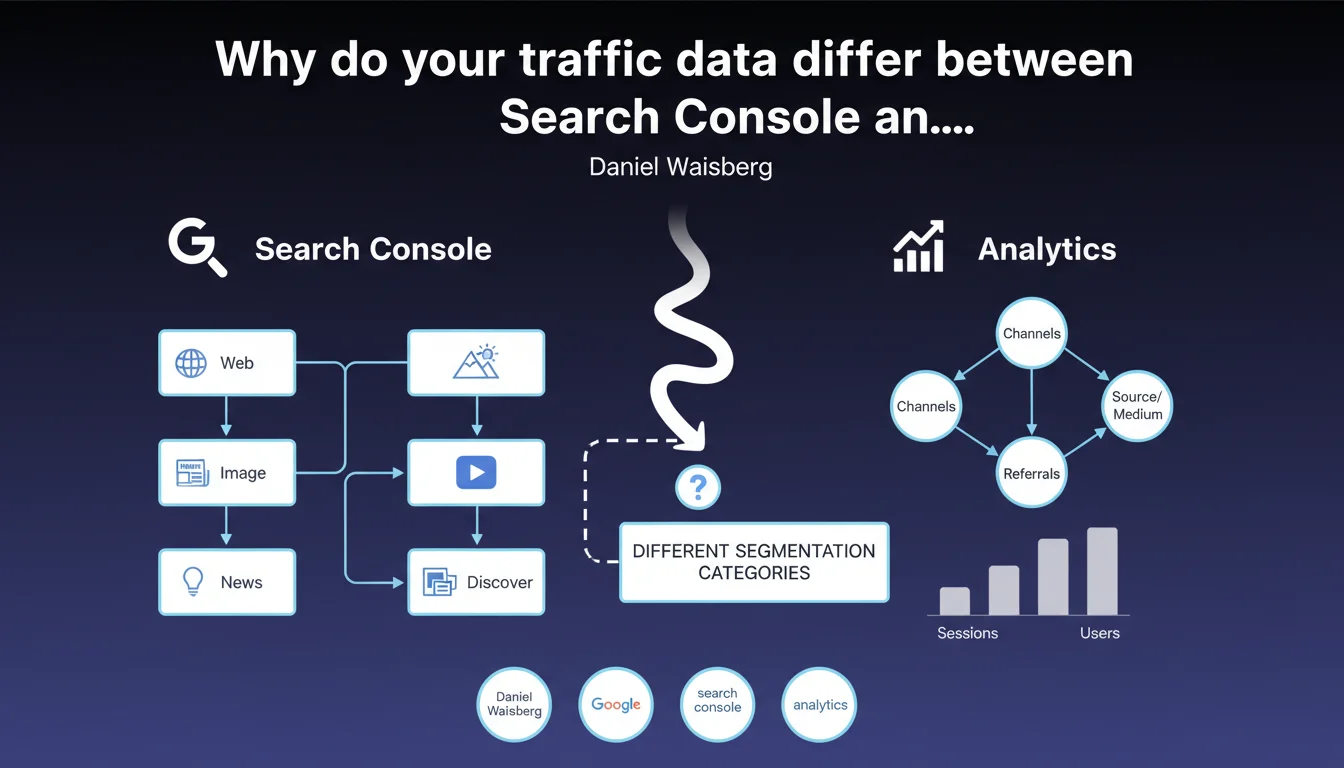
Search Console segments traffic into 5 distinct categories: Web, Image, Video, News, and Discover. This proprietary classification explains data discrepancies between GSC and Google Analytics, which use incompatible categorization logic.
What you need to understand
What exactly are these 5 segmentation categories?
Google Search Console divides incoming traffic according to five distinct search types: classic Web search, Image search, Video search, the News tab, and Google Discover. Each segment operates with its own display rules and its own relevance criteria.
Concretely? The same content can generate traffic from multiple segments simultaneously. A page optimized for video rich snippets will appear in both the Web tab AND the Video tab — two separate lines in your GSC reports.
Why don't these categories match those in Analytics?
Google Analytics classifies traffic according to its acquisition source (Organic Search, Social, Direct, Referral). Search Console, meanwhile, segments according to the type of search interface used by the user at the moment of click.
Result: a visitor who clicks from Google's Image tab will be counted as "Organic Search" in GA, but as "Image" in GSC. The two tools simply don't speak the same language.
What does this change for traffic analysis?
This difference in logic makes direct comparisons impossible. If you attempt to reconcile figures between GSC and GA to validate your data, you will systematically observe discrepancies — and that's normal.
The trap: interpreting these discrepancies as tracking bugs when they simply reflect two different ways of segmenting the same reality. You must accept that each tool answers a distinct question.
- Search Console answers: "Where does my traffic come from within the Google Search ecosystem?"
- Analytics answers: "How do my users arrive at my site, from all sources combined?"
- The two metrics are complementary, not redundant
- "Image" traffic in GSC can come from searches on desktop, mobile, or tablet — Analytics won't make this distinction
- Discover is invisible in GA unless you've configured it as a custom source
SEO Expert opinion
Does this segmentation really reflect user behavior?
Yes and no. Google genuinely needs airtight categories to measure the performance of each search interface. But from the user's perspective, these boundaries are artificial. Someone who switches from the Web tab to the Images tab within the same search session hasn't changed their intent — they're refining their query.
The problem: this technical segmentation doesn't capture hybrid journeys. A user who discovers your content via Discover, then returns three days later through a classic Web search, will be counted twice in two different segments. The notion of conversion becomes blurry.
Are all data divergences explained by this segmentation?
No, and this is where Google's messaging becomes evasive. Segmentation by search type explains part of the GSC/GA discrepancies, but not all of them. Gray areas remain: differences in time windows, different spam filters, privacy thresholds, reporting latency.
[To verify] Google never specifies how much difference is "normal". In the field, we commonly observe 10 to 25% differences between the two tools — is this solely due to segmentation? Impossible to confirm.
Should you prioritize Search Console data or Analytics data?
Let's be honest: neither source is "absolute truth". Search Console is more reliable for SERP performance (impressions, positions, CTR). Analytics is more reliable for post-click behavior (bounce rate, pages per session, conversions).
In practice? Use GSC to diagnose your visibility issues, optimize your titles and meta descriptions, and identify your keyword opportunities. Use GA to measure engagement, conversion funnels, and prove the ROI of your SEO actions. Cross-referencing the two gives you a complete picture, but don't expect arithmetic coherence.
Practical impact and recommendations
How do you correctly interpret GSC's segmented data?
Stop looking only at the global "Performance" report. Switch to the "Search type" tab and analyze each segment individually. You'll often discover that 80% of your traffic comes from Web search, but certain pages outperform in Images or Video.
These insights let you adjust your content strategy. If a page generates 40% of its traffic via the Images tab, invest in visual optimization: file size, format, alt text, ImageObject schema. If Discover sends you sporadic traffic, focus on freshness and trending topics.
What analysis mistakes should you avoid?
Never compare the "Web Search" total from GSC with the "Organic Search" total from GA expecting them to match. You'll waste time hunting for a bug that doesn't exist.
Another trap: neglecting minority segments. Even if Images represents only 5% of your traffic, that might be 5% of ultra-qualified users with superior conversion rates. Segment your GA analyses by creating custom segments for each Landing Page identified as strong in a specific search type.
What should you concretely implement to leverage this data?
Start with an audit of your underexploited channels. Export your GSC data by search type for the last three months, identify pages receiving impressions but few clicks in each segment, then optimize accordingly.
- Set up dedicated GSC reports for each search type (Web, Image, Video, News, Discover)
- Create custom segments in GA to isolate traffic from each Landing Page identified via GSC
- Analyze CTR gaps between different search types for the same page — revealing optimization issues
- Optimize specifically for each segment: alt text and compression for Images, VideoObject schema and thumbnails for Video, freshness and vertical images for Discover
- Don't attempt to reconcile GSC and GA figures — use each tool to answer different questions
- Document your typical data discrepancies to quickly detect real anomalies
❓ Frequently Asked Questions
Pourquoi le nombre de clics dans Search Console est-il toujours inférieur à celui d'Analytics ?
Le trafic Discover apparaît-il dans Google Analytics par défaut ?
Dois-je optimiser différemment pour chaque type de recherche dans GSC ?
Les positions moyennes dans GSC varient-elles selon le type de recherche ?
Comment savoir si mes écarts GSC/GA sont normaux ou révèlent un problème ?
🎥 From the same video 9
Other SEO insights extracted from this same Google Search Central video · published on 29/01/2025
🎥 Watch the full video on YouTube →
💬 Comments (0)
Be the first to comment.