
Official statement
Other statements from this video 13 ▾
- □ Pourquoi vos fiches produits n'apparaissent-elles pas dans les carrousels Shopping de Google ?
- □ Comment Google affiche-t-il les fourchettes de prix dans les rich snippets grâce au balisage Schema.org ?
- □ Comment alimenter efficacement l'infrastructure shopping de Google pour maximiser la visibilité produit ?
- □ Faut-il contrôler la fréquence de rafraîchissement de vos flux produits dans Merchant Center ?
- □ Google rafraîchit-il vos données produits Merchant Center plusieurs fois par jour ?
- □ Le rapport Merchant Listing dans Search Console va-t-il remplacer Merchant Center ?
- □ Pourquoi le prix et la disponibilité déterminent-ils la visibilité de vos fiches produits dans Google Shopping ?
- □ Schema.org vs feed specification : faut-il choisir entre les deux formats de données pour le shopping ?
- □ Comment Schema.org peut-il mieux gérer les variantes produits que les feeds ?
- □ Pourquoi Google refuse-t-il d'afficher vos produits si les prix ne correspondent pas entre le flux et le site ?
- □ Google applique-t-il vraiment les mêmes filtres de politique à Shopping qu'en recherche classique ?
- □ Le crawl budget limite-t-il vraiment les mises à jour de prix dans Google Shopping ?
- □ Pourquoi Google lance-t-il un rapport dédié aux impressions et clics produits dans Merchant Center ?
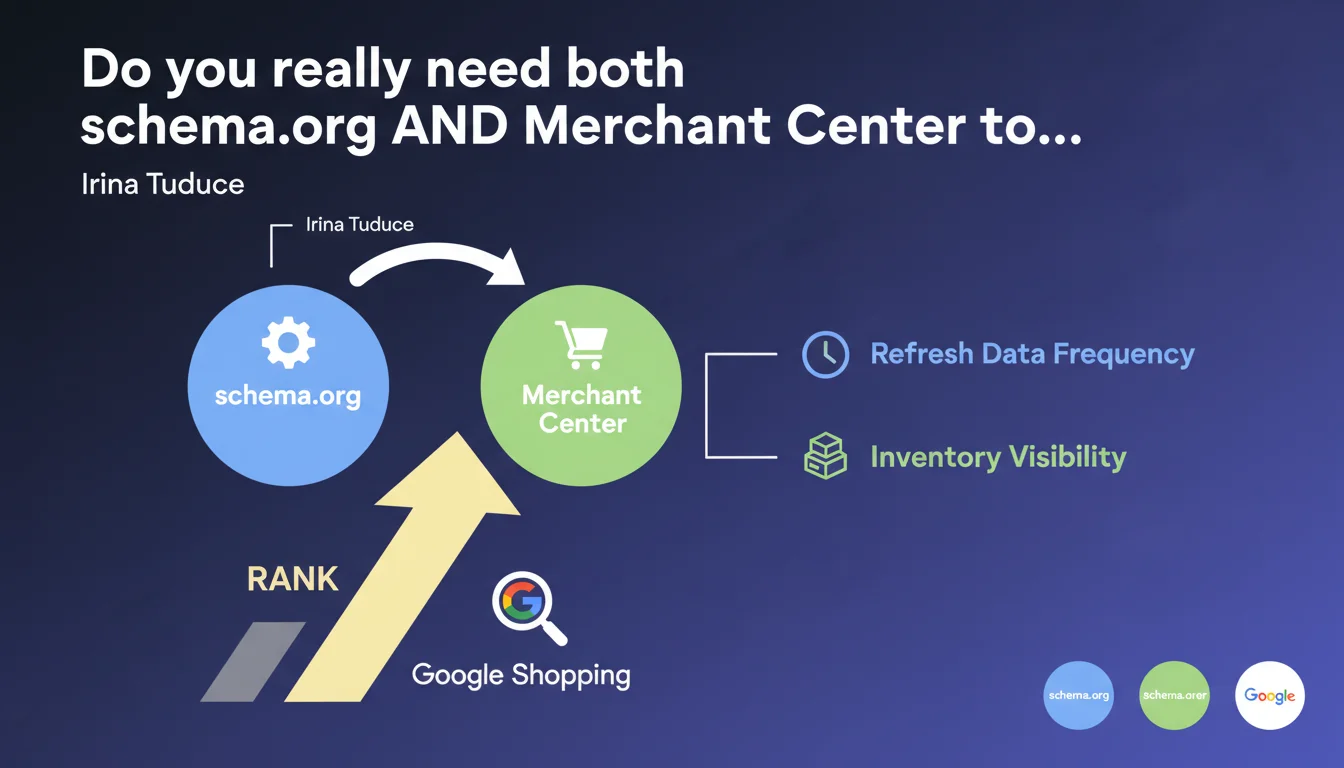
Google states that using both schema.org markup on your product pages AND Merchant Center is not redundant but complementary. This dual implementation allows you to appear in shopping results while controlling data refresh frequency. In practical terms: schema.org alone is not enough for shopping visibility.
What you need to understand
Why does Google insist on this dual entry?
Google's recommendation is based on a technical reality: schema.org and Merchant Center don't serve exactly the same functions in the shopping ecosystem. Structured markup on your pages allows Google to understand your inventory and display rich snippets in organic search. But to appear in the Shopping tab and advertising campaigns, going through Merchant Center remains mandatory.
This distinction is more than just administrative — it reflects two different technical pipelines at Google. Merchant Center gives you direct control over update frequency via product feeds, whereas schema.org crawling follows Googlebot's normal pace. For rapidly evolving catalogs (prices, stock), this difference is far from trivial.
Can schema.org markup alone be sufficient in some cases?
If your goal is limited to enriched organic results (product rich snippets in regular search results), then yes, schema.org alone does the job. But you're missing the entire Shopping dimension — dedicated tab, Google Lens, specific advertising surfaces. And let's be honest: for an e-commerce business, ignoring these channels means leaving half the playing field to your competitors.
Google isn't saying schema.org is useless — quite the opposite, it emphasizes complementarity. The markup strengthens semantic understanding of your pages, potentially improves organic CTR through stars and structured information, and serves as a safety net if your Merchant Center feed encounters technical issues.
What does Google mean by "controlling refresh frequency"?
Merchant Center lets you actively push your product updates: price changes, stock shortages, new listings. You upload a feed (XML, CSV, API) and Google ingests these changes much faster than it would re-crawl your entire product catalog. For a catalog of thousands of references that changes daily, this responsiveness is decisive.
With schema.org alone, you depend on crawl budget and how often Googlebot visits your pages. If Google only returns to certain product pages every 3-4 days, your data remains outdated in between. Merchant Center bypasses this delay — but only if your feed is properly configured and regularly updated.
- Schema.org = semantic understanding + organic rich snippets
- Merchant Center = Shopping presence + product update control
- The two are not interchangeable; they feed different surfaces
- Data freshness comes through Merchant Center, not schema.org crawling
- Ignoring either one cuts you off from part of available visibility
SEO Expert opinion
Is this recommendation consistent with what we observe in practice?
Yes, and it's even one of the rare points where Google is transparent about the need for dual implementation. Audits of e-commerce sites confirm that schema.org alone doesn't trigger appearance in the Shopping tab — you need a validated Merchant Center account and an active feed. Sites that try to do without one or the other see their visibility cut by an entire dimension.
However, Google remains quiet on one crucial detail: the priority between the two sources in case of conflict. If your Merchant Center feed shows one price and your schema.org shows another, which does Google display? Observations suggest Merchant Center takes priority for Shopping surfaces, but this is never explicitly stated. [To verify] in your own tests if you want to avoid inconsistencies.
What are the gray areas in this statement?
Google doesn't specify the exact behavior in case of desynchronization between the two sources. If your Merchant Center feed is up to date but your schema.org is outdated (or vice versa), what's the ranking impact? No public data on this. We assume Google cross-references the signals, but the relative weight of each source remains opaque.
Another blind spot: the crawl budget question. Google claims schema.org helps understanding, but does deploying comprehensive markup on 50,000 product pages actually improve your crawl, or is it marginal compared to Merchant Center? Field feedback is mixed. Some observe slight gains in new product indexing speed, others see no measurable difference. [To verify] via A/B testing if your catalog is large enough.
In what cases can this rule be circumvented?
Let's be clear: if you do e-commerce and want to exist in the Google Shopping ecosystem, there is no viable workaround. You can technically skip Merchant Center if your only goal is classic organic SEO, but then you're giving up a massive amount of potential traffic.
The only scenario where this recommendation is less critical: sites selling products not eligible for Google Shopping (certain banned categories, dematerialized services without physical inventory). There, schema.org alone might suffice, but that's a minority of cases. For 95% of e-commerce merchants, dual implementation is unavoidable.
Practical impact and recommendations
What do you need to implement concretely?
First, deploy schema.org Product markup on all your product pages. Minimum: name, image, offers (with price, priceCurrency, availability), aggregateRating if you have reviews. Use JSON-LD rather than microdata — it's cleaner to maintain and Google explicitly recommends it.
Next, configure Merchant Center with an automated product feed. Forget manual weekly CSV uploads — prioritize an API or e-commerce plugin that syncs in real time. Your feed must contain at minimum: id, title, description, link, image_link, price, availability, brand, gtin or mpn. Without these fields, Google rejects your products or displays them poorly.
Finally, and this is often overlooked: verify consistency between your two sources. An automated script that compares schema.org prices and Merchant Center prices can spare you product rejections or inconsistent displays. Platforms like Shopify or WooCommerce often have plugins that handle this sync, but verify manually anyway for edge cases (flash promotions, stock shortages).
What mistakes should you absolutely avoid?
First common mistake: incomplete or invalid schema.org markup. Google tolerates some approximations, but if you omit price or availability, your rich snippets won't display. Test your markup using Google's Rich Results Test — it's quick and catches 90% of issues.
Second trap: outdated Merchant Center feed. If your feed updates once a week but your prices change daily, you're violating Google's rules and risk account suspension. Automate as much as possible. A feed older than 30 days without updates triggers alerts in Merchant Center.
Third critical point: don't monitor Merchant Center errors. Google sends notifications when products are rejected, but if you never check the interface, you can lose 30% of your catalog without realizing it. Set up email alerts and check the Diagnostics tab at least once a week.
- Deploy schema.org Product (JSON-LD) on all product pages with price, availability, image
- Test markup via Rich Results Test and correct detected errors
- Configure Merchant Center with an automated feed (API or e-commerce plugin)
- Sync product updates in real time or at least daily
- Verify consistency of prices and stock between schema.org and Merchant Center
- Monitor Merchant Center errors and correct product rejections
- Include gtin or mpn to maximize display chances
- Never leave a Merchant Center feed inactive for more than 30 days
❓ Frequently Asked Questions
Peut-on utiliser uniquement Merchant Center sans balisage schema.org ?
À quelle fréquence faut-il mettre à jour le flux Merchant Center ?
Que se passe-t-il si le prix dans schema.org diffère de celui dans Merchant Center ?
Le balisage schema.org améliore-t-il le crawl budget ?
Quels champs sont obligatoires dans Merchant Center pour éviter les rejets ?
🎥 From the same video 13
Other SEO insights extracted from this same Google Search Central video · published on 05/09/2024
🎥 Watch the full video on YouTube →
💬 Comments (0)
Be the first to comment.