
Official statement
Other statements from this video 13 ▾
- □ Pourquoi vos fiches produits n'apparaissent-elles pas dans les carrousels Shopping de Google ?
- □ Comment Google affiche-t-il les fourchettes de prix dans les rich snippets grâce au balisage Schema.org ?
- □ Comment alimenter efficacement l'infrastructure shopping de Google pour maximiser la visibilité produit ?
- □ Faut-il contrôler la fréquence de rafraîchissement de vos flux produits dans Merchant Center ?
- □ Google rafraîchit-il vos données produits Merchant Center plusieurs fois par jour ?
- □ Faut-il vraiment utiliser schema.org ET Merchant Center pour ranker en shopping ?
- □ Pourquoi le prix et la disponibilité déterminent-ils la visibilité de vos fiches produits dans Google Shopping ?
- □ Schema.org vs feed specification : faut-il choisir entre les deux formats de données pour le shopping ?
- □ Comment Schema.org peut-il mieux gérer les variantes produits que les feeds ?
- □ Pourquoi Google refuse-t-il d'afficher vos produits si les prix ne correspondent pas entre le flux et le site ?
- □ Google applique-t-il vraiment les mêmes filtres de politique à Shopping qu'en recherche classique ?
- □ Le crawl budget limite-t-il vraiment les mises à jour de prix dans Google Shopping ?
- □ Pourquoi Google lance-t-il un rapport dédié aux impressions et clics produits dans Merchant Center ?
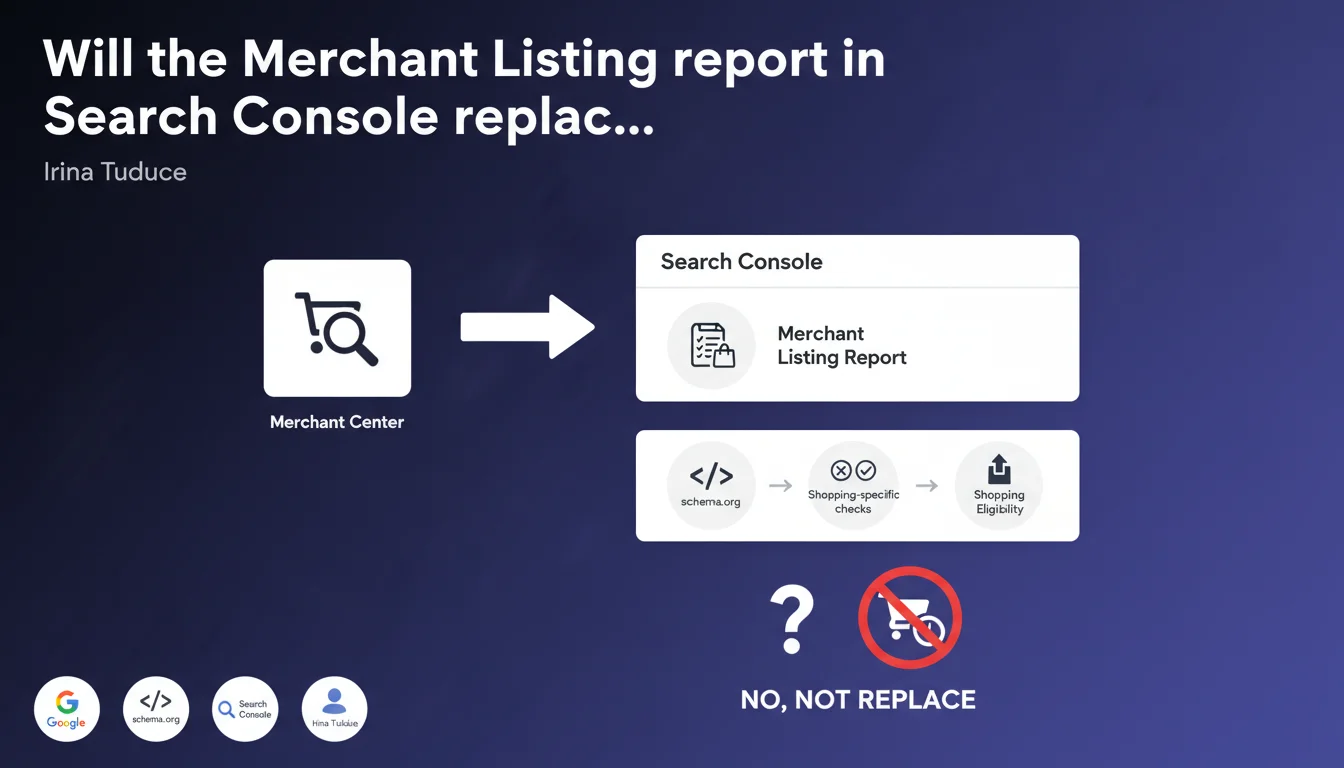
Google is integrating Merchant Center directly into Search Console through a new 'Merchant Listing' report. This report specifically analyzes schema.org markup related to shopping and flags errors blocking appearance in shopping results. In practice, e-commerce merchants can now diagnose their shopping visibility issues from a single location.
What you need to understand
What exactly does this integration change for e-commerce sites?
Until now, Merchant Center and Search Console operated in silos. A site could have flawless Product schema.org markup in Search Console but encounter rejections in Merchant Center for opaque reasons. This fragmentation created enormous friction in diagnosing why a product wasn't appearing in Google Shopping.
The new Merchant Listing report centralizes checks directly in Search Console. It scans schema.org markup and applies criteria specific to shopping results — price, availability, images, product identifiers. No more back-and-forth between two interfaces to understand what's wrong.
What specific types of errors does this report detect?
The report focuses on structural issues in schema.org markup that prevent shopping eligibility. We're talking about missing properties (price, availability, productID), incorrect formats, or inconsistencies between markup and visible content.
What's new is that Google applies strict shopping rules here, not just generic structured data validation. A product without a valid GTIN or MPN, for example, will be flagged — whereas this isn't mandatory for a standard rich result.
Does this integration completely replace Merchant Center?
No. Merchant Center remains necessary for product feeds and paid Shopping campaigns. This Search Console report is not a substitute — it's an extension that allows you to diagnose issues on your website side, particularly for organic listings.
Let's be honest: Google doesn't communicate clearly about the boundary between the two tools. We don't yet know if all Merchant Center validation criteria are covered by this report, or if certain checks remain exclusive to the dedicated interface.
- Diagnostic centralization: Shopping schema.org errors are now visible in Search Console
- Specific criteria: The report applies strict rules for shopping results, not just generic validation
- Complementarity: Merchant Center remains essential for feeds and paid campaigns
- Gray area: The exact relationship between the two tools still lacks official clarity
SEO Expert opinion
Does this announcement really solve the Merchant Center chaos?
On paper, yes. In reality, it depends on how the report is actually implemented. Merchant Center has always been a black box — rejections for 'image quality' without measurable criteria, account suspensions without detailed explanation. If this new report only catches basic schema.org errors, it won't address the real problem: arbitrary rejections on the feed side.
What interests me more is whether Google will finally align validation criteria between the two systems. Currently, a product can pass all Rich Results tests in Search Console and get rejected in Merchant Center for a phantom reason. If this report bridges that gap, that's real progress. [To verify] on the ground in the coming weeks.
Is the timing of this announcement coincidental?
Not at all. Google is increasingly pushing free organic listings in the Shopping tab — especially since the redesign of the tab to partial free-to-play. Making diagnostics easier encourages more sites to adopt Product markup without relying on a complete Merchant Center feed.
Concretely? Google wants to expand product coverage in its shopping results without depending solely on advertisers. It's consistent with a hybrid monetization strategy: attract organic traffic, then push merchants toward paid campaigns once they see volume.
What are the risks of this centralization?
The main danger is overweighting technical errors at the expense of actual quality. An automated report will focus on what's measurable: schema.org, formats, required properties. But it won't detect a product miscategorized, a misleading description, or poor image quality that technically meets specs.
And that's where it breaks down. Sites that clean up all report errors can still end up invisible in Shopping if their product content is mediocre. Google will never say it that bluntly, but a valid GTIN doesn't compensate for a sloppy product page.
Practical impact and recommendations
What should you verify first in this new report?
First step: connect your site in Search Console if you haven't already, and access the Merchant Listing section as soon as it appears (rollout can take a few weeks depending on accounts). Immediately check critical errors — those that block shopping indexing, not just cosmetic warnings.
Next, cross-reference with your Merchant Center data if you have an active feed. Inconsistencies between the two systems are frequent: a product validated in Search Console but rejected in Merchant Center, or vice versa. Note these discrepancies — they reveal Google's hidden criteria.
Which schema.org errors systematically block shopping eligibility?
Three properties are non-negotiable: price, availability, and productID (GTIN, MPN or SKU depending on category). Without them, your product will never pass shopping criteria, even if the rest of the markup is perfect.
Also watch out for currency inconsistencies — a price displayed in euros on the page but encoded in dollars in schema.org. Google detects this type of divergence and considers it an attempted manipulation. Same for inventory: if availability says 'InStock' while the page shows 'Out of Stock', you'll be penalized.
How do you ensure markup remains compliant long-term?
The real challenge is ongoing maintenance. An e-commerce catalog changes constantly — new products, price variations, temporary shortages. If your schema.org is generated manually or via a poorly configured plugin, errors will accumulate.
The ideal: automate markup generation from your product database. Modern CMS platforms (Shopify, WooCommerce, Magento) have dedicated extensions, but they often require adjustments to meet Google specs. Regular technical audits — at minimum quarterly — help detect drift before it impacts visibility.
- Enable the Merchant Listing report in Search Console as soon as it becomes available
- Prioritize fixing critical errors on price, availability, productID
- Verify consistency between schema.org and visible content (prices, currencies, stocks)
- Compare Search Console vs Merchant Center diagnostics to spot inconsistencies
- Automate markup generation from your product database
- Plan a quarterly technical audit of schema.org markup
- Test modifications on a product sample before large-scale deployment
❓ Frequently Asked Questions
Le rapport Merchant Listing est-il disponible pour tous les sites dans Search Console ?
Faut-il encore utiliser Merchant Center si ce rapport détecte toutes les erreurs ?
Les erreurs signalées dans ce rapport impactent-elles le référencement naturel classique ?
Corriger toutes les erreurs du rapport garantit-il l'apparition dans Google Shopping ?
Quelle fréquence de crawl Google applique-t-il pour mettre à jour ce rapport ?
🎥 From the same video 13
Other SEO insights extracted from this same Google Search Central video · published on 05/09/2024
🎥 Watch the full video on YouTube →
💬 Comments (0)
Be the first to comment.