
Official statement
Other statements from this video 9 ▾
- □ Pourquoi Google ignore-t-il vos balises meta placées dans le <body> ?
- □ Pourquoi Google refuse-t-il les balises canonical placées dans le <body> ?
- □ Le code HTML valide W3C améliore-t-il vraiment le référencement ?
- □ Pourquoi modifier les canonicals en JavaScript crée-t-il des signaux contradictoires pour Google ?
- □ Faut-il optimiser les hints de préchargement pour Googlebot ?
- □ Le markup sémantique HTML5 est-il vraiment inutile pour le SEO ?
- □ La performance web améliore-t-elle vraiment votre référencement naturel ?
- □ Google parse-t-il vraiment le HTML comme un navigateur ?
- □ Pourquoi Googlebot ignore-t-il vos hints de préchargement des ressources ?
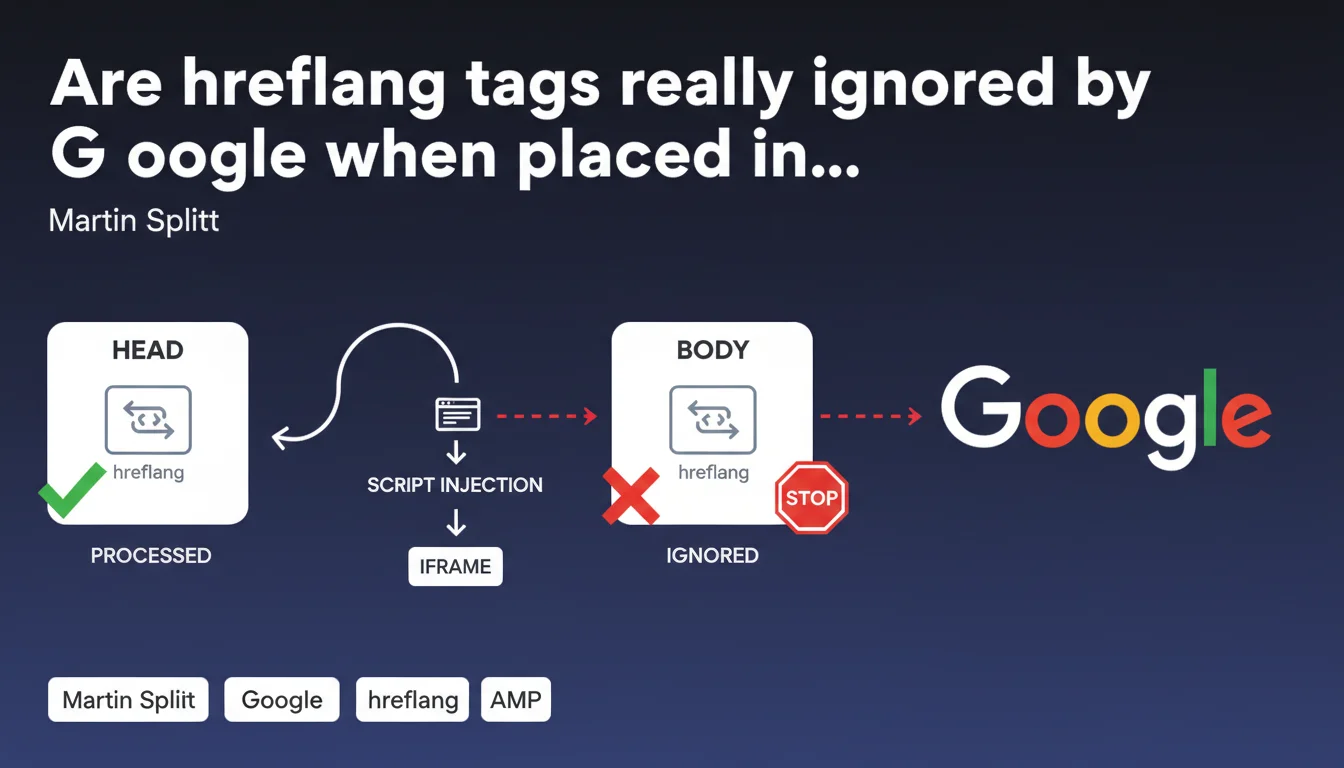
Google ignores link hreflang tags placed in the <body> — they must remain in the <head> to be recognized. This situation often occurs when a script injects an iframe that prematurely closes the <head>, moving hreflang tags into the document body.
What you need to understand
Why does Google ignore hreflang tags in the ?
The HTML specification requires that link hreflang tags be declared in the <head> section of the document. Google follows this standard strictly.
When a script injects an iframe or another element that prematurely closes the <head>, the browser automatically switches to <body> mode. The result: any hreflang tags that follow are technically in the <body> — and Googlebot simply ignores them.
How does this error occur in practice?
The typical example: a tag manager or third-party script injects an iframe directly into the <head>. The browser interprets this iframe as a <body> element and therefore automatically closes the <head>.
All <link rel="alternate" hreflang="..."> tags declared after this injection end up in the <body> — invisible to Google. The problem often goes unnoticed because the source code displayed in the inspector may look correct, but the actual DOM structure is broken.
What are the implications for multilingual SEO?
Without valid hreflang, Google can no longer correctly associate your language versions. You risk duplicate content across languages, incorrect geographic targeting, or even indexing of one version in the wrong region.
Martin Splitt confirms that Google's infrastructure detects and ignores these incorrectly placed tags — this isn't a bug, it's intentional behavior that conforms to web standards.
- link hreflang tags must be mandatory in the
<head> - A script that injects an iframe can prematurely close the
<head> - Google deliberately ignores hreflang placed in the
<body> - This error compromises multilingual SEO and can generate duplicate content
- The displayed source code can be misleading — verify the actual DOM structure
SEO Expert opinion
Does this statement match what we observe in real-world scenarios?
Yes, absolutely. We regularly see multilingual sites lose their hreflang markup due to poorly integrated third-party scripts. Google Search Console doesn't always surface this error explicitly, making diagnosis difficult.
The problem particularly affects sites that load cookie consent tools, chatbots, or advertising scripts synchronously in the <head>. The error often slips under the radar because the HTML source looks correct — but the DOM parsed by the browser is no longer valid.
Why doesn't Google show more flexibility?
Let's be honest: Google could technically parse hreflang tags wherever they appear. But strictly adhering to the HTML specification simplifies processing at scale.
If Google accepted hreflang in the <body>, it would need to handle all edge cases — duplicate tags between <head> and <body>, conflicting declarations, and more. The decision is therefore to stick to the standard, even if it penalizes hasty technical implementations.
Are there alternative solutions if the problem persists?
Yes. If fixing script injection in the <head> proves too complex or risky, you can switch to HTTP header hreflang or XML sitemap.
HTTP headers completely bypass the DOM structure problem. The sitemap lets you centralize all hreflang declarations in a separate file without touching HTML code. Both methods are officially supported and equally effective as <link> tags — provided they're correctly implemented.
<link> tags from your HTML to avoid conflicts.Practical impact and recommendations
How do you detect if your hreflang tags are in the ?
Use the DOM inspector in your browser (not the source code view). Look for your <link rel="alternate" hreflang> tags and verify they're properly nested under <head>, not <body>.
Quick test: open the DOM inspector, click on an hreflang tag, and navigate up the hierarchy. If you see <body> before <html>, you have a problem. Google Search Console's URL Inspection tool can also reveal missing hreflang in the final render.
What should you do if a third-party script breaks your ?
Identify the faulty script by temporarily disabling your third-party tags one by one. Once found, move its loading to asynchronous or after the <head> closes.
If the script must be in the <head>, ensure it doesn't inject anything that could be interpreted as a <body> element (particularly iframes). Some consent management tools offer specific loading modes to prevent this issue.
What alternative approaches should you implement if the problem is unsolvable?
Switch to HTTP headers or XML sitemap. HTTP headers require server access but guarantee your hreflang tags will never be affected by DOM structure.
The XML sitemap centralizes all your declarations in a separate file. It's particularly suited for large multilingual sites with hundreds of variants. Don't forget to declare the sitemap in your robots.txt and in Google Search Console.
- Verify the actual DOM structure using the browser inspector
- Identify third-party scripts that could prematurely close the
<head> - Place hreflang tags before any script that might inject an iframe
- Consider asynchronous loading for non-critical third-party scripts
- Test the URL in Google Search Console to validate hreflang detection
- If necessary, switch to HTTP headers or XML sitemap
- Never mix multiple hreflang declaration methods
<head> requires fine-grained control over resource loading order and DOM structure. On complex sites with many third-party scripts, this coordination can quickly become technical. Working with an SEO agency specializing in technical SEO allows you to precisely diagnose the source of the problem and implement the most suitable solution for your infrastructure — whether that's optimizing script load order or switching to an alternative method like HTTP headers.❓ Frequently Asked Questions
Les hreflang dans le sitemap XML sont-elles affectées par ce problème ?
Google Search Console signale-t-il explicitement ce type d'erreur ?
Peut-on utiliser JavaScript pour injecter les hreflang après chargement de la page ?
Si mes hreflang sont à la fois dans le <head> et le sitemap, laquelle Google privilégie-t-il ?
Combien de temps faut-il à Google pour détecter la correction après avoir replacé les hreflang dans le <head> ?
🎥 From the same video 9
Other SEO insights extracted from this same Google Search Central video · published on 26/02/2026
🎥 Watch the full video on YouTube →
💬 Comments (0)
Be the first to comment.