
Official statement
Other statements from this video 9 ▾
- □ Pourquoi Google ignore-t-il vos balises meta placées dans le <body> ?
- □ Pourquoi Google refuse-t-il les balises canonical placées dans le <body> ?
- □ Les balises hreflang dans le <body> sont-elles vraiment ignorées par Google ?
- □ Le code HTML valide W3C améliore-t-il vraiment le référencement ?
- □ Pourquoi modifier les canonicals en JavaScript crée-t-il des signaux contradictoires pour Google ?
- □ Le markup sémantique HTML5 est-il vraiment inutile pour le SEO ?
- □ La performance web améliore-t-elle vraiment votre référencement naturel ?
- □ Google parse-t-il vraiment le HTML comme un navigateur ?
- □ Pourquoi Googlebot ignore-t-il vos hints de préchargement des ressources ?
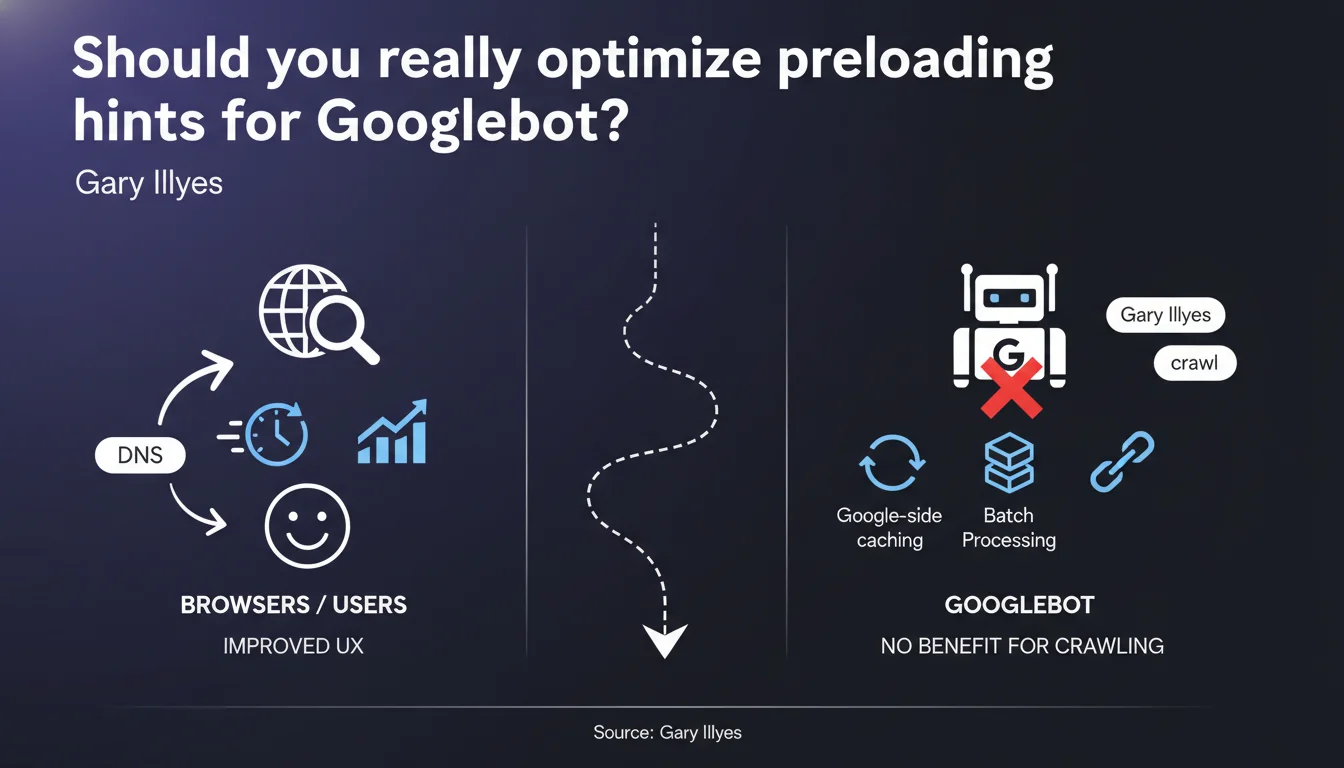
Google does not use (or uses very little) link hints like preload, prefetch, DNS prefetch or preconnect during crawling. Its infrastructure processes resources in batches and has its own caching mechanisms, which makes these browser optimizations useless for SEO. Keep using them for your visitors, but don't count on them to improve your indexation.
What you need to understand
Why does Google ignore these hints that browsers absolutely love?
The resource hints (preload, prefetch, DNS prefetch, preconnect) were designed to solve a specific browser problem: synchronous and sequential resource fetching. When a browser loads a page, it discovers CSS, then images referenced in that CSS, then fonts — a cascading process that slows down rendering.
Googlebot works radically differently. It doesn't load pages in real-time to display them to an impatient human. It processes millions of URLs in batches, has massive internal caching mechanisms, and faces no perceptible latency constraints. A 200ms delay to load a font? Completely irrelevant for indexation purposes.
What does this change concretely for crawling?
Absolutely nothing in the vast majority of cases. Hints like <link rel="preconnect"> or <link rel="dns-prefetch"> don't modify your page's HTML structure, don't make your resources more accessible, and don't influence indexable content.
Google will crawl your CSS, JS and images according to its own logic — determined by crawl budget, resource priority, and its ability to render the page. Whether it gains 50ms on a DNS lookup or not, it doesn't change the final outcome.
Why does Gary Illyes say "very little" rather than "never"?
Important nuance: he says Google doesn't use or barely uses these hints. This suggests there might be marginal or experimental cases where certain hints could be taken into account — without being documented or guaranteed.
Theoretically, Google could use these signals as prioritization indicators: "if a site preloads a critical resource, maybe it really matters". But in practice, no field observation confirms measurable impact.
- Resource hints are designed for browsers, not crawlers
- Googlebot processes resources in batches with internal cache, not in real-time
- No direct impact observed on indexation or ranking
- Continue using these hints for user experience, not for SEO
SEO Expert opinion
Is this statement consistent with what we observe in the field?
Completely. No serious case study has ever demonstrated that adding preconnect or dns-prefetch improves indexation rate, crawl frequency, or ranking. A/B tests conducted on large sites show that these optimizations impact Core Web Vitals (LCP, FID) — therefore user experience — but not the way Google explores the site.
The only case where I've seen SEO professionals get it wrong: believing that a preload on a critical CSS file would speed up rendering on Googlebot's side and therefore improve content "discoverability". Except Googlebot never needed these hints to load your CSS — it retrieves them anyway, in the order it deems relevant.
Are there any nuances or exceptions to know about?
Only one nuance: hints can indirectly influence SEO through user experience signals. If your LCP drops from 4s to 2s thanks to a well-placed preload, you improve Core Web Vitals, which is a slight but real ranking factor.
But be careful — this is a side effect, not a direct SEO mechanism. Google doesn't "read" your hints to decide whether to index a particular resource. It simply observes that your users have a better experience, which can marginally play into certain competitive contexts.
Should you remove them from your pages?
Absolutely not. These hints remain essential for user experience — and indirectly, good UX supports your SEO (bounce rate, time on site, conversions, behavioral signals). A preload on your critical CSS or a preconnect to your CDN saves precious milliseconds on load time.
Simply, don't sell them as an SEO optimization. Categorize them in your backlog as "front-end performance" or "Core Web Vitals", not as "indexation" or "crawl budget".
Practical impact and recommendations
What should you concretely do with these hints?
Keep using them, but for the right reasons. Your goal should be to optimize rendering on the browser side, not to seduce Googlebot. A preload on a critical font, a preconnect to your resource server, a dns-prefetch for an external script — all of this speeds up display for your visitors.
However, if you've invested time in fine-tuning these directives solely in hopes of improving your crawl or indexation, know that this effort was futile from pure SEO perspective. Redirect this energy toward optimizations that truly matter to Google: semantic HTML structure, internal linking, server response time, accessibility of critical resources.
What errors should you avoid when managing resource hints?
Classic mistake: over-using preload. Some sites preload 10 or 15 resources "just in case", which saturates bandwidth and paradoxically delays loading of actual critical resources. Google sees this, but it changes nothing about its crawl — however, it degrades user experience.
Another trap: believing that adding hints will compensate for structural problems. If your CSS is poorly optimized, if your server is slow, if your DOM is bloated, a preconnect won't save anything — neither on UX nor on SEO.
How do you verify that your configuration remains optimal?
Focus on Core Web Vitals measured by tools like PageSpeed Insights, Lighthouse, or CrUX data (Chrome User Experience Report). These are the metrics that reflect the real experience of your users — and indirectly, those that can influence your SEO.
On the crawling side, monitor server logs and Search Console to detect any budget or rendering issues. But never look for correlation with your resource hints — you won't find any.
- Use
preloadonly for 2-3 truly critical resources (above-the-fold CSS, primary font) - Place
preconnectto essential third-party domains (CDN, blocking analytics) - Keep
dns-prefetchfor secondary non-blocking domains - Never count on these hints to improve indexation or crawl
- Test UX impact with Lighthouse, not with your Google rankings
❓ Frequently Asked Questions
Les resource hints influencent-ils le crawl budget ?
Un preload sur un CSS critique améliore-t-il l'indexation du contenu ?
Dois-je supprimer mes resource hints pour alléger mon HTML ?
Pourquoi certains outils SEO recommandent-ils d'ajouter des hints ?
Les hints peuvent-ils indirectement aider mon SEO ?
🎥 From the same video 9
Other SEO insights extracted from this same Google Search Central video · published on 26/02/2026
🎥 Watch the full video on YouTube →
💬 Comments (0)
Be the first to comment.