
Official statement
Other statements from this video 7 ▾
- □ Pourquoi votre site peut-il être invisible pour Googlebot alors qu'il s'affiche parfaitement dans votre navigateur ?
- □ Comment vérifier si Googlebot crawle vraiment votre contenu JavaScript ?
- □ Pourquoi Google insiste-t-il sur la surveillance des erreurs serveur dans le rapport Statistiques d'exploration ?
- □ Faut-il vraiment s'inquiéter de chaque erreur de crawl remontée dans la Search Console ?
- □ Faut-il vraiment agir sur chaque erreur 500 détectée par Google dans le rapport de crawl ?
- □ Comment analyser vos logs serveur pour optimiser le crawl de Google ?
- □ Comment distinguer le vrai Googlebot des imposteurs dans vos logs serveur ?
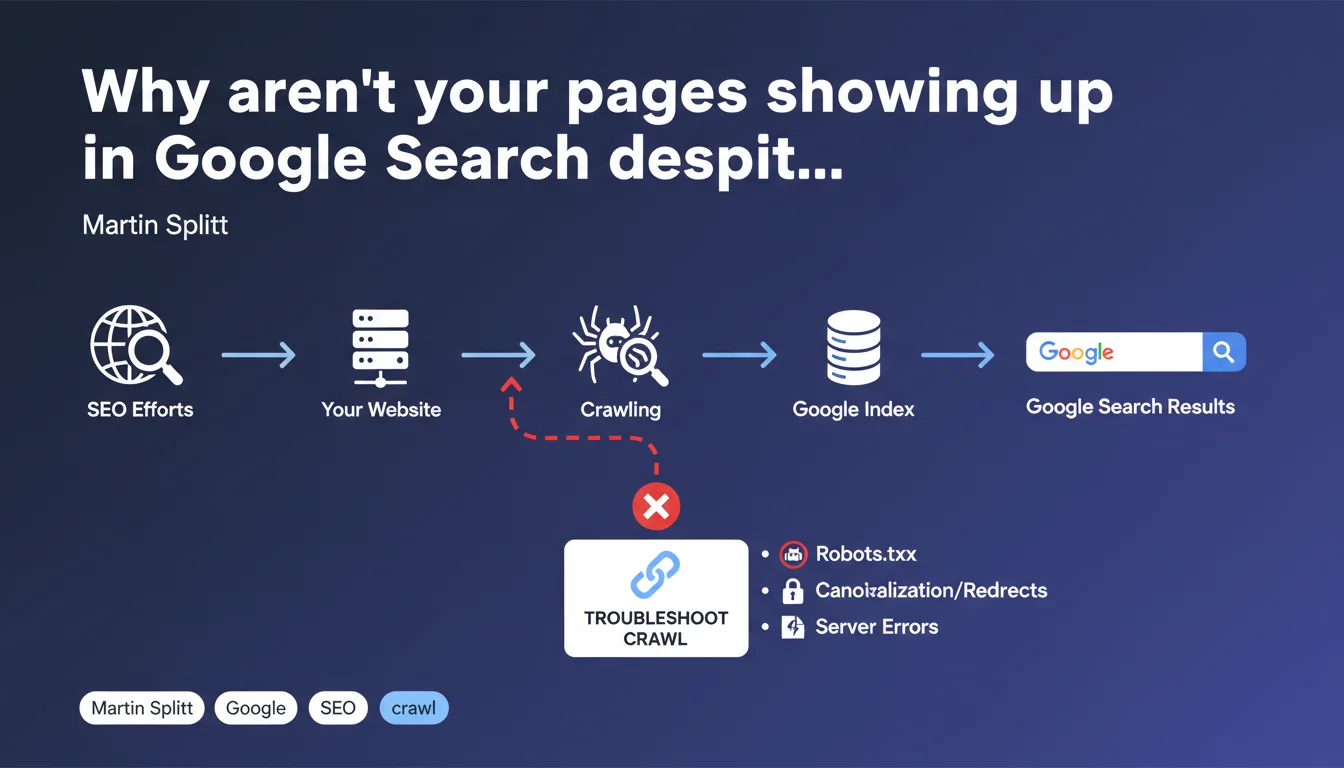
Google refocuses the debate: if your pages aren't appearing in search results, there's no point overthinking it — the problem lies at the crawl level. Martin Splitt reminds us that crawling is the mandatory gateway to the index, and that any troubleshooting must start with this often-neglected step.
What you need to understand
Is crawling really the only starting point for diagnosing an indexation problem?
Google leaves no ambiguity: if a page doesn't appear in Search, it's first and foremost a crawl problem. No indexation, no ranking, no rich snippet — none of that matters if Googlebot hasn't accessed your content.
This reminder from Martin Splitt addresses both beginners and experienced practitioners who sometimes tend to skip steps. We rush into canonical tags, XML sitemaps, or noindex directives, when the blockage is upstream.
What are the signs of a crawl problem rather than an indexation issue?
The distinction is crucial. A crawl problem means that Googlebot couldn't reach your page — or reached it only partially. An indexation problem, on the other hand, occurs after crawling: the page was explored, but Google decided not to include it in its index.
Typical symptoms of a crawl issue include: pages blocked by robots.txt, recurring 5xx server errors, timeouts, redirect chains, or inaccessible critical resources (CSS, JS). Search Console will give you precise clues via coverage reports and crawl logs.
Does Google offer a clear methodology for investigation?
The official documentation insists on a sequential approach: crawl → indexation → ranking → display. If step 1 fails, the following steps become void. Martin Splitt doesn't elaborate the complete methodology here — he simply reminds us of the priority order.
Concretely, this means your efforts on content, backlinks, or Core Web Vitals are sterile as long as crawling isn't operational. It's a wake-up call for those optimizing backwards.
- Crawling is the sine qua non condition to enter Google Search — no other optimization can bypass this step.
- Effective diagnosis begins by checking page accessibility via Search Console and server logs.
- Google favors a sequential approach: resolve crawl blockages before tackling indexation or ranking issues.
- External resources (CSS, JS, images) must also be crawlable for Google to properly understand the content.
SEO Expert opinion
Is this statement consistent with real-world observations?
Yes, and it's actually a daily finding. SEO audits regularly reveal sites where hundreds of strategic pages are blocked by misconfigured robots.txt rules or undetected server errors. Technical teams modify infrastructure without measuring the crawl impact.
But — and this is where it gets tricky — Google says nothing about situations where crawling is technically possible but simply doesn't happen. Limited crawl budget, orphaned pages, absence of internal linking: all cases where Googlebot could crawl but doesn't. [To verify] whether Google considers these situations as "crawl problems" in the strict sense.
What nuances should be added to this message?
Martin Splitt simplifies — intentionally. Crawling isn't a binary process (it works / it doesn't work). There are gray areas: partial crawling of a JavaScript page, critical resource crawling failures, delayed crawling of low-priority sections over several weeks.
Moreover, some indexation issues occur after successful crawling: duplicate content detected, quality deemed insufficient, automatic canonicalization. In these cases, troubleshooting doesn't start with crawl — it starts by understanding why Google chose not to index despite effective crawling.
In what cases does this rule not apply?
Let's be honest: there are exceptions where crawling isn't the first investigation point. If your site is already massively indexed but certain specific pages don't appear, the problem may be elsewhere: internal cannibalization, thin content, targeted manual penalty.
Similarly, for high-volume sites (e-commerce, media), crawl budget becomes a strategic issue. Google does crawl, sure, but not everything — and not often enough. In this context, optimizing crawling isn't enough: you also need to prioritize what should be crawled via internal linking, XML sitemaps, and redirect management.
Practical impact and recommendations
What concretely must you do to ensure your pages are crawlable?
First reflex: audit your robots.txt file. Check that no Disallow directive blocks critical sections of your site. The most frequent errors concern /blog, /product directories, or essential JS/CSS resources for rendering.
Next, analyze your server logs. Compare URLs crawled by Googlebot with those you want indexed. If strategic pages never appear in the logs, they're orphaned or poorly linked — Googlebot simply can't find them.
Finally, use the Live URL testing tool in Search Console. This tool simulates a crawl and immediately tells you whether Googlebot can access the page, load resources, and interpret rendered content. It's the fastest way to clear up doubt.
What errors must you absolutely avoid during troubleshooting?
Don't confuse "crawled" with "indexed". A page can be crawled without being indexed — and vice versa (Google can keep a page in the index even after a negative recrawl). Search Console displays these statuses distinctly: learn to read them correctly.
Also avoid multiplying manual indexation requests via Search Console if the problem is structural. If Googlebot can't crawl your page, forcing indexation will do nothing — fix the technical blockage first.
Last frequent error: neglecting internal linking. Even if your pages are technically crawlable, Googlebot must be able to discover them. A page with no incoming link from another site page is invisible — regardless of its quality.
- Verify that robots.txt doesn't forbid crawling of strategic sections
- Analyze server logs to identify pages not visited by Googlebot
- Test each critical URL with the "URL Inspection" tool in Search Console
- Ensure that JS/CSS resources essential for rendering are crawlable
- Control internal linking: each important page must be linked from at least one other page
- Monitor server errors (5xx) and timeouts in Search Console reports
- Optimize server response time to facilitate crawling (target < 200 ms TTFB)
- Avoid redirect chains (3xx) that slow down or interrupt crawling
Google's message is simple: no crawl, no Search. Before launching into advanced optimizations, make sure Googlebot can access your pages, load critical resources, and navigate through your internal linking.
These checks may seem basic, but they're the foundation of any SEO strategy. If your technical infrastructure presents complex blockages or if you lack resources to finely analyze your logs and Search Console reports, support from a specialized SEO agency can prove decisive in quickly identifying friction points and implementing lasting fixes.
❓ Frequently Asked Questions
Quelle est la différence entre un problème de crawl et un problème d'indexation ?
Comment vérifier si mes pages sont crawlées par Google ?
Le crawl budget est-il un problème pour tous les sites ?
Peut-on forcer Google à crawler une page plus rapidement ?
Les ressources externes (CSS, JS) doivent-elles être crawlables ?
🎥 From the same video 7
Other SEO insights extracted from this same Google Search Central video · published on 13/12/2024
🎥 Watch the full video on YouTube →
💬 Comments (0)
Be the first to comment.