
Official statement
Other statements from this video 7 ▾
- □ Comment vérifier si Googlebot crawle vraiment votre contenu JavaScript ?
- □ Pourquoi Google insiste-t-il sur la surveillance des erreurs serveur dans le rapport Statistiques d'exploration ?
- □ Faut-il vraiment s'inquiéter de chaque erreur de crawl remontée dans la Search Console ?
- □ Faut-il vraiment agir sur chaque erreur 500 détectée par Google dans le rapport de crawl ?
- □ Comment analyser vos logs serveur pour optimiser le crawl de Google ?
- □ Comment distinguer le vrai Googlebot des imposteurs dans vos logs serveur ?
- □ Pourquoi vos pages n'entrent-elles pas dans Google Search malgré tous vos efforts SEO ?
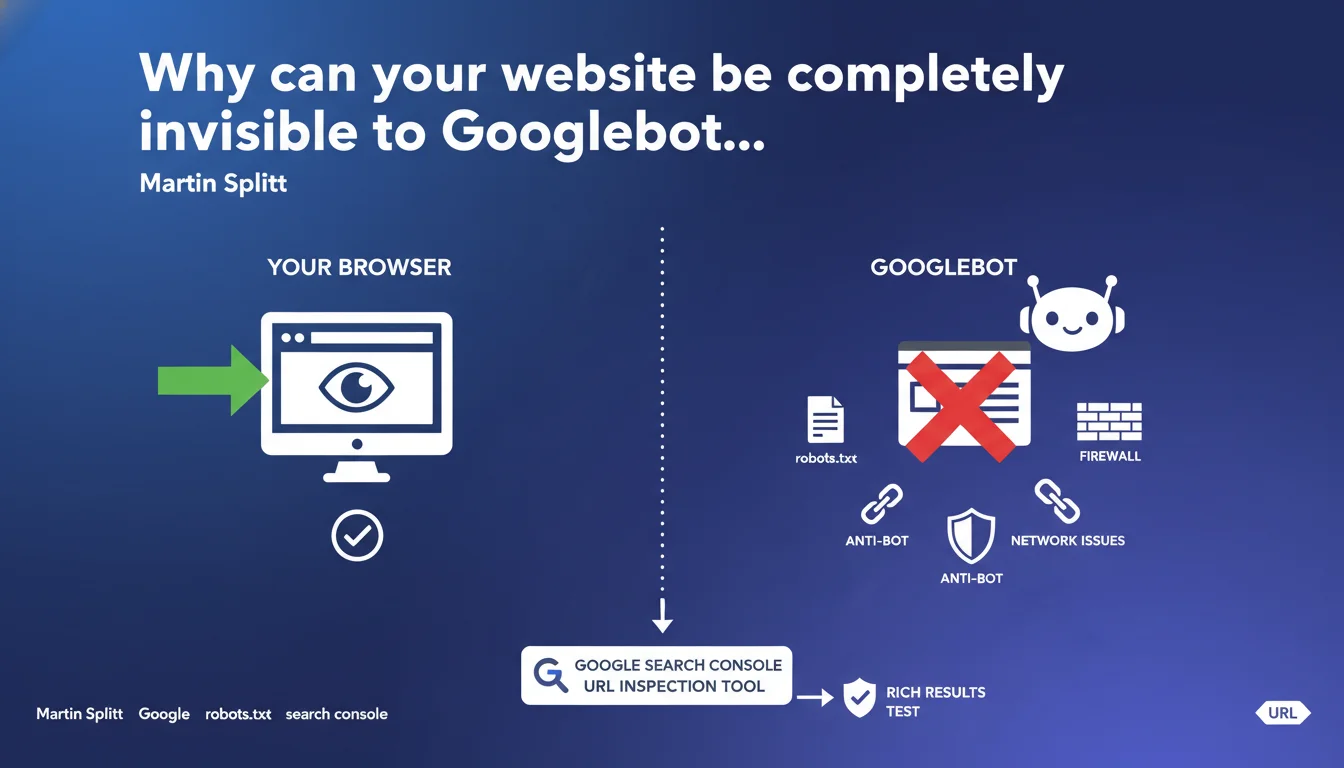
What works in your browser doesn't guarantee Googlebot can access it. robots.txt, firewalls, anti-bot protections, or network issues frequently block the crawler without your knowledge. Google Search Console's URL inspection tool remains your only reliable way to verify Googlebot's actual access to your pages.
What you need to understand
What's the gap between user experience and Googlebot experience?
When you test a page in Chrome or Firefox, you go through a standard user connection. Your browser sends standard HTTP headers, accepts cookies, executes JavaScript without restrictions.
Googlebot, meanwhile, arrives with its own user-agent, its own access rules, and confronts security layers that treat it differently from a human visitor. Result: a page perfectly accessible to you might return a 403, a 500, or simply never respond to the bot.
What are the most common blocks that escape manual testing?
The robots.txt remains the classic trap — a forgotten Disallow directive, a misplaced wildcard, and entire sections become invisible. But it's far from the only culprit.
Anti-bot protections like Cloudflare, Sucuri, or Imperva sometimes block Googlebot through overzealousness. Corporate firewalls, misconfigured WAFs, overly aggressive rate-limiters — all can reject the crawler without triggering any development-side alert.
And then there are network issues: timeouts, unstable DNS, misconfigured SSL certificates. Everything that goes unnoticed during a one-off manual test but hammers crawl performance over time.
Why is Search Console essential for diagnosing these blocks?
Because the URL inspection tool shows you exactly what Googlebot saw during its last crawl attempt. Not a simulation, not an approximation — the actual rendering, HTTP headers received, blocked resources.
The rich results test does the same for structured data. If Googlebot can't access your JSON-LD, you see it immediately. It's the only way to move past assumptions and work with facts.
- Browser accessibility ≠ Googlebot accessibility: these are two distinct technical paths
- Server-side blocks (robots.txt, firewall, anti-bot) escape standard manual testing
- Google Search Console's URL inspection tool is the only reliable diagnosis of Googlebot's actual access
- Network issues (timeouts, DNS, SSL) can block the crawler with no visible user-side symptoms
SEO Expert opinion
Is this distinction really that critical in practice?
Let's be honest: yes, and it's actually one of the most frequent sources of error in SEO audits. I've lost count of sites where the client swears that "everything works" because they see their pages online, while Googlebot is getting hit with 403s for weeks straight.
The problem is that standard monitoring tools don't detect these blocks. Uptime Robot, Pingdom — they test with standard user-agents. If your WAF treats Googlebot differently, you'll never see it in your usual dashboards.
Where are the blind spots in this recommendation?
Martin Splitt is right on the fundamentals, but he oversimplifies a bit. The URL inspection tool is a snapshot at a specific moment in time. If Googlebot is blocked intermittently — because your server saturates at certain hours, because a rate-limiter kicks in under load — the tool won't necessarily catch it.
And then there's the question of deferred JavaScript rendering. The tool shows you what Googlebot rendered, but not always under what conditions or with what delay. If your critical content loads after 10 seconds because an external dependency is slow, the tool might say "OK" when the actual crawl has timed out.
What field practices complement this recommendation?
Monitoring server logs remains essential. Search Console tells you if Googlebot could access, but not how many times it tried, or what HTTP errors it encountered before succeeding (or giving up).
And set up alerts on 5xx and 429 codes specifically for the Googlebot user-agent. Because these errors slip under the radar if you don't filter them explicitly. A 503 for a bot, nobody notices — until pages disappear from the index.
Practical impact and recommendations
What should you check first to avoid these blocks?
Start with robots.txt. Test it with the dedicated tool in Search Console, but don't stop there — also verify that the rules don't contradict each other. An Allow followed by an overly broad Disallow, it happens more often than you'd think.
Next, inspect your WAF and anti-bot configurations. If you're using Cloudflare, verify that Googlebot isn't subjected to JavaScript challenges. If you have Sucuri or Wordfence, make sure rate-limiting rules explicitly exempt legitimate crawlers.
Test your critical pages with the URL inspection tool after every server update. An Apache config change, an nginx modification, a new firewall rule — any of it can break Googlebot's access without warning.
Which technical errors cause the most false negatives?
Server timeouts are sneaky. Your page responds in 2 seconds for a user, but Googlebot waits 30 seconds for a blocking resource and gives up. Result: in Search Console, you see "Server Error" when technically, the page works.
Misconfigured SSL certificates (incomplete certification chain, obsolete cipher suites) can also block Googlebot while modern browsers compensate. And don't overlook DNS issues — a slow or unstable resolver can cause crawl failures intermittently.
How do you automate detection of these issues?
Set up active monitoring of server logs with a filter on the Googlebot user-agent. Configure alerts on 4xx/5xx codes, timeouts, refused connections. It takes some initial setup, but it's the only way to detect blocks in real time.
Schedule regular inspections via the Search Console API for your strategic pages. A script that triggers the inspection tool every week on your top landing pages and alerts you on any status change. It's doable, and it prevents nasty surprises.
- Check robots.txt with the Search Console tool AND manually to detect rule conflicts
- Audit WAF, anti-bot, and rate-limiting configurations to exempt Googlebot
- Test URL inspection after every server modification or deployment
- Monitor server logs filtered on Googlebot user-agent, with alerts on 4xx/5xx
- Verify complete SSL chain and cipher suites to avoid connection rejections
- Automate regular inspections via the Search Console API on critical pages
❓ Frequently Asked Questions
Est-ce que tous les outils anti-bot bloquent Googlebot par défaut ?
L'outil d'inspection d'URL suffit-il pour diagnostiquer tous les problèmes d'accès ?
Si mon site est accessible dans l'outil d'inspection, puis-je être sûr que Googlebot crawle correctement toutes mes pages ?
Comment savoir si mon robots.txt bloque réellement des pages importantes ?
Les problèmes d'accès de Googlebot impactent-ils immédiatement le classement ?
🎥 From the same video 7
Other SEO insights extracted from this same Google Search Central video · published on 13/12/2024
🎥 Watch the full video on YouTube →
💬 Comments (0)
Be the first to comment.