
Official statement
Other statements from this video 11 ▾
- □ L'attribut HTML loading=lazy suffit-il vraiment pour éviter les problèmes d'indexation ?
- □ Faut-il vraiment bannir le lazy loading des images hero ?
- □ Le lazy loading tue-t-il vraiment votre LCP ?
- □ Votre bibliothèque JavaScript custom sabote-t-elle l'indexation de vos images par Google ?
- □ Comment vérifier que votre lazy loading n'empêche pas Google de voir vos images ?
- □ Le lazy loading natif de WordPress améliore-t-il vraiment votre SEO ?
- □ Le lazy loading améliore-t-il vraiment votre SEO ou seulement vos performances ?
- □ Votre LCP est un bloc de texte chargé en JavaScript : comment Google le mesure-t-il vraiment ?
- □ Le lazy loading sabote-t-il l'indexation de vos images dans Google ?
- □ Les images en CSS sont-elles vraiment invisibles pour le référencement Google ?
- □ Infinite scroll et lazy loading : pourquoi Google insiste-t-il sur leur différence fondamentale ?
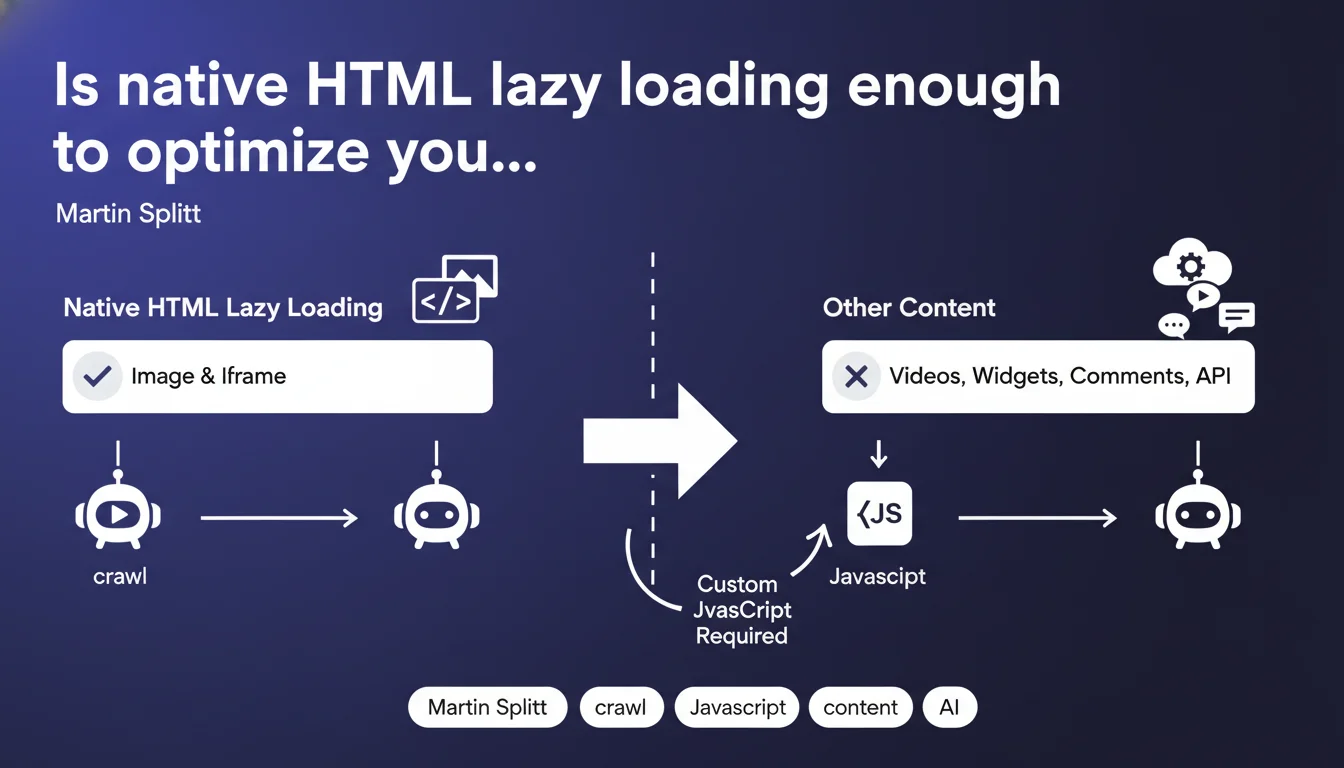
Native HTML lazy loading (loading="lazy") only works for images and iframes. If you lazy load videos, widgets, comments, or API content, you need custom JavaScript — and there, the SEO implications change completely.
What you need to understand
Why does this limitation of native lazy loading pose a problem?
Native HTML lazy loading is an elegant solution: you add loading="lazy" to an <img> or <iframe> tag, and the browser handles deferring the load until the element enters the viewport. No JavaScript, no third-party library, just standard HTML.
Except this approach only covers two types of elements. As soon as you want to lazy load native videos, third-party widgets, comment sections, or content loaded via API, you need to write custom JavaScript. And that's where it gets sticky: Googlebot must then execute this JS to access the content.
What's the difference between native lazy loading and JavaScript for crawling?
With native lazy loading, Googlebot loads all images and iframes marked with loading="lazy" during rendering, regardless of their position on the page. No risk of invisibility. The content is technically present in the initial DOM.
With custom JavaScript, you introduce an additional execution layer. If your script waits for a scroll, a user event, or a specific condition before injecting content, Googlebot might miss it — or see it with a delay, which impacts crawl budget and indexation.
What content is really affected by this limitation?
Concretely, all elements that are neither <img> nor <iframe>. <video> elements that load their source on demand, chat modules, complex carousels, paginated comment threads, recommended products loaded from an API.
If these elements contain textual content or links you want indexed, JavaScript lazy loading becomes a gamble. You gain performance on the user side, but risk losing visibility on the search engine side.
- Native HTML lazy loading applies only to <img> and <iframe>
- For any other content, you must use custom JavaScript
- Googlebot executes JavaScript, but with crawl budget and rendering constraints
- Content lazy loaded in JS can be invisible or indexed with delay if the script doesn't execute properly
- Content critical for SEO should never be lazy loaded in JavaScript
SEO Expert opinion
Is this statement consistent with what we observe in the field?
Absolutely. We regularly see sites that lazy load text blocks or links via JavaScript and end up with entire sections not indexed. The problem isn't that Googlebot can't execute the JS — it can — but that it doesn't always do so under the same conditions as a regular browser.
JS lazy loading often relies on scroll events or Intersection Observers. Googlebot, on the other hand, doesn't scroll. It renders the page in a default viewport, executes available JS, waits a few seconds, then moves on. If your script waits for a scroll that will never come, the content remains invisible.
What are the most common mistakes with JavaScript lazy loading?
The first is lazy loading structured text content — product descriptions, blog articles, FAQs. Even if Googlebot eventually sees it, you introduce unnecessary delay in indexation. Text should be in the initial HTML, period.
The second is lazy loading important internal links. If your secondary navigation, category filters, or pagination links are injected in JavaScript after an event, Googlebot may never discover them. Result: orphaned pages, broken internal linking, inefficient crawling.
In what cases does JavaScript lazy loading remain acceptable?
For purely decorative content or non-critical functionality: social media widgets, chat modules, ads, non-indexable footer content. Anything that adds nothing to SEO can be lazy loaded without hesitation.
For high-media-volume pages (galleries, portfolios), JavaScript lazy loading remains a viable option — provided that textual content and metadata remain in the initial DOM. The user gains loading time, and Googlebot indexes what matters.
Practical impact and recommendations
What should you prioritize checking on your current pages?
Start by auditing elements using JavaScript lazy loading. Inspect the DOM before and after JS execution, compare with what Googlebot sees in Search Console (URL inspection tool, "Rendered page" section).
If you find that textual content, internal links, or structured data appear only after JS execution, you have a problem. This content should be in the initial HTML, or lazy loaded via native tags if possible.
How do you migrate to native lazy loading when possible?
For images and iframes, it's simple: replace your lazy loading scripts with the loading="lazy" attribute. Remove dedicated JavaScript libraries (lozad, lazysizes, etc.) if that's all they do.
For other content, ask yourself the question: does this content really need to be lazy loaded? If it's critical text, the answer is no. If it's a non-indexable third-party widget, keep the JS but make sure it doesn't interfere with the rest.
What rules should you apply for SEO-safe lazy loading?
- Use loading="lazy" only on
<img>and<iframe> - Never lazy load structured text content (descriptions, articles, FAQs)
- Never lazy load important internal links (navigation, pagination, linking structure)
- If you lazy load in JavaScript, test rendering in Search Console and compare with initial DOM
- Avoid scripts that wait for scroll or user events before injecting SEO-critical content
- Favor Server-Side Rendering (SSR) or Static Site Generation (SSG) for JS frameworks
- Regularly audit your pages with Screaming Frog in JavaScript mode to detect invisible content
🎥 From the same video 11
Other SEO insights extracted from this same Google Search Central video · published on 21/08/2025
🎥 Watch the full video on YouTube →
💬 Comments (0)
Be the first to comment.