
Official statement
Other statements from this video 11 ▾
- □ L'attribut HTML loading=lazy suffit-il vraiment pour éviter les problèmes d'indexation ?
- □ Faut-il vraiment bannir le lazy loading des images hero ?
- □ Le lazy loading tue-t-il vraiment votre LCP ?
- □ Votre bibliothèque JavaScript custom sabote-t-elle l'indexation de vos images par Google ?
- □ Le lazy loading natif de WordPress améliore-t-il vraiment votre SEO ?
- □ Le lazy loading améliore-t-il vraiment votre SEO ou seulement vos performances ?
- □ Votre LCP est un bloc de texte chargé en JavaScript : comment Google le mesure-t-il vraiment ?
- □ Le lazy loading natif HTML suffit-il vraiment pour optimiser le crawl de vos pages ?
- □ Le lazy loading sabote-t-il l'indexation de vos images dans Google ?
- □ Les images en CSS sont-elles vraiment invisibles pour le référencement Google ?
- □ Infinite scroll et lazy loading : pourquoi Google insiste-t-il sur leur différence fondamentale ?
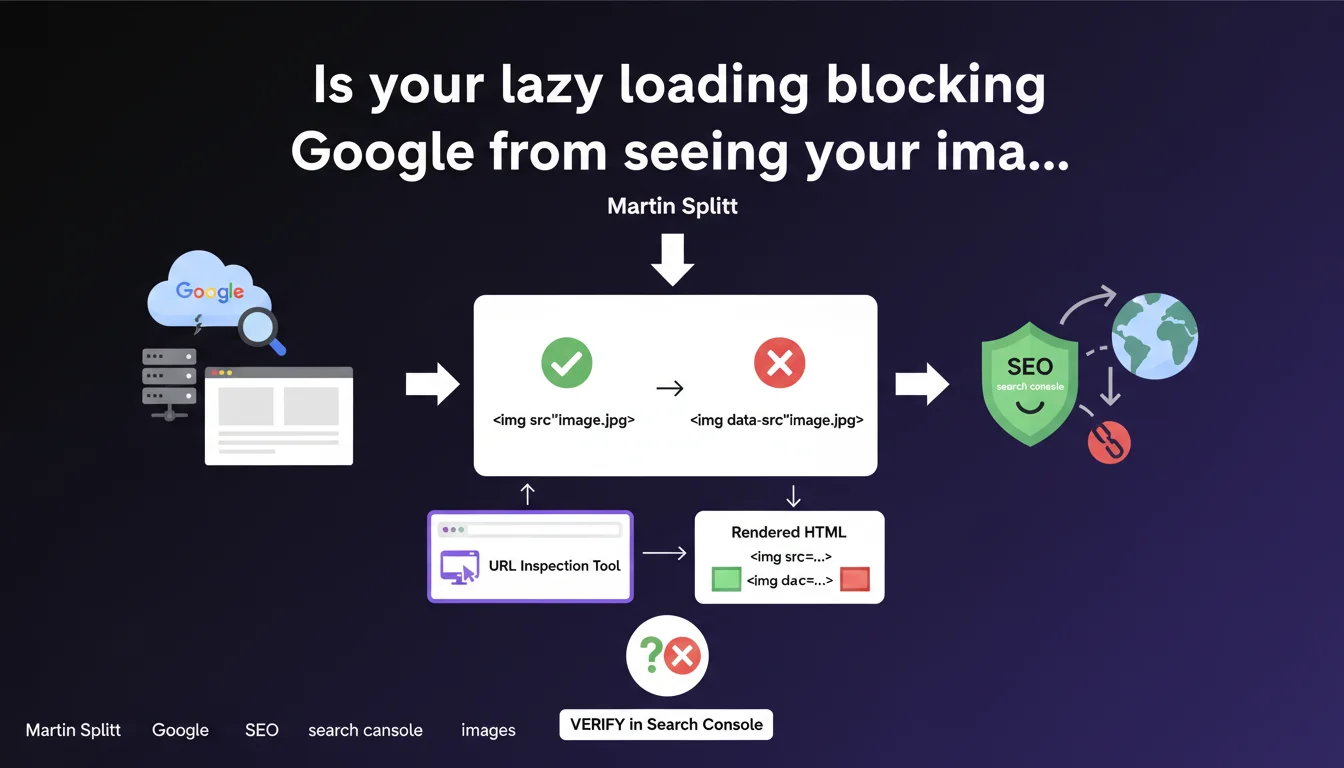
Google recommends inspecting the rendered HTML in Search Console to ensure that lazy loading works correctly. The decisive criterion: all image URLs must appear in the 'src' attribute of <img> tags, not solely in data-* attributes or JavaScript. If your images aren't visible in the HTML rendered by Googlebot, they likely won't be indexed.
What you need to understand
Why does Google insist on the 'src' attribute rather than other methods?
Because Googlebot does render JavaScript, yes, but with time and resource constraints. If your lazy loading relies on a script that waits for a scroll or interaction event, Google might never trigger the image loading.
The 'src' attribute in the rendered HTML guarantees that the image URL is accessible to Googlebot without depending on user events. It's the only way to ensure that Google actually sees your visuals — and can index them in Google Images.
What is rendered HTML and how does it differ from source code?
The source code is what you see when pressing Ctrl+U in your browser. The rendered HTML is what that code becomes after JavaScript execution.
Search Console shows you exactly this rendered HTML as Googlebot sees it. If your <img> tags still contain data-src attributes without the src being populated, it means lazy loading didn't work for Google.
What are the concrete risks of misconfigured lazy loading?
First risk: your images aren't indexed in Google Images, depriving you of a often underestimated traffic channel. Some e-commerce sites generate 10 to 15% of their organic traffic via Google Images.
Second risk: if your images play a role in understanding the content — typically infographics, diagrams, explanatory screenshots — Google might not fully understand your page. Result: worse rankings on queries where visual content matters.
- The URL inspection tool in Search Console is your best ally for diagnosing these problems
- Verify that all image URLs appear in the 'src' attribute, not in data-src, data-lazy, or other attributes
- Native lazy loading (
loading="lazy") is supported by Google and poses no indexation issues - Third-party JavaScript solutions must be systematically tested as they can introduce delays or conditions that Googlebot doesn't meet
SEO Expert opinion
Is this recommendation truly new or just a reminder?
It's mostly a timely reminder. Martin Splitt has been discussing this topic since at least 2019, but it's clear that many sites continue to implement lazy loading incorrectly.
What's changing is that Search Console now displays rendered HTML more clearly. Google is making diagnosis easier — but the problem remains recurring, especially on sites that pile up WordPress plugins or use front-end frameworks without really understanding what's happening under the hood.
Are all lazy loadings equal from an SEO perspective?
Absolutely not. Native lazy loading — <img src="image.jpg" loading="lazy"> — works perfectly with Googlebot. It loads the image when rendering, but the browser delays downloading it until it's near the viewport. For Google, the URL is immediately visible in the src.
JavaScript solutions, on the other hand, can be problematic. Many wait for a scroll or IntersectionObserver event to replace data-src with src. If Googlebot doesn't trigger this event — or if it doesn't leave enough time for the script to execute — the image remains hidden.
Should you abandon JavaScript solutions in favor of native lazy loading?
Not necessarily, but favor native when possible. It's been supported by all modern browsers since 2020, and poses no SEO risk.
If you must use a JavaScript solution — to handle special cases, advanced responsive behavior, or because your framework requires it — systematically test with Search Console. And if possible, implement fallback logic that places at least a placeholder URL in the src, even low resolution, to guarantee Google sees something.
Practical impact and recommendations
How do you audit your site's lazy loading in Search Console?
Open the URL inspection tool, paste a URL with lazy-loaded images, run a live test. Once rendering is complete, click "View crawled page" then "HTML".
Press Ctrl+F and search for your <img tags. Check if the src attribute contains the final image URL, not a placeholder, not a transparent gif, not nothing. If you still see data-src or data-lazy without src being filled, it's failed.
What errors should you avoid when implementing lazy loading?
First classic mistake: leaving src empty or with a 1×1 transparent placeholder. Some plugins do this to avoid double loading, but Google will never see the actual image if JavaScript doesn't execute correctly.
Second mistake: lazy loading everything, including images above the fold. Google explicitly recommends not lazy loading immediately visible images — it's also bad practice for Core Web Vitals (LCP). Reserve lazy loading for images further down the page.
Third mistake: not testing after each plugin or theme update. A minor change can break your implementation and make your images disappear from Google's index for weeks without you noticing.
What should you do if your images don't appear in the rendered HTML?
If the issue comes from a WordPress plugin, start by checking if there's an option to disable lazy loading or switch to native mode. Many recent plugins now offer this choice.
If you're on a JavaScript framework (React, Vue, Next.js), make sure that server-side rendering (SSR) or static generation (SSG) includes proper <img> tags with complete src attributes. Lazy loading can be applied afterward, but the basic HTML structure must be clean from the first render.
- Test at least 5 to 10 representative URLs of your site in Search Console's URL inspection tool
- Verify that all critical images (products, infographics, diagrams) have their URL in the
srcattribute of the rendered HTML - Favor native lazy loading (
loading="lazy") for non-critical images - Never lazy load images visible above the fold (Above The Fold)
- Set up regular monitoring after each technical update or plugin change
- Also test your images in Google Images by searching
site:yourdomain.comto verify they're properly indexed
🎥 From the same video 11
Other SEO insights extracted from this same Google Search Central video · published on 21/08/2025
🎥 Watch the full video on YouTube →
💬 Comments (0)
Be the first to comment.