
Official statement
Other statements from this video 11 ▾
- □ Le poids du contenu varie-t-il selon son emplacement en HTML et en PDF ?
- □ Google dépend-il vraiment d'Adobe pour indexer vos PDF ?
- □ Google indexe-t-il vraiment le code source comme du texte ordinaire ?
- □ Pourquoi les fichiers de code source peinent-ils à se classer dans Google ?
- □ Faut-il vraiment arrêter de stocker tous vos PDF dans un dossier /pdfs/ ?
- □ Pourquoi Google n'indexe-t-il jamais une image isolée sans page d'hébergement ?
- □ Google indexe-t-il vraiment les images et vidéos différemment du texte ?
- □ Google filtre-t-il les données personnelles avant indexation ?
- □ L'extension de fichier (.html, .php, .txt) a-t-elle un impact sur le référencement Google ?
- □ Google indexe-t-il vraiment tous vos fichiers XML ?
- □ Peut-on vraiment indexer des fichiers JSON et texte brut sans méta-données ?
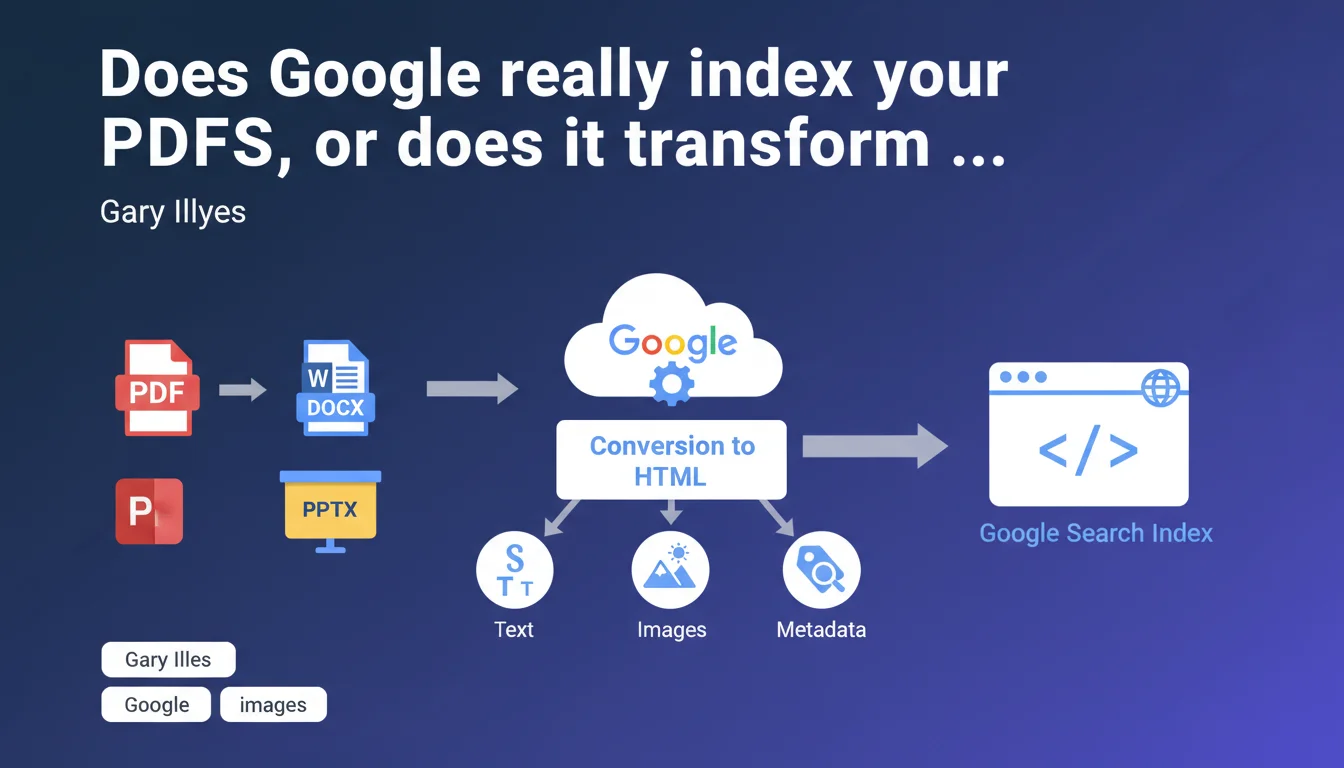
Google never indexes PDF files directly. Every document — PDF, Word, PowerPoint — goes through conversion to HTML before entering the index. This transformation extracts text, images, and metadata, which can impact how your content is understood and ranked.
What you need to understand
Why does Google convert PDFs to HTML instead of indexing them directly?
The reason is straightforward: uniform processing. Google operates with an HTML-based index. Rather than developing separate indexing systems for each proprietary format, the engine converts everything to HTML before moving on to semantic analysis and ranking.
This approach also makes it possible to cleanly extract metadata, text, and images without running into the quirks of each format. A PDF can contain layers, annotations, embedded fonts — elements that have no direct equivalent in Google's index.
What does this actually mean for the SEO of your documents?
It means that the internal structure of your PDF matters enormously. If your document is poorly tagged (no selectable text, scanned images without OCR, missing metadata), the conversion to HTML will be flawed. Google risks missing entire sections of your content.
Conversely, a well-structured PDF — with hierarchical headings, real text, alt tags on images — will facilitate extraction and improve your visibility. This is where many sites lose rankings without understanding why.
Do all proprietary formats receive the same treatment?
Yes. Word, PowerPoint, Excel, Pages — all go through this conversion. Gary Illyes doesn't detail the exact process, but we know Google uses internal converters to transform these formats into usable HTML.
Concretely, this means your PowerPoint presentation will be indexed as a series of HTML pages. If it contains text in comment zones or invisible notes, Google may or may not extract them — there is no official guarantee on this.
- Google never indexes PDFs directly — everything goes through HTML conversion
- The process also applies to Word documents, PowerPoint, Excel and other proprietary formats
- The conversion extracts text, images, and metadata, but extraction quality depends on the structure of the source document
- A poorly tagged or scanned-without-OCR PDF will be partially or poorly indexed
- Metadata (title, author, description) play a role in how Google understands content
SEO Expert opinion
Is this statement consistent with what we observe in practice?
Absolutely. For years, SEOs have observed that well-structured PDFs rank better than scans or poorly formatted documents. This statement confirms what we knew empirically: Google doesn't read the PDF "natively," it transforms it.
It also explains why some PDFs appear in SERPs with truncated excerpts or incorrect metadata. If the conversion fails to properly extract information, Google works with what it has — and that can result in anything.
What nuances should we add to this claim?
Gary Illyes remains vague about the depth of extraction. Does Google retrieve annotations, hidden layers, EXIF metadata from embedded images? [To verify] — no official documentation clarifies this.
Similarly, nothing indicates whether Google respects PDF/UA (accessibility) structure tags. In theory, a well-tagged PDF with semantic tags should facilitate conversion. In practice, no one knows if Google actually exploits this information or simply does basic parsing.
In what cases could this rule cause problems?
If you publish complex documents with tables, charts, diagrams, the HTML conversion can butcher the layout. Google will extract the text, but the logical structure — the element that gives content meaning — risks being lost.
Another case: protected or encrypted PDFs. If Google can't open the file to convert it, it simply won't index it. Same for PDFs behind forms or paywalls — conversion will never happen.
Practical impact and recommendations
What should you do concretely to optimize your PDFs?
First step: ensure your PDF contains selectable text. If it's a scan, run it through a quality OCR tool before publication. Google can attempt to do it, but better to control the result yourself.
Next, fill in the document metadata: title, author, description, keywords. This information is extracted during conversion and can influence ranking. A PDF without metadata is like an HTML page without a title tag.
Third point: structure your document with hierarchical headings. If you use H1, H2, H3 styles in Word before converting to PDF, Google will better understand the logical structure. It's semantic markup, document software version.
What mistakes should you absolutely avoid?
Never publish a PDF generated from images without OCR. It's a guarantee of catastrophic indexing. Google will only see a series of image blocks without exploitable text.
Also avoid PDFs that are too heavy with hundreds of pages. If the document is 50 MB, Google may decide not to crawl it entirely or abandon it mid-way. Break it into smaller files if possible.
Last common mistake: not testing the conversion. Open your PDF in a reader, try to copy-paste the text. If it doesn't work properly, Google will face the same difficulties.
- Verify the PDF contains selectable text (not just scanned images)
- Fill in the document metadata (title, author, description) before publication
- Use a heading structure (H1, H2, H3) to facilitate semantic extraction
- Add alt tags to images embedded in the PDF (if the format allows)
- Limit the file size to prevent crawl abandonment
- Test text selection manually to detect extraction issues
- Avoid password protection or encryption that blocks Google access
❓ Frequently Asked Questions
Google peut-il indexer un PDF protégé par mot de passe ?
Les images dans un PDF sont-elles indexées par Google ?
Un PDF scanné sans OCR peut-il être indexé ?
Les métadonnées d'un PDF influencent-elles le classement ?
Faut-il préférer HTML ou PDF pour du contenu à forte valeur SEO ?
🎥 From the same video 11
Other SEO insights extracted from this same Google Search Central video · published on 08/09/2022
🎥 Watch the full video on YouTube →
💬 Comments (0)
Be the first to comment.