
Official statement
Other statements from this video 11 ▾
- □ Google indexe-t-il vraiment vos PDF ou les transforme-t-il d'abord ?
- □ Google dépend-il vraiment d'Adobe pour indexer vos PDF ?
- □ Google indexe-t-il vraiment le code source comme du texte ordinaire ?
- □ Pourquoi les fichiers de code source peinent-ils à se classer dans Google ?
- □ Faut-il vraiment arrêter de stocker tous vos PDF dans un dossier /pdfs/ ?
- □ Pourquoi Google n'indexe-t-il jamais une image isolée sans page d'hébergement ?
- □ Google indexe-t-il vraiment les images et vidéos différemment du texte ?
- □ Google filtre-t-il les données personnelles avant indexation ?
- □ L'extension de fichier (.html, .php, .txt) a-t-elle un impact sur le référencement Google ?
- □ Google indexe-t-il vraiment tous vos fichiers XML ?
- □ Peut-on vraiment indexer des fichiers JSON et texte brut sans méta-données ?
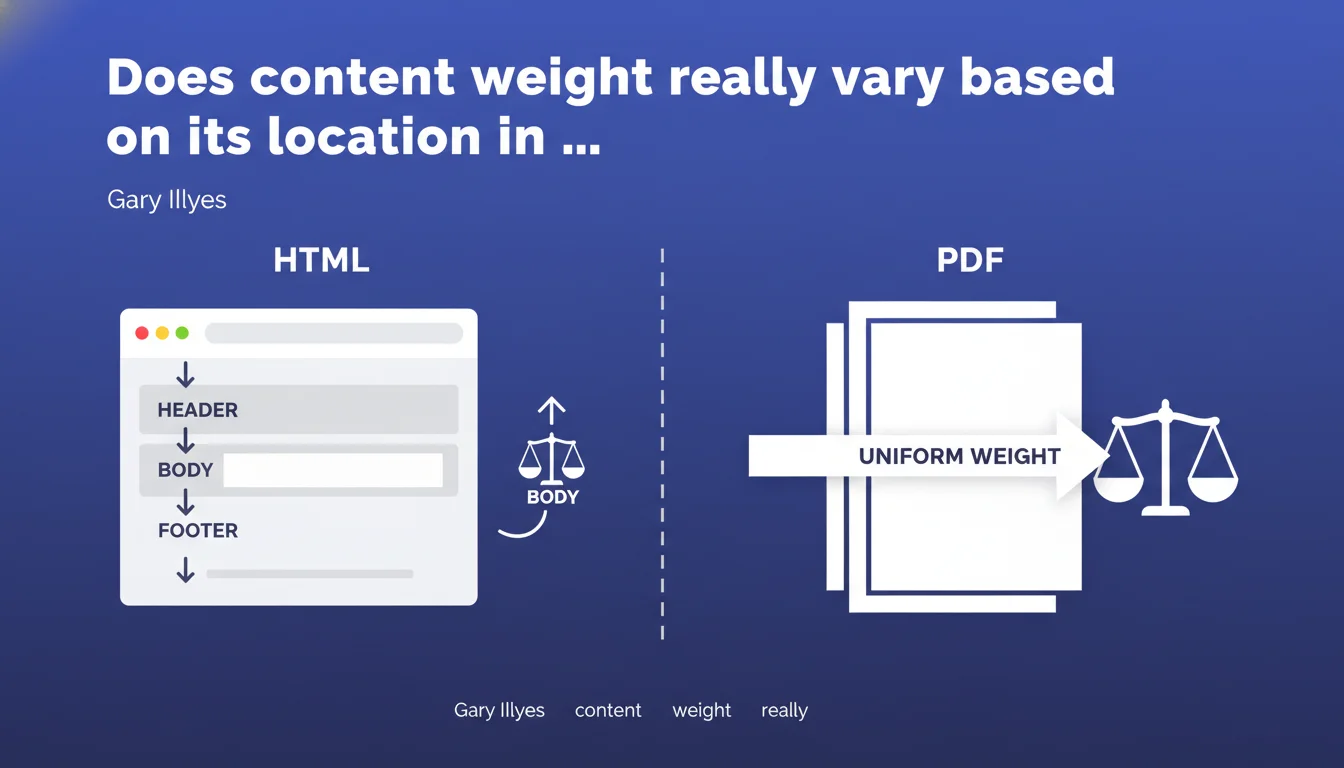
Google treats content weight differently depending on format: in a PDF, all content carries equal weight everywhere. In HTML, position matters — content in the footer carries less weight than content in the body. This structural difference directly impacts how you should organize your strategic content.
What you need to understand
Why does Google distinguish between PDFs and HTML when processing content?
The reason lies in the intrinsic structure of both formats. A PDF is by nature a continuous document with no exploitable semantic hierarchy for Google's algorithms. The search engine reads it as a linear flow from beginning to end.
HTML, on the other hand, relies on explicit semantic architecture. Tags like <header>, <main>, <footer>, and <aside> inform Google about the function of each zone. This structure enables the engine to assign differentiated weight based on content location.
What does this actually change in terms of crawling and indexing?
For a PDF, Google has no way to distinguish a strategic paragraph from a legal disclaimer. Everything is treated with equal importance. If your key message appears on page 12, it theoretically carries the same weight as on page 1.
In HTML, the engine will prioritize main content (the <main> tag or page body) over peripheral elements like the footer. The same text placed in the footer will have less impact on ranking than if it were in the main body.
Which HTML elements are considered low-weight?
Gary Illyes explicitly mentions the footer, but field observations show that other zones receive the same treatment: sidebars, widgets, legal notices, repetitive menus across all pages.
Google seeks to identify the unique and primary content of the page. Anything that repeats across multiple pages or is positioned in secondary areas sees its relative weight decrease.
- PDFs are treated as a linear document without weight hierarchy
- In HTML, the structural position of content directly influences its algorithmic weight
- The footer, sidebars, and repetitive elements carry less weight than main content
- This distinction relies on HTML5 semantic tags
SEO Expert opinion
Does this statement match field observations?
Absolutely. For years, A/B tests have shown that moving strategic content from footer to body improves organic performance. This statement from Gary Illyes formalizes what many practitioners already knew empirically.
The PDF case is more nuanced. Let's be honest: Google has historically struggled with PDFs. The lack of semantic hierarchy complicates meaning extraction. But saying everything carries equal weight doesn't mean a PDF ranks as well as an equivalent HTML page — far from it.
What gray areas remain in this statement?
Gary doesn't specify how much the weight differs between body and footer. Are we talking about a 0.5 coefficient? 0.1? Impossible to quantify. [To verify]: this imprecision makes it difficult to make decisions for certain borderline content.
Another unclear point: what about content in <aside> tags or rich lateral blocks? Does Google systematically treat them like footers, or are there nuances depending on their thematic relevance?
In which cases might this rule not apply strictly?
If your footer contains internal links to strategic pages, their presence repeated across your entire site can offset the low unit weight. Volume × repetition = non-negligible cumulative signal.
Regarding PDFs: in certain sectors (legal, academic, technical), Google sometimes has no well-structured HTML alternative. The PDF can then rank correctly by default, but rarely optimally.
Practical impact and recommendations
What should you do concretely with this information?
Audit your strategic pages. Identify important content or links placed by default in the footer, sidebar, or other peripheral zones. If these elements have real SEO value (target keywords, internal links to priority pages), move them into the <main>.
For PDFs: if you regularly publish indexable PDF documents, systematically create a optimized HTML version. The PDF remains available for download, but Google indexes and ranks the structured HTML version.
Which mistakes should you avoid when restructuring?
Don't drastically empty your footer. It has a purpose: secondary navigation, legal notices, links to Terms of Service, social media. Keep it, but don't rely on it to carry your strategic keywords or critical internal backlinks.
Another trap: duplicating footer content to the body across all pages. This creates massive internal duplicate content. If an element needs to be moved up, do it strategically, page by page, based on thematic relevance.
How can you verify that the HTML structure is correctly interpreted by Google?
Use the URL Inspection Tool in Search Console and check the HTML rendering. Verify that your semantic tags (<main>, <article>, <section>) properly frame the main content.
Compare organic performance before/after moving critical content. If important text moves from footer to body, monitor the evolution of traffic and rankings for targeted queries. Impacts can appear within 2 to 6 weeks.
- Identify strategic content currently in footer, sidebar, or peripheral zones
- Move this content into the
<main>or primary page body - Create optimized HTML versions for all PDFs intended for SEO
- Keep the footer for secondary navigation, without placing critical SEO content there
- Use HTML5 semantic tags to clearly structure content zones
- Audit HTML rendering via the URL Inspection Tool in Search Console
- Measure the impact of structural changes on rankings and organic traffic
❓ Frequently Asked Questions
Un lien placé dans le footer a-t-il vraiment moins de valeur SEO qu'un lien dans le body ?
Dois-je arrêter de publier des PDF pour privilégier exclusivement du HTML ?
Comment Google identifie-t-il le contenu principal d'une page HTML ?
Le poids différencié s'applique-t-il aussi aux images et vidéos, ou uniquement au texte ?
Faut-il placer les liens internes importants uniquement dans le body pour maximiser leur poids ?
🎥 From the same video 11
Other SEO insights extracted from this same Google Search Central video · published on 08/09/2022
🎥 Watch the full video on YouTube →
💬 Comments (0)
Be the first to comment.