
Official statement
Other statements from this video 11 ▾
- □ Google indexe-t-il vraiment vos PDF ou les transforme-t-il d'abord ?
- □ Le poids du contenu varie-t-il selon son emplacement en HTML et en PDF ?
- □ Google dépend-il vraiment d'Adobe pour indexer vos PDF ?
- □ Google indexe-t-il vraiment le code source comme du texte ordinaire ?
- □ Pourquoi les fichiers de code source peinent-ils à se classer dans Google ?
- □ Pourquoi Google n'indexe-t-il jamais une image isolée sans page d'hébergement ?
- □ Google indexe-t-il vraiment les images et vidéos différemment du texte ?
- □ Google filtre-t-il les données personnelles avant indexation ?
- □ L'extension de fichier (.html, .php, .txt) a-t-elle un impact sur le référencement Google ?
- □ Google indexe-t-il vraiment tous vos fichiers XML ?
- □ Peut-on vraiment indexer des fichiers JSON et texte brut sans méta-données ?
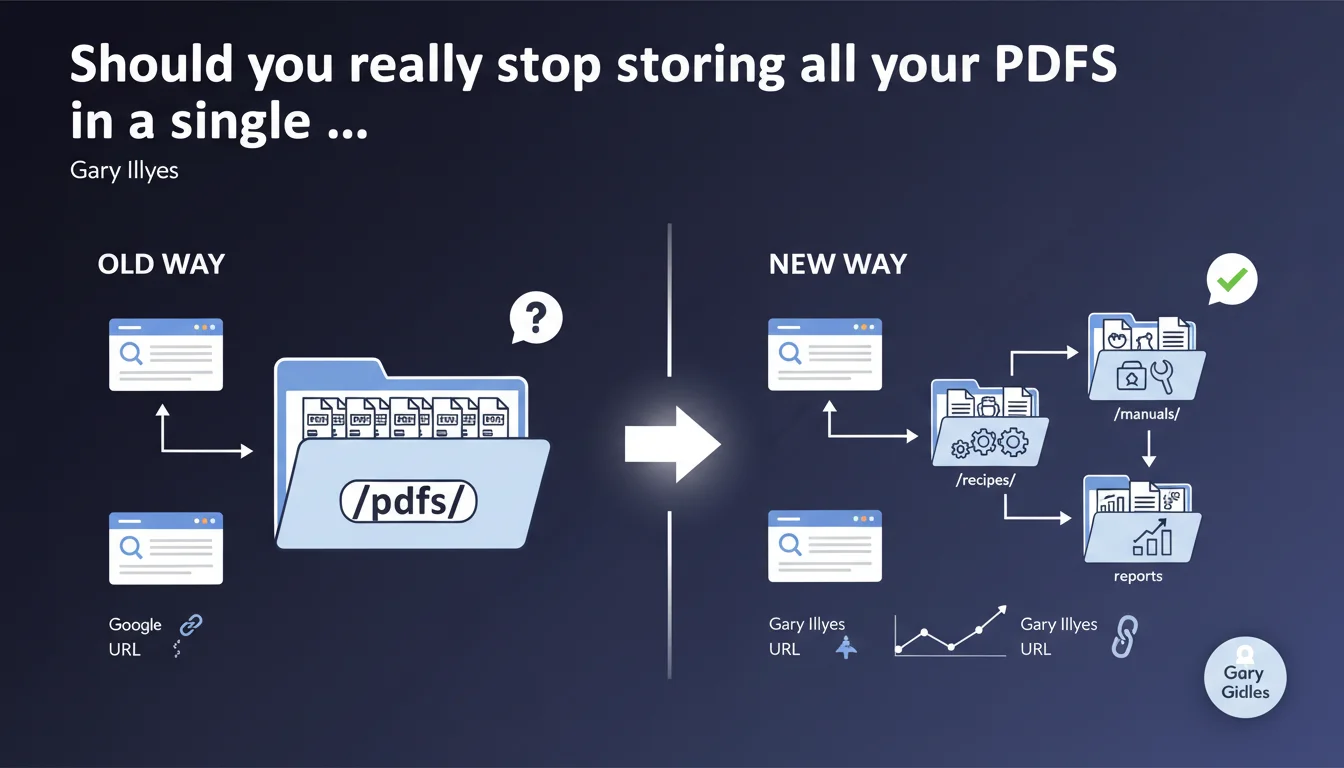
Google recommends distributing PDFs by topic rather than grouping them in a generic /pdfs/ folder. The goal: enable the search engine to leverage URL structure signals already established on the site instead of learning an isolated pattern. An architectural approach that prioritizes semantic consistency across your site hierarchy.
What you need to understand
Why does Google insist on thematic PDF distribution?
The logic is straightforward: a PDF about technical SEO has a much better chance of inheriting relevance signals if it's stored in /technical-seo/crawl-guide.pdf than in /pdfs/crawl-guide.pdf.
Google uses URL structure as a contextual signal. When all your documents are buried in a /pdfs/ directory, the search engine must learn a new pattern without benefiting from the thematic associations already established elsewhere on your site.
What does this actually change for indexation?
A PDF placed within a coherent folder structure inherits the semantic context of its parent section. If your /marketing/ section already generates relevance signals for digital marketing queries, your PDFs in that section benefit from this established history.
Conversely, a generic /pdfs/ catch-all folder forces Google to analyze each file in isolation, without being able to rely on existing patterns. This is more costly in terms of crawl budget and less effective for establishing thematic relevance.
Does this recommendation apply to all types of websites?
The relevance depends on your document volume and architectural structure. On a site with 10 PDFs, the impact will be marginal. On a platform with hundreds of technical documents, subject-based organization becomes critical.
Publishing sites, knowledge bases, and B2B portals are the primary concern. If your PDFs constitute a significant part of your indexable content, this logic becomes essential.
- URL structure = contextual signal leveraged by Google to infer thematic relevance
- A generic /pdfs/ folder forces the search engine to learn an isolated pattern instead of exploiting what already exists
- The impact is proportional to document volume and the quality of your architecture
- PDFs distributed by subject inherit signals from their parent section
SEO Expert opinion
Is this logic consistent with real-world observations?
Yes, and it's no surprise. We've observed for years that documents placed within thematic sections perform better than those stored in technical directories (/assets/, /documents/, /files/).
The functioning through signal inheritance isn't new: Google already applies it to HTML pages. Extending this logic to PDFs is consistent with how the search engine builds its semantic understanding of a site.
What nuances should we add to this recommendation?
Gary Illyes remains vague on one point: what folder depth should be prioritized? A PDF at the root of a section (/marketing/guide.pdf) or in a subsection (/marketing/strategy/guide.pdf)? [To verify] — no official data on this.
Another gray area: multilingual sites. Should you duplicate the thematic structure by language or create a mixed hierarchy? Google doesn't clarify, and real-world feedback varies depending on configurations.
In what cases does this rule not apply?
On sites with fewer than 50 PDFs, the impact will be negligible. If your priority is management simplicity rather than document SEO, a centralized folder remains defensible.
For dynamically generated PDFs (invoices, exports, personalized reports), creating a thematic hierarchy makes no sense. These documents aren't targeting organic search — block them via robots.txt and move on.
Practical impact and recommendations
What should you do concretely if you're using a /pdfs/ folder?
First task: identify the main topics of your PDFs. Group them by subjects coherent with your existing HTML hierarchy. A technical SEO guide belongs in /seo/, not in /resources/ or /documents/.
Next, move files progressively. Don't change everything at once — start with your most strategic PDFs. Each move requires a 301 redirect from the old URL.
How do you handle redirects without breaking anything?
Map all your old URLs in a tracking file. For each moved PDF: /pdfs/seo-guide.pdf → /technical-seo/seo-guide.pdf with permanent 301 redirect.
Check your backlinks after migration. If external sites point to your old /pdfs/ URLs, the redirects must remain in place long-term. Never remove them, even after several months.
What errors should you avoid during reorganization?
Don't create overly deep structures for organizational convenience. A PDF buried five levels deep loses in accessibility what it gains in thematic logic.
Also avoid multiplying subfolders for just a few files. If you have 3 PDFs on local SEO, /seo-local/ is sufficient — no need for /seo-local/guides/, /seo-local/case-studies/, etc.
- Audit current hierarchy and identify main topics
- Group PDFs for coherence with existing HTML sections
- Implement 301 redirects for each relocated file
- Test accessibility after migration (Screaming Frog crawl or equivalent)
- Monitor external backlinks and maintain redirects long-term
- Don't exceed 3-4 levels of depth to preserve accessibility
❓ Frequently Asked Questions
Dois-je renommer mes fichiers PDF lors du déplacement ?
Les redirections 301 transmettent-elles le PageRank des anciennes URL PDF ?
Faut-il soumettre les nouvelles URL via un sitemap XML dédié ?
Cette logique s'applique-t-elle aussi aux fichiers DOCX, XLSX ou autres formats ?
Que faire si ma structure HTML actuelle est elle-même incohérente ?
🎥 From the same video 11
Other SEO insights extracted from this same Google Search Central video · published on 08/09/2022
🎥 Watch the full video on YouTube →
💬 Comments (0)
Be the first to comment.