
Official statement
Other statements from this video 10 ▾
- □ Should you really mark up your paid content with paywall structured data?
- □ Does robots.txt really protect your private content from Google indexation?
- □ Is robots.txt really protecting your private content from Google?
- □ Why do your private pages never appear in Google despite being indexed?
- □ Should you really enrich your login pages to boost their indexability?
- □ Should you really redirect your private pages to marketing content rather than straight to a login form?
- □ Why does Google refuse to index corporate intranet pages?
- □ Are your URLs leaking private data even when your content is protected?
- □ Should you really test your site in private browsing to properly assess your SEO visibility?
- □ Does Google really give preferential SEO advice to its own internal teams?
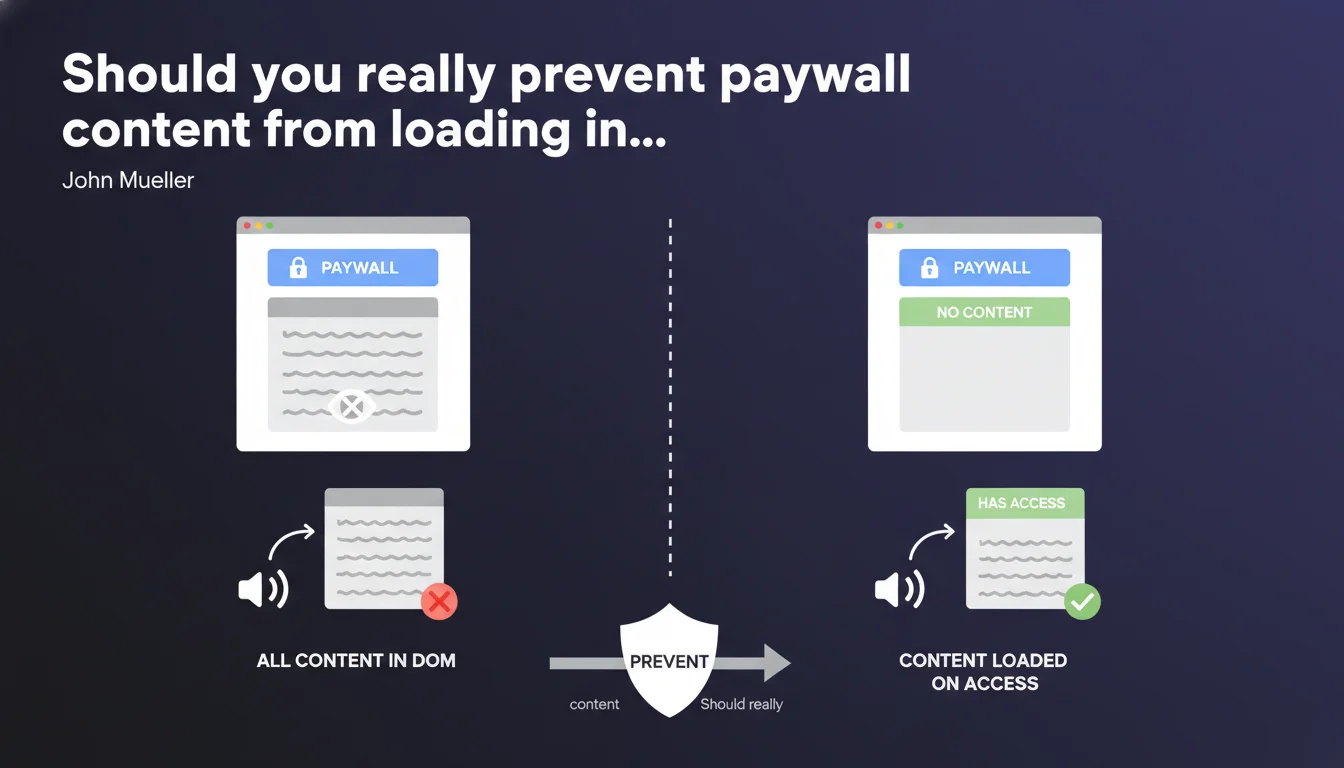
Google explicitly asks you not to load the full content of a paywall article into the HTML/DOM of the page. Protected content should only be served when the user actually has access to it, particularly to prevent screen readers from exposing the entire hidden text. This guideline raises important technical and SEO questions for all sites that monetize their content.
What you need to understand
Why is Google clarifying this rule now?
This statement by John Mueller is not new in principle, but it clarifies a technical point that is often misunderstood. Many sites still use CSS/JavaScript techniques to visually hide paywall content while loading it entirely into the HTML DOM.
The problem — and Google states it bluntly — is that this approach exposes content to assistive technologies like screen readers. A visually impaired user could thus access content for free that is supposed to be paid, simply because their screen reader reads everything present in the DOM.
Does this guideline target only accessibility?
No. The accessibility argument is the one emphasized, but there is a direct SEO dimension. If the complete content is in the DOM, Googlebot can technically access it too, even if you try to hide it with CSS.
Google has always had an ambiguous position on paywalls: it wants publishers to be able to monetize, but it also wants to index content. The official solution remains the structured data markup for paywalls, but this assumes that protected content is not fully exposed on the client side.
What is the difference from cloaking?
That is where it gets tricky. Loading content only for Googlebot would be pure cloaking, which is sanctionable. But not loading paywall content into the DOM for a non-subscriber user is legitimate — provided that Google can still understand that there is protected content.
The schema.org/Article markup with the isAccessibleForFree: false property is supposed to handle this case. But practically speaking, if the content is never in the HTML, how does Google assess its quality and relevance for ranking?
- Never load the complete content of a paywall article into the HTML DOM
- Use structured data markup to signal protected content to Google
- Serve content only after server-side authentication, not through client-side JavaScript
- Screen readers must not be able to access hidden content
- This rule applies equally to accessibility and to avoid any SEO ambiguity
SEO Expert opinion
Is this statement consistent with observed practices?
Not really. The majority of major media outlets with paywalls still use hybrid techniques: some content visible in plain sight, the rest loaded into the DOM but hidden with display:none or via a JavaScript overlay.
Some — like The New York Times or Le Monde — have sophisticated implementations that actually load content on the server side after authentication. But many niche or regional news sites still leave the complete HTML exposed, betting on technical obscurity to protect their content. Google just told them: that doesn't work anymore.
What nuances should be made?
Google is not saying you must block everything. The official advice remains to show enough preview for the user — and the search engine — to understand what the article is about. This is the principle of the "metered paywall" or the visible lead.
But the line between "legitimate preview" and "hidden complete content" is blurred. If you load 80% of the article into the DOM thinking it is a preview, you are out of bounds. The real criterion is: could someone bypass your paywall by inspecting the source code? If yes, Google considers that you are serving the content, even if it is hidden.
In what cases does this rule not apply?
If you use a soft paywall system with a quota of free articles per month, the rule still applies: content should only be loaded if the user still has quota remaining. No shortcut consisting of loading everything and deciding on the client side.
On the other hand, if your model is a simple registration wall (free signup required), you can load the content into the DOM for all registered users. The key distinction: is access conditioned on payment or on a status verified on the server side? If yes, no content in the DOM before validation.
Practical impact and recommendations
What should you do concretely if your site has a paywall?
First step: audit your current implementation. Open a paywall article in private browsing, not logged in, and inspect the raw HTML source code. If the complete content appears anywhere — even in a div hidden, even in inline JSON — you are affected.
Then, modify your architecture so that protected content is served only after server-side authentication. Concretely: the non-subscriber user receives HTML with the lead and a placeholder, and the complete content is never sent by the server until they pay.
What mistakes should you avoid at all costs?
Do not try to work around the rule by loading content via asynchronous JavaScript after initial page load. If the client-side script retrieves the complete text and injects it into the DOM, you are still in breach — and worse, you complicate indexing for Google.
Another classic mistake: using aria-hidden="true" thinking that it is enough to hide content from screen readers. It is not. If the text is in the DOM, accessibility tools can access it. The only truly clean solution is not to send the content to the client.
How do you verify that your site is compliant?
- Open a paywall article in private browsing (not logged in)
- Inspect the raw HTML source code — not just the visual rendering
- Verify that no DOM element contains the complete article text
- Test with a screen reader (NVDA, JAWS) to confirm that protected content is not read
- Ensure that structured data markup includes
isAccessibleForFree: false - Check that complete content is only loaded after validated server-side authentication
- Verify that client-side JavaScript scripts do not retrieve content in plain text
This Google guideline requires a technical overhaul for many sites that have implemented their paywall in an approximate manner. The message is clear: paid content must never be sent to the client unless the user legitimately has access to it.
The issue goes beyond accessibility — it is a matter of coherence between what you sell and what you expose technically. A rigorous audit of your current implementation is necessary.
These modifications can be complex depending on your technical stack, especially if your paywall relies on third-party solutions or CMS with generic plugins. In this context, support from a specialized SEO agency can be invaluable to diagnose gaps, design a compliant architecture, and coordinate adjustments between editorial and technical teams, without compromising either indexing or monetization.
🎥 From the same video 10
Other SEO insights extracted from this same Google Search Central video · published on 04/09/2025
🎥 Watch the full video on YouTube →
💬 Comments (0)
Be the first to comment.