
Official statement
Other statements from this video 10 ▾
- □ Faut-il vraiment baliser son contenu payant avec la structured data 'paywall' ?
- □ Faut-il vraiment empêcher le contenu paywall de se charger dans le DOM ?
- □ Pourquoi robots.txt ne protège-t-il pas votre contenu privé ?
- □ Pourquoi vos pages privées n'apparaissent jamais dans Google malgré leur indexation ?
- □ Faut-il vraiment enrichir vos pages de login pour améliorer leur indexation ?
- □ Faut-il vraiment rediriger vos pages privées vers du contenu marketing plutôt qu'un simple login ?
- □ Pourquoi Google refuse-t-il d'indexer les intranets d'entreprise ?
- □ Pourquoi vos URLs peuvent trahir vos données privées malgré un contenu protégé ?
- □ Faut-il vraiment tester son site en navigation privée pour évaluer sa visibilité SEO ?
- □ Google donne-t-il vraiment des conseils SEO privilégiés à ses propres équipes ?
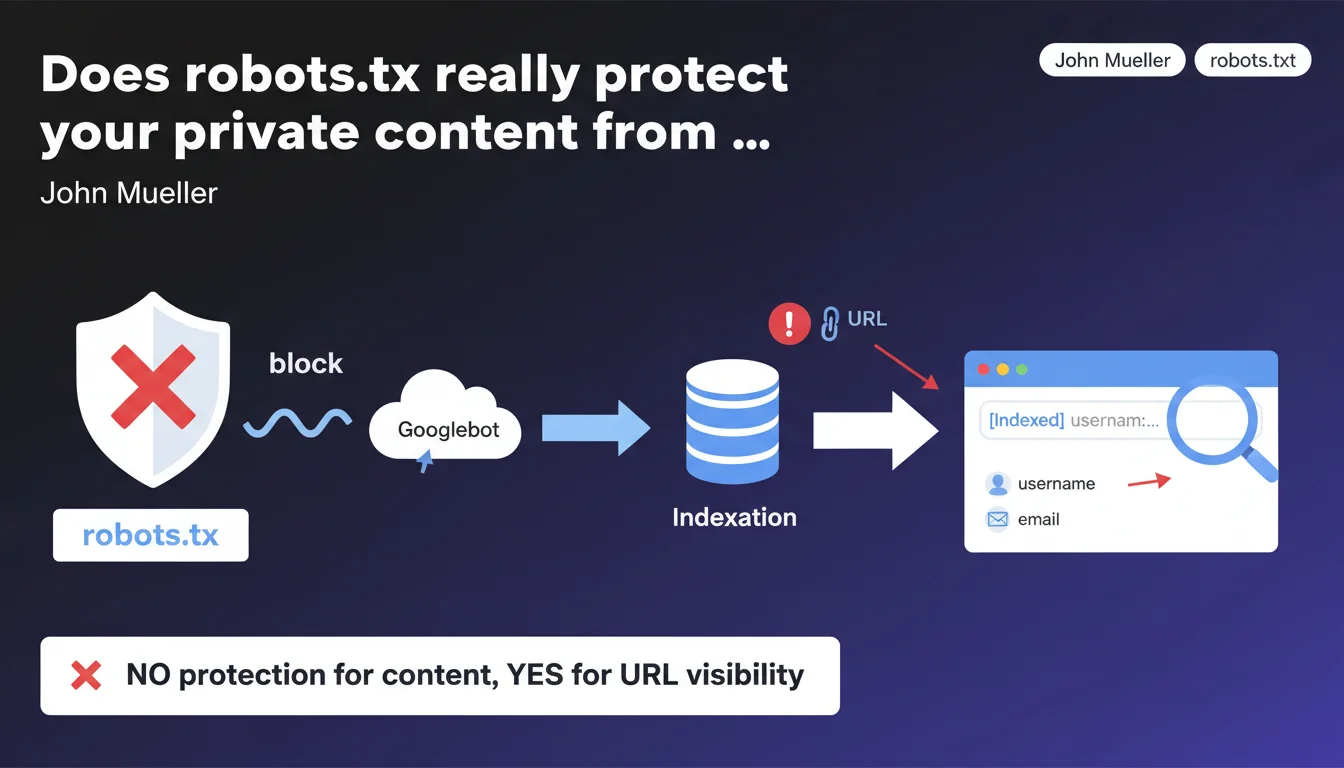
Google confirms that blocking URLs with robots.txt provides no protection for private content. URLs can be indexed without their content, potentially exposing sensitive information such as usernames, emails, or tokens present directly in the URL in search results. The directive is clear: robots.txt is not a privacy tool.
What you need to understand
What's the difference between blocking crawl and preventing indexation?
Blocking a URL via robots.txt prevents Googlebot from crawling the page — so from reading its content. But it doesn't prevent Google from indexing the URL itself if it's discovered through other means: external backlinks, third-party sitemaps, social media shares.
Result: the page appears in search results with just its URL and sometimes a generic snippet like "No information available for this page". Except if the URL contains sensitive data — username, email address, session token — this information is exposed publicly.
Why does this mechanism pose a security risk?
Because many websites build URLs with identifying parameters or segments: /user/john.smith, /reset-password?email=contact@example.com, /admin/dashboard?token=abc123. If these URLs are blocked by robots.txt, their content isn't crawled — but their structure remains visible in the index.
An attacker can then use search results as a source for enumeration: search for URL patterns, retrieve user lists, identify sensitive endpoints. This is structural information leakage.
What's Google's official best practice?
John Mueller is explicit: for truly private content, you must use server-side protection — HTTP authentication, mandatory login, or better yet, a noindex directive combined with a password. Robots.txt should only serve to optimize crawl budget or avoid non-sensitive internal duplication.
- robots.txt blocks crawl, not indexation of URLs discovered elsewhere
- Sensitive information in URLs (emails, usernames, tokens) can appear in search results
- To protect private content: server authentication + noindex in meta or X-Robots-Tag
- robots.txt = crawl management tool, not a privacy firewall
SEO Expert opinion
Does this statement match what we observe in the field?
Absolutely. We regularly see sites with thousands of Disallow pages in robots.txt that still appear in the index with the notice "No information available for this page due to robots.txt". This mainly affects member areas, admin dashboards, password reset URLs.
The problem is many developers still think robots.txt = security. That's wrong and dangerous. Google has documented this for years, but the confusion persists — probably because the tool seems to work: the content isn't crawled, so everything looks fine. Except the URL itself is leaking.
In what cases can this approach still be justified?
There are situations where blocking with robots.txt remains relevant, even if the URL can be indexed. For example: deep pagination URLs, non-strategic filter facets, or printable versions of already-indexed pages. There, the information leak risk is zero.
But as soon as you're dealing with authentication, user management, or personal data — robots.txt must be abandoned in favor of real protection. Concretely: HTTP 401/403, login wall, or noindex combined with disallow if you also want to save crawl budget.
What nuance should we add about combining robots.txt + noindex?
Theoretically, if a page is already indexed and you add a Disallow in robots.txt, Google can no longer crawl the page to read the noindex tag. Result: the page stays indexed indefinitely. This is a classic trap.
The correct sequence: first allow crawl, add noindex, wait for deindexation, then block in robots.txt if you want to save crawl. Or better: use X-Robots-Tag: noindex in HTTP headers, which works even without crawling the page body — but still requires HTTP access to be read.
Practical impact and recommendations
What should you audit first on an existing site?
Start with a site: search on Google to identify indexed URLs that are blocked by robots.txt. Look for suspicious patterns: /user/, /admin/, /account/, email=, token=, reset, password.
Then cross-check with your robots.txt file. Any private URL appearing there in Disallow is a potential risk. Verify whether it contains personal or sensitive data in its structure — not just in the content.
What corrective measures should you apply immediately?
For already-indexed URLs: remove them from robots.txt, add noindex (meta or X-Robots-Tag), wait for deindexation, then delete them via Search Console's URL removal tool to speed up the process. Monitor with regular site: searches.
For new sensitive URLs: implement server authentication (HTTP 401/403) or a login wall. If you still want to save crawl budget, combine with robots.txt — but the real barrier must be server-side, not in a text file crawlable by anyone.
On the architecture side: avoid putting sensitive information in URLs. Favor opaque identifiers (/user/a3f8b2 rather than /user/john.smith), or better, manage everything behind authentication with generic routes.
- Run a
site:audit to spot indexed URLs blocked by robots.txt - Identify those containing sensitive data (emails, usernames, tokens)
- Remove these URLs from robots.txt and add
noindexin meta or X-Robots-Tag - Use the Search Console removal tool to speed up deindexation
- Implement server authentication (HTTP 401/403) for any private section
- Avoid placing personal information directly in URL structure
- Review application logic to isolate sensitive content behind login
- Document internally the difference between crawl blocking and real protection
🎥 From the same video 10
Other SEO insights extracted from this same Google Search Central video · published on 04/09/2025
🎥 Watch the full video on YouTube →
💬 Comments (0)
Be the first to comment.