
Official statement
Other statements from this video 10 ▾
- □ Faut-il vraiment baliser son contenu payant avec la structured data 'paywall' ?
- □ Faut-il vraiment empêcher le contenu paywall de se charger dans le DOM ?
- □ Pourquoi robots.txt ne protège-t-il pas vos contenus privés de l'indexation Google ?
- □ Pourquoi robots.txt ne protège-t-il pas votre contenu privé ?
- □ Pourquoi vos pages privées n'apparaissent jamais dans Google malgré leur indexation ?
- □ Faut-il vraiment enrichir vos pages de login pour améliorer leur indexation ?
- □ Faut-il vraiment rediriger vos pages privées vers du contenu marketing plutôt qu'un simple login ?
- □ Pourquoi vos URLs peuvent trahir vos données privées malgré un contenu protégé ?
- □ Faut-il vraiment tester son site en navigation privée pour évaluer sa visibilité SEO ?
- □ Google donne-t-il vraiment des conseils SEO privilégiés à ses propres équipes ?
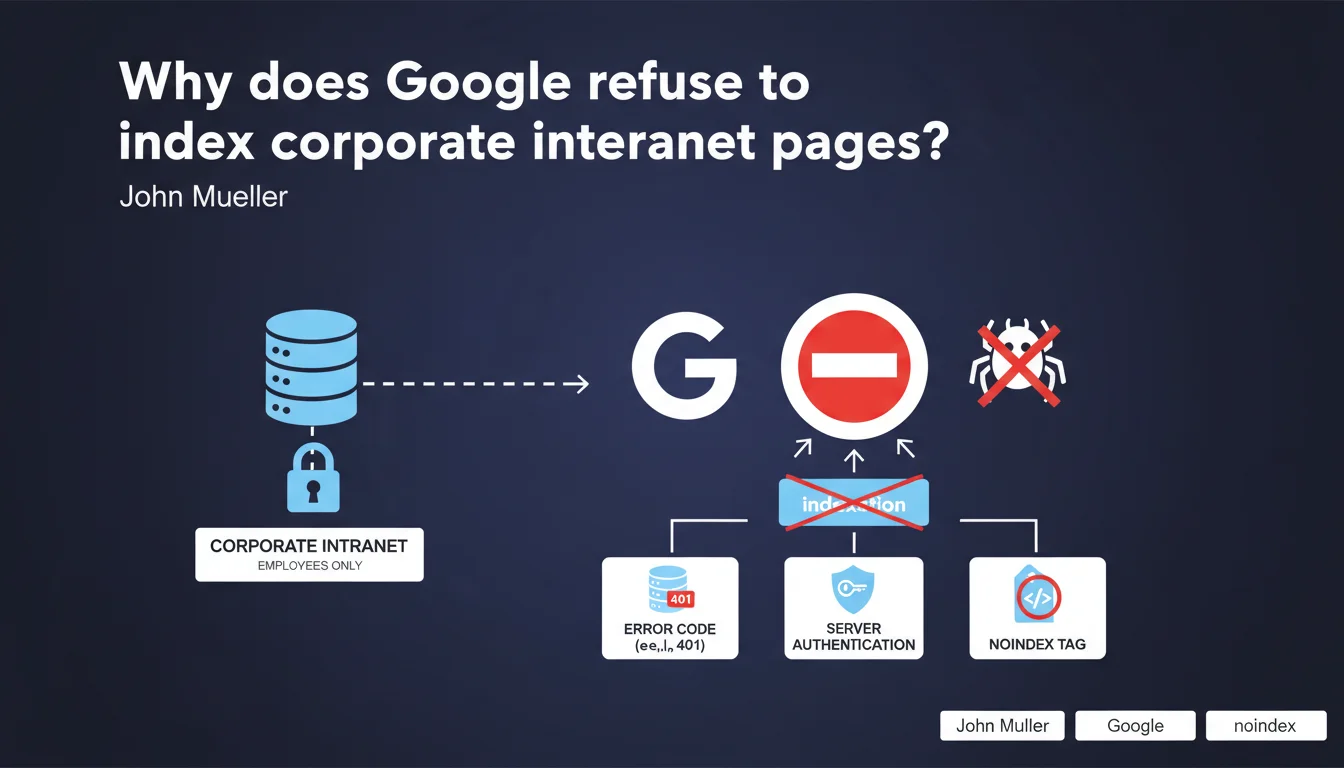
Google explicitly recommends blocking the indexation of corporate intranet login pages. Three methods are proposed: HTTP error code, server authentication, or noindex tag. The position is clear — an intranet has no business being in the search index.
What you need to understand
Why does Google specifically address the issue of intranets?
Mueller's statement responds to a recurring problem: intranet login pages that end up being indexed by mistake. These pages provide absolutely no value to Google users — it's impossible to access the content without credentials.
The search engine wastes time crawling useless URLs, and the company sometimes exposes information about its internal structure. Not exactly an ideal use case for anyone.
What are the three methods recommended by Google?
Mueller proposes three distinct approaches to block indexation of these interfaces:
- HTTP error code — Returning a 403 or 404 prevents the bot from considering the page as indexable
- Server authentication — HTTP Basic Auth or equivalent blocks access before the crawler even reaches the HTML content
- Noindex tag — HTML-level solution, accessible but explicitly marked as non-indexable
Each method has its technical implications. Server authentication is the most radical — it cuts off access at the root. Noindex requires the bot to load the page to read the directive.
Does this recommendation apply only to intranets?
No, and that's where it gets interesting. The logic extends to any interface requiring authentication without SEO value — client spaces, SaaS dashboards, internal tools.
If the content behind the login isn't intended for the public, why let Google index the entry point? The question becomes different for a blog with a member area where certain content can justify partial visibility.
SEO Expert opinion
Is this position consistent with practices observed in the field?
Absolutely. I've seen too many companies end up with indexed login pages that cannibalize their crawl budget for nothing. The Googlebot crawler doesn't guess that a page requires credentials — it treats it like any other accessible URL.
Mueller's recommendation finally aligns official discourse with what SEO practitioners have been applying for years. Blocking these pages frees up crawl resources for content that actually matters.
Which method should be prioritized among the three options offered?
Server authentication remains the cleanest technical solution — it eliminates any ambiguity. The bot never accesses the HTML, so there's no risk of misinterpretation.
Noindex works, but means Google loads the page to read the directive. That's wasted crawl. HTTP error codes (notably 403) are a good compromise — clear, quick to interpret, with no semantic ambiguity.
Are there cases where indexing a login page could make sense?
Let's be honest — not really. Some argue it helps with branding or service discoverability. But a login page without context provides zero informational value.
If visibility is the goal, it's better to create a dedicated public landing page that explains the service and redirects to the login. At least that one can rank and convert.
Practical impact and recommendations
How do I verify if my intranet or client space is currently indexed?
Start with a site:yourdomain.com search on Google. Specifically look for login URLs, dashboards, or internal interfaces. If they appear, you have a problem.
Also use Google Search Console — "Pages" section to see which URLs are indexed. Filter by path (for example /login, /dashboard, /admin) to identify leaks.
What's the quickest method to block these pages?
It depends on your technical infrastructure. If you control server configuration, HTTP authentication can be set up in minutes via .htaccess or equivalent.
For an application-level solution, add a noindex in the <head> of all pages requiring authentication. It's less clean, but functional if you don't have server access.
HTTP error codes often require backend intervention — configure your application to return a 403 to bots detected on sensitive URLs.
- Audit the Google index with site:yourdomain.com to spot indexed login pages
- Implement HTTP server authentication for intranets and client spaces
- Add noindex to all post-authentication pages as a safety net
- Configure 403 Forbidden codes for administrative interfaces
- Verify in Search Console that Google progressively deindexes these URLs
- Document the blocking strategy for future site evolutions
🎥 From the same video 10
Other SEO insights extracted from this same Google Search Central video · published on 04/09/2025
🎥 Watch the full video on YouTube →
💬 Comments (0)
Be the first to comment.