
Official statement
Other statements from this video 11 ▾
- □ Is old content really killing your search rankings?
- □ Can old content still rank well despite its age?
- □ Should you really fix broken links in your older content?
- □ Should you really add warning banners to your older content pieces?
- □ Should you really update all your old content for SEO?
- □ Should you really let your old articles stay with their original mistakes?
- □ Should you really delete outdated content instead of simply marking it as deprecated?
- □ Is using the canonical tag as a hidden redirect costing you your SEO rankings?
- □ Should you really stop adding dates to your titles just to make them look fresh?
- □ Should you redirect or create an explanatory page when discontinuing a tool?
- □ Is auditing your documentation regularly really essential to maintain strong SEO performance?
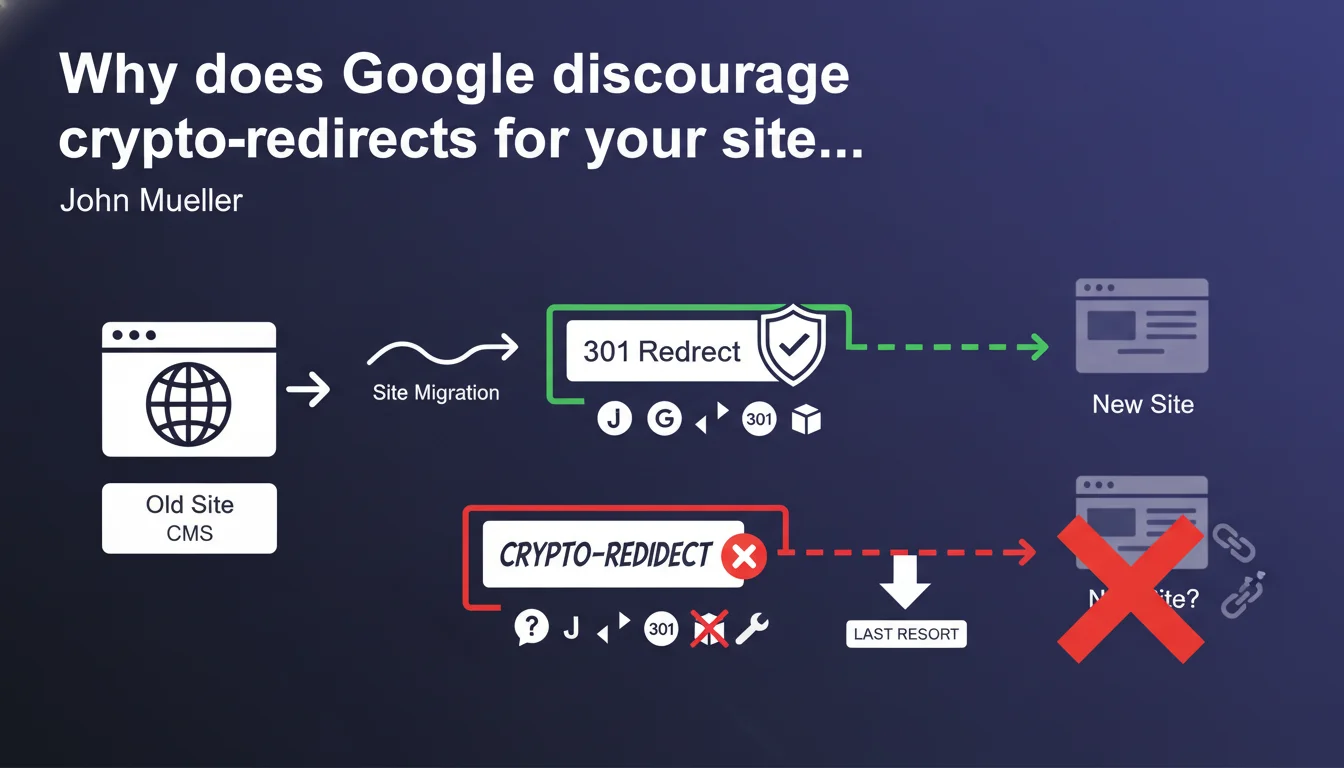
John Mueller is clear: crypto-redirects (banners signaling that a page has moved) should be avoided. They should only be used as a last resort, when a proper 301 redirect from the CMS is technically impossible. In other words: if you can set up a server-side redirect, forget about the banners.
What you need to understand
What exactly is a crypto-redirect?
A crypto-redirect refers to a banner or message displayed on a page to inform the user (and search engines) that the content has moved to another URL. Unlike a standard 301 redirect, no HTTP instruction is sent to the server — the original page remains accessible but displays a warning.
This type of mechanism often relies on client-side JavaScript or a simple HTML block. The problem? Google cannot guarantee it will interpret this signal as a true migration. The risk of content duplication or loss of SEO equity exists.
Why does Google only tolerate them as a last resort?
The reason is straightforward: a 301 redirect is a standard HTTP signal that all search engines understand instantly. It transfers PageRank, preserves indexing history, and avoids any ambiguity. Crypto-redirects, on the other hand, add a layer of uncertainty.
Google always prefers native and predictable technical solutions. If your CMS doesn't allow you to configure server redirects, it's a sign that your technical infrastructure may deserve a rethink — not that you should work around the problem with band-aid solutions.
In what specific cases does this situation arise?
Some proprietary platforms or legacy custom CMSs don't allow managing redirects at the server level without heavy intervention. The same goes for static sites hosted without .htaccess file or server access.
That said, these cases are becoming rare. Most modern CMSs (WordPress, Shopify, Drupal, etc.) offer native plugins or modules to handle redirects properly.
- 301 redirect: always the absolute priority for any URL migration
- Crypto-redirects: only if proven technical impossibility on the server side
- Risks: content duplication, loss of PageRank transfer, unclear indexing
- Context: some legacy or proprietary CMSs don't allow server-side redirects
SEO Expert opinion
Does this statement really reflect what happens in practice?
Yes, but with an important caveat. In theory, Google does handle certain crypto-redirects via JavaScript — it can execute JS and interpret a window.location as a redirect. Except this handling is never guaranteed at 100%, especially if the JS takes time to execute or if Googlebot decides to crawl in simplified mode.
In reality, we regularly see sites using banners that get away with it… for a while. But as soon as an algorithm update rolls out, or a competitor does things properly with 301s, these sites lose ground. [To be verified]: Google has never published data comparing the success rate of crypto-redirects versus standard 301 redirects.
When does this rule truly not apply?
There are edge cases. For example, a temporary migration for maintenance where you display a banner saying "this content will soon be at /new-url" without touching the original page. Technically, this isn't a true migration — it's user communication.
Another case: some sites do URL A/B testing and display conditional banners. Again, this falls outside the scope of strict SEO migration. But as soon as you're talking about a redesign, domain change, or site restructuring, the 301 becomes the only viable option.
Do you really need to wait until you're blocked technically?
No. If you're on a CMS that doesn't natively handle redirects, it's often a symptom of a larger problem: technical debt, vendor lock-in, obsolete stack. Rather than improvising workarounds, it's better to seriously audit your infrastructure.
Concretely? Let's be honest — if your CMS forces you to use crypto-redirects, your platform probably deserves migration to a modern solution. The initial cost may seem high, but the medium-term SEO gains more than compensate.
Practical impact and recommendations
What should you do if your CMS doesn't allow 301 redirects?
First, genuinely verify that it's the case. Many proprietary or legacy CMSs can actually handle redirects via an .htaccess file (Apache) or nginx.conf (Nginx) — you just need server access or to ask your hosting provider.
If the limitation is confirmed, document it precisely. Then consider a gradual migration to a modern CMS that natively handles redirects. In the meantime, use crypto-redirects only on key pages, and monitor crawl logs for any anomalies.
How can you minimize risks if you must use a crypto-redirect?
Implement a lightweight and fast JavaScript that redirects immediately via window.location.replace(). Avoid artificial delays or animations that slow loading — Googlebot won't wait indefinitely.
Also add a <link rel="canonical"> tag pointing to the new URL. It's not a redirect, but it helps Google understand which version to prioritize. And most importantly, monitor Search Console to detect any indexing duplication.
What mistakes should you absolutely avoid?
Never mix crypto-redirects and true 301 redirects on the same domain — it muddies the signals. Don't use purely visual banners without JS redirection: Google doesn't read text like a human, it looks for technical signals.
Another common mistake: leaving crypto-redirects in place after migration. Once your CMS finally allows 301s (after an update or hosting change), immediately replace banners with proper server-side redirects.
- Verify if your CMS or server truly allows 301 redirects (htaccess, nginx, plugins)
- If technical impossibility is confirmed, precisely document the constraints
- Implement a lightweight crypto-redirect in JavaScript (
window.location.replace()) - Add a
rel="canonical"tag pointing to the new URL - Monitor Search Console to detect any indexing duplication
- Consider migrating to a modern CMS if the limitation persists
- Replace crypto-redirects with 301s as soon as possible
❓ Frequently Asked Questions
Un crypto-redirect peut-il transférer du PageRank comme une redirection 301 ?
Quel délai Google met-il pour comprendre un crypto-redirect ?
Peut-on utiliser un crypto-redirect pour une migration temporaire ?
Les crypto-redirects sont-ils pénalisés par Google ?
Comment vérifier si mon CMS permet des redirections 301 ?
🎥 From the same video 11
Other SEO insights extracted from this same Google Search Central video · published on 09/05/2024
🎥 Watch the full video on YouTube →
💬 Comments (0)
Be the first to comment.