
Official statement
Other statements from this video 11 ▾
- □ Le contenu ancien pénalise-t-il vraiment votre référencement ?
- □ Le contenu ancien peut-il encore se classer malgré son âge ?
- □ Faut-il vraiment corriger les liens cassés dans vos contenus anciens ?
- □ Faut-il vraiment ajouter des bannières d'avertissement sur vos contenus anciens ?
- □ Faut-il vraiment mettre à jour tous vos anciens contenus pour le SEO ?
- □ Faut-il vraiment laisser vos vieux articles avec leurs erreurs d'origine ?
- □ Faut-il vraiment supprimer le contenu obsolète plutôt que de le marquer comme déprécié ?
- □ Pourquoi utiliser la balise canonical comme redirection est-il une erreur SEO majeure ?
- □ Pourquoi Google déconseille-t-il les crypto-redirects pour vos migrations de sites ?
- □ Faut-il vraiment arrêter d'ajouter des dates dans les titres pour paraître frais ?
- □ Faut-il vraiment auditer régulièrement sa documentation pour rester performant en SEO ?
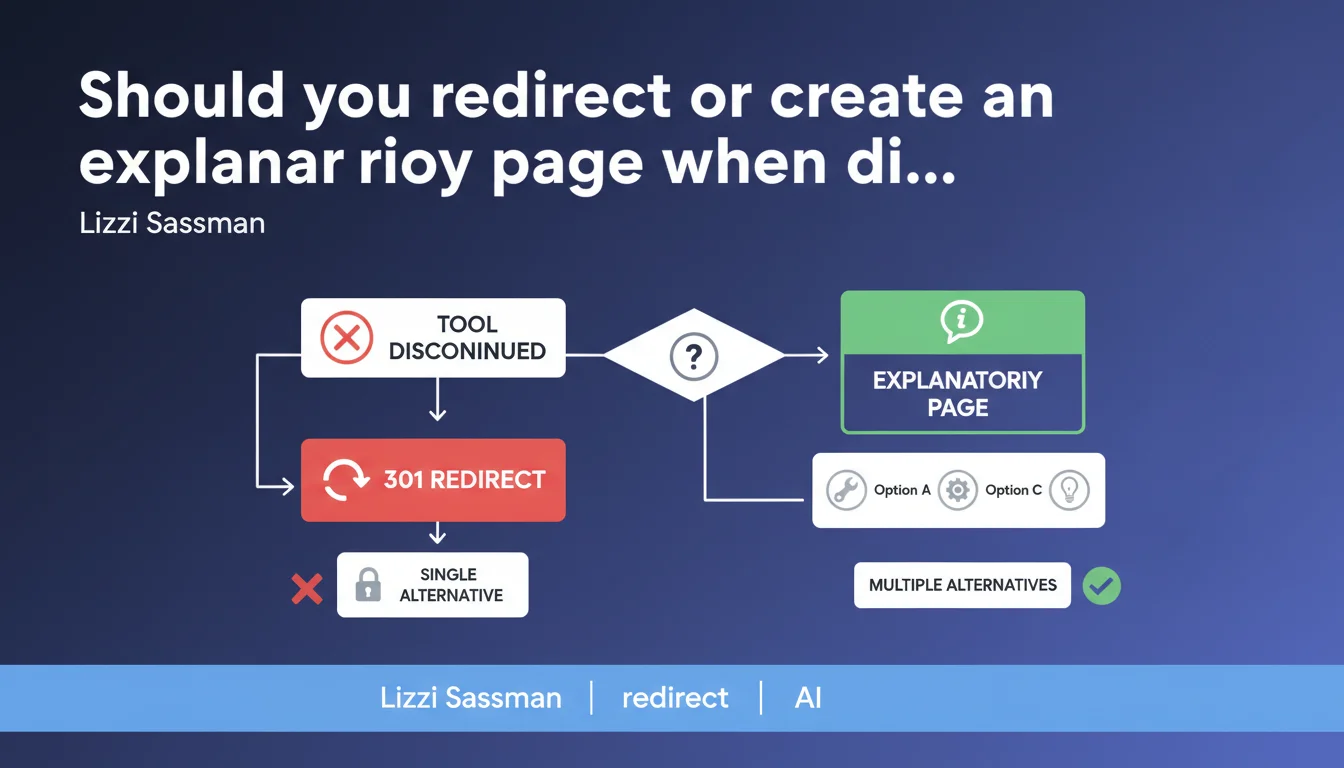
Google recommends creating an explanatory page listing available alternatives rather than directly redirecting to a single option when a tool or feature is removed. This approach preserves user experience by offering an informed choice rather than an arbitrary decision imposed by a 301 redirect.
What you need to understand
This statement from Lizzi Sassman addresses a recurring dilemma: what to do with a popular URL when the associated product or service no longer exists? The standard answer is often a 301 redirect to the best alternative.
Google nuances this approach. When multiple viable alternatives exist, an arbitrary redirect to a single option can frustrate the user who was looking for something specific.
Why does Google recommend an explanatory page rather than a redirect?
The reason lies in user intent. Someone searching for a specific tool probably has specific needs. Redirecting them to a randomly chosen alternative ignores this nuance.
An explanatory page allows you to maintain context. It explains why the tool no longer exists, presents the available options with their specific features, and lets the user choose. It's basic UX — but applied to URL management.
Does this apply to all types of removed content?
No. Google is clear: "when multiple alternatives exist". If only one logical alternative exists, a redirect remains relevant. If no alternative exists, a 410 (Gone) or an explanatory page without alternatives may be appropriate.
The advice targets ambiguous situations: a discontinued WordPress plugin with 3-4 viable replacements, a SaaS service merged with features scattered across multiple products, etc.
- Create an intermediate page when multiple equivalent alternatives exist
- Clearly explain why the tool/feature was removed
- Present options with their key differences to facilitate choice
- Redirect directly only if a single obvious alternative exists
- Use a 410 code if no replacement exists and the content is definitively obsolete
SEO Expert opinion
Is this recommendation consistent with practices observed in the field?
Yes, and it reflects what sites with true UX maturity are already doing. Major SaaS players (Atlassian, Microsoft, Adobe) often maintain "Product X has been retired" pages with links to alternatives.
The interesting point: Google is formalizing this practice as a good SEO practice, not just UX. This implies that these intermediate pages are not penalized as "thin content" if they provide real value.
What are the practical limitations of this approach?
Let's be honest: this recommendation assumes you have the time and resources to create and maintain these pages. For a site that removes 2-3 tools per year, it's manageable. For an aggregator that dereferences 500 products per quarter, it's unrealistic.
Another nuance: the statement says nothing about SEO weight transmission. A 301 redirect transmits PageRank. An intermediate page with outbound links? Much less clear. [To be verified]: Does Google treat these pages as legitimate "hubs" or as potential dead ends?
In what cases could this rule be counterproductive?
When commercial intent takes priority over information. If you discontinue a product and an obvious internal alternative exists, creating an intermediate page might just add friction to your conversion funnel.
Imagine: you're stopping your "Starter" offer and everyone should logically switch to "Pro". An explanatory page = an extra step before conversion. In this case, a direct 301 redirect to /pro with an explanatory banner might be more effective.
Practical impact and recommendations
What should you do concretely when removing a tool or feature?
First step: audit existing alternatives. List all viable options, internal and external if relevant. If a single alternative stands out, classic 301 redirect. If multiple exist with significant differences, create an explanatory page.
For the explanatory page itself: clear title ("[Tool Name] has been discontinued"), concise explanation of the reason, structured presentation of alternatives with their key differences. Not a novel, just the information needed to choose.
How to structure this page to be SEO-friendly?
Keep the original URL of the tool if possible, or create a clear URL (ex: /tools/tool-name-discontinued). No redirect to /404-custom or /oops.
Use a 200 status code, not 404 or 410, since the page exists and provides value. Add schema.org: a DiscontinuedProduct if applicable, or simply a well-structured Article/WebPage.
Insert relevant internal links to alternatives. If you have comparison pages or usage guides for replacements, this is the time to promote them.
What mistakes to absolutely avoid?
Don't create an empty page with just "This tool is gone, bye". That's pure thin content. If you have nothing useful to say, a 410 (Gone) is more honest.
Avoid overwhelming the page with 15 alternatives when 12 are tangential. It dilutes the message and paralyzes choice. Maximum 3 to 5 options, well explained.
- Identify whether one or multiple viable alternatives exist
- Create an explanatory page only if multiple equivalent options are available
- Write clear content: reason for removal + structured alternatives
- Keep the original URL or create an explicit URL (no generic /404)
- Use a 200 status code, not 404 or 410
- Add appropriate schema.org (DiscontinuedProduct or Article)
- Integrate internal links to alternatives and related content
- Limit to 3-5 alternatives maximum to avoid choice paralysis
- Monitor metrics (bounce rate, clicks to alternatives) to validate the approach
Google's recommended approach prioritizes user experience over technical convenience. It requires additional editorial effort but preserves the value of historical URLs while guiding users toward suitable solutions.
This strategy reflects mature content lifecycle management. If you manage an evolving product catalog, a tool ecosystem, or technical resources with frequent deprecations, structuring this approach can quickly become complex. Support from a specialized SEO agency can help you define scalable processes, reusable templates, and editorial governance suited to your evolution pace.
❓ Frequently Asked Questions
Dois-je créer une page explicative même si j'ai une alternative interne évidente ?
Quel code HTTP utiliser pour une page explicative d'outil supprimé ?
Ces pages intermédiaires transmettent-elles du PageRank vers les alternatives ?
Combien d'alternatives maximum présenter sur la page ?
Faut-il inclure des alternatives externes ou seulement internes ?
🎥 From the same video 11
Other SEO insights extracted from this same Google Search Central video · published on 09/05/2024
🎥 Watch the full video on YouTube →
💬 Comments (0)
Be the first to comment.