
Official statement
Other statements from this video 9 ▾
- □ Is Search Console really THE benchmark for measuring Google organic traffic?
- □ Does Search Console Really Only Track Data Before Users Click Through to Your Site?
- □ Does Google really process Search Console data the same way for every single website?
- □ Why do Search Console and Google Analytics show conflicting data?
- □ Why does Search Console report more traffic than Analytics for your non-HTML content?
- □ Why do your traffic data differ between Search Console and Analytics?
- □ Why do Search Console and Google Analytics show different traffic numbers?
- □ Should you worry about discrepancies between Search Console and Google Analytics?
- □ Should you really cross Search Console and Google Analytics data to optimize your SEO strategy?
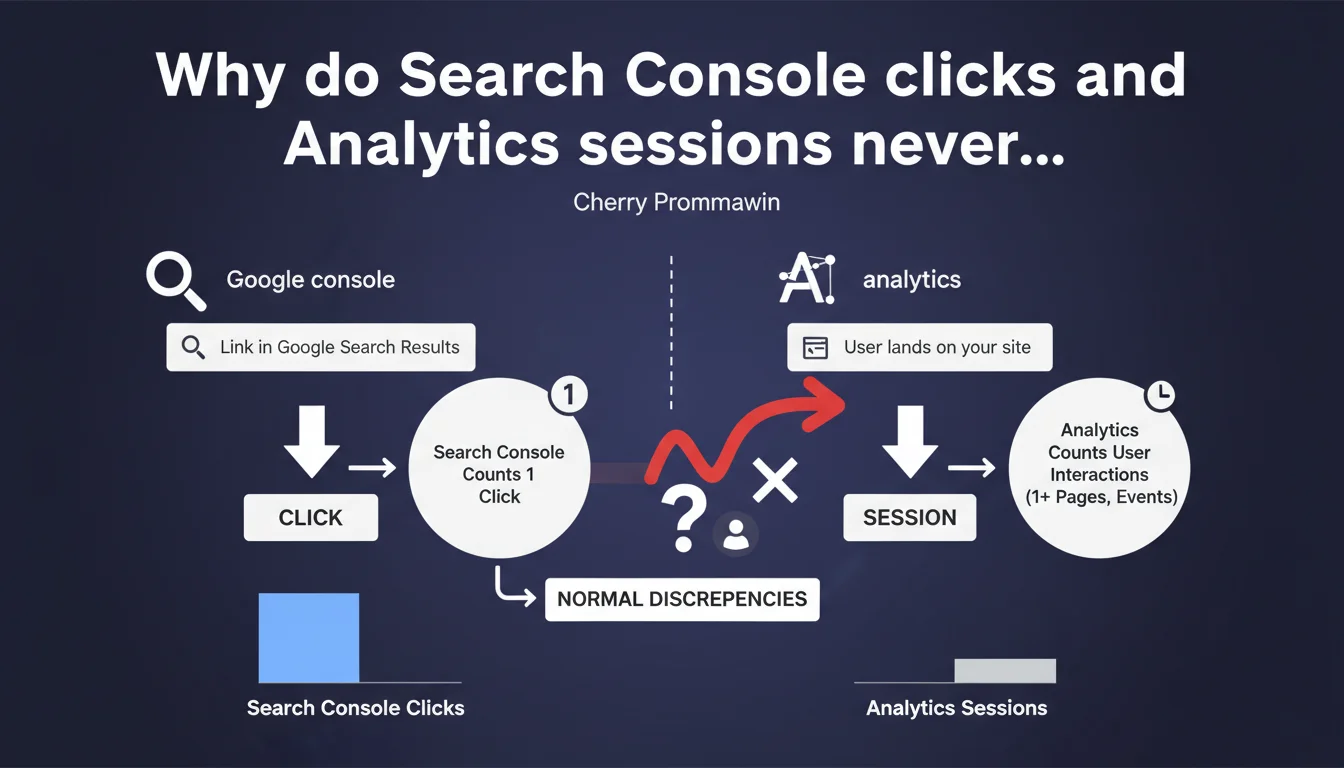
Google clarifies that clicks in Search Console and sessions in Analytics measure different things — one counts interactions with search results, the other counts sessions on your site. These discrepancies are normal and don't signal a tracking problem. Stop trying to reconcile these metrics: they were never designed to be identical.
What you need to understand
What is the fundamental difference between these two metrics?
A click in Search Console occurs at the exact moment a user clicks on a link in Google search results. It's an interaction with the SERP, not with your site.
A session in Google Analytics is a group of interactions on your website, starting when the user arrives and ending after 30 minutes of inactivity (by default). A single click can trigger multiple sessions if the user returns later — or no sessions at all if tracking fails.
Why do these discrepancies exist systematically?
The reasons are multiple and cumulative. A user may click on your result then close the tab before it fully loads — Search Console records the click, Analytics sees nothing. Ad blockers and anti-tracking extensions prevent the Analytics code from firing, but Search Console still counts the click on Google's side.
Another case: a user clicks on your site at 11:50 AM, browses, then returns at 12:25 PM. Search Console = 1 click. Analytics = 2 sessions (the second starts after the timeout). Redirect errors, pages with load times over 30 seconds, JavaScript errors — all of this creates holes in Analytics tracking that Search Console ignores.
Is Google telling us to ignore these discrepancies?
Not exactly. Google clarifies that these metrics are not equivalent by nature, so looking for a perfect match makes no sense. That doesn't mean completely ignoring the discrepancies.
If you see 10,000 Search Console clicks and 500 Analytics sessions, that's abnormal — likely a tracking problem, JavaScript crawlability issue, or massive blockers. But a 15-30% discrepancy? Perfectly normal. It's the difference between measuring intention (the click) and execution (the session on your site).
- Search Console measures interaction with Google (on the SERP side)
- Analytics measures interaction with your site (on the server/client side)
- Tracking blockers affect Analytics, not Search Console
- One click can generate 0, 1, or multiple sessions depending on user behavior
- Discrepancies of 15-30% are normal and expected
SEO Expert opinion
Is this statement consistent with what we observe in the field?
Yes, absolutely. Anyone who's tried to reconcile these numbers knows it's an impossible mission. What's frustrating is that Google takes 15 years to officially clarify what practitioners have understood for a long time.
The average discrepancy observed hovers around 20-25% between GSC clicks and organic Analytics sessions, sometimes higher depending on the industry. Sites with tech-savvy audiences (developers, marketers)? Discrepancies climb to 40% due to ad blockers and privacy-first extensions. Consumer-focused sites? Closer to 15-20%.
What factors amplify these discrepancies beyond normal?
Let's be honest: if your discrepancy exceeds 40%, there's likely an underlying technical issue. Poorly implemented Analytics tracking remains the top cause — GA4 code that loads after the first click event, broken cross-domain configurations, overly aggressive filters that exclude legitimate traffic.
JavaScript-heavy sites (React, Vue, Next.js) are particularly exposed. If your Analytics tracking depends on client-side JavaScript and Google's bot pre-renders the page differently from what the user sees, you lose sessions. [To verify]: Google doesn't specify whether recent changes in how Chrome handles third-party cookies affect these two metrics differently.
Another rarely mentioned point: rapid multiple clicks. A user clicks on your result, goes back in 2 seconds, clicks again. Search Console = 2 clicks. Analytics = maybe 1 session, maybe 0 if the first page didn't have time to load the tag.
Should we completely ignore these differences in client reporting?
No. But you need to contextualize them intelligently. When a client asks "why does Search Console show 15,000 clicks but Analytics only 11,000 sessions?", the answer isn't "it's normal, Google said so." That's too easy.
The real answer: analyze trends, not absolute numbers. If the discrepancy remains stable month after month (~20-25%), it's indeed normal. If the discrepancy goes from 20% to 45% in one month, that's a signal — maybe a technical regression, a shift in user behavior (more blockers), or an Analytics update that was misconfigured.
Practical impact and recommendations
Which metric should we use to measure SEO performance?
Search Console for visibility, Analytics for behavior. Stop trying to make them match — they're two different lenses on the same reality.
To measure the impact of an SEO optimization (new content, technical overhaul, migration), Search Console is your source of truth: impressions, clicks, CTR, average position. It's what Google sees and how users interact with your results in the SERP.
To measure organic traffic quality (time spent, page views, conversions), Analytics is essential. But never use organic Analytics sessions as the primary KPI for an SEO campaign — too many external variables (blockers, tracking errors, session timeouts) pollute the data.
How do you identify if the discrepancy reveals a real problem?
Calculate the ratio Analytics sessions / Search Console clicks each month. If this ratio stays within a range of 0.70 to 0.85, you're within normal range. Below 0.60? Investigate.
First check: does your Analytics code load correctly on all pages receiving organic traffic? Use Tag Assistant or DevTools to verify that the GA4 tag fires before the user can interact. Second check: are your Analytics filters and exclusions blocking legitimate traffic?
Also test with the Search Console API to retrieve the exact URLs receiving clicks, then compare with organic landing pages in Analytics. If certain URLs have GSC clicks but zero Analytics sessions, you have a tracking issue specific to those pages — often related to JavaScript or redirects.
What should you explain to clients and marketing teams?
Train your clients to understand that Search Console = intention, Analytics = results. A click in GSC means "a user wanted to visit your site." An Analytics session means "a user actually interacted with your site AND tracking worked."
Always present both metrics side by side in your dashboards, with clear explanation: "Expected discrepancy: 15-30% due to tracking blockers and measurement differences. As long as this discrepancy remains stable, no action required."
- Use Search Console as the primary metric for SEO performance (visibility, CTR, rankings)
- Use Analytics to measure the quality and behavior of organic traffic
- Calculate the sessions/clicks ratio monthly to detect anomalies
- Investigate if the ratio drops below 0.60 or varies dramatically by more than 15 points
- Verify proper loading of Analytics code on main organic landing pages
- Audit Analytics filters and exclusions that might block legitimate traffic
- Train clients to accept a normal 15-30% discrepancy between the two tools
❓ Frequently Asked Questions
Quel est l'écart normal entre clics Search Console et sessions Analytics ?
Si j'ai plus de sessions Analytics que de clics Search Console, c'est grave ?
Les bloqueurs de publicités affectent-ils Search Console ?
Dois-je utiliser Search Console ou Analytics pour mes KPIs SEO ?
Comment savoir si mon écart révèle un problème technique ?
🎥 From the same video 9
Other SEO insights extracted from this same Google Search Central video · published on 29/01/2025
🎥 Watch the full video on YouTube →
💬 Comments (0)
Be the first to comment.