
Official statement
Other statements from this video 10 ▾
- □ Pourquoi vos données Search Console ne correspondent-elles jamais à votre fuseau horaire ?
- □ Pourquoi Search Console vous cache-t-elle vos données les plus récentes par défaut ?
- □ Pourquoi vérifier vos performances uniquement sur l'onglet Web classique vous fait passer à côté de 40% de votre trafic potentiel ?
- □ Pourquoi vos requêtes cibles n'apparaissent-elles pas dans la Search Console ?
- □ Pourquoi vos pages stratégiques n'apparaissent-elles pas dans Search Console ?
- □ Un CTR faible justifie-t-il vraiment d'ajouter images et données structurées ?
- □ Pourquoi les annotations personnalisées dans Search Console peuvent-elles transformer votre analyse SEO ?
- □ Les annotations Search Console sont-elles vraiment privées ou visibles par tous vos prestataires ?
- □ Pourquoi le rapport Discover reste invisible dans Search Console malgré du trafic ?
- □ Pourquoi votre rapport Google News reste-t-il invisible dans Search Console ?
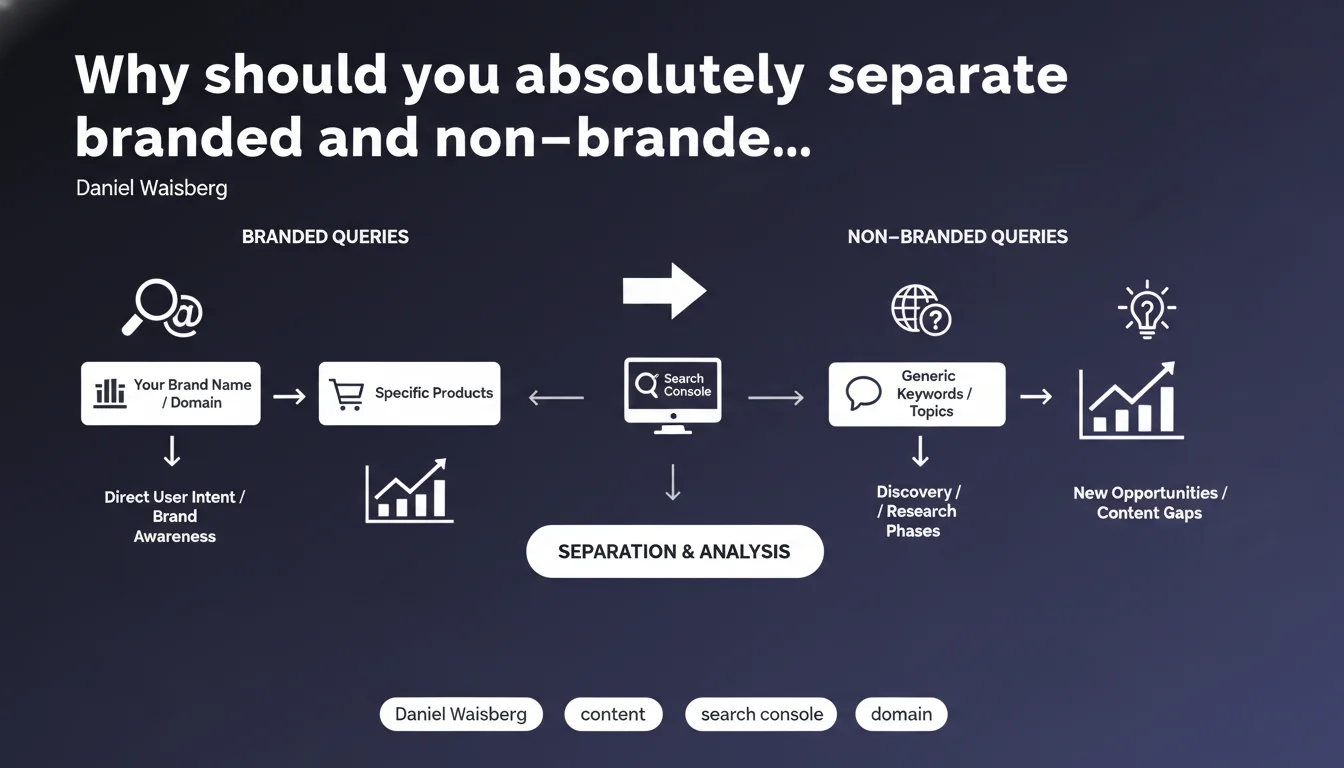
Search Console now offers native filtering to distinguish brand searches from generic queries. This separation allows you to analyze two completely different dynamics independently: acquired brand awareness (branded) and your real ability to capture SEO traffic on cold intentions (non-branded). Let's be honest, mixing both in your dashboards is like comparing apples and tractors.
What you need to understand
What exactly is a branded query according to Google?
Google considers any search mentioning your brand name, domain or specific registered products a branded query. In concrete terms? If you're Nike, "Nike Air Max" is branded, "white running shoes" is not.
The Search Console filter automatically identifies these queries — but be careful, Google's definition may differ from yours. A local brand with multiple possible spellings or complex product variations may see certain variants miscategorized.
Why does this distinction change SEO analysis?
Branded queries reflect your brand equity: people are already looking for you. Traffic is hot, conversion rates are high, but it's not pure SEO — it's brand awareness flowing through Google.
Non-branded queries measure your ability to intercept users who don't know you yet. This is where the real SEO battle plays out: ranking for generic intentions, direct competition, content optimizations.
What problem does this feature solve?
Before this native filtering, mixing both query types skewed analysis. A company with strong brand awareness could show massive impressions and clicks — but 80% came from brand searches, hiding catastrophic non-branded performance.
Conversely, an emerging site with little branded traffic but excellent informational content strategy saw its efforts diluted in the mix. The filter restores accuracy to your numbers.
- Branded queries = brand awareness indicator and direct demand
- Non-branded queries = real SEO performance on cold intentions
- The Search Console filter automates segmentation that was previously done manually (and imperfectly) via regex or exports
- Watch out for false positives: some ambiguous queries may be misclassified by Google's algorithm
SEO Expert opinion
Does this separation really change the game for practitioners?
Yes and no. Senior SEOs were already segmenting their data — via manual filters, regex or third-party tools. The novelty is accessibility: less technical teams can finally see clearly without spending two hours tinkering with CSV exports.
The real benefit? Standardization. When Google itself defines what a branded query is for your site, it avoids sterile internal debates and dashboard inconsistencies. However, it also imposes Google's vision — and it's not always aligned with your business reality.
What biases should you watch out for with this automatic filtering?
Google may classify obscure brand variations as non-branded, or conversely mark generic terms you historically dominate as branded. Concrete example: if you're "The Coffee House" and people search "coffee house", Google may hesitate depending on geographic context.
Another trap — multiple or sub-brands. If you manage a group with several retail banners, the filter will likely recognize the main brand but miss secondary ones. Result: skewed data, faulty conclusions.
Does this feature make third-party tools obsolete?
No. Platforms like Ahrefs, Semrush or Sistrix offer finer segmentation, longer histories and data crossovers (backlinks, rankings, SERP features) impossible in Search Console. What Google gives you here is a free and reliable baseline — but limited.
For quick exploratory analysis or basic monthly client reporting, the Search Console filter is more than enough. For advanced diagnostics, competitive analysis or forecasting, you'll always need paid tools. And that's where it pinches: Google only gives you what it's willing to give.
Practical impact and recommendations
How do you concretely exploit this separation in your reporting?
First step: activate the filter in Search Console and export both views separately. Compare performance: CTR, average positions, temporal evolution. If your non-branded stalls or declines while branded explodes, you have a content or ranking problem — not a visibility issue.
Second lever: use this segmentation to adjust your editorial priorities. A site with 90% branded traffic needs to invest heavily in informational content, guides, comparisons — anything that captures cold intentions. Conversely, a site with too little branded traffic needs to work on visibility outside SEO (PR, social, partnerships).
What interpretation mistakes should you absolutely avoid?
Don't celebrate a spike in total clicks if it comes 100% from branded searches. You haven't progressed in SEO, you've just benefited from a PR campaign or buzz. The true indicator of SEO health is non-branded evolution.
Another classic trap: comparing conversion rates between branded and non-branded without context. Of course branded converts better — people are already looking for you. What matters is the absolute volume of conversions on non-branded and its evolution over time.
What should you set up starting today?
Integrate this distinction into all your dashboards and KPIs. Separate objectives: non-branded growth for pure SEO, branded maintenance to monitor brand health and detect potential crises (sudden drop = reputation or aggressive competitor targeting your brand).
Automate weekly or monthly exports via the Search Console API if you have the technical means. Otherwise, schedule recurring manual extraction and store data in a master file to track long-term trends.
- Activate the branded/non-branded filter in Search Console and export both views
- Compare performance (CTR, positions, impressions) between the two segments
- Identify performance gaps and adjust editorial strategy accordingly
- Integrate this segmentation into your dashboards and client/internal reporting
- Validate the consistency of Google's automatic filtering with your own definitions (regex, manual exports)
- Monitor non-branded evolution over time as a key SEO performance indicator
- Never mix branded and non-branded KPIs in a single overall objective
🎥 From the same video 10
Other SEO insights extracted from this same Google Search Central video · published on 04/12/2025
🎥 Watch the full video on YouTube →
💬 Comments (0)
Be the first to comment.