
Official statement
Other statements from this video 8 ▾
- □ Does Googlebot actually store cookies when crawling your website?
- □ Why do search engine crawlers systematically ignore your cookies?
- □ Is dynamic rendering with content parity really risk-free for indexation?
- □ Does Google's crawler really behave like a standard browser, even with the same user agent?
- □ Why is testing your site with a crawler absolutely essential for SEO success?
- □ Why does Google refuse cookie-based pagination systems?
- □ Do cookies really prevent bots from accessing your content?
- □ Are cookie-dependent websites invisible to Googlebot?
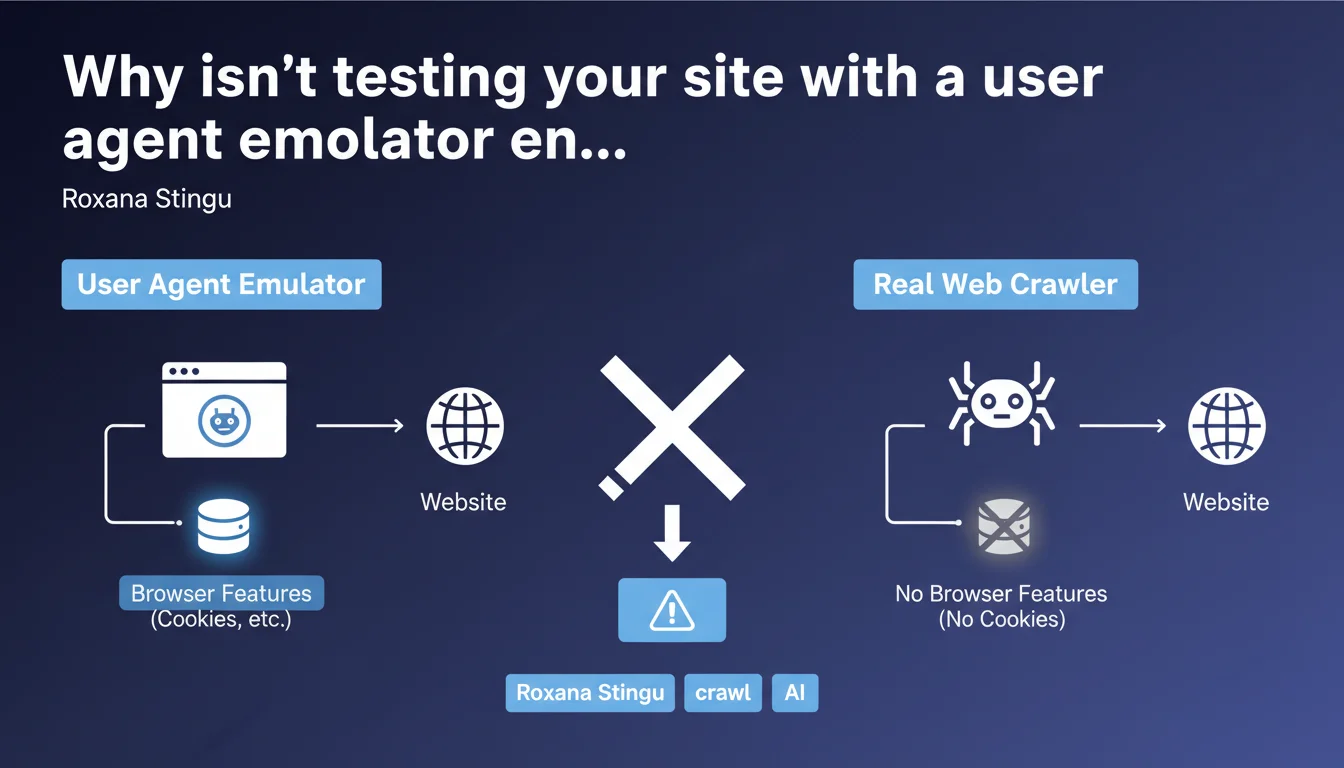
Google reminds us that emulating a bot user agent in a standard browser doesn't faithfully reproduce a real crawler's behavior. Browsers retain features like cookies, cache, and full JavaScript functionality that Googlebot doesn't necessarily use in the same way. The result: you miss problems that only appear under real-world conditions.
What you need to understand
What's the actual difference between a browser with a modified user agent and a real crawler?
When you change the user agent in Chrome DevTools to simulate Googlebot, you're only modifying the HTTP User-Agent header. The rest of the rendering engine stays intact: active cookies, browser cache, local storage, full JavaScript capabilities.
But Googlebot doesn't work that way. It doesn't handle session cookies, doesn't maintain cache between different page visits, and its JavaScript execution environment — though based on Chromium — has its own limitations and behaviors. Scripts that run flawlessly in your browser might crash or fail to execute entirely on the bot side.
Why is Google issuing this warning now?
Because user agent emulation has become a reflex for many SEOs. It's fast, accessible, and gives the impression of seeing "as Googlebot" would. Except that false sense of security reassures wrongly.
Entire websites pass audits on this basis, while conditional redirects, content served differently based on cookies, or silent JavaScript errors are never detected. Google has likely seen too many Support tickets where webmasters swear that "it works in my browser with the Googlebot user agent".
What concrete problems fly under the radar?
- Cookie-based redirects: If your site redirects users without cookies to a homepage or onboarding page, Googlebot will never see the actual content — your browser will.
- Conditional content: Content displayed only to authenticated visitors, stored in localStorage, or dependent on a session state.
- Scripts that fail silently: JavaScript that works in Chrome 120 but crashes in the Googlebot environment based on a slightly different or restricted version.
- Aggressive caching: Your browser may serve a cached version that hides an actual server-generation problem.
- Poorly implemented lazy loading: Some frameworks detect "real" bots differently than by user agent — your emulation misses this case.
SEO Expert opinion
Is this statement really a surprise?
No. Any experienced technical SEO knows that changing the user agent doesn't replicate a crawler's full environment. But let's be honest: how many audits are still conducted using only DevTools and a user agent switcher extension?
Google isn't saying anything new here — it's a useful reminder for those taking shortcuts. The real issue is that Google still doesn't provide a simple official tool to test your site exactly as Googlebot sees it, outside of Search Console (the URL inspection tool), which only covers one URL at a time and remains a black box.
What nuances should we add to this advice?
User agent emulation retains value for quick checks: verifying that content isn't hidden via CSS from a bot, testing a mobile/desktop version, spotting an obvious redirect. It's a first filter, not final validation.
The real problem lies elsewhere: too many SEOs stop there. They don't cross-reference with server logs, don't look at actual rendering in Search Console, don't test with third-party crawlers (Screaming Frog, OnCrawl, Botify) which also have their limitations but come closer to real behavior.
And that's where it gets tricky — Google says "the emulator isn't enough," but doesn't explicitly state what to do instead. [To verify]: how reliable are tests via the Search Console URL inspection tool for detecting all edge cases? Google doesn't precisely document the differences between this tool and production crawling.
In what cases does this rule cause the most problems?
High-personalization sites (e-commerce, media, SaaS platforms) are most exposed. They serve different content based on user profile, browsing history, A/B tests. A user agent emulator will detect none of these cases.
Same for modern Single Page Applications (SPAs): client-side rendering can fail in a thousand ways invisible in a standard browser but fatal for a bot. If your JavaScript framework expects a cookie or token to hydrate the DOM, Googlebot will see nothing.
Practical impact and recommendations
What should you do concretely to test like Googlebot?
First step: use the URL inspection tool in Search Console. It's the closest tool to Google's actual crawl, even if it's not perfect. It shows the final HTML rendering, blocked resources, critical JavaScript errors.
Second step: analyze your server logs. Look at which URLs Googlebot actually requests, with what return codes, which redirects, what response times. Compare with what you see in a browser. Gaps reveal the pitfalls.
Third step: crawl your site with a serious third-party tool configured to disable cookies, limit JavaScript, simulate a degraded environment. Screaming Frog, Sitebulb, OnCrawl, or Botify depending on your budget. Cross-reference results with Search Console.
What mistakes should you absolutely avoid?
- Never validate a site using only a user agent switcher in Chrome/Firefox.
- Don't ignore differences between Search Console rendering and what you see in a browser — that's a red flag.
- Don't test only the homepage or a few key pages — cookie/session issues often appear deeper in the site (product pages, articles).
- Don't forget to test in private browsing mode AND without cookies to replicate Googlebot's lack of state.
- Don't trust tools promising "100% testing like Google" — no third-party tool can perfectly replicate Google's internal environment.
How do you implement a reliable testing process?
Integrate multiple validation layers into your workflow. Before any major deployment: user agent test (quick first filter), Search Console URL inspection (Google validation), third-party crawler (anomaly detection at scale), post-deployment log analysis (real verification).
Document observed discrepancies between browser and bot for each content type or feature. Create a checklist specific to your tech stack: if you use React/Vue/Angular, if you have a paywall, if you serve personalized content.
❓ Frequently Asked Questions
L'outil d'inspection d'URL de la Search Console reproduit-il exactement le crawl de Googlebot ?
Les crawlers tiers comme Screaming Frog voient-ils la même chose que Googlebot ?
Pourquoi un site peut-il fonctionner parfaitement dans mon navigateur avec user agent Googlebot mais poser problème en crawl réel ?
Faut-il désactiver tous les cookies sur mon site pour être sûr que Googlebot accède au contenu ?
Comment savoir si un script JavaScript plante silencieusement pour Googlebot mais pas dans mon navigateur ?
🎥 From the same video 8
Other SEO insights extracted from this same Google Search Central video · published on 15/11/2022
🎥 Watch the full video on YouTube →
💬 Comments (0)
Be the first to comment.