
Official statement
Other statements from this video 8 ▾
- □ Does Googlebot actually store cookies when crawling your website?
- □ Why do search engine crawlers systematically ignore your cookies?
- □ Is dynamic rendering with content parity really risk-free for indexation?
- □ Does Google's crawler really behave like a standard browser, even with the same user agent?
- □ Why isn't testing your site with a user agent emulator enough to catch crawl problems?
- □ Why is testing your site with a crawler absolutely essential for SEO success?
- □ Why does Google refuse cookie-based pagination systems?
- □ Are cookie-dependent websites invisible to Googlebot?
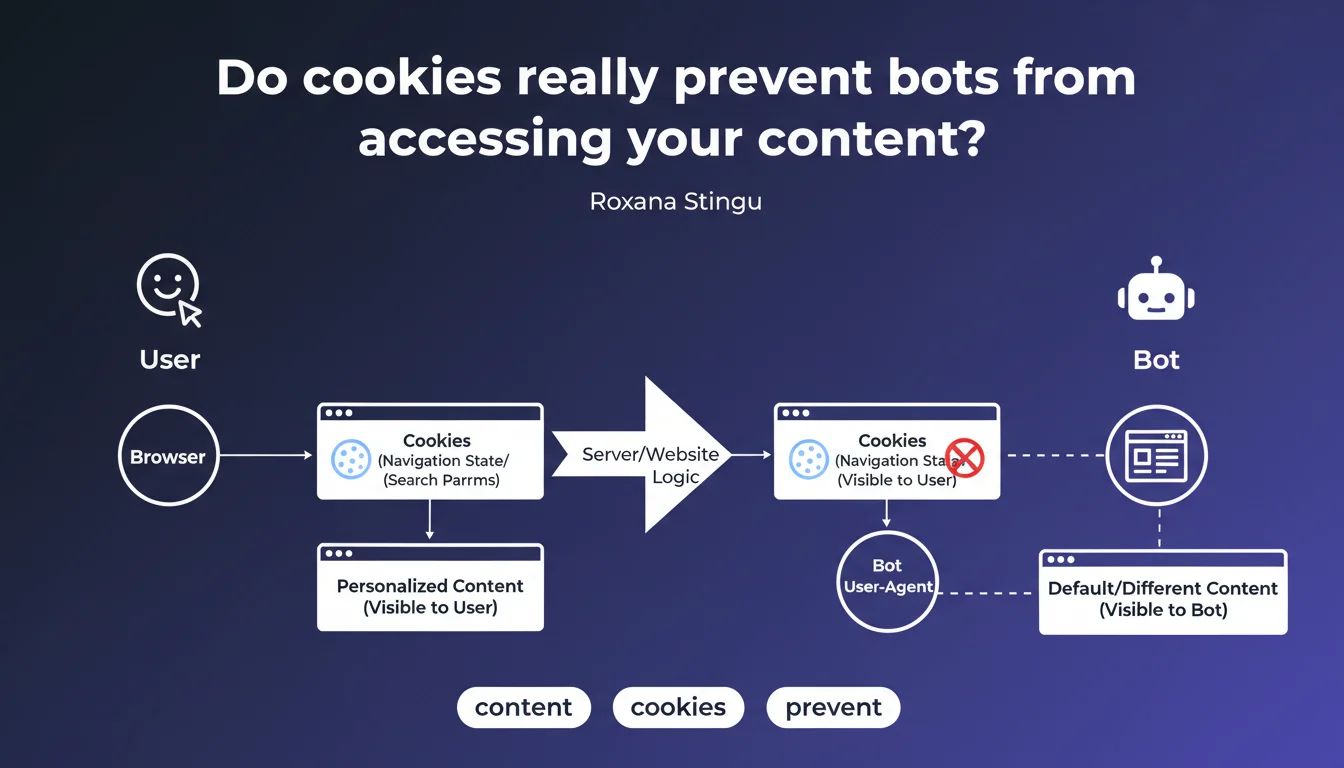
Features that rely on cookies to manage navigation state or search parameters create a major divergence between what users see and what bots crawl. Google confirms that these mechanisms can lead to completely different rendering for Googlebot, with direct implications for indexation.
What you need to understand
Why do cookies cause crawling problems?
Googlebot does not persist cookies between requests by default. When a site uses cookies to store navigation state (cart, active filters, sorting preferences), the bot always arrives in a fresh session.
Result: the crawled version of the site can display default content that is radically different from what a user sees who has already interacted with the site. Search facets, recommended products, personalized modules — all of this disappears in bot rendering.
Which features are affected?
Internal search filters based on cookies are a classic case. A user who filters by category or price sees a clean URL, but the bot arrives at this same URL with no cookies — so without the filter applied.
Same logic for personalization systems: dynamic modules, product recommendations, content adapted based on history. If everything relies on cookies, Googlebot sees an empty shell.
How significant is the problem?
Google doesn't quantify the impact, but the wording is unambiguous: "completely different". We're not in the realm of nuance — this is a structural divergence between user rendering and bot rendering.
E-commerce sites with faceted filters and web applications that manage state on the client side are the first to be exposed. If your architecture relies heavily on cookies to display content, you have a blind spot.
- Googlebot does not persist cookies between requests by default
- Cookie-dependent features create a divergence in bot/user rendering
- Search filters, personalization, navigation states are typical cases
- The impact can be "completely different" according to Google — not marginal
SEO Expert opinion
Is this statement consistent with field observations?
Yes, and it confirms what we've observed for years on e-commerce sites with facets. Filters based on cookies generate clean URLs that don't reflect the actual filter state on the bot side.
The problem is that Google remains vague about solutions. The statement points to the symptom but says nothing about how Googlebot handles essential first-party cookies versus ancillary cookies. [To verify]: to what extent does the bot respect Set-Cookie in a single session?
What nuance should we add about Googlebot's actual behavior?
Googlebot can accept cookies within a single crawl session, but does not preserve them from one visit to another. That means a multi-page journey in the same session could theoretically preserve state — but it's far from guaranteed.
Concretely? If your site serves a cookie on the first hit and expects it to be returned on the second, it can work. But relying on that for indexation is playing Russian roulette. Better to encode state in the URL or use explicit parameters.
In which cases does this rule not apply?
If your cookies only serve ancillary functions (analytics, A/B testing, consent), no impact on visible content. The bot sees the same thing as the user.
Also watch out for sites that use cookies for security mechanisms (anti-bot, rate limiting). That's a different issue — and Google says nothing about how its crawler handles these protections. [To verify] by testing with rendering tools.
Practical impact and recommendations
How can I verify if my site is exposed to this problem?
First reflex: crawl your site without cookies. Use Screaming Frog or a headless crawler in private navigation mode, explicitly disable cookies, and compare the rendering with standard user navigation.
Then inspect the Mobile-Friendly Test and Search Console. If critical pages return rendering errors or missing content, check if they depend on cookies to display their main elements.
What mistakes should you absolutely avoid?
Never manage faceted filters or navigation states solely through cookies. If the URL doesn't reflect the state, the bot can't understand it — and you lose indexation of these variants.
Also avoid conditioning the display of essential content (extended product descriptions, SEO content blocks) to user preference cookies. The bot always arrives in default config.
- Crawl the site in private mode / without cookies and compare with user rendering
- Encode navigation state in URL parameters rather than cookies
- Test Googlebot rendering via Mobile-Friendly Test and URL Inspection Tool
- Verify that critical content does not depend on any cookie to display
- Migrate filtering mechanisms to URL-based solutions (query params, explicit fragments)
- Audit JS frameworks: Next.js, Nuxt, etc. can introduce invisible cookie dependencies
❓ Frequently Asked Questions
Googlebot conserve-t-il les cookies d'une page à l'autre lors du crawl ?
Les filtres à facettes basés sur cookies sont-ils indexables ?
Comment tester si mon site affiche du contenu différent aux bots à cause des cookies ?
Les cookies de consentement (RGPD) bloquent-ils l'accès des bots au contenu ?
Quelle alternative aux cookies pour gérer l'état de navigation en SEO-friendly ?
🎥 From the same video 8
Other SEO insights extracted from this same Google Search Central video · published on 15/11/2022
🎥 Watch the full video on YouTube →
💬 Comments (0)
Be the first to comment.