
Official statement
Other statements from this video 11 ▾
- □ Have site migrations really become less risky for SEO now?
- □ Are Meta Refresh Redirects Destroying Your SEO Migration Strategy?
- □ Do you really need to panic if your site traffic hasn't recovered a year after migration?
- □ Should you really avoid combining domain migration and complete redesign at the same time?
- □ Can changing your HTML structure really impact your Google rankings?
- □ Should you really migrate a complex website in phases rather than all at once?
- □ Should you really verify a domain's history before SEO migration?
- □ Can a domain with a problematic past secretly tank your SEO performance for an entire year?
- □ Are HTTPS migrations really as trouble-free as Google claims?
- □ Is a comprehensive URL mapping really the single most critical factor that makes or breaks an SEO migration?
- □ Does a properly executed SEO migration really guarantee zero traffic loss?
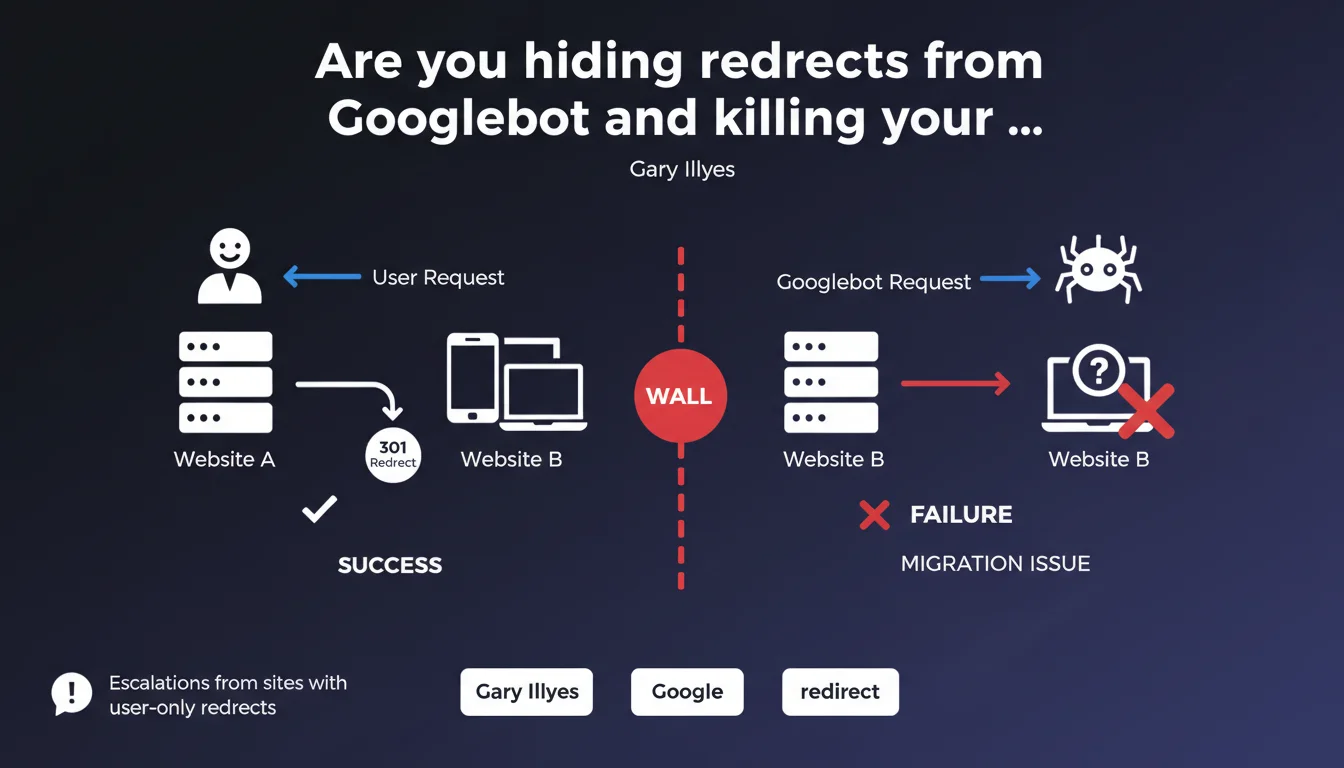
Google is reporting migration failures caused by redirects configured only for human users, leaving Googlebot stuck on the old site. The bot doesn't follow redirects it can't see — resulting in lost crawl budget, outdated indexation, and migrations that turn into technical disasters.
What you need to understand
Why would a site hide its redirects from Googlebot?
This practice often stems from misunderstanding user-agents or JavaScript implementations that only activate on the client side. Some modern CMS platforms or frameworks trigger redirects via JavaScript after initial rendering — Googlebot misses them if JavaScript isn't executed properly.
Other cases involve intentional server configurations: user-agent detection to serve differentiated content. Sometimes it's a clumsy attempt to prevent bots from following certain URLs during a gradual migration. Except that denying Googlebot redirects tells it to stay on the old site version.
What actually happens during such a migration?
Users land on the old site and get redirected to the new one. Googlebot lands on the old site, doesn't get redirected, and continues crawling the old structure. It indexes or maintains the old content, ignores the new, and ranking signals remain locked to the old domain or old URLs.
Result? The migration doesn't exist in Google's eyes. You lose organic traffic on new pages that are never crawled, the old site stays indexed with obsolete or deleted content, and your consolidation strategy falls apart.
What's the real scope of this problem?
Gary Illyes mentions escalations — meaning cases serious enough to reach the Search team directly. That signals a recurring error in technical migrations, not an isolated bug. Web dev teams sometimes implement client-side redirects without checking server-side behavior.
- Redirects must be visible to all user-agents, including Googlebot
- JavaScript or client-side redirects are risky during migration if Googlebot doesn't execute them
- An HTTP 301/302 redirect at server level remains the most reliable method for migration
- Testing migration with a simulated Googlebot user-agent is essential before cutover
SEO Expert opinion
Is this statement consistent with observed practices?
Absolutely. We regularly see migrations collapse because redirects are implemented via JavaScript, delayed Meta Refresh, or worse, via server rules that explicitly exclude bots. Developers sometimes think they're doing the right thing by "protecting" bots from redirects during a testing phase — except they forget to re-enable for Googlebot.
What's interesting is that Gary isn't pointing to a Google bug here. He's highlighting webmaster configuration error. That reinforces accountability: if Googlebot doesn't see the redirect, it won't follow it. Period. No miraculous rendering that fixes everything.
What nuances should be noted?
Googlebot executes JavaScript in some cases, so a JS redirect can be followed — but [To verify] since rendering isn't guaranteed for all pages, and the delay between HTML crawl and JS rendering can be several days. Betting on that for migration is playing Russian roulette.
Second nuance: client-side redirects (Meta Refresh with zero delay, immediate JavaScript redirect) are technically supported by Google, but remain less reliable than HTTP 301/302. During migration, reliability trumps technical elegance.
In what cases doesn't this rule apply?
If your migration is purely frontend (SPA that changes routes without changing server URLs), you don't need HTTP redirects. But again, ensure Googlebot sees the new URLs through rendering or classic internal links.
For partial or gradual migrations, it may be tempting to redirect only certain users — but never at the expense of bots. If Googlebot doesn't follow, you break indexation. Better to migrate all at once or use canonical tags to signal the preferred version during transition.
Practical impact and recommendations
How do I verify that Googlebot sees my redirects?
Use the URL inspection tool in Google Search Console. Test the original URL: if Google displays a redirect and follows to the new URL, you're good. If the tool shows old page content without a redirect, you have a problem.
Another method: simulate a crawl with a Googlebot user-agent via curl or a tool like Screaming Frog in "Googlebot smartphone" mode. Verify the HTTP status code is indeed 301 or 302, and the Location header points to the new URL. If you get a 200 with HTML content, your redirect is invisible to Googlebot.
What errors should you absolutely avoid?
Never configure server rules that serve redirects only to certain user-agents (unless you know exactly what you're doing and explicitly include Googlebot). Don't rely on JavaScript redirects without prior testing with the URL inspection tool.
Avoid Meta Refresh with delay greater than zero — Google can follow it, but with less reliability and speed. During migration, every day counts for transferring ranking signals. An HTTP 301 server redirect is immediate and unambiguous.
What exactly should you do before and after migration?
- Implement redirects at server level (Apache, Nginx, CDN) with 301 codes for permanent migration
- Test each critical URL with Search Console's URL inspection tool before cutover
- Simulate full crawl with Googlebot user-agent to verify all redirects are visible
- Monitor server logs post-migration: Googlebot must receive 301/302, not 200 on old URLs
- Verify in Search Console that old URLs disappear from index and new ones are crawled
- Set up alerts on 404 errors and orphaned pages to detect missing redirects
❓ Frequently Asked Questions
Une redirection JavaScript est-elle suffisante pour une migration de site ?
Comment savoir si Googlebot suit mes redirections ?
Puis-je cacher temporairement une redirection à Googlebot pendant une phase de test ?
Quels codes de statut HTTP utiliser pour une migration définitive ?
Les redirections Meta Refresh sont-elles fiables pour une migration ?
🎥 From the same video 11
Other SEO insights extracted from this same Google Search Central video · published on 23/02/2023
🎥 Watch the full video on YouTube →
💬 Comments (0)
Be the first to comment.