
Official statement
Other statements from this video 8 ▾
- □ La latence tue-t-elle vraiment vos conversions et votre SEO ?
- □ La performance mobile est-elle vraiment un facteur de classement déterminant ?
- □ Faut-il vraiment lancer Lighthouse en boucle pour diagnostiquer la performance de ses pages ?
- □ Les GIF animés plombent-ils vraiment votre SEO et vos Core Web Vitals ?
- □ Le lazy loading d'images est-il vraiment indispensable pour votre SEO ?
- □ Faut-il vraiment analyser ses bundles JavaScript avec webpack pour performer en SEO ?
- □ 15% de vitesse mobile en plus = combien d'utilisateurs gardés sur vos pages produits ?
- □ Pourquoi l'optimisation de performance prend-elle autant de temps en SEO ?
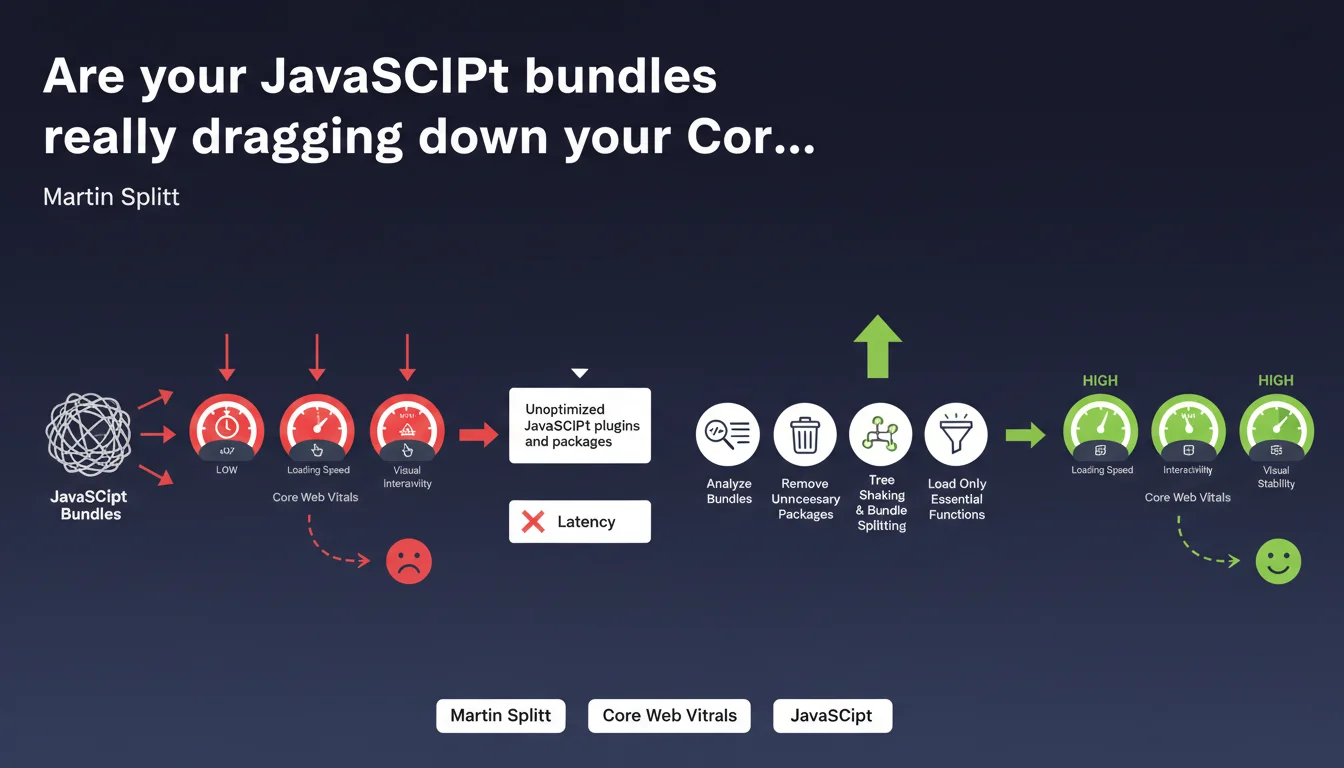
Google reminds us that poorly optimized JavaScript bundles significantly increase latency and directly impact user experience. Package analysis, tree shaking, and bundle splitting are no longer optional—they're prerequisites to stay competitive on high-traffic keywords.
What you need to understand
Why does Google place so much emphasis on JavaScript optimization?
JavaScript has become the primary bottleneck for web performance. Unoptimized bundles force the browser to download, parse, and execute tens (or even hundreds) of kilobytes of unnecessary code.
In practice? A carousel plugin that bundles an entire library when you only use 3 functions. A full framework loaded just to display a simple form. These situations pile up and latency skyrockets.
What exactly are tree shaking and bundle splitting?
Tree shaking involves eliminating dead code—all those imported functions that are never actually used. It's automated cleanup in your dependencies. Modern tools like Webpack or Rollup do this natively, but you need to configure your builds correctly.
Bundle splitting takes it further: instead of one monolithic JavaScript file, you split the code into multiple bundles loaded on demand. The homepage loads only what it needs, and so do product pages.
What's the real SEO impact?
Google measures user experience through Core Web Vitals, notably LCP and FID (now INP). Poorly optimized JavaScript delays LCP (largest contentful paint) and degrades FID/INP (responsiveness to interactions).
Sites with poor CWV scores lose rankings on competitive queries. It's not binary—it's a cumulative disadvantage against competitors who've done the optimization work.
- Increased latency: every extra kilobyte delays rendering and interactivity
- Core Web Vitals: direct impact on LCP, FID/INP, and CLS (if JS modifies layout)
- Crawl budget: Google consumes resources executing JavaScript—if it's heavy, exploration slows down
- Mobile-first: on mobile, bandwidth and CPU power are limited—JavaScript bloat is even more penalizing
SEO Expert opinion
Is this statement consistent with real-world observations?
Absolutely. Audits regularly reveal sites with 500 KB to 2 MB bundles, 70% of which is unused code. Tools like Chrome DevTools Coverage show the extent of the waste—and Google has access to the same metrics.
The problem is that many developers (and clients) underestimate the impact. They add WordPress plugins or npm libraries without considering the cost. Result: a site loading 15 JavaScript libraries just to display... a carousel.
Are there nuances to consider?
Yes. Google isn't saying that all JavaScript is bad—it's saying that unoptimized JavaScript is. A well-configured React or Vue site, with proper code splitting and lazy loading, can outperform a poorly built "traditional" site.
Also beware of the opposite extreme: removing useful JavaScript or breaking features to save 10 milliseconds. The goal is to eliminate the unnecessary, not sacrifice everything.
[To verify] Google remains vague on precise thresholds. At what bundle size does the penalty become significant? Hard to say—Google's internal benchmarks aren't public. We work with correlations and real-world observations.
What are common mistakes that undo optimization efforts?
First mistake: optimize the main bundle but ignore third-party scripts (analytics, chatbots, ad pixels). These scripts often escape your control and tank performance.
Second mistake: do bundle splitting... but badly. If you split into 50 micro-bundles, you create an avalanche of HTTP requests that cancels the benefit. You need to find the right balance.
Practical impact and recommendations
What concrete steps should you take to optimize bundles?
First step: audit your current state. Use Lighthouse, WebPageTest, or Chrome DevTools Coverage to identify unused JavaScript. You'll often be surprised.
Next, review each dependency. That 80 KB jQuery plugin used for a single animation? Replace it with 10 lines of vanilla JavaScript. That 200 KB date library? Maybe a lighter alternative (or native code) is enough.
What tools and techniques should you implement?
If you're using a modern bundler (Webpack 5, Vite, Parcel), enable tree shaking in production mode. Configure code splitting to separate vendor code (third-party libraries) from application code.
Implement lazy loading for non-critical components—anything that doesn't appear above the fold can be loaded on demand. Use dynamic imports (import()) to load modules at runtime when needed.
Also consider preloading and prefetching to anticipate user needs without blocking initial render.
How do you verify that optimizations are working?
Measure before/after with real metrics: LCP, FID/INP, TBT (Total Blocking Time). Don't rely only on Lighthouse scores—test on actual mobile devices with simulated 3G connections.
Use monitoring tools like CrUX (Chrome User Experience Report) to track real-world performance with your actual users. If your Core Web Vitals improve in Search Console, you're on the right track.
- Audit bundles with Coverage (Chrome DevTools) and Lighthouse
- Remove unnecessary or redundant JavaScript packages and plugins
- Enable tree shaking and configure bundle splitting in your build
- Implement lazy loading for non-critical components
- Analyze and optimize third-party scripts (analytics, ads, chatbots)
- Test performance on mobile with simulated 3G connection
- Monitor Core Web Vitals via CrUX and Search Console
- Automate bundle size checks in your CI/CD pipeline
❓ Frequently Asked Questions
Le tree shaking fonctionne-t-il avec toutes les bibliothèques JavaScript ?
Quel est le poids maximal acceptable pour un bundle JavaScript ?
Le bundle splitting peut-il nuire aux performances en créant trop de requêtes HTTP ?
Comment gérer les scripts tiers qui échappent à mon contrôle ?
Les frameworks JavaScript modernes sont-ils compatibles avec ces optimisations ?
🎥 From the same video 8
Other SEO insights extracted from this same Google Search Central video · published on 29/12/2022
🎥 Watch the full video on YouTube →
💬 Comments (0)
Be the first to comment.