
Official statement
Other statements from this video 9 ▾
- □ La Search Console est-elle vraiment le seul outil fiable pour vérifier le crawl de votre site ?
- □ La Search Console détecte-t-elle vraiment tous les problèmes d'indexation de votre site ?
- □ Faut-il vraiment soumettre un sitemap via Search Console pour optimiser l'indexation de vos pages ?
- □ Comment vérifier efficacement vos données structurées et rich results dans la Search Console ?
- □ La Search Console est-elle vraiment la seule source fiable pour mesurer votre trafic organique ?
- □ Comment exploiter la Search Console pour diagnostiquer une chute de trafic organique ?
- □ Pourquoi devriez-vous croiser Search Console et Google Analytics pour piloter votre SEO ?
- □ Comment filtrer correctement le trafic organique Google dans Analytics ?
- □ Comment identifier précisément les pages et requêtes responsables d'une chute de trafic ?
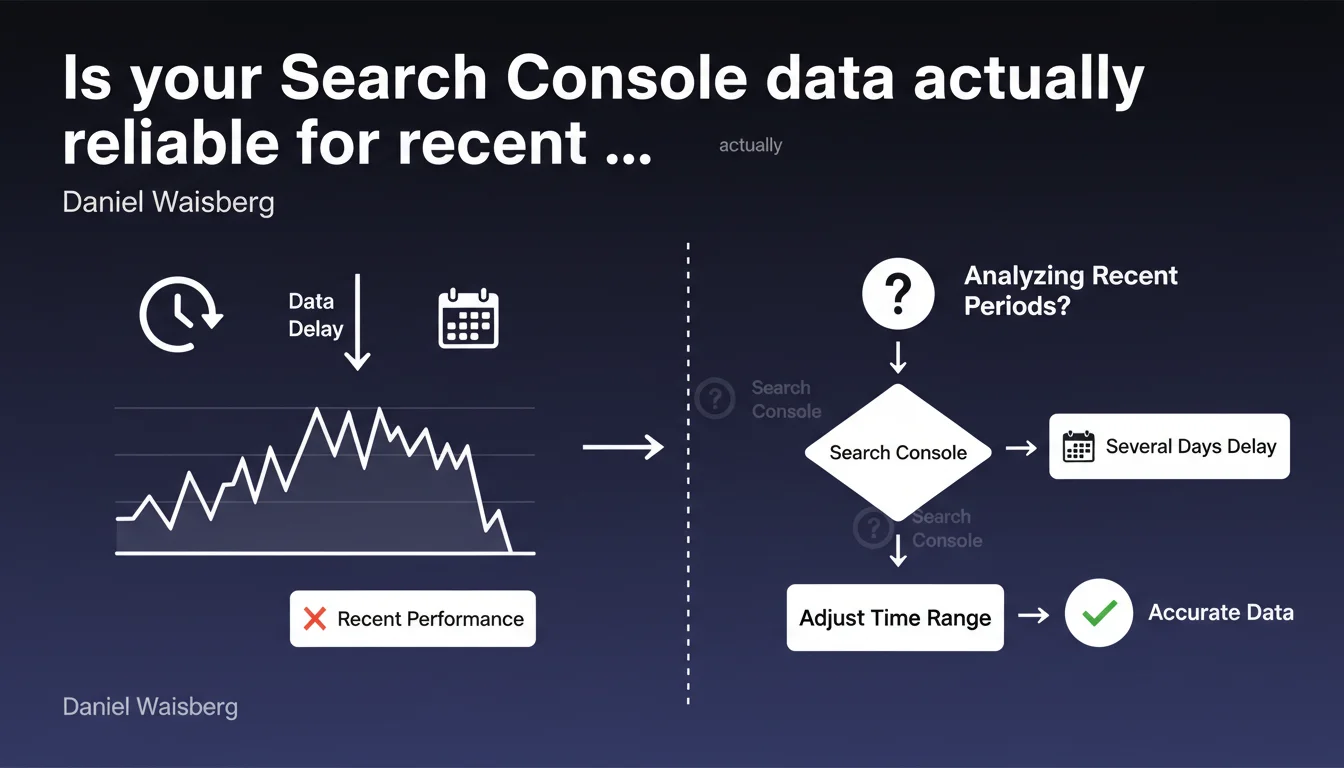
Google officially confirms that Search Console data experiences a delay of several days before becoming complete. In practice, analyzing performance from the last 2-3 days can lead to incorrect conclusions because the figures are still partial. For any audit or campaign tracking, you need to adjust the time range and exclude the most recent days.
What you need to understand
This statement from Daniel Waisberg reminds us of a known but often overlooked principle: the data displayed in Search Console is never instantaneous. The delay between the user's search query and the data appearing in the interface can reach 48 to 72 hours.
The problem arises when you analyze recent periods without accounting for this lag. An apparent traffic spike yesterday may actually be incomplete — and what looks like a sudden drop could simply be a temporary absence of data reporting.
What exactly is this latency delay?
Google mentions "several days" without being more specific. Based on real-world observations, the delay typically ranges between 24 and 72 hours, with more noticeable latency on performance data (clicks, impressions) than on indexation.
The most recent data (Day-1, Day-2) is systematically incomplete. This isn't a bug—it's the normal functioning of Google's data processing pipeline.
Why does this latency exist?
Google aggregates billions of queries daily. Processing, validating, and anonymizing data takes time. Information must be consolidated from multiple data centers, filtered to remove spam, then made available in the interface.
This isn't a matter of arbitrary technical limitation—it's a constraint of scale. The larger the data volume, the longer the consolidation delay becomes.
Which data is affected by this delay?
All performance metrics: clicks, impressions, CTR, average position. Indexation data (indexed pages, crawl errors) is also subject to this lag, though generally less pronounced.
Conversely, crawl data (Coverage statistics) can display more recent information since it comes from a different pipeline.
- Performance data (clicks, impressions) experiences a 24 to 72 hour delay
- Indexation data can also be offset by several days
- Crawl statistics are sometimes more responsive, but still subject to a slight delay
- It's impossible to view real-time data in Search Console
- Adjusting the time range by excluding the last 2-3 days becomes a systematic best practice
SEO Expert opinion
Is this latency consistent with real-world observations?
Absolutely. Any SEO professional who tracks page launches or migrations knows this phenomenon: data always takes 48 to 72 hours to stabilize. This isn't a surprise—it's official confirmation.
The real problem is that many practitioners—and especially clients—want immediate figures. "Why don't I see my impressions after publishing my page yesterday?" Because Google doesn't operate in real-time.
What nuances should we add to this statement?
Google deliberately remains vague by saying "several days". Why not be specific: "48 to 72 hours on average, up to 96 hours in some cases"? [To be verified] but we sometimes observe longer delays on sites with low traffic volume.
Another point to note: this delay isn't uniform across data types. Indexation errors can take longer to appear than clicks. There isn't a single pipeline, but several, each with its own latency.
Are there cases where this rule doesn't apply?
Nowhere. This delay is systematic. Even a site receiving millions of visits daily receives no priority treatment in data reporting. Google makes no exceptions.
However, if you use other tools (Google Analytics, server logs, Cloudflare Analytics), you can cross-reference sources to validate your hypotheses in real-time—but Search Console will always remain offset.
Practical impact and recommendations
What should you do concretely to avoid analysis errors?
First rule: never analyze the last 2-3 days in Search Console. If you're comparing performance over the past week, systematically exclude the most recent days. Compare Day-7 to Day-14, not Day-0 to Day-7.
Second rule: adjust your dashboards and automated reports. If you extract data via the Search Console API, configure your scripts to exclude the last 72 hours by default.
What errors should you absolutely avoid?
The classic mistake: panicking after an apparent drop in impressions or clicks over the last few days. This isn't a drop—it's incomplete consolidation. Waiting 48 to 72 hours is often enough to see the data complete itself.
Another trap: comparing periods that include incomplete days. If you compare "this week" (including Day-1 and Day-2) to "last week" (complete), your conclusions will be skewed.
How do you adjust your workflows and tools?
Integrate this delay into your audit and reporting processes. If you use third-party tools (SEMrush, Ahrefs, Screaming Frog coupled with the Search Console API), configure them to exclude the last 3 days from automated analyses.
For post-migration or post-redesign tracking, plan for a minimum 72-hour buffer before drawing conclusions. If you launch a site on Monday, don't begin analysis until Thursday.
- Systematically exclude the last 2-3 days from any Search Console analysis
- Adjust automated reports and API extractions to not include incomplete data
- Train clients and internal teams on this lag to prevent false alerts
- Cross-reference Search Console data with Google Analytics or server logs to validate trends in real-time
- Allow a minimum 72-hour delay before measuring the impact of a technical or editorial modification
- Never trigger corrective action based on partial data
❓ Frequently Asked Questions
Combien de temps exactement faut-il attendre avant que les données Search Console soient complètes ?
Ce délai affecte-t-il aussi les données d'indexation et de crawl ?
Peut-on obtenir des données en temps réel avec l'API Search Console ?
Comment ajuster mes rapports automatisés pour tenir compte de ce délai ?
Ce délai est-il plus court pour les gros sites ?
🎥 From the same video 9
Other SEO insights extracted from this same Google Search Central video · published on 06/02/2025
🎥 Watch the full video on YouTube →
💬 Comments (0)
Be the first to comment.