
Official statement
Other statements from this video 13 ▾
- □ Faut-il vraiment maîtriser la technique SEO avant de produire du contenu ?
- □ La Search Console suffit-elle vraiment pour détecter tous les problèmes techniques SEO ?
- □ Pourquoi les titres de produits e-commerce doivent-ils impérativement contenir la marque et la couleur ?
- □ Les données structurées sont-elles vraiment indispensables pour que Google comprenne vos pages ?
- □ Faut-il vraiment garder les pages de produits en rupture de stock indexées ?
- □ Faut-il vraiment créer du contenu spécifique pour chaque étape du parcours d'achat ?
- □ Faut-il vraiment créer une URL unique pour chaque variante de produit ?
- □ Faut-il vraiment décrire toutes les variantes produit dans la page canonique ?
- □ Faut-il vraiment réutiliser la même URL pour vos événements promotionnels récurrents ?
- □ L'expérience utilisateur est-elle vraiment un facteur de classement déterminant chez Google ?
- □ Pourquoi le SEO met-il vraiment plusieurs mois à produire des résultats ?
- □ Pourquoi Google considère-t-il tous les liens payants comme artificiels et dangereux pour votre SEO ?
- □ Le « meilleur contenu possible » : vrai cap stratégique ou paravent marketing de Google ?
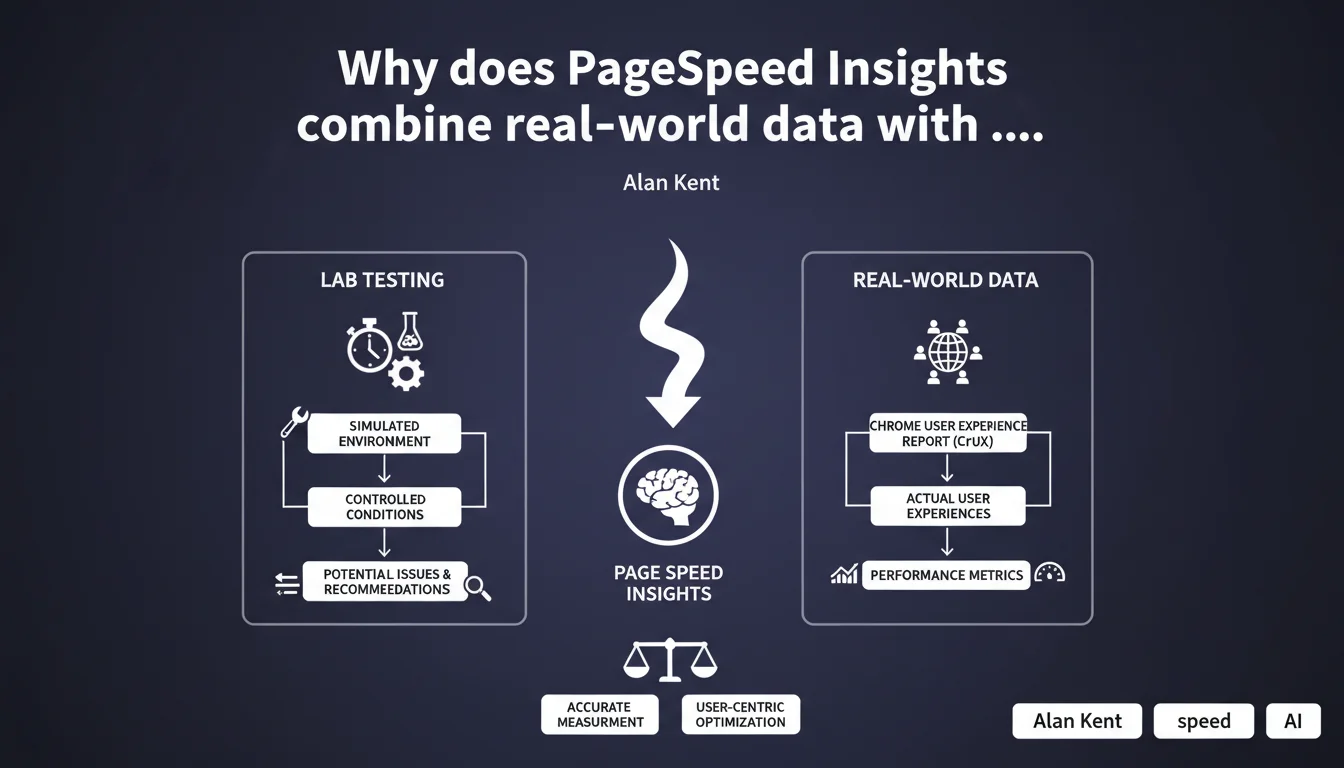
PageSpeed Insights offers a dual perspective: lab tests to diagnose technical issues, and real-world data from the Chrome User Experience Report to measure the actual experience of your visitors. This distinction is crucial because a site can perform brilliantly in the lab and disappoint in real conditions, or vice versa.
What you need to understand
What's the difference between lab tests and real-world data?
Lab tests run in a controlled environment: stable connection, standardized machine, cleared cache. They isolate pure technical issues — blocking JavaScript, unoptimized images, missing critical CSS. Reproducible infinitely, they allow you to pinpoint exactly what's wrong in your code.
Real-world data comes from the Chrome User Experience Report (CrUX). It reflects the actual experience of your users: failing 3G connections, older Android smartphones, parasitic Chrome extensions. It's the daily reality of your visitors, not a sterile test environment.
Why does Google insist on this dual approach?
Because each sheds light on the blind spot of the other. A site can display a perfect Lighthouse score (lab) but catastrophic Core Web Vitals in production (real-world). Conversely, you can have decent CrUX metrics despite massive technical debt — simply because your audience has a good connection.
This distinction keeps you from two traps: ignoring real problems because of an artificially good score, or panicking over alerts that don't reflect your users' actual experience.
How do you interpret the recommendations provided?
PageSpeed Insights lists optimization opportunities detected during lab tests. These suggestions aren't all equally important. Some directly impact your Core Web Vitals under real conditions, others marginally improve a synthetic score with no measurable effect.
Your job is to cross-reference these recommendations with your CrUX data. If your real-world LCP is degraded and the tool points to an unoptimized hero image, go for it. If your FID is excellent despite JavaScript alerts, question the priority.
- Lab tests: controlled environment, reproducible, pure technical diagnosis
- CrUX data: real user experience, over 28 rolling days, all devices and connections combined
- Recommendations: prioritize based on their impact on your site's real-world metrics
- A good lab score doesn't guarantee good real-world performance, and vice versa
SEO Expert opinion
Is this dual reading really workable in practice?
Yes, as long as you don't drown in numbers. Too many SEOs panic over a Lighthouse score of 60 when their Core Web Vitals are actually green. Or the reverse: they celebrate a 95 in the lab while their mobile users wait 8 seconds to see content.
The real work is identifying gaps between lab and real-world. A huge gap? Your audience uses devices or connections that your tests don't simulate. Perfect correlation? Your lab optimizations translate directly into real gains — keep going.
Are PageSpeed Insights recommendations always relevant?
Not necessarily. The tool sometimes suggests marginal optimizations that complicate your stack for imperceptible gains. Classic example: eliminating render-blocking resources by inlining all critical CSS can generate code that's hard to maintain, to squeeze out 0.2 seconds on an LCP that's already decent.
[To verify] — Google doesn't specify how these recommendations are prioritized. Some seem auto-generated without evaluating their actual impact on your Core Web Vitals. Test, measure the effect on CrUX, then decide.
Should you give more weight to CrUX data than Lighthouse scores?
Absolutely. CrUX reflects what Google uses for ranking — it's the only source of truth that matters for your positions. Lighthouse helps you understand why CrUX is degraded, but it never replaces real-world data.
Let's be honest: a catastrophic Lighthouse score with excellent CrUX Core Web Vitals won't penalize you. The opposite — a 100 in the lab with frustrated users — will sink you. Always prioritize real experience.
Practical impact and recommendations
How do you concretely use PageSpeed Insights to improve your SEO?
Start by checking if you have CrUX data for your key pages. No data? Your traffic is too low to feed the report over 28 days. You'll need to rely on your own monitoring tools (RUM) or Google Analytics 4.
Once CrUX data is available, focus on the three Core Web Vitals: LCP, FID (or INP), CLS. These are your absolute priorities. Lighthouse recommendations that directly impact these metrics go to the top of your queue.
What mistakes should you avoid when interpreting results?
Don't obsess over achieving a Lighthouse score of 100. It's a waste of time. A site at 75 in the lab with green Core Web Vitals in the real world will always outrank a theoretical 100 with users abandoning on load.
Second trap: blindly applying all recommendations without measuring real impact. Some optimizations break features, complicate maintenance, or deliver negligible gains. Test each change, compare before/after on CrUX.
What if lab data and real-world data diverge significantly?
Analyze your actual audience. If CrUX shows degraded performance despite a good lab score, your users likely have slow connections or underpowered devices. Adapt your lab tests: CPU throttling, 3G connection, mid-range devices.
Conversely, if your lab is catastrophic but CrUX is decent, your audience may have robust infrastructure that compensates for your technical weaknesses. That doesn't excuse optimization — but it puts urgency in perspective.
- Check CrUX data availability for your key pages (Search Console, PageSpeed Insights)
- Identify degraded Core Web Vitals under real conditions (LCP, FID/INP, CLS)
- Cross-reference Lighthouse recommendations with CrUX metrics to prioritize actions
- Test optimizations in a staging environment before deployment
- Measure real impact on CrUX after each change (wait 28 days for complete data)
- Monitor the desktop/mobile gap and adjust tests accordingly
- Don't sacrifice code maintainability for marginal gains
❓ Frequently Asked Questions
PageSpeed Insights utilise-t-il les mêmes données CrUX que la Search Console ?
Combien de temps faut-il pour voir l'impact d'une optimisation dans les données CrUX ?
Que faire si mon site n'a pas assez de trafic pour générer des données CrUX ?
Les recommandations Lighthouse sont-elles pondérées selon leur impact SEO ?
Un score Lighthouse élevé garantit-il de bonnes performances en conditions réelles ?
🎥 From the same video 13
Other SEO insights extracted from this same Google Search Central video · published on 29/06/2022
🎥 Watch the full video on YouTube →
💬 Comments (0)
Be the first to comment.